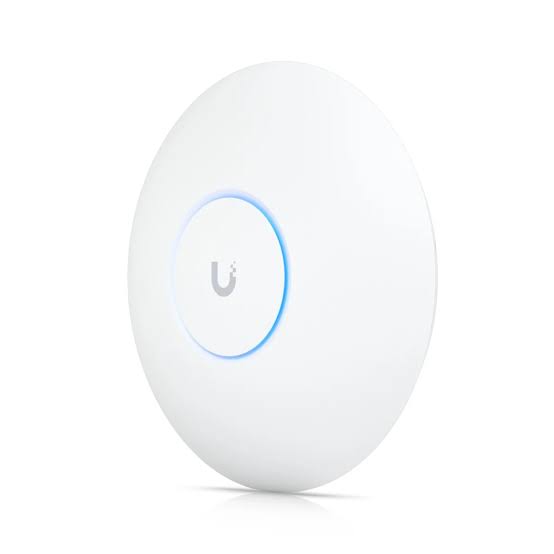
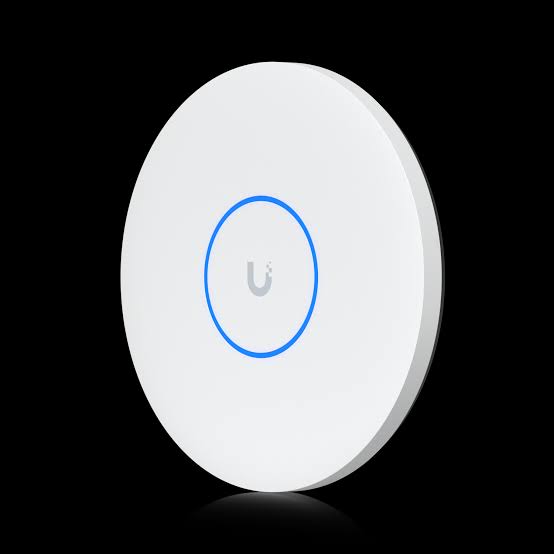
ACCESS POINT U7 PRO
Buy ACCESS POINT U7 PRO in Kenya | Reisen
Available on Reisen: https://reisenseo.com/shop/access-point-u7-pro
Catalog listed price: KSh 28,500 (confirm current pricing at checkout).
Product Overview
ACCESS POINT U7 PRO is listed by Reisen in Kenya as an option for wireless access. Its role in a working installation depends on what is connected around it: the upstream service or infrastructure, the physical medium, compatible endpoint equipment, and the configuration applied by the technician. When selecting this model, start with the intended installation rather than the product name alone. A home, an office, an ISP distribution point, a shop, and a surveillance deployment can have very different practical requirements even when they all use network equipment.
The current Reisen catalog identifies this exact product and its category. The technical points highlighted for this listing are UniFi U7 Pro Wi-Fi 7 access point; 2.4 GHz, 5 GHz, and 6 GHz tri-band radios; 2.5 Gigabit Ethernet uplink; PoE+ power requirement; 6 GHz operation depends on local country regulations. Specifications described as conditional should be checked against the hardware revision or manufacturer labeling before a purchase decision. This approach avoids confusing similarly named devices with different radios, connectors, power requirements, or packaging. Buyers searching for ACCESS POINT U7 PRO in Kenya can use the sections below to evaluate suitability, plan a sensible installation, and discuss any remaining details with their installer.
Key Benefits and Practical Value
For a UniFi wireless network, the U6 Pro access-point listing is a useful reference point for comparing client density, power requirements, and mounting arrangements.
The main benefit of ACCESS POINT U7 PRO is how it can contribute to a well-planned wireless access project. A successful result requires the right equipment in the right place. For example, installers should assess coverage planning, authentication, placement and client capability before they begin. A product with appealing specifications cannot compensate for incompatible connectors, poor physical installation, or a misconfigured upstream network.
For buyers, the strongest advantages are usually predictable deployment, straightforward maintenance, and equipment that can be supported by local technicians. First confirm the exact model designation. Next ask whether the operating environment, power supply, and connected equipment match its documented limits. Finally include the necessary installation materials in the budget. This method reduces avoidable returns and helps a technician complete the job without last-minute substitutions.
Where a performance figure is quoted, distinguish a manufacturer laboratory or physical-interface maximum from real-world service speed. Throughput can change with workload, cabling, signal quality, ISP provisioning, configuration, and other devices sharing the network. Product value should be judged from compatibility, use-case fit, installation quality, and ongoing serviceability rather than a single headline number.
How to Buy ACCESS POINT U7 PRO

Confirm the precise model, review compatibility and package contents, place the order through Reisen, and validate the installed result. This visual describes the buying process rather than a product feature.
Key Specifications
|
Item |
Details |
|
Product |
ACCESS POINT U7 PRO |
|
Brand / family |
ACCESS |
|
Reisen category |
Ubiquiti Network Devices |
|
Product listing |
https://reisenseo.com/shop/access-point-u7-pro |
|
Characteristic 1 |
UniFi U7 Pro Wi-Fi 7 access point |
|
Characteristic 2 |
2.4 GHz, 5 GHz, and 6 GHz tri-band radios |
|
Characteristic 3 |
2.5 Gigabit Ethernet uplink |
|
Characteristic 4 |
PoE+ power requirement |
|
Characteristic 5 |
6 GHz operation depends on local country regulations |
|
Installation assessment |
Confirm compatible interfaces, supply and environmental requirements |
|
Hardware or supplier revision |
Verify against the label on the delivered unit |
|
Price in catalog |
KSh 28,500 |
Features Explained for Buyers
ACCESS POINT U7 PRO should be evaluated feature by feature. Relevant catalog and product information includes UniFi U7 Pro Wi-Fi 7 access point; 2.4 GHz, 5 GHz, and 6 GHz tri-band radios; 2.5 Gigabit Ethernet uplink; PoE+ power requirement; 6 GHz operation depends on local country regulations. Each feature has a practical meaning: an interface indicates what can connect; a power rating affects the supply or injector required; a cable description affects where and how the run may be installed; and a management feature determines the administrator’s level of control.
Use a checklist while evaluating features. Ask what the feature enables, whether compatible accessories are included, and whether it works on the exact version being supplied. Manufacturers sometimes publish a product family with several regional versions or hardware revisions. Those differences matter during procurement, particularly when a device will be managed remotely, adopted into a controller, or installed in a hard-to-access location.
Also pay attention to capabilities that are not expressly confirmed. An Ethernet port should not automatically be treated as Gigabit, an advertised PoE adapter should not automatically be assumed to support active IEEE PoE, and an outdoor marketing label should not replace a verified environmental rating. For professional deployments, use the equipment label and the official hardware-specific guide as the final reference.
Understanding the Specifications
The specification table records the confirmed characteristics and flags items that require a precise SKU. Read it as a procurement aid rather than as a complete network design. For ACCESS POINT U7 PRO, the critical information is the exact hardware designation, interface or cable format, power method, deployment environment, and interaction with other network equipment.
It is important to separate a component’s capability from a system-level guarantee. Wireless link rates do not equal internet speeds. An optical terminal needs service-provider registration before access is possible. A PoE switch has both per-port limits and an aggregate power budget. Copper cable performance depends on channel length, termination quality, and compliance with applicable structured cabling standards. Always consider the weakest compatible link in the installation.
For any undocumented point, request a photo of the original product label, packaging, or datasheet for the supplied revision. Confirming the rating before installation is less expensive than discovering incompatibility after cable runs have been pulled or equipment has been mounted.
Installation checkpoints
A newer WiFi generation is not automatically a better fit for every installation. The U7 Pro access-point listing provides a comparison when evaluating the access-point generation and upstream network capacity.

This chart is a process-planning illustration. It does not present measured throughput, coverage, reliability, or other manufacturer performance data.
Planning considerations

This chart is a process-planning illustration. It does not present measured throughput, coverage, reliability, or other manufacturer performance data.
Buyer decision factors

This chart is a process-planning illustration. It does not present measured throughput, coverage, reliability, or other manufacturer performance data.
Procurement and installation matrix
When a site needs alternative indoor or outdoor wireless placement, the UniFi U6 Mesh option can be compared for its mounting and wireless design rather than assumed to be equivalent.

This chart is a process-planning illustration. It does not present measured throughput, coverage, reliability, or other manufacturer performance data.
Where to Use This Product in Kenya
Potential settings for ACCESS POINT U7 PRO include homes, small businesses, institutions, managed buildings, professional installation sites, and growing ISP networks where its verified features match the design. Suitability is not automatic: the installer must assess coverage planning, authentication, placement and client capability. A retail shop may emphasize reliability during payment transactions, while an office may prioritize predictable client access, traffic separation, and support for additional devices.
In Nairobi and other urban areas, installers often need to account for shared radio spectrum, building materials, cable pathways, and crowded communications cabinets. In regional installations, lightning exposure, long outdoor cable runs, electricity supply, and accessibility for maintenance may deserve more weight. These are general engineering considerations, not claims about any special protective rating of this particular product.
For structured commercial rollouts, document each device location, cable identifier, management address, and acceptance test. That information helps future technicians diagnose faults quickly and keeps expansion projects organized. If this model is being purchased for multiple sites, establish a common installation standard and verify the same hardware revision before ordering in quantity.
Compatibility and System Planning
When planning an IP-based network, select the switch by its IEEE PoE standard and total power budget rather than port count alone. Compare PoE switch selection before deciding how to power compatible access points or cameras.
Compatibility starts with both ends of the connection. Before ordering ACCESS POINT U7 PRO, identify upstream equipment, connected devices, expected traffic, power availability, and any management platform being used. Consider coverage planning, authentication, placement and client capability. An item may physically fit a connection yet still be unsuitable because the electrical standard, data rate, service authentication, firmware, or environmental rating is different.
Create a simple site diagram showing the incoming service, router or controller, switches, access points or endpoints, power supplies, and the cable or fiber routes between them. Record the intended interfaces in the diagram. When PoE is involved, check active versus passive signaling as well as required voltage, current, per-port limit, and total switch budget. When optical service is involved, match PON technology, OLT authorization requirements, and the prescribed optical connectors.
The safest procurement strategy is to match a part number and hardware revision to a verified technical document, then review the remainder of the bill of materials. Accessories are not interchangeable merely because their packaging looks similar. Ask an installer to review any compatibility that is not documented rather than relying on assumptions.
Choosing the Right Installation Accessories
Cable selection can affect the reliability of the whole installation. Compare structured cabling equipment for the appropriate Ethernet or fiber run, then check material, distance, environmental rating, and connector requirements.
A complete project often needs more than ACCESS POINT U7 PRO. Depending on the installation, the bill of materials could include correctly rated Ethernet or fiber cable, mounting hardware, a power supply, an approved PoE source, rack accessories, test instruments, protective equipment, and documentation. These are project-planning examples; they are not a claim that those items are included in the sales package.
Choose accessories by verified specification. For structured Ethernet cabling, maintain category compatibility and use suitable connectors and termination practices. For optical equipment, match fiber type, connector end face, cleaning procedure, and optical budget. For wireless access equipment, consider mounting location and cable pathway before the ceiling or wall is finished. For power equipment, never substitute an injector or supply based only on similar plugs.
An experienced technician will also plan a maintenance loop, label both ends of installed cables, secure strain relief, and leave access for future servicing. These small choices can substantially reduce troubleshooting time. For bulk purchasing in Kenya, confirm all components from the same approved design before deploying across several locations.
Installation Preparation and Safety
Before installing ACCESS POINT U7 PRO, inspect the product label and packaging for model identity, damage, and any supplied accessories. Review the applicable manufacturer installation instructions, including the safety warnings and electrical ratings. Prepare the work area and check that mounting surfaces, cable paths, and power sources are suitable.
Switch off power before changing electrical connections where required by the hardware documentation. Never guess PoE polarity or voltage; passive PoE can damage equipment that expects a different standard. Follow fiber laser safety practices when using optical equipment, and never look into an active fiber connector. Avoid unsafe roof work and take appropriate precautions for elevated outdoor installations.
Prepare a record of the existing network configuration, especially if replacing a functioning device. For routers and managed equipment, back up settings before a disruptive change. For cable works, make the plan clear before pulling or terminating the run. Good preparation protects both the technician and the customer’s operating network.
How to Set Up ACCESS POINT U7 PRO
The sequence for ACCESS POINT U7 PRO depends on its actual role. Start by confirming the part number, power requirements, and upstream compatibility. Map the intended connection route, then install the equipment or cable according to the instructions for the supplied revision. Where software configuration is required, establish a direct and trusted management connection first.
For a managed network device, use the supported discovery or management method, set administrator credentials, update firmware only through the official procedure, and apply addressing, VLANs, wireless settings, routing, or PoE policies as relevant. For passive accessories or cables, the process focuses instead on correct physical connection and verification with suitable testing equipment.
After installation, test the complete path rather than checking only for an indicator light. Verify wireless association, signal quality, congestion and power. Document the final configuration and ask the customer to confirm the intended service works from a normal client device. A completed installation should leave the system operational, supported, and understandable to the next technician.
A Step by Step Guide to Setting Up ACCESS POINT U7 PRO
Step 1: Confirm the exact model and hardware revision, then compare the label to the project bill of materials. Step 2: Inspect the installation location and confirm that the required electrical, optical, or Ethernet interfaces are available. Step 3: Check the approved power arrangement and disconnect or isolate the equipment as directed by the manufacturer. Step 4: Mount, route, or place the product securely, respecting the cable bend radius, ventilation, and operating environment.
Step 5: Connect upstream and downstream interfaces with compatible cables and verified accessories. Step 6: Apply power safely and observe the documented status indicators. Step 7: If the device is managed, use the official access procedure to set credentials, network addressing, and the required service parameters. Step 8: Test the actual installation using the correct methods for its technology. Step 9: Label connections and record the configuration. Step 10: Demonstrate normal operation to the customer.
If any step produces an unexpected result, stop and check the technical documentation instead of changing several settings simultaneously. Make one controlled change, retest, and record the outcome. This disciplined approach is particularly useful when commissioning multiple similar devices across different sites.
Installation Workflow

Use the hardware-specific manual where the equipment requires settings or electrical procedures beyond this general workflow.
Performance, Reliability, and Maintenance
Expect real-world performance from ACCESS POINT U7 PRO to depend on the wider system. Relevant constraints may include device processing capacity, installed cable quality, radio interference, upstream bandwidth, power stability, firmware, and traffic patterns. For some products there is no meaningful single throughput rating; the correct measure is whether the connection performs its intended function safely and consistently.
For ongoing maintenance, keep purchase and installation records, inspect physical connections, and check status or controller alerts on a schedule appropriate to the site. Managed devices should have controlled administrator access and configuration backups. Passive cabling should have accurate labeling and test results. Fiber connections should remain clean and protected. Environmental damage, loose connections, and unauthorized configuration changes are common causes of faults across network installations.
Do not use a headline wireless rate, switch fabric rate, or manufacturer transmission distance as a guaranteed customer outcome. Record acceptance tests in the installed environment. Where a network is business-critical, plan redundancy and a suitable support process instead of relying on one device to solve every potential outage.
Troubleshooting Common Problems
If ACCESS POINT U7 PRO is not working as expected, begin with physical verification. Check the correct product variant, installation wiring, supported supply, and visible indicators. Next evaluate wireless association, signal quality, congestion and power. Follow a step-by-step diagnostic sequence so each observation narrows the problem rather than creating additional uncertainty.
Separate the fault domain. If local equipment communicates but the internet is unavailable, investigate the upstream ISP and default route. If a device is not detected by its controller, check power, management connectivity, firmware compatibility, and network access policy. If cabling tests fail, inspect the plug, termination, conductor integrity, and cable path. If an optical endpoint does not register, ask the service provider to verify OLT authorization and optical conditions.
Record error messages and test results before performing a reset. Factory resets can erase important provider-specific or business network settings. Use the official recovery process and maintain a known-good configuration where possible. If the problem persists, involve an authorized technician with the device label and the recorded diagnostics.
Buying Advice and Comparison Checklist
When comparing ACCESS POINT U7 PRO with another product, use a like-for-like checklist rather than matching only prices. Assess interfaces, genuine compatibility, installation method, support, available stock, and operational requirements. Compare the exact model and version—not a broad family name. This is especially important when similarly named equipment uses different power systems or network standards.
A lower price does not automatically mean a lower total project cost. Extra injectors, unsupported firmware, unsuitable connectors, shorter service life, or additional technician visits can change the economics of an installation. Equally, a more expensive model may add features that the site will never use. The sensible purchase is the device that meets a documented requirement without avoidable complexity.
Reisen lists this product as part of its Kenyan networking and security catalog. Ask for current availability, the precise package configuration, and warranty conditions before checkout. For larger projects, share the intended network diagram with the sales team so the recommended accessories and connected equipment can be checked before purchase.
Warranty, Returns, and Local Support
Warranty duration, return eligibility, and the condition of supplied stock must be established from the seller’s current terms and the exact product listing. No universal warranty period is assumed here for ACCESS POINT U7 PRO. Keep the invoice, serial number where present, and original packaging until acceptance testing is complete.
If a problem arises, provide the seller with the product identification, a brief description of the fault, clear photos of any relevant indicators, and the steps already tested. A documented issue is easier to diagnose than a broad report that the product does not work. Do not modify connectors, open sealed equipment, or use an unapproved power source if doing so may affect warranty coverage.
Professional installations should also include a service handover: identify who manages the network, who can change configuration, and who will respond to faults. This is separate from the hardware sale and should be agreed with the installer where ongoing support is required.
Frequently Asked Questions
**Is ACCESS POINT U7 PRO suitable for every network?** No. Its suitability depends on the intended application and exact interfaces, power arrangement, and hardware version. **Does the listed price include installation?** The catalog price is a product listing, and installation should be confirmed separately. **Can I use any power adapter?** No; use the manufacturer-approved specification and the correct PoE method where applicable.
**Will the product automatically improve internet speeds?** Not necessarily. Network performance depends on the complete path, service plan, and deployment conditions. **Can I install it myself?** Some devices are straightforward for experienced users, but electrical, fiber, rooftop, and managed-network work should be handled by a qualified technician where appropriate. **What should I check before ordering?** Confirm the exact model, hardware revision, interfaces, compatibility, supplied accessories, warranty terms, and required service-provider settings.
**How can I reduce future faults?** Choose verified components, protect cabling, maintain sensible ventilation and clean connectors, label connections, and keep relevant configuration backups. **What if I am buying for several sites?** Standardize equipment versions and test a sample installation before a bulk deployment.
Why Buy from Reisen Kenya
Buying ACCESS POINT U7 PRO through Reisen offers a clear product reference for customers sourcing network, fiber, wireless, and security-related equipment in Kenya. Before ordering, verify the latest stock position, exact model variant, price, and any accessories needed for your project. A carefully prepared order reduces installation delays and helps the technician arrive with a complete, compatible set of materials.
For project buyers, provide the planned quantity, delivery location, preferred timeline, and installation purpose when requesting a quotation. It can also help to share an existing site diagram or a photo of the device being replaced. These details enable more accurate component matching. For individual purchases, focus on compatibility and the required output rather than buying extra features without a practical need.
A successful purchase is one that solves the correct problem. Review the specifications and installation guidance in this description, identify anything that requires confirmation, and use Reisen’s product listing to continue with the appropriate item.
What's in the Box
|
Item |
Details |
|
Main item |
ACCESS POINT U7 PRO |
|
Documentation |
See delivered retail or supplier packaging for any included printed guide |
|
Power supply / cable |
Inclusion is not assumed; confirm the delivered SKU |
|
Mounting or installation accessories |
Inclusion is not assumed; confirm the delivered SKU |
Recommended Accessories and Related Products
A complete installation may need supporting equipment in addition to ACCESS POINT U7 PRO. The following options help you plan the surrounding system; check connection types, power budgets, and the exact model specifications before selecting accessories.
For access points and other powered equipment, examine PoE+ switches for devices that require 802.3at power. Assess the power source against the device datasheet. This is a related purchasing consideration, not a guarantee of compatibility with the product on this page.
For the physical connection layer, compare structured cabling and Ethernet cable options. Ethernet runs for wired uplinks. This is a related purchasing consideration, not a guarantee of compatibility with the product on this page.
If more wired Ethernet ports are needed, explore Gigabit network switches for additional wired connections. Expand the LAN with a Gigabit switch. This is a related purchasing consideration, not a guarantee of compatibility with the product on this page.
If you are considering higher-generation wireless equipment, compare UniFi U7 Pro for a possible wireless network upgrade. Compare with a Wi-Fi 7 access point. This is a related purchasing consideration, not a guarantee of compatibility with the product on this page.
Where placement and coverage are priorities, review UniFi U6 Mesh as another wireless coverage option. Consider another wireless placement option. This is a related purchasing consideration, not a guarantee of compatibility with the product on this page.
Choose accessories based on the installation design and the exact product version. In particular, match PoE standard and power budget, port speed, cable type, mounting conditions, and any recorder or management-platform requirements before buying.