
Save 1%
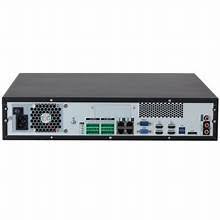
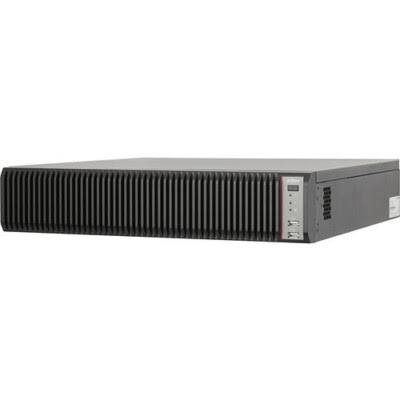
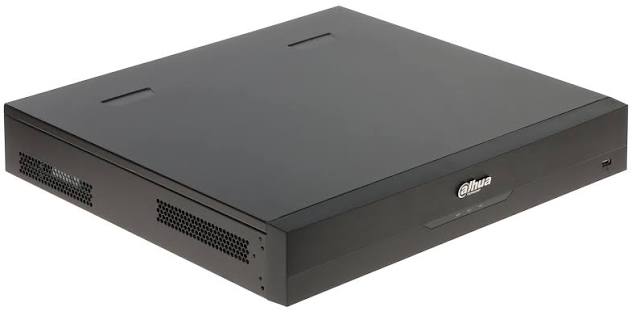
Select an image to view it. Click the main image to enlarge.
DAHUA DH-IVSS7108/H Price in Kenya
In stock
KES 175,999.00
KES 177,000.00
You save KES 1,001.00
Buy Dahua DHI-IVSS7108/H surveillance server in Kenya. Explore 128 IP camera channels, eight storage bays, RAID options and installation guidance.
View product detailsNeed help choosing?
Talk to our team at +254 714 804 532
Product details
Dahua DHI-IVSS7108/H Intelligent Video Surveillance Server
The Dahua DHI-IVSS7108/H is a model-specific 128-channel, 2U intelligent surveillance server for professional IP camera systems. This Kenya-focused buying and engineering description covers recording and camera access, drive-bay planning, secure commissioning, network topology and manufacturer-defined limits.
What the Dahua DHI-IVSS7108/H Does
The Dahua DHI-IVSS7108/H is a 2U intelligent video surveillance server intended for larger IP-camera environments where straightforward recording is not the only requirement. The manufacturer’s model-matched datasheet describes up to 128-channel IP camera access, eight internal SATA drive bays, a substantial recording-bandwidth envelope, several monitor outputs, and support for surveillance management and supported AI-by-camera workflows. This is not a consumer Wi-Fi camera, a basic four-channel DVR, or a PoE switch with 128 powered sockets. It belongs in a properly designed surveillance network with suitable switching, cameras, storage and electrical protection.
The /H suffix is critical. Dahua sells similarly named IVSS7108 models and later variations with different processing limits. The description here refers to the manufacturer document headed DHI-IVSS7108/H, not IVSS7108-1I, IVSS7108/H-V2, or an unspecified IVSS7108. Before quoting customers in Kenya, compare the actual chassis label, firmware and distributor part number with the stated /H specification. If the supplier offers another variant, re-check every affected claim rather than assuming a newer or cheaper chassis has identical capabilities.

How to Buy Dahua DHI-IVSS7108/H Intelligent Video Surveillance Server. Model-specific buying guide and verification steps.
Key Specifications
|
Parameter |
Verified value / buying condition |
|
Exact model |
Dahua DHI-IVSS7108/H, not the IVSS7108/H-V2 or IVSS7108-1I |
|
Device class |
2U intelligent video surveillance server |
|
Maximum IP camera access |
128 channels; subject to stream/workload limits |
|
Network bandwidth |
Up to 768 Mbps incoming; 768 Mbps recording; 768 Mbps outgoing in referenced datasheet |
|
Drive bays |
8 internal SATA3.0 slots |
|
RAID |
0, 1, 5, 6, 10, 50, 60 |
|
Network interfaces |
4 × 10/100/1000 Mbps RJ45 Ethernet |
|
Local display connectors |
4 × HDMI and 1 × VGA (independent decoding limitations apply) |
|
USB |
4 ports: two front USB 2.0, two rear USB 3.0 |
|
Video compression |
Smart H.265+, H.265, Smart H.264+, H.264 |
|
Camera interoperability |
ONVIF profiles and vendor support listed; model-specific feature testing required |
|
Power |
200–240 V AC, 50/60 Hz in model-matched datasheet |
|
Stated maximum per disk |
Up to 20 TB/HDD in referenced datasheet; qualified disk list must be checked |
|
Unit contents |
Manufacturer datasheet does not establish which HDDs or accessories are bundled |
What's in the Box
|
Parameter |
Verified value / buying condition |
|
IVSS server |
DHI-IVSS7108/H chassis is the product being procured |
|
Hard drives |
Quantity and model not established by manufacturer datasheet; confirm before order |
|
Power cable / rack fittings |
Exact retailer pack not established; verify supplied accessories |
|
Cameras, switches, monitor |
Not stated as included; quote separately if required |
Where an Intelligent Surveillance Server Makes Sense
A school campus with several buildings, a distribution warehouse, a large hospitality compound, an industrial operation or a multi-branch facility may need central monitoring of many camera feeds and reliable management of recorded evidence. Such environments can justify a surveillance server rather than a small entry-level NVR. The buying case becomes stronger where trained staff need controlled access, event management, video health checks and an appropriate storage-recovery plan, not merely a high camera count printed on a brochure.
The maximum supported number of channels does not establish that every site can run 128 high-resolution cameras with every analytic function switched on at once. Video bitrate, configured frame rate, decoding for local display, storage write load, supported camera functions and network topology have separate constraints. A professional proposal therefore starts with a camera schedule and sample streams, then validates the actual incoming and recording loads against the manufacturer’s model-specific bandwidth limits. That engineering step protects against under-sized storage and disappointing performance.

Dahua camera-capacity bubbles. 128 access channels and conditional AI-camera resolution-dependent capacities.
128 Camera Inputs and the 768 Mbps Envelope
Dahua’s /H datasheet specifies 128-channel IP video access and up to 768 Mbps of incoming, recording and outgoing network bandwidth in the documented configuration. These are ceiling specifications, not a guarantee that a particular site’s camera codecs and recording settings will all operate simultaneously without resource trade-offs. Encoding quality, motion complexity, frame rate, audio streams and simultaneous remote viewers affect system demand. A capacity plan needs a worst-case estimate and headroom for operating conditions rather than just dividing one published bandwidth number evenly by 128.
An illustrative engineering calculation starts with the intended average and peak bitrates per camera and multiplies by concurrent channel count; then the designer checks how much traffic crosses each physical link. This is not a replacement for a manufacturer configuration tool or a real load test. A camera schedule should include the physical location, lens, resolution, retention target, event rules, camera clock configuration and selected video profile. It also helps the operator document which feeds should be retained when a fault occurs.
The exact stated channel and bandwidth limits are specified in the DHI-IVSS7108/H model-matched manufacturer datasheet; verify the chassis suffix before applying them.

Eight-bay planning pie chart. Clearly labeled example, not an assertion that disks are supplied.
Storage: Eight SATA Bays and RAID Planning
The DHI-IVSS7108/H datasheet identifies eight SATA3.0 storage slots and support for RAID 0, 1, 5, 6, 10, 50 and 60. The choice among these schemes involves trade-offs in usable capacity, redundancy, rebuild behavior and configuration overhead. It is not appropriate to declare one RAID level universally best for every CCTV customer, and RAID does not remove the need for independent backup of critical incidents. The supplied server may not include any HDDs: the exact contents of the commercial package should be confirmed before purchasing drives.
The manufacturer document also states a maximum per-bay drive capacity under its specified conditions. An installer should still check which exact surveillance-disk models and firmware combinations are qualified, especially for large-capacity disks. A single disk containing an investigation file can fail while the wider system remains operational; operators need a workable export and backup procedure. Retention periods should be based on realistic compression rates and motion schedules, not on an advertisement that promises a fixed number of recording days for all deployments.
Disk replacement and RAID recovery must be planned in advance. The site needs adequate spares where downtime matters, trained administrators with documented permissions, power protection during rebuild, and a clear procedure for checking array health. If the customer requests secure evidence retention or regulatory compliance, document who may export video, how storage devices are handled at end of service, and how deletion or encryption requirements apply. Never assume RAID is synonymous with tamper-proof storage.
Intelligent Functions Depend on Compatible Cameras
The Dahua /H platform discusses functions such as face detection, face recognition, video metadata, perimeter rules and license plate comparisons using compatible intelligent cameras. The phrase “AI by camera” matters: not every connected camera exposes the required algorithms, metadata or controls. Some functions need particular camera model families, firmware, resolution constraints and integration settings. An installer should create a capability matrix showing each camera model, required event, detection area and appropriate licensing or platform configuration before promising analytics to the buyer.
For example, counting vehicles at an entrance is not equivalent to identifying license plates from an arbitrary low-resolution bullet camera. Plate recognition applications normally need correct camera placement, shutter settings and a device designed for the workload. Likewise, a face detection alert does not prove identity or establish lawful use of biometric data. Customers should consider Kenyan data-protection obligations, authorized operator access and retention controls before enabling analytics involving identifiable people. Deployment decisions need both technical and privacy review.

Verified interface counts. Shows SATA, HDMI, network, USB and VGA physical resources.
Network Interfaces and Switching Architecture
The model-matched Dahua datasheet lists four self-adaptive 10/100/1000 Mbps RJ45 network ports. They are recorder network interfaces, not a bank of 128 dedicated camera PoE ports. IP cameras ordinarily connect through properly sized access switching, often PoE switches where the cameras support an appropriate power standard. The network designer must separate camera endpoint electrical budgets from the server network budget and avoid implying that a high camera-channel capacity provides camera power.
On a multi-building site, the traffic path may include PoE access switches, an aggregation layer, fiber uplinks, an appropriately configured VLAN design and the surveillance server. Confirm bandwidth at each layer, including uplink oversubscription, camera multicast or unicast behavior and remote-viewing traffic. A Mikrotik CRS312 or another capable core switch may have a role in high-throughput aggregation, but that does not turn the IVSS Gigabit ports into 10GbE interfaces. Compare actual physical connectors, link rates and transceiver standards before procurement.
For an aggregation-layer product comparison, examine the MikroTik CRS312 network aggregation switch on Reisen
Local Video Outputs, Operator Display and Control
The DHI-IVSS7108/H datasheet lists four HDMI outputs and one VGA output, with individual output constraints. The ability to connect several displays does not mean that 128 high-resolution channels can all be decoded into full-frame views on one screen at once. Local decoding and multiview specifications should be assessed separately from recording channel count. Control-room design must account for screen size, operator workload, evidence export, incident response and which events need to be visible at a glance.
Where centralized management is required, decide whether operators will use the local interface, a permitted web client, or another integrated management platform. Test user roles, firmware, supported browsers and the exact camera/event workflows during acceptance. A neat monitor wall without correct permissions, time synchronization or incident procedures is not an effective surveillance system. The installation report should include device network addresses, authorized account handover and a diagram of which display represents which monitoring area.

Dahua DHI-IVSS7108/H Intelligent Video Surveillance Server installation diagram. Wiring and power roles for a correctly designed installation.
How to Install the Dahua DHI-IVSS7108/H Surveillance Server
Installation is a controlled IT and security project rather than a quick household plug-in task. Choose a rack or desktop location with ventilation, protected mains supply, secure physical access and a documented camera network. Confirm that the rack depth and load can safely accommodate a 2U chassis, selected disks, cabling and UPS equipment. The server should be installed by someone able to manage storage arrays, network routing, IP camera settings, user access and recovery procedures. The work should begin with written design acceptance, not improvisation at the equipment rack.
A Step by Step Guide to Install the Dahua DHI-IVSS7108/H Surveillance Server
Step 1 — Confirm part number and survey the rack. Inspect the shipping label and chassis for DHI-IVSS7108/H and record the unit’s revision and serial number in the customer asset list. Verify intended rack position, cabinet depth, airflow, earthing, power source, service access and protected electrical load. Ensure the operator knows that camera PoE power is supplied by suitable access switches, not by the server’s Gigabit RJ45 ports.
Step 2 — Plan cameras and the network. Create a device list with camera models, recording resolution, expected bitrates, required AI events and VLAN membership. Reserve management IP addressing and confirm uplink routes and firewall requirements. The camera network should remain accessible to the recorder under the authorized security design, with remote access controlled appropriately. Test each network cable and switch port before treating a camera as a recorder fault.
Step 3 — Select and install compatible drives. Follow the official installation procedures for qualified SATA disks and confirm each drive’s capacity, health and suitability for continuous surveillance use. Configure the agreed RAID or disk-group policy, documenting redundancy and rebuild trade-offs. The customer should be told that disk bays are not disks, and that RAID configuration can change usable storage space. Never assume all eight slots must be filled on day one.
Step 4 — Power and initialize the server. Connect the documented mains input through an appropriately rated and maintained protective power arrangement. Record firmware version, change default or temporary credentials, establish time settings and configure authorized network management access. Verify that fans, drives, temperature monitoring and power alerts report correctly before adding a large camera load. Make configuration backups if the platform provides the required procedure.
Step 5 — Add cameras incrementally. Commission a small group of compatible cameras first, confirming image quality, timestamps, codec, frame rate, event tags and recording schedules. Then add more camera streams while monitoring network and disk resources. Camera-based AI should be enabled only after confirming supported camera functions and the site’s lawful surveillance policy. Do not interpret the maximum 128 input channels as an instruction to load all channels during initial setup.
Step 6 — Configure storage, retention and evidence exports. Test continuous, scheduled and event-triggered recording as required by the project. Create and verify the retention plan using actual stream properties. Test exporting an incident clip to an approved destination, audit access controls, and check that recorded video remains usable after a planned restart. Document who can delete video, replace disks, investigate alarms and approve firmware upgrades.
Step 7 — Test displays, alarms and recovery. Connect monitors through the supported HDMI and VGA outputs, observing the actual multiview decoding limits. Trigger a camera-disconnect alarm and a storage-health test under controlled conditions. Verify notification recipients and escalation procedures. Finally, perform a witnessed handover with a physical network diagram, asset register, backed-up settings and an operator checklist for daily health reviews.
Security, Data Protection, and Evidence Handling
Large surveillance environments need governance as well as hardware. Limit recorder administrator access, assign named operator roles, keep a documented change log and place management interfaces on appropriately controlled networks. Prefer secure remote access through the site’s normal IT security architecture rather than exposing the management port openly to the Internet. The retention policy should account for legal requirements, investigatory needs and the customer’s own operational policies. Sensitive footage should be available only to people with a legitimate role.
Video analytics involving faces, bodies, license plates or behavioral events can increase privacy impact. The presence of an AI feature on a specification sheet does not establish that every use is lawful or appropriate. A business in Kenya should obtain relevant data protection advice where necessary, post required surveillance notices, and set proportionate retention and access rules. Such obligations can affect the project budget and the choice of whether to enable a specific analytic workflow.
Performance Commissioning and Acceptance Tests
For acceptance, verify the number of live camera streams, expected recording bitrate, observed aggregate network utilization, disk array status and playback from representative channels. Test both peak-hour live viewing and normal recording, especially where remote clients, monitor wall output or event search add load. An “online” status light is not sufficient evidence that recordings are complete. Export sample clips and compare their timestamps with a reliable clock, then verify the file can be opened by the intended review system.
Include planned failure tests. Under an approved controlled change window, simulate a camera cable disconnect, an upstream switch outage and a recorder restart where practical. Record the effect on alarms, client display and stored data. If the design includes redundancy or hot standby, verify its actual installed topology rather than quoting a general manufacturer feature. A commissioning record should state the conditions tested and any unresolved capacity or integration limitation.
Troubleshooting IP Cameras That Do Not Record
If a camera is reachable but has no recording, inspect its stream settings, authentication, recording schedule, supported codec, channel status and storage policy. Confirm that the camera’s network and recorder interface can communicate and that the system has enough free recording bandwidth. An ONVIF discovery success alone does not prove that every intelligent event or stream profile is interoperable. When the camera provides basic video but no analytics, compare the model-supported metadata and event interface with Dahua’s specific compatibility documentation.
If several cameras fail together, focus on shared network components or power. A PoE switch with insufficient total power budget can cause intermittent endpoint restarts, while a congested uplink can cause packet loss and incomplete recording. Check individual PoE port diagnostics and switch uplink errors before replacing cameras. The IVSS should be assessed as part of a complete system; it cannot compensate for missing power, incompatible camera firmware or an untested network path.
Troubleshooting HDD Alerts and Playback Problems
Storage errors should be handled using a documented disk-management procedure. Inspect array state, per-drive diagnostics, logged rebuild events and available free capacity. Avoid pulling multiple drives or initiating a rebuild based on assumptions about an unfamiliar RAID layout. Establish which evidence files are important before attempting repairs and make independent copies when the system is still readable. A disk fault can coexist with apparently normal live camera images, which is why daily storage-health checks matter.
If video exists but playback is poor, distinguish decoding performance from recorded stream quality. Test another local display or authorized client, inspect the source recording parameters, and check system health during playback. An interface that can record 128 channels may have a much smaller simultaneous decoding capability, depending on the selected resolution and layout. Avoid interpreting a slow multiview screen as proof that the archive is corrupted without performing a narrower investigation.
Comparison with Smaller NVR Solutions
A smaller NVR can be easier to buy, install and maintain when a site needs only a few cameras and straightforward recording. Reisen’s Dahua 64-channel NVR listing is an example of an alternative product class to evaluate when the requirements are below a large multi-bay enterprise server. The IVSS7108/H becomes more appropriate as camera aggregation, event analysis, multiple outputs, storage governance and operator workflows become more complex. However, the most expensive platform is not automatically the right system: support capacity and integration effort must be considered.
Customers comparing platforms should request a requirements matrix: actual supported camera models, concurrent stream bitrate, recording retention, analytics availability, storage redundancy, user roles, network topology and maintenance resources. Keep the /H revision separate from later V2 brochures even if both advertise 128 inputs. A proposal that mixes two variants’ specifications could lead to a capacity shortfall during commissioning and expensive disputes after installation.
For a different capacity class, see the Dahua NVR5464-EI listing on Reisen

Equipment compatibility matrix. Matches endpoint power, switching, storage and operating roles.
Recommended Accessories and Related Products
For surveillance camera networks, select compliant IP cameras, properly sized PoE access switches, tested Ethernet cable, suitable rack equipment and qualified surveillance disks. Network Switch Kenya’s CCTV-switch category provides an external comparison point for suitable camera-access switching, but the individual switch must be checked for power budget and network speeds before ordering. A switch sized for eight cameras is not a complete access layer for a 128-channel server unless the entire network topology has been designed accordingly.
Tawa’s structured-cabling and rack-cabinet categories can help installers plan patch leads, network cabinets and related parts. On Reisen itself, the 24-port AICO patch panel can be considered where the cable termination category and hardware revision are suitable; a patch panel is passive and cannot supply camera PoE or switch network traffic. The Ubiquiti USW-Lite-8-PoE is a small edge option with limited PoE ports and budget, not a drop-in solution for a large camera deployment. Storage products such as Seagate SkyHawk drives should be selected by verified drive SKU and the IVSS approved-disk list.
For camera power and network access, compare Network Switch Kenya CCTV PoE switch options
For installation cable and rack peripherals, browse Tawa structured-cabling equipment
For appropriately specified structured-cabling termination, see the Reisen 24-port AICO patch panel
For a recording-disk buying comparison, review the Reisen Seagate SkyHawk 4TB surveillance drive
How to Prepare a Kenyan Business Purchase Request
For procurement, specify DHI-IVSS7108/H as the exact requested model, document the camera schedule, desired video retention, evidence export requirements, operator seats, number and type of displays, disk configuration and network design. Request a written quotation separating server chassis, hard drives, network switches, rack installation, cabling, UPS equipment, labor, training and maintenance. This prevents a price comparison that looks favorable only because a supplier omitted critical components or assumed that disks were included.
Ask the supplier for a confirmed hardware revision and warranty terms, the manufacturer-supported disk list, any required license or platform component, delivery terms to the county of use, and a commissioning scope. An on-site project should include as-built network diagrams and tested recovery instructions. Where the customer has strict internal IT policies, involve the IT administrator early to avoid a disagreement about VLANs, remote access, data retention or firmware maintenance.
Frequently Asked Questions
Is the DHI-IVSS7108/H a PoE switch? No. It is an intelligent video surveillance server with network interfaces and storage bays. Compatible IP cameras need an appropriate network path; many installations use separate PoE access switches to power camera endpoints. The server’s 128-channel input figure does not represent 128 powered physical camera ports. Always size the switch budget for the cameras rather than for the channel license count.
Are eight hard disks included? An eight-bay specification describes the chassis capacity, not supplied storage devices. The available manufacturer datasheet does not establish the exact retailer bundle contents. Confirm the supplied package and choose qualified disks separately when required. Disk quantity and RAID policy affect usable retention, so the storage bill of materials should be approved before ordering.
What does the 768 Mbps value mean? Dahua documents maximum incoming, recording and outgoing bandwidth envelopes for this model. These are platform limits under specified conditions; they are not individual camera speeds and should not be combined as a total guaranteed throughput. Engineer the traffic streams, uplinks and concurrent playback demands with headroom. Check the actual operating version and relevant decoding limits during design.
Can it work with third-party IP cameras? The datasheet refers to ONVIF and other interoperability methods, but actual video, audio, events and analytics can vary by camera. A successful video stream does not ensure proprietary intelligent events will be available. Test the real camera model and firmware with the server before committing to a wide-scale deployment.
Can I use ordinary desktop hard drives? Qualified surveillance-oriented drives are preferable for the intended workload, but the actual choice should follow Dahua’s supported drive list and procurement requirements. Do not assume any SATA disk is validated simply because the connector fits. Confirm endurance, drive firmware, thermal constraints and replacement availability for the planned configuration.
Will the server display all 128 video feeds at full resolution? Recording channel capacity and local decode/display capability are separate specifications. Dahua lists specific decoding limits and multi-screen arrangements for the /H. Test the control-room layout using the actual camera resolutions and desired frame rates. Split displays or reduce on-screen stream profiles as necessary rather than inferring display capacity from the camera input number.
What must be delivered with the installation? Request the configured device, verified disk health, camera list, network and rack diagrams, account handover procedure, retention and evidence-export testing, firmware/version record, alarm tests, and written maintenance expectations. A customer should not accept only a set of live feeds as proof that a surveillance server is fully commissioned and recoverable.
Additional information
| Product | DAHUA DH-IVSS7108/H Price in Kenya |
|---|---|
| Category | NVR |
| Price | KES 175,999.00 |
| Availability | In stock |
Keep exploringMore in NVR
Related products