Save 1%
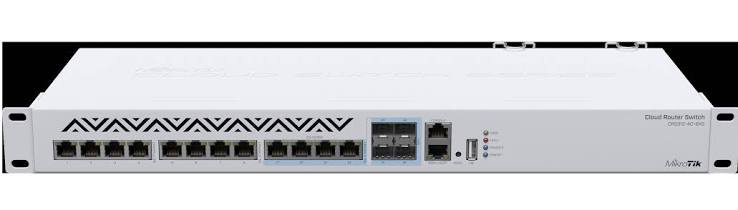
Select an image to view it. Click the main image to enlarge.
MIKROTIK CRS312-4C+8XG-RM Price in Kenya
In stock
KES 82,999.00
KES 84,000.00
You save KES 1,001.00
Buy CRS312-4C+8XG-RM in Kenya at Reisen. Compare verified features, installation needs, compatibility, and related equipment before ordering online.
View product detailsNeed help choosing?
Talk to our team at +254 714 804 532
Product details
MIKROTIK CRS312-4C+8XG-RM
MIKROTIK CRS312-4C+8XG-RM is listed in the Reisen Kenya catalog. The product described here is a rack-mount managed 10 Gigabit aggregation switch. The most useful buying decision is whether its actual interfaces, power requirements, performance limits, and operating environment suit the site. This guide explains the model information that can be confirmed from the available documentation and the practical checks that avoid unnecessary replacements or installation delays.
For Kenyan buyers searching for CRS312-4C+8XG-RM price in Kenya, the initial hardware cost is only one part of the decision. The full installation may also require suitable power equipment, the correct copper or fiber cables, mounting hardware, rack space, upstream Internet or routing, and a realistic support plan. Compare the exact order code and the supplier quotation before payment; a near-identical model name can represent a very different power budget, port mix, or accessory bundle.
For exact-model details, use the MikroTik official CRS312-4C+8XG-RM specifications. Hardware revisions and regional options still need to match the unit being purchased.
What This Product Does and Who Should Buy It
This managed aggregation switch targets networks where multiple high-speed copper or fiber connections must be handled within a rack. It should be evaluated as part of a wider topology, including endpoint NICs, cabling and management.
Why 10 Gigabit copper matters
A 10GbE port can reduce congestion between high-speed workstations, editing systems, file servers, and NAS equipment when all connected endpoints support the higher link rate. It does not increase the speed of a slower Internet connection automatically. Plan which links actually need 10GbE and keep ordinary clients on appropriate access switches so the aggregation layer is not wasted.
Combo interfaces and fiber design
A combo port presents a choice of media for a single logical interface. On the CRS312, four combo ports can use copper or compatible SFP+ optics, but they do not become eight separate active interfaces. Document the planned media for each combo and verify the optic type, transceiver compatibility, fiber connector, reach, and partner switch before commissioning.
RouterOS versus SwOS
This model can boot RouterOS or SwOS. SwOS offers switch-focused configuration; RouterOS gives broader network administration capabilities. The best choice depends on the operator’s management requirements and experience. High-speed hardware switching is not the same as pushing all traffic through software routing or filtering, so test the intended configuration against the manufacturer’s performance guidance.
How to Choose the Right Configuration in Kenya
· Map 10G endpoints. Confirm it for the physical unit and the actual installation rather than trusting a similar model listing.
· Check combo media. Confirm it for the physical unit and the actual installation rather than trusting a similar model listing.
· Qualify cabling. Confirm it for the physical unit and the actual installation rather than trusting a similar model listing.
· Plan rack power. Confirm it for the physical unit and the actual installation rather than trusting a similar model listing.
· Validate switching. Confirm it for the physical unit and the actual installation rather than trusting a similar model listing.

How to Buy CRS312-4C+8XG-RM. Map 10G endpoints; Check combo media; Qualify cabling; Plan rack power; Validate switching.
Key Specifications
|
Feature |
Verified model information / purchase check |
|
Multigigabit RJ45 |
8 × 1/2.5/5/10GbE |
|
Additional combo interfaces |
4 × 10GbE RJ45/SFP+ combo; one media option active per combo |
|
Management |
RouterOS / SwOS dual-boot |
|
Switching capacity |
240 Gbps |
|
Non-blocking throughput |
120 Gbps |
|
Power |
Two AC inputs 100–240V for redundancy |
|
PoE output |
Not specified for this model |
Model suffixes, hardware revisions, exact accessory packs and regional certifications should be checked against the delivered hardware. Unverified details are intentionally excluded from definitive specifications.
What These Model Details Mean for Your Installation
Multigigabit RJ45
Multigigabit RJ45: 8 × 1/2.5/5/10GbE. Match this detail to the actual job: the room, cabinet, site conditions, compatible endpoints and desired maintenance procedure. It is useful when comparing quotations, but should not be extrapolated into other specifications that the manufacturer did not document.
Additional combo interfaces
Additional combo interfaces: 4 × 10GbE RJ45/SFP+ combo; one media option active per combo. A port count is useful only after the role of each socket is understood. Distinguish endpoint ports from uplinks and check whether a port supplies PoE, carries Gigabit data, or shares a combo interface. Draw a port schedule for the site before ordering.
Management
Management: RouterOS / SwOS dual-boot. The supported management workflow determines who can configure the device and how a technician recovers it after a fault. Record administrator access and test the practical controls before treating a feature as available to every hardware revision.
Switching capacity
Switching capacity: 240 Gbps. This number is a technical capacity or signaling specification under documented conditions, not a promise of measured site performance. Actual results also depend on connected devices, cable or radio quality, settings and the wider network.
Non-blocking throughput
Non-blocking throughput: 120 Gbps. This number is a technical capacity or signaling specification under documented conditions, not a promise of measured site performance. Actual results also depend on connected devices, cable or radio quality, settings and the wider network.
Installation Architecture and Connections
Plan the complete connection path before drilling, fixing a rack device or energizing the equipment. Identify the upstream router, cable type, source of electrical power and each supported endpoint. The connection layout below distinguishes network traffic from electrical supply so that installers can prepare the right cables and protection.

CRS312-4C+8XG-RM installation diagram. The exact power method, endpoint support and cable type must match the installed product.
Understanding the Ports, Performance, and Practical Limits
Evaluate actual usable interface groups rather than relying on a single total port number. Uplinks, combo interfaces, downstream Ethernet sockets and powered ports have different roles. When comparing technical capacity, separate link signaling rates from customer throughput and check whether multiple physical connectors share one logical interface.

CRS312-4C+8XG-RM verified capability comparison. Values are counts or stated signaling specifications, not an independent field benchmark.
Cable choice and link negotiation
The physical plug may fit an RJ45 socket even when the installed cable cannot reliably carry 10GbE at the desired length. Identify the cable class, termination quality, and measured link speed. Multi-gigabit negotiation can fall back when the complete channel does not qualify. Use short qualified patch cords near the rack and verify in the switch that each high-speed endpoint negotiates the expected rate.
Power and redundancy
The CRS312 has two AC power inputs for supply redundancy, but resilient operation still depends on independent safe power sources and upstream network design. A second cord on the same failing extension strip is not full redundancy. Label both feeds, observe airflow, and plan UPS capacity. The device is not a PoE access switch; do not attach PoE-only endpoints expecting it to supply power.
Rack environment
Ten-gigabit switches can be more demanding on cooling and acoustic tolerance than compact office switches. Check rack depth, front and rear clearance, grounding, and cable management. Place the unit where heat from nearby equipment is not trapped. Keep a maintenance path to replace a power cord or SFP+ module without pulling unrelated patch leads.
Planning Priorities for the Installation
A useful design starts with the customer’s problem and works backward to the hardware. Check the real site conditions, document the required coverage or port count, calculate electrical needs and agree on a support plan before ordering. The following selection framework helps organize those decisions in a practical sequence.

CRS312-4C+8XG-RM deployment planning wheel. A qualitative planning framework rather than fabricated chart percentages.
Compatibility with Routers, Switches, Cameras, and Accessories
Compatibility is a chain of requirements. A connector that fits is not proof that two devices share the correct voltage, PoE protocol, optical standard, management method, or supported software features. Check each connection against the intended endpoint and physical hardware before buying or energizing a system.
For a practical comparison of the other end of the installation, review DGS-1016D in the Reisen catalog. This is useful for understanding the overall system design; exact interoperability or power compatibility still requires separate verification.

CRS312-4C+8XG-RM compatibility matrix. Compatibility statements are conditional on the connected devices and revision.
How to Install and Use CRS312-4C+8XG-RM
A Step by Step Guide to Installing and Using CRS312-4C+8XG-RM
Step 1 — Confirm and document the exact hardware. Read the label on the physical unit and compare it with the quotation, packaging and official documentation where available. Record the serial number, revision and supplied accessories so later support decisions refer to the same product.
Step 2 — Plan the location and connections. Sketch the power path, data path and connected equipment before making permanent mounting holes or terminating cables. Identify access for maintenance and protection from dust, heat, water, accidental knocks or unauthorized tampering.
Step 3 — Check supply ratings and cabling. Verify the power method, matching connector, cable condition and route before applying voltage. Follow manufacturer and electrical-safety instructions. For PoE, confirm whether it is active or passive and calculate available budget.
Step 4 — Connect the minimum working system. Begin with the upstream network and one proven endpoint. Verify link indicators, IP addressing, correct media negotiation and application response before adding the remaining equipment. This isolates wiring and protocol issues.
Step 5 — Configure only supported features. Access documented management tools if the product actually supports them. Otherwise do not look for fictional dashboards on an unmanaged switch, patch panel, PDU, or basic storage device. Change default credentials where applicable.
Step 6 — Run an acceptance test. Test the real use case: network throughput for a switch, stable radio coverage for an AP, recorded footage for a camera, certified cabling for a panel, electrical load for a PDU, or sample restore for storage.
Step 7 — Record the as-built result. Document port assignments, routes, administrative recovery process, actual power loads, cable labels and any deviations from the original plan. Store the record securely for future service.
Onsite Commissioning and Troubleshooting
The strongest test is one that reproduces the customer’s intended use rather than merely showing a power light. Record both a successful baseline and a likely failure mode, so another technician can tell the difference between an endpoint problem, cable problem and network configuration problem.

CRS312-4C+8XG-RM onsite verification map. Five areas to inspect during commissioning; no implied statistical values.
Migration from Gigabit
A staged migration reduces disruptions. Identify the most congested path, upgrade endpoint NICs and switch ports, verify storage performance, then test application throughput. Do not replace the entire LAN blindly. Confirm backup, management IP, VLAN requirements, and change windows before cutting core links. A short post-cutover checklist catches speed mismatches and unplanned broadcast domains.
Troubleshooting 10G links
If a 10GbE link drops to a lower speed, begin with cable qualification, endpoint negotiation, optics and firmware compatibility. Review interface error counters and temperature. For combo interfaces, check whether a populated SFP+ cage takes precedence over copper. Avoid assuming a 10G port is defective until the peer configuration and physical layer have been isolated.
Real-World Deployment Examples
Media production studio
Editors working with shared footage may benefit from 10GbE workstations and storage, provided disks and network interfaces can sustain the workload. In a procurement review of CRS312-4C+8XG-RM, identify the desired outcome, map the equipment already onsite, and list the minimum test that would prove the system works. This helps compare complete installed cost rather than only the list price. For a Kenya-based installation, also plan practical access for service, delivery logistics, and written handover information.
Virtualization host rack
Several hosts and NAS units can use 10GbE aggregation while ordinary office devices remain on a separate Gigabit access layer. In a procurement review of CRS312-4C+8XG-RM, identify the desired outcome, map the equipment already onsite, and list the minimum test that would prove the system works. This helps compare complete installed cost rather than only the list price. For a Kenya-based installation, also plan practical access for service, delivery logistics, and written handover information.
ISP aggregation
Fiber or copper uplinks are selected according to the site topology, optical reach and available switch interfaces. In a procurement review of CRS312-4C+8XG-RM, identify the desired outcome, map the equipment already onsite, and list the minimum test that would prove the system works. This helps compare complete installed cost rather than only the list price. For a Kenya-based installation, also plan practical access for service, delivery logistics, and written handover information.
Recommended Accessories and Related Products
A useful accessory solves a real limitation in the proposed installation. Do not order a powered device merely because it appears in a cross-selling block; first check mechanical fit, port standard, voltage, software support, power budget and the customer’s broader system.
For a related part of the same installation, explore DGS-108GL on Reisen to compare downstream access switches, network endpoints or Wi-Fi uplink requirements. Check the linked product’s own specification and configuration before treating it as an exact compatible pair.
For a related part of the same installation, explore DGS-1016D on Reisen to compare downstream access switches, network endpoints or Wi-Fi uplink requirements. Check the linked product’s own specification and configuration before treating it as an exact compatible pair.
For a related part of the same installation, explore DGS-1024D on Reisen to compare downstream access switches, network endpoints or Wi-Fi uplink requirements. Check the linked product’s own specification and configuration before treating it as an exact compatible pair.
For a separately sourced, relevant comparison where the project needs it, review MikroTik Kenya CRS312 model listing. This is a comparison resource rather than a claimed included accessory or guaranteed identical model.
For a specific technical buying explanation, see the CRS312 10G copper buying guide on MikroTik Kenya.
Advantages and Limitations
· Advantage: Rack-mount managed 10 gigabit aggregation switch can simplify a correctly specified tenG installation when its real model and connections match the requirement.
· Advantage: The guidance above gives buyers a traceable way to compare ports, wiring, power and the complete bill of materials before payment.
· Limitation: Connected equipment, cable quality, installation conditions and firmware can limit the achievable result even when the product meets its own specification.
· Limitation: Accessories and compatibility must be confirmed for the exact supplied revision; a similar-looking unit is not a substitute for verification.
What’s in the Box
|
Item / component |
Status for this exact order |
|
Switch unit |
Main CRS312-4C+8XG-RM switch |
|
IEC power cords |
2 × IEC cords per MikroTik |
|
Rack mounting ears |
Included per MikroTik |
|
K-57 screw and feet kit |
Included per MikroTik |
Optional transceivers, Ethernet leads, power injectors, camera mounts and rack accessories must not be treated as included unless the exact package documentation confirms them.
Product Guides, Documentation, and Support
Check current installation instructions and supported revisions in the official manufacturer model documentation. A reseller photo or generic wiring video cannot establish the hardware version in your box.
Warranty and Returns
Confirm current written warranty conditions, replacement eligibility, inspection requirements, original packaging requirements and delivery terms with Reisen before ordering. No fixed warranty period or return window is promised here because the exact seller policy for this product has not been verified.
Frequently Asked Questions About CRS312-4C+8XG-RM
Can I buy this product in Kenya?
CRS312-4C+8XG-RM is listed in the Reisen catalog. Confirm live stock, final quote, payment conditions, delivery coverage and the exact supplied revision at checkout.
Does this product automatically power connected devices?
Only when the actual hardware and appropriate powered ports support the required power standard. A passive panel, unpowered switch or external disk does not deliver Ethernet PoE merely because it has an Ethernet-related role.
Will it work with equipment from another brand?
It may, where protocols, voltage, connector type, firmware, cabling and performance requirements match. Cross-brand support must be tested rather than assumed from a similar port shape.
Does the price include installation?
The catalog hardware listing alone does not establish labor, mounting, cable, transport or configuration charges. Ask for a written installed-system quotation if those services are needed.
What should I test after installation?
Verify the intended result end to end, including link or signal quality, stable electrical supply, correct addressing or data transfers, authorized access and a documented recovery procedure.
What is the main mistake to avoid?
Do not substitute another model or revision for CRS312-4C+8XG-RM without comparing the actual function, port layout, power method and manufacturer documents.
How to Order in Kenya
Before placing a purchase order for CRS312-4C+8XG-RM, send the exact model code, required quantity, destination county, intended application and expected installation date. Ask Reisen to confirm hardware revision, available stock, package contents, warranty terms and any optional installation accessories. Procurement teams can request a formal quotation and compare the total installed cost, including VAT treatment and delivery arrangements, rather than comparing incomplete hardware-only prices.
Reisen is working toward being a leading eCommerce platform in Kenya and a leading eCommerce platform in Africa through useful technical product information, transparent buying guidance and supportable purchasing decisions. These are business aspirations, not claims of independently proven market leadership.
Additional information
| Product | MIKROTIK CRS312-4C+8XG-RM Price in Kenya |
|---|---|
| Category | Network Switches |
| Price | KES 82,999.00 |
| Availability | In stock |
Keep exploringMore in Network Switches
Related products