Save 4%
Select an image to view it. Click the main image to enlarge.
TP-Link SG1048 48-Port Gigabit Ethernet Switch Price in Kenya
In stock
KES 25,000.00
KES 26,000.00
You save KES 1,000.00
Buy TP-Link TL-SG1048 48-Port Gigabit Ethernet Switch in Kenya. Check specifications, setup, compatibility and accessories. Compare your options and request.
View product detailsNeed help choosing?
Talk to our team at +254 714 804 532
Product details
TP-Link TL-SG1048 48-Port Gigabit Ethernet Switch
TP-Link TL-SG1048 48-Port Gigabit Ethernet Switch is listed in the Reisen catalog at KSh 25,000. The specific item identifier is TL-SG1048. It is intended for a rack with many ordinary Gigabit copper connections, provided PoE and managed VLAN switching are not required at this layer. This description focuses on a real buying decision: interfaces, installation method, compatible equipment, support information, and the correct assumptions to avoid. Its role in the wider system should be evaluated before the unit is purchased.
Buyers comparing TL-SG1048 in Kenya should verify the exact unit printed on the box. The commercial catalog title is useful for finding the listing but is not a substitute for an engineering specification. For this item, the most important checks include port count, copper speed, power needs, rack space. Good installation planning is valuable because even a genuinely capable product may fail to deliver its intended service when the external components are unsuitable.
Buyer-fit and installation scenarios
TP-Link TL-SG1048 48-Port Gigabit Ethernet Switch is especially worth considering for a rack with many ordinary Gigabit copper connections, provided PoE and managed VLAN switching are not required at this layer. Begin with a written list of connected equipment and constraints, including existing cable routes, usable power, environment and who will maintain the installation. A purchase should be justified by the practical role of TL-SG1048, not solely by headline numbers or price. If there are any conditions that the catalog does not establish, obtain written confirmation rather than turning a reasonable assumption into a claimed product feature.
Verified product details and important distinctions
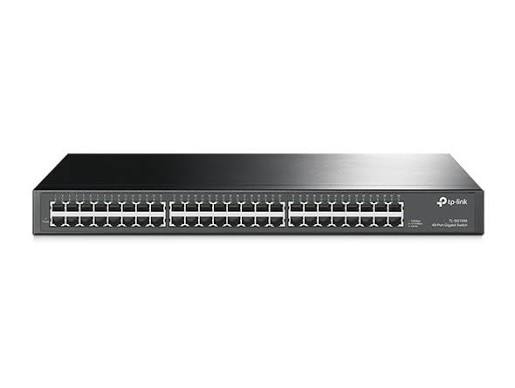
TP-Link officially identifies the TL-SG1048 as an unmanaged 48-port Gigabit rackmount switch. This distinction should also be recorded in the technical installation plan and discussed with the seller before payment. A clear model designation on the quotation is important when ordering replacement parts or commissioning accessories.
It does not provide Power over Ethernet; connecting an AP requiring PoE needs an appropriate separate injector or PoE switch. This distinction should also be recorded in the technical installation plan and discussed with the seller before payment. A clear model designation on the quotation is important when ordering replacement parts or commissioning accessories.
How the equipment fits into a working installation
The diagram below distinguishes signal or data flow from the separate power and safety path. Components shown around the featured product are elements of a reference system, not an assertion that every accessory ships with the product. Check the supplier bill of materials, connector type and physical port labels when converting this concept to a live deployment.

TP-Link TL-SG1048 48-Port Gigabit Ethernet Switch installation and connection diagram. A product-specific visual to support selection, setup or compatibility; numerical values appear only where verified.
How to Install TP-Link TL-SG1048 48-Port Gigabit Ethernet Switch
A Step by Step Guide to Install TP-Link TL-SG1048 48-Port Gigabit Ethernet Switch
Step 1: Confirm the unit
Inspect the model and any hardware revision on TL-SG1048. Compare it with the quotation and avoid using a manual intended for a visually similar but different model. This is particularly important when the manufacturer has several generations or the seller listing omits accessories.
Step 2: Prepare the installation plan
Sketch the upstream and downstream connections. Separate data, optical fiber, power and management paths where applicable. Check site measurements, cable lengths, protective equipment, and a safe way to access the device for maintenance.
Step 3: Check the power or passive-safety requirements
Verify source voltage, connector, rated current, fuse or protective arrangements and any PoE standard before powering equipment. Passive fiber accessories do not need mains supply, but active routers, switches, access points and OLTs do.
Step 4: Install or connect in the correct order
Mount or place the product according to its exact manual, preserving cable strain relief and ventilation where required. Connect the upstream handoff, then relevant downstream interfaces. For fiber, avoid mixing APC and UPC terminations, and keep clean end caps on disconnected optical ports.
Step 5: Configure only supported functions
Use the manufacturer-supported interface and software release, and apply a planned IP/VLAN or service configuration when the product is an active network device. For passive tools, perform the correct preparation or termination procedure instead of inventing software controls.
Step 6: Test and document the result
Verify expected link state and service using an appropriate test. Record asset location, installed interfaces, configuration backup when possible, and relevant optical or Ethernet measurements. Do not accept a successful power-on LED as proof of completed end-to-end service.
For exact-model evidence, consult the manufacturer documentation for TL-SG1048 before making version-specific changes or purchases.
Unmanaged switching versus network policy
The TL-SG1048 forwards Ethernet frames as an unmanaged switch. It offers a large number of physical ports but not the per-port VLAN, ACL, monitoring and configuration controls found on managed switches. If an office must isolate CCTV, guests and finance devices, design that segmentation through appropriate managed infrastructure. Do not advertise the TL-SG1048 as a PoE source or a managed distribution switch. In an ordinary desktop network, its plug-and-play design can be an advantage, but it must still be connected to a suitable router and cabled correctly.
Avoiding port-count surprises
Forty-eight RJ45 ports do not automatically imply forty-eight independent Internet connections or infinite bandwidth. A single uplink to the gateway remains a shared path, and multiple clients compete for network and server resources. Create a port schedule for workstations, printers, access points, IP phones and uplinks. Leave a realistic margin for expansion. In offices with many high-traffic devices, plan aggregation carefully and consider whether a managed switch with link aggregation or higher-speed uplinks is appropriate. A physical port count should be interpreted in the context of the complete topology.

TP-Link TL-SG1048 48-Port Gigabit Ethernet Switch technical comparison. A product-specific visual to support selection, setup or compatibility; numerical values appear only where verified.
Rack installation and cooling
The manufacturer lists a 19-inch, 1U rackmountable enclosure. Verify rack depth, mounting accessories and airflow clearance before installation. Use strain relief and cable managers to keep a dense bundle of forty-eight patch cords from pulling on ports. Label switch ports and patch panel positions consistently. Keep mains leads separate from tangled data cables and preserve access to the front LEDs. In a warm cabinet, measure temperature rather than relying on the switch’s external metal case as proof of adequate ventilation. A well-organized rack saves troubleshooting time.
Distinguishing PoE and data
Ethernet connectors do not automatically deliver Power over Ethernet. The TL-SG1048 is not a PoE supply. An IP phone or wireless access point requiring PoE must be powered through a compatible injector or powered switch, or through a permitted local adapter if the endpoint supports one. Never wire passive PoE directly into a non-compatible network endpoint. Confirm the total power budget on the separate source and the exact PoE standard demanded by the endpoint. The installation diagram should show power and data paths separately so installers cannot confuse a data-only port with a powered port.

TP-Link TL-SG1048 48-Port Gigabit Ethernet Switch planning wheel. A product-specific visual to support selection, setup or compatibility; numerical values appear only where verified.
Cabling and fault isolation
Use appropriate twisted-pair cabling and properly terminated RJ45 connectors for Gigabit operation. A link at 100 Mbps instead of 1000 Mbps can indicate cable pairs, endpoint settings or older hardware rather than a defect in the new switch. Start fault isolation by swapping a known-good patch cord and port, then checking the endpoint’s negotiated link rate. If multiple devices lose Internet access simultaneously, investigate the router, uplink and power before replacing forty-eight patch leads. Record switch location and port inventory for future maintenance.

TP-Link TL-SG1048 48-Port Gigabit Ethernet Switch decision map. A product-specific visual to support selection, setup or compatibility; numerical values appear only where verified.
Key interface and compatibility checks
The documented entry for TP-Link TL-SG1048 48-Port Gigabit Ethernet Switch is “Ports: 48× 10/100/1000 Mbps RJ45.” Count physical interfaces and distinguish those dedicated to uplink, data, management and power. A port label alone does not ensure it suits a particular optical or Ethernet service. When preparing a quotation, show the exact model beside this entry and verify any associated interface, supply or accessory against the site bill of materials. Where the listing deliberately says that a detail is unverified, a buyer should obtain the manufacturer label or datasheet rather than infer an unsupported feature from the product family.
The documented entry for TP-Link TL-SG1048 48-Port Gigabit Ethernet Switch is “Management: Unmanaged.” This is a purchasing and commissioning checkpoint, not proof that every other device or accessory is compatible. When preparing a quotation, show the exact model beside this entry and verify any associated interface, supply or accessory against the site bill of materials. Where the listing deliberately says that a detail is unverified, a buyer should obtain the manufacturer label or datasheet rather than infer an unsupported feature from the product family.
The documented entry for TP-Link TL-SG1048 48-Port Gigabit Ethernet Switch is “PoE output: No.” This is a purchasing and commissioning checkpoint, not proof that every other device or accessory is compatible. When preparing a quotation, show the exact model beside this entry and verify any associated interface, supply or accessory against the site bill of materials. Where the listing deliberately says that a detail is unverified, a buyer should obtain the manufacturer label or datasheet rather than infer an unsupported feature from the product family.
The documented entry for TP-Link TL-SG1048 48-Port Gigabit Ethernet Switch is “Switching capacity: 96 Gbps (manufacturer).” This is a purchasing and commissioning checkpoint, not proof that every other device or accessory is compatible. When preparing a quotation, show the exact model beside this entry and verify any associated interface, supply or accessory against the site bill of materials. Where the listing deliberately says that a detail is unverified, a buyer should obtain the manufacturer label or datasheet rather than infer an unsupported feature from the product family.
The documented entry for TP-Link TL-SG1048 48-Port Gigabit Ethernet Switch is “Rack size: 19-inch, 1U.” This is a purchasing and commissioning checkpoint, not proof that every other device or accessory is compatible. When preparing a quotation, show the exact model beside this entry and verify any associated interface, supply or accessory against the site bill of materials. Where the listing deliberately says that a detail is unverified, a buyer should obtain the manufacturer label or datasheet rather than infer an unsupported feature from the product family.
The documented entry for TP-Link TL-SG1048 48-Port Gigabit Ethernet Switch is “Supply: 100–240 VAC.” This is a purchasing and commissioning checkpoint, not proof that every other device or accessory is compatible. When preparing a quotation, show the exact model beside this entry and verify any associated interface, supply or accessory against the site bill of materials. Where the listing deliberately says that a detail is unverified, a buyer should obtain the manufacturer label or datasheet rather than infer an unsupported feature from the product family.
The documented entry for TP-Link TL-SG1048 48-Port Gigabit Ethernet Switch is “Version: Manufacturer specifications may vary across revisions.” This is a purchasing and commissioning checkpoint, not proof that every other device or accessory is compatible. When preparing a quotation, show the exact model beside this entry and verify any associated interface, supply or accessory against the site bill of materials. Where the listing deliberately says that a detail is unverified, a buyer should obtain the manufacturer label or datasheet rather than infer an unsupported feature from the product family.

TP-Link TL-SG1048 48-Port Gigabit Ethernet Switch compatibility matrix. A product-specific visual to support selection, setup or compatibility; numerical values appear only where verified.
Who this product is for
The right customer is someone who can state the job this equipment must perform, the environment where it will operate and the equipment it must connect to. For TP-Link TL-SG1048 48-Port Gigabit Ethernet Switch, the buyer should first identify the upstream and downstream parts of the system, confirm that the intended model is exactly what the catalog lists and note any interfaces already installed on site. A technician designing a new network needs a different degree of documentation from a customer replacing one known failed component. Clear requirements reduce unnecessary accessories and repeat site visits.
Model identification before paying
The important starting point is the exact model identifier: TL-SG1048. Similar product names and marketing classes can refer to different hardware revisions, region-specific configurations or packaging. Check the unit label rather than relying on a supplier photograph. Where the source listing lacks an SKU, the safe purchasing choice is to request a photograph of the rating plate and the manufacturer documentation. This prevents a plausible description from becoming an unsupported promise about the actual hardware delivered to the buyer in Kenya.
Installation design matters more than a single specification
A good installation starts with a route drawing and clearly separated power and data paths. The product cannot compensate for incompatible connectors, poor cable termination, an undersized power source or an optical design that exceeds its loss budget. For TP-Link TL-SG1048 48-Port Gigabit Ethernet Switch, identify where the equipment is physically located, where its upstream connection comes from and which services depend on the link. Record cable lengths and any environmental hazards. The installation diagram in this description is a planning aid, not permission to ignore the exact manufacturer instructions.
What to ask before ordering in Kenya
Verify the current selling price, stock status, available hardware revision, supplied accessories, VAT treatment, delivery arrangements and return conditions directly with the seller. A catalog figure of KSh 25,000 is a listing snapshot, not a promise of final invoice terms or ongoing inventory. Ask for a clearly identified item on the quotation and ensure the exact model appears on the invoice or delivery note. For an installation project, request an itemized bill of materials so cables, connectors, labor and testing are not hidden in an apparently inexpensive device price.
Comparison should follow the job, not the headline number
Two products can share a headline family name while having different ports, power methods, physical dimensions, management features or deployment requirements. The better choice is the unit whose verified features solve the intended problem without creating a new bottleneck. When comparing TL-SG1048 with alternatives, write down the required interfaces, site conditions and support arrangements first. Ignore vague claims about being the “best” unless there is an explicit benchmark and a documented test methodology. The appropriate choice for a small premises may be different from that for a school, apartment block or service provider.
Responsible interpretation of specifications
Technical specifications describe a defined test or hardware capability. They should not be turned into universal performance promises. For network equipment, client devices, cabling, congestion and upstream services may impose lower practical limits; for passive fiber parts, losses and installation quality are decisive; for tools, the material and operator technique matter. In this description, a value is treated as model-specific only when the consulted manufacturer documentation supports it. Unlisted details remain buying checks rather than inventions placed into the specifications table.
Commissioning and record keeping
Before handing the system over, document the installed model, serial number if available, physical location, connectivity, relevant configuration and a baseline functional test. Record the name of the person who tested it and the date, and keep the manufacturer support URL in the asset register. A few minutes of documentation can prevent hours of fault tracing months later. For products used in an ISP or structured cabling environment, link each part to a port, cable ID or subscriber record so maintenance staff know what depends on it.
Maintenance and future expansion
Plan for access to the installed product after commissioning. A spare port, useful service loop or available rack position can reduce later work, but a design with excessive unused equipment is not automatically superior. Consider replacement accessories and software support where relevant. Revisit the setup after adding new devices or users; a topology that worked with a few endpoints may behave differently at scale. Do not treat maintenance or vendor warranty arrangements as guaranteed unless they are stated on the supplied purchase documents.
Troubleshooting in a disciplined sequence
Start with a clear symptom and a known-good baseline. Verify power and physical connections, then check link negotiation or optical continuity, then service-layer configuration. Change one thing at a time and document the result. If the problem follows a particular cable or endpoint, isolate that component before replacing the central device. Avoid reset-to-default as a first reaction because it may erase working VLAN, ISP, user or security configuration. Make sure any testing on an operational network is authorized and minimizes business interruption.
What this purchase does not include by default
A product listing is not a complete project design. Do not assume professional installation, an extra controller, optical modules, splitters, cable, batteries, PoE injectors or mounting brackets are included merely because they appear in an example diagram. The What’s in the Box table distinguishes manufacturer-documented items from details requiring order confirmation. The installer should check the physical package against the quotation before leaving for site. This is particularly important for the generic products whose manufacturer part numbers are not provided in the catalog.
Recommended Accessories and Related Products
Choose supporting items only after confirming interfaces and the complete site design. The following Reisen listings are useful for comparing related system components, alternatives or complementary tools; listing them together does not establish direct electrical, optical or software compatibility.
Consider the TP-Link Archer C6 AC1200 MU-MIMO Gigabit Wi-Fi Router when evaluating wired uplinks, local connectivity or alternative access equipment. Check each product’s available ports and power rules before selecting it.
Consider the TP-Link Archer AX10 AX1500 Wi-Fi 6 Router when evaluating wired uplinks, local connectivity or alternative access equipment. Check each product’s available ports and power rules before selecting it.
Consider the MikroTik hEX S (2025) E60iUGS Router when evaluating wired uplinks, local connectivity or alternative access equipment. Check each product’s available ports and power rules before selecting it.
For a broader local selection, Review related network switching options. Confirm product availability and that the chosen item fits the exact installation rather than purchasing by category name alone.
How to Buy TP-Link TL-SG1048 48-Port Gigabit Ethernet Switch
Use the five checks illustrated below to confirm that the listed hardware suits the physical site, fits the neighboring equipment and can be supported after installation. Treat unanswered questions as items for the quotation rather than assumptions to make on site.

How to Buy TP-Link TL-SG1048 48-Port Gigabit Ethernet Switch. A product-specific visual to support selection, setup or compatibility; numerical values appear only where verified.
Key Specifications
|
Specification |
Documented value |
|
Ports |
48× 10/100/1000 Mbps RJ45 |
|
Management |
Unmanaged |
|
PoE output |
No |
|
Switching capacity |
96 Gbps (manufacturer) |
|
Rack size |
19-inch, 1U |
|
Supply |
100–240 VAC |
|
Version |
Manufacturer specifications may vary across revisions |
What’s in the Box
|
Item |
Supply information |
|
Switch |
Manufacturer-listed item |
|
Power cord |
Manufacturer-listed item |
|
Installation guide |
Manufacturer-listed item |
|
Rackmount kit |
Manufacturer-listed item |
|
Rubber feet |
Manufacturer-listed item |
Frequently Asked Questions
Can this switch power an EAP610-Outdoor over Ethernet?
Not by itself. TL-SG1048 is an unmanaged non-PoE data switch. The EAP requires a separate compatible PoE source or the manufacturer-approved adapter arrangement for the applicable hardware revision.
Can I use this with any existing equipment?
No compatibility should be assumed solely from a similar connector or brand name. First identify the exact interfaces, power inputs and firmware or optical standards of both ends. The product listing and the official documentation are the appropriate starting points. If the required compatibility cannot be established, test with a representative unit under a controlled, authorized setup before buying a large quantity.
Will the quoted performance always be achieved?
No. Rated physical specifications are not service guarantees. Actual results depend on the complete system: available ISP bandwidth, contention, interference, fiber loss, endpoint capability, power and installation quality as applicable. The responsible approach is to establish a measurable acceptance target and test it in the real deployment. A purchase should be judged by that target rather than a slogan on packaging.
Does the product include every accessory shown in the installation diagram?
Not necessarily. The diagram illustrates related system components and intended connection paths; it is not a statement that all of them are supplied in one carton. The separate package table indicates only what is supported by the available documentation. Confirm cables, power units, modules, tape, splitters and mounting hardware in the supplier quotation before paying.
Can an installer use this without reading a manual?
A basic physical connection is not the same as safe and correct commissioning. Electrical ratings, mounting procedures, connector standards and software settings may be model-specific. An experienced installer should still consult the correct version of the manual and record the configured state. Training is especially important for GPON, fiber splicing, passive PoE and devices exposed to outdoor conditions.
How should I choose between a smaller and larger alternative?
Start with known present demand, then reserve a realistic margin for verified expansion. Count actual ports, cable routes and service profiles rather than selecting the largest headline number. A larger product can increase cost, energy use or maintenance complexity without helping a small site. Conversely, a device with no spare capacity may become expensive to replace after a modest expansion.
How do I avoid ordering the wrong revision?
Request the exact model and hardware version printed on the carton and rating label. Compare that identifier with the manufacturer technical sheet and make sure the supplier quote includes the same designation. Different countries or hardware revisions may have different power adapters, radio features or package contents. Do not treat images or generic catalog titles as sufficient verification.
What should be tested after installation?
At a minimum, inspect physical condition and labeling, verify the correct power path, confirm the expected interface is operating, and test the intended service or mechanical function. For fiber installations add appropriate optical tests; for network equipment check address assignment, link status and required applications. Record what was tested and the result before handing over to the customer.
What is the best next step before purchase?
Provide a simple list of existing devices, required connections, installation environment, desired outcomes and budget. Compare that list against the verified Key Specifications and the relevant manufacturer documentation. Ask for a written confirmation of any uncertain model suffix or included accessory. This is more useful than asking whether a product is universally “good,” because suitability is always specific to a system.
Buying Guidance for Kenya
The Reisen catalog lists TP-Link TL-SG1048 48-Port Gigabit Ethernet Switch at KSh 25,000. Before making a final purchase, request the exact item identification, a quotation specifying any modules or accessory bundles, and appropriate delivery terms. For deployments with multiple devices, verify one complete working setup before scaling the order. The right product decision is supported by a clear use case, valid system design and a documented acceptance test.
Additional information
| Product | TP-Link SG1048 48-Port Gigabit Ethernet Switch Price in Kenya |
|---|---|
| Category | Network Switches |
| Price | KES 25,000.00 |
| Availability | In stock |
Keep exploringMore in Network Switches
Related products