Save 3%
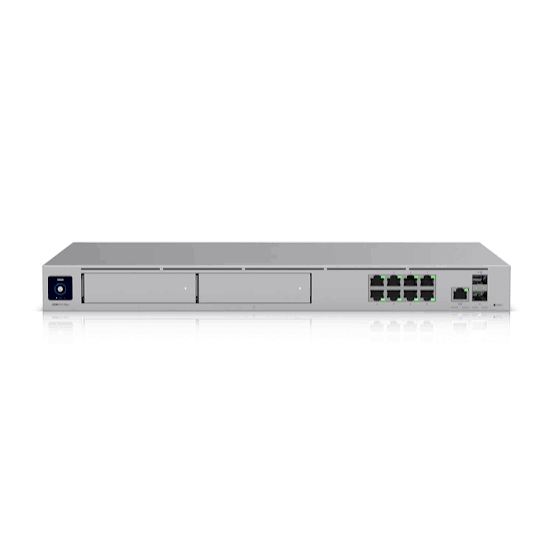
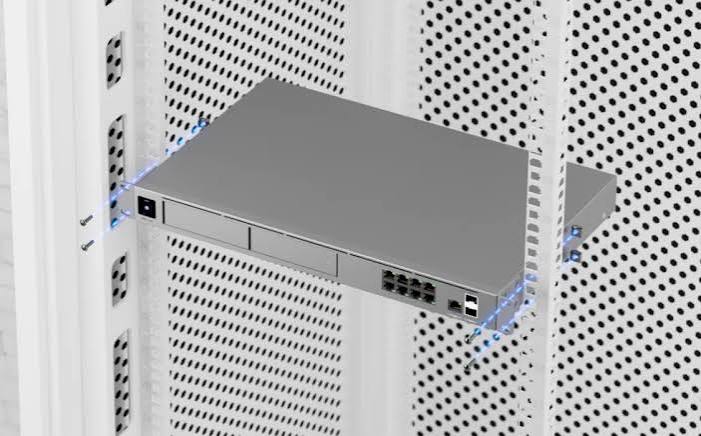
Select an image to view it. Click the main image to enlarge.
Ubiquiti UniFi Dream Machine Pro Max (UDM Pro Max) Price in Kenya
In stock
KES 87,000.00
KES 90,000.00
You save KES 3,000.00
Buy Ubiquiti UniFi Dream Machine UDM-Pro-Max in Kenya. Compare verified features, installation requirements, practical compatibility and accessories at Reisen.
View product detailsNeed help choosing?
Talk to our team at +254 714 804 532
Product details
Ubiquiti UniFi Dream Machine UDM-Pro-Max
UDM-Pro-Max is offered through Reisen as a integrated UniFi network gateway and controller. For Kenyan customers planning multi-site businesses and facilities needing advanced routing, security and UniFi orchestration, the relevant purchasing question is not simply whether a unit carries an appealing price or headline rating. A sound choice starts with the intended task, site environment, upstream network or cable path, and the accessories needed to make the system reliable. The catalog price is KSh 87,000; installation, optional components, taxes and final seller quotation must be checked separately.
This description explains how to evaluate UDM-Pro-Max without confusing a label with a performance guarantee. Its most useful capabilities or purchasing considerations include centralized UniFi management, advanced routing and VPN, dual storage bays for Protect, separate PoE switching when needed. Each technical value below is presented in its proper context; optional items and regional kit variations should always be matched to the exact hardware offered for sale.
Who Should Consider This Product
A practical installation begins with a clear use case. The UDM-Pro-Max is positioned as a integrated UniFi network gateway and controller for multi-site businesses and facilities needing advanced routing, security and UniFi orchestration. The relevant selection factors are WAN handoff, LAN design, SFP+ optics, Protect disk sizing, security features and separate PoE requirements. A buyer who specifies these points at quotation stage is less likely to pay for replacement cabling, an unsuitable power adapter or an avoidable second site visit.
Think about the service the equipment must deliver after installation, not merely the object in its box. For UDM-Pro-Max, that means documenting the connected devices, the upstream and downstream interfaces, the expected operating schedule, access for maintenance and the effect of an outage. Those questions determine whether this unit is a sensible match or whether a larger, smaller or differently equipped model would be a better purchase.
In a Kenyan office or installation project, price is only one component of the decision. The uploaded Reisen catalog lists this item at KSh 87,000. The completed system may also require properly rated supplies, cable, mounting consumables, testing, transport and configuration. An accurate quotation should state what the supplied package contains instead of treating optional accessories as included by default.
How to Buy UDM-Pro-Max
Begin with the job, not a photograph. Assess WAN handoff, LAN design, SFP+ optics, Protect disk sizing, security features and separate PoE requirements. Next, inspect the equipment designation and choose the correct variant. Verify supporting cabling, adapters, configuration and commissioning tasks before accepting a quotation. The illustrated purchasing sequence below describes that process for UDM-Pro-Max and helps prevent the wrong hardware or an incomplete installation kit from reaching the site.

Buying decision graphic: establish the installation objective, select the exact model, calculate supporting components, and verify the supplied SKU before deployment.
Key Specifications
|
Specification |
Documented detail |
|
Gateway |
UniFi Cloud Gateway 1U |
|
WAN options |
10G SFP+ and 2.5GbE RJ45 default |
|
LAN ports |
8 × 1GbE RJ45 |
|
Optical ports |
2 × 10G SFP+ total |
|
IDS/IPS reference |
5 Gbps manufacturer figure |
|
NVR bays |
2 × 3.5-inch HDD |
|
Integrated storage |
128 GB SSD |
|
Max draw |
60 W |
A specification table is a comparison tool, not an invitation to assume features that are absent from the manufacturer's record. Confirm the label, hardware revision and regional software before purchasing UDM-Pro-Max; this is particularly important for power options, interface counts and functions that can differ between similarly named devices.
Features and Real-World Benefits
Centralized unifi management
Centralized unifi management. This is relevant to the role of UDM-Pro-Max because it influences how the equipment behaves in a complete field system. Consider the upstream service, endpoint expectations and likely maintenance tasks together. A cloud gateway may host several UniFi applications, but port speed, IDS/IPS throughput and camera capacity are different constraints. The integrated eight 1GbE LAN ports are not a substitute for a high-capacity PoE access switch when deploying powered APs or cameras. For purchasing, describe the actual application in the equipment schedule and require a written answer about which accessories, optics, cables or services are necessary. A clearer deployment brief is more useful than an impressive but context-free specification.
Advanced routing and vpn
Advanced routing and vpn. This is relevant to the role of UDM-Pro-Max because it influences how the equipment behaves in a complete field system. Consider the upstream service, endpoint expectations and likely maintenance tasks together. A cloud gateway may host several UniFi applications, but port speed, IDS/IPS throughput and camera capacity are different constraints. The integrated eight 1GbE LAN ports are not a substitute for a high-capacity PoE access switch when deploying powered APs or cameras. For purchasing, describe the actual application in the equipment schedule and require a written answer about which accessories, optics, cables or services are necessary. A clearer deployment brief is more useful than an impressive but context-free specification.
Dual storage bays for protect
Dual storage bays for protect. This is relevant to the role of UDM-Pro-Max because it influences how the equipment behaves in a complete field system. Consider the upstream service, endpoint expectations and likely maintenance tasks together. A cloud gateway may host several UniFi applications, but port speed, IDS/IPS throughput and camera capacity are different constraints. The integrated eight 1GbE LAN ports are not a substitute for a high-capacity PoE access switch when deploying powered APs or cameras. For purchasing, describe the actual application in the equipment schedule and require a written answer about which accessories, optics, cables or services are necessary. A clearer deployment brief is more useful than an impressive but context-free specification.
Separate poe switching when needed
Separate poe switching when needed. This is relevant to the role of UDM-Pro-Max because it influences how the equipment behaves in a complete field system. Consider the upstream service, endpoint expectations and likely maintenance tasks together. A cloud gateway may host several UniFi applications, but port speed, IDS/IPS throughput and camera capacity are different constraints. The integrated eight 1GbE LAN ports are not a substitute for a high-capacity PoE access switch when deploying powered APs or cameras. For purchasing, describe the actual application in the equipment schedule and require a written answer about which accessories, optics, cables or services are necessary. A clearer deployment brief is more useful than an impressive but context-free specification.
Engineering and System Planning
A cloud gateway may host several UniFi applications, but port speed, IDS/IPS throughput and camera capacity are different constraints. The integrated eight 1GbE LAN ports are not a substitute for a high-capacity PoE access switch when deploying powered APs or cameras.
The major design risks for this integrated UniFi network gateway and controller are usually integration risks: a system with the right core hardware but the wrong supply, optic, connector, management design or environmental protection can still fail. Write down the expected connected equipment, interface speed, tolerable interruption, required tests and future access before choosing every component. For UDM-Pro-Max, reviewing the whole data or optical path is more reliable than comparing a single headline attribute.
The gateway is listed as UniFi Cloud Gateway 1U for the reference documented here. This specification should be considered alongside the site survey, accessory compatibility, maintenance needs and the real workload. It is an input to selecting a suitable installation, not a stand-alone promise about field performance or package contents.
For integrated UniFi network gateway and controller, the wan options entry is 10G SFP+ and 2.5GbE RJ45 default. Buyers should distinguish physical connector count from negotiated speed, management support and shared interface restrictions. A matching plug alone is not proof of fiber-transceiver or power compatibility, so the entire link should be qualified before ordering costly accessories.
For integrated UniFi network gateway and controller, the lan ports entry is 8 × 1GbE RJ45. Buyers should distinguish physical connector count from negotiated speed, management support and shared interface restrictions. A matching plug alone is not proof of fiber-transceiver or power compatibility, so the entire link should be qualified before ordering costly accessories.
For integrated UniFi network gateway and controller, the optical ports entry is 2 × 10G SFP+ total. Buyers should distinguish physical connector count from negotiated speed, management support and shared interface restrictions. A matching plug alone is not proof of fiber-transceiver or power compatibility, so the entire link should be qualified before ordering costly accessories.
The ids/ips reference is listed as 5 Gbps manufacturer figure for the reference documented here. This specification should be considered alongside the site survey, accessory compatibility, maintenance needs and the real workload. It is an input to selecting a suitable installation, not a stand-alone promise about field performance or package contents.
The nvr bays is listed as 2 × 3.5-inch HDD for the reference documented here. This specification should be considered alongside the site survey, accessory compatibility, maintenance needs and the real workload. It is an input to selecting a suitable installation, not a stand-alone promise about field performance or package contents.
Bar Chart: Verified Technical Comparison

This chart compares documented numeric values with units shown. Different interfaces or operating modes should not be added together to claim real-world throughput or power capacity.
Planning and Capacity Visualization

The planning wheel represents nonnumeric evaluation steps when meaningful percentage data is unavailable. Where the product has directly comparable port counts, the chart instead illustrates their verified physical shares. It is not a benchmark of total application speed.
Performance, Compatibility, and Buying Decisions
The three-dimension decision graphic compares practical design priorities for UDM-Pro-Max. Compare centralized UniFi management, advanced routing and VPN, and dual storage bays for Protect in the context of the actual site; no invented scores, efficiency percentages or field-test measurements are used to enlarge the circles. A useful buying decision is specific about what must work on day one and how success will be tested.

Compatibility Matrix and Integration Checks
Confirm each compatibility requirement at both ends of the connection. The matrix below distinguishes documented support from issues that require further verification. For example, optical modules must match optical interfaces and fiber type; an IEEE PoE port is different from passive DC power; and a SIP telephone requires an IP calling service. These checks protect a customer from buying a system that appears complete but has an unsupported link.

What’s in the Box
|
Item / supplied element |
Confirmation basis |
|
Dream Machine Pro Max gateway |
Manufacturer or catalog reference; verify exact regional carton |
|
Power cable / mounting accessories per manufacturer's box listing (verify current kit) |
Manufacturer or catalog reference; verify exact regional carton |
|
Hard disks not assumed included |
Manufacturer or catalog reference; verify exact regional carton |
Accessories are included in this table only where manufacturer or catalog information supports them; otherwise the entry explicitly calls for seller confirmation. Separate parts such as additional SFP modules, mounting poles, splitters, batteries, PoE injectors, specialist cables or hand tools must not be assumed included because they appear in an installation example.
How to Set Up UDM-Pro-Max
Installation or configuration should be completed by a person competent in the relevant electrical, network, optical or telecommunications work. The following workflow covers planning, safe connection, initial setup and verification for UDM-Pro-Max. It supplements—not replaces—the current manufacturer's instructions and the requirements of the project site.
A Step by Step Guide to Set Up UDM-Pro-Max
Step 1: Inventory WAN interfaces and failover plans. Start by writing down the operational objective and the conditions at the deployment location. List the devices or fibers that depend on this step; doing so gives the installer an acceptance criterion before any configuration changes. For UDM-Pro-Max, check how the intended role fits the rest of the system rather than selecting hardware from price alone.
Step 2: Confirm topology and router ownership. Record the exact labeling and revision on the supplied unit. Look for inconsistencies between the packaging, product data sheet, purchase order, and proposed bill of materials before committing a mounting or power decision. If the exact model differs from the published family name, stop and confirm the correct product before claiming specifications for UDM-Pro-Max.
Step 3: Prepare rack power and cooling. Trace the complete connection route and establish which links carry data, optical signal, or electrical power. Mark each termination so a later fault can be isolated without disconnecting unrelated services. Keep the path for WAN failover, UniFi adoption, and protected configuration clear in the as-built record, including which cables or ports are shared and which are dedicated.
Step 4: Label WAN and LAN optic/copper paths. Check the limits that are most likely to be overlooked: load, input voltage, interface family, reach, thermal environment, and safe access. Document any value that must be measured rather than guessed. Any incompatible supply, connector, or optical component should be corrected before energy or a live signal is introduced.
Step 5: Mount the gateway and apply trusted power. Prepare and secure the mounting, support, or interface location. Avoid unapproved adapters and make enough physical space for strain relief, cooling, fiber slack, or safe operation as applicable. Site conditions can change the final method; do not transfer a mounting or preparation technique blindly from a different product family.
Step 6: Connect to the UniFi setup workflow. Connect the upstream service and test that connection independently before joining downstream endpoints. An upstream problem can mimic a defect in the new device when the system is considered as one undivided unit. If upstream connectivity is uncertain, use a known-good test endpoint before changing the configuration of UDM-Pro-Max.
Step 7: Create VLANs and firewall policies. Apply only the settings required for the planned service. Keep a record of credentials, firmware, VLANs, call profiles, optical programs, or other configuration inputs so the installation can be restored. Use documented manufacturer controls; avoid activating unverified features or leaving default administrator access exposed.
Step 8: Adopt managed switches and access points. Test normal operation and one sensible failure condition. Observe the service from the perspective of an end user, and confirm that the connection or protected load behaves as designed. Confirm the required service under realistic conditions rather than relying only on physical power or status LEDs.
Step 9: Provision cameras with qualified drives. Capture the measurements that establish acceptance: link speed, loss, load, alarm state, coverage or call completion as applicable. A useful handover shows recorded results, not only screenshots of a setup wizard. If the result is outside the acceptance threshold, isolate the likely stage of WAN failover, UniFi adoption, and protected configuration and repeat a focused test.
Step 10: Test ISP failover, backups and alerts. Finish by labeling every relevant connection and recording the installed model, accessory list and maintenance interval. Explain to the site owner which signs warrant a return visit and where the service documentation is stored. Keep the final record with the purchase and any valid support information so replacements can match the installed design.
Installation Diagram: Real Connection Path

Connection diagram: devices are shown as labeled equipment illustrations, with separate data, fiber, radio or electrical links as relevant. This is a topology guide, not an approval to substitute an undocumented power source or omit manufacturer safety instructions.
Site Safety and Long-Term Reliability
Harden the management account with MFA, maintain recovery backups, protect the rack power and confirm cable/optic compatibility. Proper drive handling and security policy changes should be scheduled to avoid needless production downtime.
A reliable deployment of UDM-Pro-Max should be documented. Keep the actual hardware code, firmware revision where relevant, placement photographs, test results, cable identifiers and a record of accessories supplied. These details make repairs safer and help the owner distinguish a defective device from a power, fiber, radio or upstream-network problem. For shared infrastructure, maintain a change log so later contractors can identify which port or splice was assigned to which service.
Troubleshooting Without Guesswork
A new gateway may be reachable while devices fail adoption because management VLAN, DNS, controller versions or site ownership differ. Diagnose WAN, switching, controller adoption and Protect storage separately.
SKU and revision. Read the label on UDM-Pro-Max and compare it with the catalog title; suffixes can change powering, ports, management or supplied items. If the expected condition is not met, isolate that part of the installation before replacing other devices. Capture a reproducible observation and test the path from its upstream source toward the endpoint so the repair addresses the actual cause.
Power and compatibility. Match input supply, UPS sizing or PoE class to the exact product; do not treat every device bearing the same brand as electrically compatible. If the expected condition is not met, isolate that part of the installation before replacing other devices. Capture a reproducible observation and test the path from its upstream source toward the endpoint so the repair addresses the actual cause.
Physical and environmental fit. Check placement, ventilation, rain and dust exposure, mounting hardware, cable entry, bend radius and safe service access for the integrated UniFi network gateway and controller. If the expected condition is not met, isolate that part of the installation before replacing other devices. Capture a reproducible observation and test the path from its upstream source toward the endpoint so the repair addresses the actual cause.
Management and ecosystem. Ensure any required controller, SIP PBX, SIM plan, NVR, optical module or monitoring workflow is available before the installation begins. If the expected condition is not met, isolate that part of the installation before replacing other devices. Capture a reproducible observation and test the path from its upstream source toward the endpoint so the repair addresses the actual cause.
How This Product Compares With Alternatives
There is no universal 'best' integrated UniFi network gateway and controller. Compare UDM-Pro-Max with alternatives according to the work it must do, physical form factor, compatible ports, feature licensing, service quality and installed lifecycle cost. The most meaningful comparisons are within the same engineering category: a managed switch should be assessed against port speed and software features, while a fiber box should be assessed against its available openings, seal kit and splice management. A low purchase price can be deceptive if an adapter, compatible SFP, replacement battery or certified field visit is omitted. Ask suppliers for comparable scope, not merely comparable sticker prices.
A useful Reisen comparison is MIKROTIK CRS310-8G+2S+IN. Compare its documented role and power/media requirements with this product before using either as a substitute.
A useful Reisen comparison is MikroTik CRS510-8XS-2XQ-IN. Compare its documented role and power/media requirements with this product before using either as a substitute.
A useful Reisen comparison is TP-Link TL-SG3452XP – 48-Port Gigabit PoE+ Switch with 10G SFP+ Uplinks. Compare its documented role and power/media requirements with this product before using either as a substitute.
Recommended Accessories and Related Products
Think in terms of a complete, serviceable installation. Common supporting elements for integrated UniFi network gateway and controller include items such as suitable rated power, correctly specified cable or optics, mounting materials, testing tools, and any necessary managed network or recording platform. Their real compatibility must be demonstrated by documentation or a qualified system designer; a product from the same brand is not automatically interoperable.
For a relevant external comparison of switching categories, review managed and fiber switches in Kenya and confirm exact interface speed and required optics.
For primary technical verification, consult the manufacturer model reference. Manufacturer documentation takes precedence over summaries and catalog wording where they conflict.
Frequently Asked Questions
Is UDM-Pro-Max suitable for every installation?
No. Suitability depends on WAN handoff, LAN design, SFP+ optics, Protect disk sizing, security features and separate PoE requirements. Confirm the full system requirement and physical site conditions before treating a catalog model as a fit.
Does the headline speed, capacity or rating guarantee performance?
No. A published label must be interpreted according to the underlying interface and test definition. A cloud gateway may host several UniFi applications, but port speed, IDS/IPS throughput and camera capacity are different constraints. The integrated eight 1GbE LAN ports are not a substitute for a high-capacity PoE access switch when deploying powered APs or cameras.
Can I use accessories from another model?
Only after checking the exact electrical, mechanical and software requirements. A connector that appears to fit may still have the wrong pinout, load rating or optics. UDM-Pro-Max should be matched by documented specifications.
How do I reduce installation failures?
Follow a documented installation and acceptance checklist. A new gateway may be reachable while devices fail adoption because management VLAN, DNS, controller versions or site ownership differ. Diagnose WAN, switching, controller adoption and Protect storage separately.
What should a Kenyan buyer confirm before paying?
Ask for the label photo, hardware revision, detailed quoted contents, written warranty terms, taxes, delivery and configuration scope. The catalog price is KSh 87,000, but it is not a guaranteed current quote.
What maintenance should be scheduled?
Keep installation records, test the relevant electrical or optical/wireless paths, check software/firmware security where applicable, and inspect wear items. Harden the management account with MFA, maintain recovery backups, protect the rack power and confirm cable/optic compatibility. Proper drive handling and security policy changes should be scheduled to avoid needless production downtime.
Final Buying and Acceptance Checklist
· SKU and revision: Read the label on UDM-Pro-Max and compare it with the catalog title; suffixes can change powering, ports, management or supplied items.
· Power and compatibility: Match input supply, UPS sizing or PoE class to the exact product; do not treat every device bearing the same brand as electrically compatible.
· Physical and environmental fit: Check placement, ventilation, rain and dust exposure, mounting hardware, cable entry, bend radius and safe service access for the integrated UniFi network gateway and controller.
· Management and ecosystem: Ensure any required controller, SIP PBX, SIM plan, NVR, optical module or monitoring workflow is available before the installation begins.
· Testing and handover: Specify what must be measured, recorded and demonstrated at acceptance instead of relying on a powered-on LED or a catalog screenshot.
· Commercial completeness: Request confirmation of local stock, tax treatment, delivery, seller warranty, return policy and any accessory cost that is outside KSh 87,000 catalog price.
For UDM-Pro-Max, the purchase is most successful when equipment selection, installation and acceptance testing form one documented process. Request the exact SKU, verify all required components, arrange a suitable delivery and plan a handover that proves the desired service works. This avoids turning an apparently attractive equipment-only quotation into a project with unexpected missing parts or avoidable return visits.
Additional information
| Product | Ubiquiti UniFi Dream Machine Pro Max (UDM Pro Max) Price in Kenya |
|---|---|
| Category | Ubiquiti Network Devices |
| Price | KES 87,000.00 |
| Availability | In stock |
Keep exploringMore in Ubiquiti Network Devices
Related products