

Save 9%

Select an image to view it. Click the main image to enlarge.
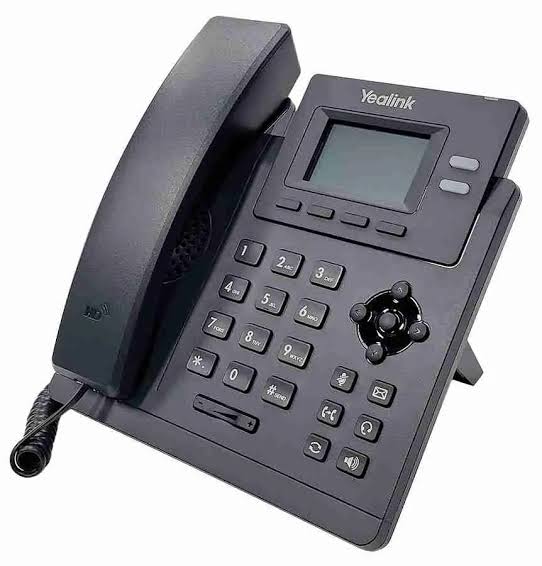
Yealink SIP-T31P Business IP Phone Price in Kenya
In stock
KES 5,000.00
KES 5,500.00
You save KES 500.00
Buy the Yealink SIP-T31P business IP phone in Kenya at Reisen SEO for compatible SIP calling, PoE installation, and everyday office communications.
View product detailsNeed help choosing?
Talk to our team at +254 714 804 532
Product details
Yealink SIP-T31P Business IP Phone Price in Kenya
The Yealink SIP-T31P is a desk IP phone for businesses using a compatible SIP telephone system. It suits staff desks, reception extensions, small offices, and other locations requiring a dedicated business handset.
Unlike an analog telephone, it registers with a SIP service or PBX over the network. Successful calling therefore depends on the phone, network configuration, and telephone-service settings working together.
Key Specification
| Feature | Specification |
|---|---|
| Model | SIP-T31P |
| Telephone type | SIP IP desk phone |
| SIP accounts | Two |
| Display | Backlit 132 × 64-pixel graphical LCD |
| Audio | HD voice support |
| Local conferencing | Up to five participants |
| Network ports | Dual 10/100Mbps Ethernet |
| Power | PoE support; confirm adapter package |
| Service requirement | Compatible SIP PBX or provider |
HD audio depends on compatible codecs and the complete call path. yealink.com
Features and Benefits
Dedicated business calling
A physical handset gives staff a consistent calling interface without relying on a personal mobile phone or computer application.
Two-account support
The phone can be configured for suitable extension or service arrangements within its supported account capacity.
PoE installation
Compatible PoE can carry power and network data through one cable, simplifying desk cabling.
Compare the matching Yealink SIP-T31P. Alternative desk-phone options include the Yealink SIP-T33G and Grandstream GXP1625.
How to Set Up the SIP-T31P
- Assemble the stand and connect the handset to the handset socket.
- Connect the network cable to the phone’s internet/network port.
- Supply power through a compatible PoE switch or approved adapter.
- Check the phone’s assigned IP address.
- Open its management interface from an authorized computer.
- Change the administrator credentials where permitted.
- Enter the SIP server, account, authentication ID, and password supplied by the administrator.
- Configure time, language, and network settings.
- Apply a voice VLAN if the network design requires one.
- Test internal calls, external calls, incoming calls, transfer, and two-way audio.
- Enable approved provisioning and firmware management.
Advantages and Disadvantages
Advantages: Dedicated SIP calling; PoE support; practical office interface.
Disadvantages: Requires a SIP service; Fast Ethernet ports can limit a connected PC; no assumption of built-in Wi-Fi.
Troubleshooting
| Problem | Check |
|---|---|
| Account does not register | Credentials, server, DNS, and network access |
| One-way audio | Firewall, NAT, RTP settings, and provider requirements |
| Phone has no power | PoE compatibility or adapter |
| Calls fail externally | Dial plan and PBX permissions |
Frequently Asked Questions
Can it connect directly to an analog telephone line?
No. It needs an appropriate SIP system.
Is the power adapter always included?
Confirm the package.
Buy the SIP-T31P in Kenya
Contact Reisen SEO for the phone and compatible power and network accessories.
Additional information
| Product | Yealink SIP-T31P Business IP Phone Price in Kenya |
|---|---|
| Category | PBX & Phones |
| Price | KES 5,000.00 |
| Availability | In stock |
Keep exploringMore in PBX & Phones
