Save 20%
Select an image to view it. Click the main image to enlarge.
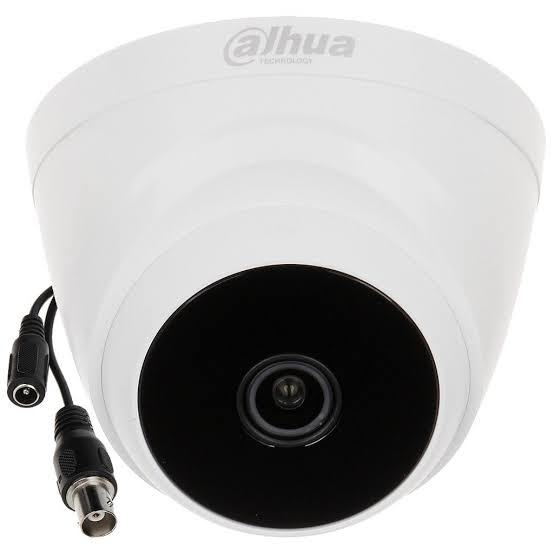
Dahua DH-HAC-T1A21P 2MP Eyeball Camera Price in Kenya
In stock
KES 2,000.00
KES 2,500.00
You save KES 500.00
Buy DH-HAC-T1A21P in Kenya at Reisen. Explore HDCVI CCTV compatibility and practical installation guidance.
View product detailsNeed help choosing?
Talk to our team at +254 714 804 532
Product details
Dahua DH-HAC-T1A21P 2MP HDCVI Infrared Eyeball Camera
Dahua DH-HAC-T1A21P 2MP HDCVI Infrared Eyeball Camera is a analog HDCVI surveillance camera listed by Reisen for Kenyan buyers planning a practical security, networking or entry-control installation. The key buying decision is not simply whether it has a familiar Dahua name: it is whether its signal, power, capacity, mounting and operation fit the job already defined on site. The DH-HAC-T1A21P serves a coax-based CCTV system. It does not plug directly into an Ethernet-only NVR like an IP camera. When upgrading an existing installation, compatible DVR/XVR input modes, power arrangements and cable condition matter more than whether the camera and recorder share a brand.
For a shop ceiling or residential corridor, specify who will use the equipment, how they will recognize that it is working, what happens during electricity or internet interruptions and which existing equipment must remain in service. The model is DH-HAC-T1A21P. The planned system purpose is coax-based surveillance with existing recorder infrastructure. A complete quotation needs the device and every relevant supporting component, not a product name alone.
This buying guide brings together manufacturer-supported model information and the practical questions that determine reliable deployment. Where a catalog description lacks a unique model number or differs from manufacturer wording, the description stays within the supported product class rather than assigning an attractive but unverified feature. No seller-specific warranty promise, delivery time or inventory claim is assumed.
Key Features and Practical Benefits
· Imaging: 2 MP, 1920 × 1080. Compare the required detail at the actual scene distance with lens field of view, frame rate and recorder support. Higher resolution consumes more storage at comparable compression settings, but cannot correct a poorly positioned camera.
· Signal: CVI, TVI, AHD or CVBS selectable. Validate the receiving equipment and required video format before ordering. Mixed generations can display similar model names while differing in supported output, recorder audio and video resolution.
· Illumination: Smart IR, rated up to 20 m. This published lighting characteristic is not an identification-distance guarantee. Test a representative subject in the real after-dark setting, and prevent visible lights from disturbing neighboring rooms or drivers.
· Lens options: 3.6 mm standard; 2.8 mm optional. Check the resulting framing from the chosen mount. A motorized pan/tilt head can change direction, but does not necessarily provide optical zoom or the permanent all-direction coverage of multiple fixed cameras.
· Form: Fixed-focal eyeball. Use appropriately rated mounting hardware, safe weatherproof connections and service access. An enclosure rating does not excuse exposed power joints or unsuitable cable entries.
· Video wiring: BNC/coax-type analog video path. This published lighting characteristic is not an identification-distance guarantee. Test a representative subject in the real after-dark setting, and prevent visible lights from disturbing neighboring rooms or drivers.
How to Choose the Right Product Before Ordering
For DH-HAC-T1A21P, start with the exact model label, intended location and existing equipment list. Review the image or workflow requirements, compatible signal or credential method, correct power and the expected installation accessories. Do not accept “same as similar Dahua unit” as a technical verification method.
If the viewing distance, enclosure style or illumination does not suit this location, compare Tawa’s CCTV camera selection before selecting an alternative. Check individual models rather than assuming all 2MP or 4MP cameras share identical lenses, power or recording interfaces.

Buying checklist for DH-HAC-T1A21P: confirm model, interface, supply, accessories and customer acceptance before payment.
Key Specifications
The specifications below are limited to the model-supported attributes established from available manufacturer sources; variant-specific unknowns are not filled in from adjacent models. Always compare the delivered label with DH-HAC-T1A21P.
|
Specification |
Verified detail or installation requirement |
|
Catalog product number |
346 |
|
Manufacturer |
Dahua Technology |
|
Model / classification |
DH-HAC-T1A21P |
|
Device family |
Analog hdcvi surveillance camera |
|
Imaging |
2 MP, 1920 × 1080 |
|
Signal |
CVI, TVI, AHD or CVBS selectable |
|
Illumination |
Smart IR, rated up to 20 m |
|
Lens options |
3.6 mm standard; 2.8 mm optional |
|
Form |
Fixed-focal eyeball |
|
Video wiring |
BNC/coax-type analog video path |
|
Recommended use |
Coax-based surveillance with existing recorder infrastructure |
|
Installation environment |
A stable mounting position matched to lens and recording format |
|
System integration |
HDCVI camera → coax/BNC or approved baluns → compatible XVR/DVR |
|
Power selection principle |
Separate matching 12 VDC supply; check voltage drop on long runs |
|
Testing requirement |
BNC termination, video mode, after-dark exposure and recorded playback |
How the Specifications Affect Real-World Installation
Begin by writing down the actual outcome required at the shop ceiling, not by shopping from a megapixel number or port count alone. With DH-HAC-T1A21P, the first question is whether a analog HDCVI surveillance camera solves that exact job. A good brief specifies who operates the device, what evidence or service the installation must deliver and which other systems are already on site. The The DH-HAC-T1A21P serves a coax-based CCTV system. It does not plug directly into an Ethernet-only NVR like an IP camera. When upgrading an existing installation, compatible DVR/XVR input modes, power arrangements and cable condition matter more than whether the camera and recorder share a brand. Translate that difference into a one-page acceptance checklist. For instance, the project should say how many points must be covered and whether somebody needs live response, retained evidence, visitor access or an attendance record. This prevents the specification from drifting into unrelated features after installation has begun.
For buyers comparing a turret-style analog view with an exterior-facing bullet, review the Dahua HFW1200TP-A analog bullet at Tawa as a housing alternative. The recorder input standard, lens, power and illumination still need to match the installation.
The interface between DH-HAC-T1A21P and the rest of the project is a procurement decision rather than an installation detail to leave until later. Its intended route is: HDCVI camera → coax/BNC or approved baluns → compatible XVR/DVR. Draw that route on the bill of materials and assign responsibility for each connector, adapter, network port and endpoint. This matters especially when replacing older equipment: an analog BNC video signal cannot be assumed to work on an IP NVR, an intercom kit is not a conventional camera and a PoE switch does not automatically offer advanced managed VLAN controls. Verify interface diagrams and exact port functions before the goods leave the supplier.
Test lighting and visual usability at the reception room as an acceptance requirement. A rating such as illumination: Smart IR, rated up to 20 m should guide further questions, but it cannot guarantee identification at a particular distance, successful detection behind glass or accurate exposure during headlights, shadows or rapidly changing artificial light. Use a real person or representative object at the intended recognition zone, not just an empty room, to test the result. Record both daytime and nighttime images, check motion blur and evaluate whether built-in visible lighting causes glare. Where external floodlighting is used, aim and shield it to avoid dazzling drivers or residential windows.
Survey the physical business entryway before choosing the position for DH-HAC-T1A21P. Identify where technicians can route cables or DC power without unsafe joints, where a person or vehicle will appear in the viewing or access area, and how sunlight, surface reflections, nearby fixtures and furniture may change the usable scene. At a business entryway, it is often helpful to mark the mounting point with removable tape and examine the scene from that height. Include a safe maintenance path, correct fixings for concrete or metal and a protected cable entry. If several people share a building, take account of privacy boundaries and avoid capturing neighboring premises unnecessarily.
Plan electrical power for DH-HAC-T1A21P as part of the site survey. The correct approach is: Separate matching 12 VDC supply; check voltage drop on long runs. A device can display a status light yet fail under night illumination, PTZ movement, lock actuation or simultaneous PoE load if the supply is marginal. Label power circuits and test recovery after a controlled outage. Budget the load for every device on a shared supply, include overhead and note whether startup or nighttime conditions draw more current. Protect outdoor junctions from moisture and avoid mixing incompatible supply voltages. Do not treat a nominal PoE port count as a promise that each connected device can draw its maximum class power simultaneously.

Checklist area counts for DH-HAC-T1A21P; counts reflect 12 planning questions, not performance benchmarks.

Planning-share chart for DH-HAC-T1A21P; deliberately represents a checklist, not market share or performance.
Best Applications and Deployment Scenarios in Kenya
For a shop ceiling, the proposed DH-HAC-T1A21P should be assigned one observable task before the installation quote is approved. The technician should stand in the actual user position, check the expected operation and note where power and communications will enter the equipment. The relevant model information includes imaging (2 MP, 1920 × 1080), signal (CVI, TVI, AHD or CVBS selectable). That information guides selection, but does not replace the site test. Ask how faults would be noticed, who would be authorized to respond and whether the system preserves useful evidence or access records where applicable. Where the location changes after commissioning, repeat the view and workflow checks; a small move of furniture, an added light or a different access schedule can alter the required setup significantly.
When a wall-mounted analog bullet is preferable, the Dahua HFW1200CLP 2MP HDCVI bullet at Orbitlink is a relevant HDCVI alternative to review. Compare effective night coverage and the recorder’s supported analog formats before substituting it.
If DH-HAC-T1A21P is being considered for a coax CCTV system, also review Dahua DH-HAC-HDW1200CLQP-IL-A 2MP IR Dome Camera as a smart dual-light analog camera. Compare recorder signal format, lens and mounting requirements before replacing one analog camera with another.
For a residential corridor, the proposed DH-HAC-T1A21P should be assigned one observable task before the installation quote is approved. The technician should stand in the actual user position, check the expected operation and note where power and communications will enter the equipment. The relevant model information includes signal (CVI, TVI, AHD or CVBS selectable), illumination (Smart IR, rated up to 20 m). That information guides selection, but does not replace the site test. Ask how faults would be noticed, who would be authorized to respond and whether the system preserves useful evidence or access records where applicable. Where the location changes after commissioning, repeat the view and workflow checks; a small move of furniture, an added light or a different access schedule can alter the required setup significantly.
For a reception room, the proposed DH-HAC-T1A21P should be assigned one observable task before the installation quote is approved. The technician should stand in the actual user position, check the expected operation and note where power and communications will enter the equipment. The relevant model information includes illumination (Smart IR, rated up to 20 m), lens options (3.6 mm standard; 2.8 mm optional). That information guides selection, but does not replace the site test. Ask how faults would be noticed, who would be authorized to respond and whether the system preserves useful evidence or access records where applicable. Where the location changes after commissioning, repeat the view and workflow checks; a small move of furniture, an added light or a different access schedule can alter the required setup significantly.
For a business entryway, the proposed DH-HAC-T1A21P should be assigned one observable task before the installation quote is approved. The technician should stand in the actual user position, check the expected operation and note where power and communications will enter the equipment. The relevant model information includes lens options (3.6 mm standard; 2.8 mm optional), form (Fixed-focal eyeball). That information guides selection, but does not replace the site test. Ask how faults would be noticed, who would be authorized to respond and whether the system preserves useful evidence or access records where applicable. Where the location changes after commissioning, repeat the view and workflow checks; a small move of furniture, an added light or a different access schedule can alter the required setup significantly.
Recording, Networking and Supporting Infrastructure
Decide what the organization actually needs to preserve. For DH-HAC-T1A21P, the relevant method is HDCVI/AHD/TVI/CVBS capable XVR/DVR with matching resolution. Continuous recording is different from event-triggered recording, and viewing a live feed is not evidence that storage or playback works. Document dates, timezone, retention, disk health and authorized export procedures. Retention depends on actual encoded bitrate, resolution, frame rate, number of sources, motion levels and the available usable disk space. It is inappropriate to advertise a fixed number of recording days from the camera name alone. Test searching by time, replaying events and making a lawful export while the intended user is present.
If continuous visible illumination is being considered, compare the Dahua HFW1209CP-LED analog bullet at Orbitlink as an alternative camera design. Confirm light spill, power draw and recorder compatibility before choosing a different illumination system.
If DH-HAC-T1A21P is being considered for a coax CCTV system, also review Dahua DH-HAC-B1A21P 2MP Bullet Camera as an analog bullet camera. Compare recorder signal format, lens and mounting requirements before replacing one analog camera with another.
Network design is important even when DH-HAC-T1A21P is not a router. Determine which equipment must communicate, which traffic should remain local and where administrative access should terminate. A guest Wi-Fi network should not automatically expose a business recorder, access terminal or surveillance camera. Map addresses, DNS, time synchronization and authorized remote access. For a network-connected project, set distinct administrator and viewing permissions, use an up-to-date router firewall and document whether the installation requires internet access for remote app functions. Local recording may continue when the WAN fails, but cloud notifications or external viewing may not; this behavior should be tested rather than assumed.
An installer should treat DH-HAC-T1A21P as part of a security process, not as a substitute for one. Limit administrator accounts, change default credentials, keep a record of the approved firmware version and avoid exposing management ports directly to the public internet. Where images or biometric identifiers are handled, apply an appropriate notice, lawful purpose and restricted retention. Access to footage, biometric templates and door-release controls should follow job responsibilities, with changes logged where supported. An organization should have a clear rule for account removal when employees leave and a predictable process for responding to a lost phone or compromised password. Disable unused remote features instead of leaving them available indefinitely.
Leave enough room to expand the system without an expensive reinstall. At the shop ceiling, ask whether another camera, entrance, monitor, viewing terminal or network switch could be added next year. Reserve practical cable routes and choose recording, switch and power infrastructure for the total intended design rather than for the first device alone. The expansion plan should consider the likely bottleneck: additional PoE load, disk throughput, switch uplinks, door readers, monitored rooms or insufficient wireless signal. Reserving two spare network ports is useful only if the electrical budget and recording or control capacity are also adequate.

Deployment review priorities for DH-HAC-T1A21P; bubble sizes show checklist-question counts only.
How to Install and Set Up DH-HAC-T1A21P
Choose a qualified technician for electrical, ladder, gate-lock and business-network work. The steps below are a practical commissioning sequence, not a substitute for the current manufacturer installation manual or local electrical and safety requirements.
A Step by Step Guide to Setting Up DH-HAC-T1A21P
Step 1: Confirm the recorder input
Identify the XVR/DVR model, compatible signal standard, output resolution and audio support before changing cameras. For DH-HAC-T1A21P, record who carried out this step, the connection or setting used, and the observed result. Retain evidence of the check so future technicians can separate installation errors from genuine equipment faults.
Step 2: Inspect the cable path
Test coax continuity or compatible passive-balun twisted-pair wiring; replace corroded or unreliable joints. For DH-HAC-T1A21P, record who carried out this step, the connection or setting used, and the observed result. Retain evidence of the check so future technicians can separate installation errors from genuine equipment faults.
Step 3: Select approved power
Use a suitable 12 VDC supply and calculate voltage loss at the far end under camera illumination. For DH-HAC-T1A21P, record who carried out this step, the connection or setting used, and the observed result. Retain evidence of the check so future technicians can separate installation errors from genuine equipment faults.
Step 4: Mount the camera
Set a stable field of view and keep external cable entries protected from rain and tension. For DH-HAC-T1A21P, record who carried out this step, the connection or setting used, and the observed result. Retain evidence of the check so future technicians can separate installation errors from genuine equipment faults.
Step 5: Connect the BNC route
Terminate correctly and attach the camera to a known recorder channel while power is isolated. For DH-HAC-T1A21P, record who carried out this step, the connection or setting used, and the observed result. Retain evidence of the check so future technicians can separate installation errors from genuine equipment faults.
Step 6: Select video mode
Use the camera or recorder’s supported signal selection only when necessary; do not assume HDCVI and IP are interchangeable. For DH-HAC-T1A21P, record who carried out this step, the connection or setting used, and the observed result. Retain evidence of the check so future technicians can separate installation errors from genuine equipment faults.
Step 7: Configure retention
Set time, disk schedule and access rights at the XVR/DVR, not on a camera assumed to have network storage. For DH-HAC-T1A21P, record who carried out this step, the connection or setting used, and the observed result. Retain evidence of the check so future technicians can separate installation errors from genuine equipment faults.
Step 8: Check day/night capture
Verify recorded detail with a representative target after dark, including white-light or infrared mode where supported. For DH-HAC-T1A21P, record who carried out this step, the connection or setting used, and the observed result. Retain evidence of the check so future technicians can separate installation errors from genuine equipment faults.
Step 9: Document the installation
Identify camera location, recorder channel, power source and any special mounting or lens settings. For DH-HAC-T1A21P, record who carried out this step, the connection or setting used, and the observed result. Retain evidence of the check so future technicians can separate installation errors from genuine equipment faults.

Conceptual connection route for DH-HAC-T1A21P; not an electrical wiring pinout or exact network schematic.
Compatibility, Alternatives and Buying Decisions
Compare DH-HAC-T1A21P with the nearest relevant alternative on function, not appearance. For this analog HDCVI surveillance camera, the strongest comparison questions include exact signal family, operating environment, required power and whether the existing infrastructure can support the device. The distinction between form (Fixed-focal eyeball) and signal (CVI, TVI, AHD or CVBS selectable) is more useful than a generic “premium” label. Use a comparison worksheet with rows for signal compatibility, main purpose, physical protection, management, operating cost and maintenance effort. An IP-based solution may offer flexibility but needs sound network design; an analog-camera upgrade may reuse existing coax but still requires a compatible recorder. Neither is universally better.
For a similar analog view with dome-style installation, examine the Dahua HDW1209TLQP-LED dome at Orbitlink and assess its mounting height, scene lighting and cable exit path. Product appearance alone does not guarantee a like-for-like replacement.
For coax terminations, consider BNC CONNECTOR and confirm cable type and connector preparation. Poor BNC joints often cause intermittent analog video even when the camera itself is working.
The purchase price is only one element of the overall installed cost of DH-HAC-T1A21P. A sound comparison includes suitable cabling, termination components, power accessories, mounting materials, recording or control hardware, installation labor, commissioning, documentation and eventual maintenance. A cheap product that needs an incompatible recorder or a replacement power system may be more expensive overall. Request a written, itemized quotation that separates the device from accessories, configuration and any ongoing monitoring service. This makes it possible to compare two offers fairly. A “complete system” should list exactly what comes in the box and what installers must source independently.
Choose the simpler alternative if it meets the real requirement more safely and economically. For a analog HDCVI surveillance camera, the right comparison is a like-for-like system with known input types, compatible power and properly verified features. Do not upgrade solely because a larger resolution or higher model number is advertised; a better-matched lens, recorder or site design can matter more. Ask whether the existing infrastructure and user workflow already solve most requirements. A compatible replacement of the same type may be the least disruptive path; a full migration can make sense where existing equipment lacks the capacity, safe access or evidence quality required by the project.
Before buying DH-HAC-T1A21P in Kenya, ask the seller to confirm exact manufacturer code, hardware revision, included accessories, stock condition and the official datasheet that matches the unit. If the product is from an older generation, check support status and whether a replacement revision would change the mounting, audio, power or recording compatibility. Confirm VAT and actual delivered price separately. Obtain a model-label photograph when the catalog title contains a missing suffix, a generic family name or an inconsistency. Use the official ordering table to distinguish PAL/NTSC variants, microphone suffixes, lens codes and S2/S5/S6 generations. Never substitute specifications taken from a similarly named model without a documented match.

Decision matrix for DH-HAC-T1A21P, assigning the checks to supplier, technician and buyer.
Recommended Accessories and Related Products
DH-HAC-T1A21P: To compare Dahua-branded equipment in the Kenyan supply channel, consult Dahua equipment at Orbitlink Solutions and check the stated model suffix. Supplier product families are useful for a shortlist, but the exact manufacturer’s data sheet governs technical suitability.
DH-HAC-T1A21P: For a wider site-level price comparison, the CCTV camera comparisons at Orbitlink provide alternative camera designs. Evaluate camera placement and recorder compatibility before letting purchase price decide the specification.
DH-HAC-T1A21P: For a complete quotation rather than a device-only purchase, the security and surveillance equipment at Tawa makes it easier to compare the camera, recording, door-entry and supporting categories. Select components against the actual site survey; appearing on the same storefront does not guarantee interoperability.
DH-HAC-T1A21P: Where a network cable is actually required, compare Ethernet cabling options at Tawa while specifying conductor material, outdoor protection, length and termination quality. For analog video over twisted pair, approved baluns are necessary and Ethernet PoE must not be assumed.
When integrating DH-HAC-T1A21P with analog recording, compare DAHUA DH-XVR1B04 as a possible XVR platform. Verify camera input formats, channel resolution and available capacity on the exact recorder revision before treating it as compatible.
When integrating DH-HAC-T1A21P with analog recording, compare DAHUA DH-XVR1B08-1 as a possible XVR platform. Verify camera input formats, channel resolution and available capacity on the exact recorder revision before treating it as compatible.
For an analog camera run using approved twisted-pair baluns, review Dahua PFM800-4K 1-CH Passive Video Balun and confirm the correct pair count, cable distance and signal format; this accessory does not convert an analog camera into an IP camera.
For an enquiry on the exact listed model rather than an alternative, open DH-HAC-T1A21P at Reisen. Confirm the supplier’s current stock, price, hardware revision, packaging and any accessories before payment.
What's in the Box
Only the main listed product can be assumed as the object of sale from this catalog extract. Confirm physical packaging and included parts against the exact model/revision, especially where a kit may have regional variations. Optional accessories must be quoted separately.
|
Pack item |
Quantity/status |
Description and inclusion boundary |
|
Main device |
1 |
DH-HAC-T1A21P; confirm carton/revision |
|
Power adapter, cable, disk, memory card |
Not assumed |
Check manufacturer ordering information and seller packing list |
|
Mounting bracket / fixings |
Not assumed |
Only what the exact retail box confirms |
Troubleshooting and Maintenance
Treat commissioning as a repeatable acceptance test, not merely a successful power-on. For DH-HAC-T1A21P, check BNC termination, video mode, after-dark exposure and recorded playback. Capture an approved baseline photograph or screenshot of the finished installation, record settings that matter for troubleshooting and have the responsible user demonstrate the key operation without prompting. Test faults deliberately: unplug and restore a network cable, simulate a managed power interruption and check the user workflow after restart. Never simulate a dangerous lock failure or defeat a safety system to prove a point. Document the acceptance result together with the date and person who witnessed it.
A buyer who actually requires more image detail should compare the Dahua 5MP HDW1500TP-IL-A dome at Orbitlink with the 2MP alternatives. Moving to 5MP must be supported by the recorder’s channel-specific recording resolution and the site storage plan.
If DH-HAC-T1A21P is being considered for a coax CCTV system, also review Dahua DH-HAC-HDW1200TP-IL-A 2MP IR Dome Camera as another dual-light analog eyeball option. Compare recorder signal format, lens and mounting requirements before replacing one analog camera with another.
Plan safe access and routine service from the beginning. Dust, vibration, weathered seals, damaged patch leads, poor connectors and a changing surrounding environment can defeat a good installation. Keep the installed model and serial number, contact details, physical location and configuration backup in the maintenance record. Where equipment is mounted high, plan safe access equipment. Schedule periodic checks for storage warnings, software updates, cleaning and physical fixings. Review alarm rules because a site can change: newly installed lights, a relocated counter or growing vegetation may alter the recorded scene. Prioritize security fixes using official release notes rather than blindly upgrading every device during office hours.
A useful handover pack allows another technician to support the project later. Record the asset name, purpose, business entryway location, cable identifier, controller or recorder address where relevant, approved software version and installed accessories. Include a short user guide that explains normal use, who can view logs or footage and when a fault should be reported. Include the inspection and test results with the installation drawing. Future support staff need to distinguish a loose connection from a password issue, camera firmware mismatch or unavailable internet service. A small amount of accurate documentation can save repeated site visits and make future replacement purchasing much easier.
At handover, ask the customer to perform the most important task without technician assistance. For DH-HAC-T1A21P that may mean opening a live view, searching for a recorded event, seeing a visitor, or releasing a door with authorization. Also agree who is permitted to reset it, where credentials are kept securely, and which service work is covered by an actual contract. Give users the boundaries of the solution: where it records, what happens during a power failure and how to report a failed device. Explain that warranty conditions, travel charges and support duration depend on the actual seller agreement. Do not imply that remote viewing or mobile notifications are guaranteed when broadband is unavailable.
Frequently Asked Questions
Is this model suitable for my site?
Suitability depends on the exact interface, intended task, environment, supporting recorder or controller, and available power. Compare the requirements against the specifications and the site survey instead of making the decision from product appearance.
Can I connect it to my existing equipment?
Only when the existing equipment supports the required signal, management protocol and power standard. Check device labels and firmware, test interoperability and keep record of any assumptions before purchasing.
Will I need additional accessories?
Many installations require appropriate power components, mounting hardware, cable, connectors, a recorder or lock interface. Manufacturer-listed optional accessories are not necessarily in the retail box; request a written packing list.
Does a higher megapixel rating mean better results?
Not by itself. Field of view, real scene lighting, recording bitrate, movement, mounting angle and the ability to retrieve usable evidence matter. For devices without cameras, pixel count is simply not a relevant buying metric.
Can it work during an internet outage?
Local features may remain available where the device, network, recording system and power are operating, but app notifications, remote viewing and cloud services can fail when the internet is down. Test your actual installation.
How is the installed cost calculated?
Combine the equipment, verified optional components, cabling, installation labor, power protection, recording or access hardware and customer training. Confirm any VAT and delivery charges explicitly rather than assuming the unit price is the whole project.
How should passwords and accounts be handled?
Use unique administrator credentials, appropriate user roles, a documented update process and secure transfer of control at handover. Avoid sharing one unrestricted account among everyone who may need only viewing rights.
How often should it be tested?
Test after initial commissioning, after material network or power changes and periodically according to site risk. Include nighttime operation, status warnings and the actual task users depend on.
Is the listed device always supplied with a memory card, disk or adapter?
No assumption should be made from the product family name. Verify exact package contents on the manufacturer ordering information and with the seller before accepting a quotation.
What should I ask the seller in Kenya?
Ask for the exact model and revision, compatible datasheet, included accessories, current price, stock position, warranty conditions and a clear separation between equipment, installation and support services.
Final Buying Guidance
Dahua DH-HAC-T1A21P 2MP HDCVI Infrared Eyeball Camera belongs in a project only when the confirmed model, accessories, and infrastructure match the actual requirements. For Kenyan customers, a useful next step is to prepare a short site schedule identifying the location, existing equipment, cable runs, preferred power method, administrator responsibilities and desired acceptance test. Compare the manufacturer data with the supplied hardware before paying, and request an itemized quotation that separates the equipment from installation and ongoing services.
Additional information
| Product | Dahua DH-HAC-T1A21P 2MP Eyeball Camera Price in Kenya |
|---|---|
| Category | Networking Tools & Accessories |
| Price | KES 2,000.00 |
| Availability | In stock |
Keep exploringMore in Networking Tools & Accessories
Related products