Save 7%
Select an image to view it. Click the main image to enlarge.
DAHUA DHI-NVR4108HS-8P-4KS2/L Price in Kenya
In stock
KES 14,000.00
KES 15,000.00
You save KES 1,000.00
Buy DHI-NVR4108HS-8P-4KS2/L in Kenya at Reisen. Explore an 8-channel IP NVR with built-in PoE ports for supported surveillance networks.
View product detailsNeed help choosing?
Talk to our team at +254 714 804 532
Product details
DAHUA DHI-NVR4108HS-8P-4KS2/L Price in Kenya
Overview
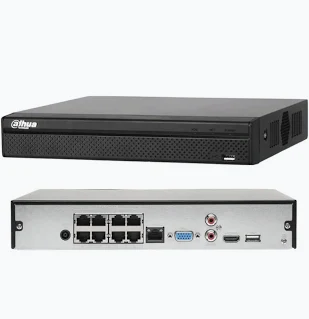
DAHUA DHI-NVR4108HS-8P-4KS2/L is offered through Reisen for Kenyan buyers planning a network recording deployment. The strongest purchase case for this listing is a system in which its actual interfaces, recording method and mounting conditions are understood before installation. Important documented model information includes channels: 8 IP camera channels; poe ports: 8 integrated ports; video codec: Smart H.265 / H.265 / Smart H.264 / H.264 / MJPEG. Select the complete installation around the final unit, not around a visually similar product family.
For homes, offices, stores, estates, warehouses, and institutions, a reliable networked IP surveillance equipment installation depends on correct cabling, equipment compatibility, placement, and long-term maintenance. A well-designed security system should be easy to test, troubleshoot, and expand. This guide explains how to plan the purchase of DAHUA DHI-NVR4108HS-8P-4KS2/L with those priorities in mind.
How to Buy DAHUA DHI-NVR4108HS-8P-4KS2/L

Confirm the exact SKU, installation context, and required accessories before ordering.
Key Specifications
The following specification fields help match DAHUA DHI-NVR4108HS-8P-4KS2/L to the correct camera, recorder and supporting installation equipment. Exact hardware editions can differ in features and included accessories; use the full model code when planning a purchase.
|
Item / Specification |
Details |
|
Product model |
DAHUA DHI-NVR4108HS-8P-4KS2/L |
|
Channels |
8 IP camera channels |
|
PoE ports |
8 integrated ports |
|
Video codec |
Smart H.265 / H.265 / Smart H.264 / H.264 / MJPEG |
|
Hard drive |
1 SATA interface |
|
Video outputs |
HDMI and VGA |
|
Power input |
48/53 V DC adapter |
|
Shared PoE budget |
72 W |
|
Network interface |
10/100 Mbps Ethernet uplink |
Installation Connection Flow

This connection flow shows the supporting equipment classes to review before installation; it does not imply that the accessories are supplied with the product.
Resolution and Technical Planning

The bar graphic compares resolution reference points where model resolution is documented; otherwise it counts editorial planning checks, not a performance claim.
Site Survey Checklist Mix

A chart of twelve practical pre-installation questions, grouped by signal, power, storage and commissioning. These are planning tasks rather than hardware specifications.
Deployment Decisions

The bubbles represent counts of decisions in a sample site-survey framework, not scores assigned to camera performance.
Compatibility Checklist

Use this compatibility matrix to verify the device, power path and selected recording or monitoring equipment before purchase.
Features and Practical Benefits
The most important benefit of correctly specifying DAHUA DHI-NVR4108HS-8P-4KS2/L is predictability. An installer who matches the power source, signal path, and recording or viewing equipment before deployment can avoid common commissioning delays.
Choose equipment based on the actual environment. Busy commercial sites require dependable access, documented configurations, and a clear maintenance plan. A single device is only one part of a complete security installation.
Suitable Applications
For a residential property, DAHUA DHI-NVR4108HS-8P-4KS2/L may be considered as part of an appropriately designed entry-point, perimeter, or common-area security system. Confirm whether the chosen technology and mounting position satisfy the required viewing and privacy needs.
For retail, warehouse, and institutional sites, plan the complete networked IP surveillance equipment arrangement around camera positioning or system endpoint locations, retention policy, safe cabling, and staff access controls. Do not assume that any one product independently provides recording or remote access.
Compatibility and System Planning
DAHUA DHI-NVR4108HS-8P-4KS2/L is the recording component of an IP surveillance system. Match camera channels, codecs, supported decoding, disks and network capacity to the intended camera schedule. Check whether camera-side PoE is built in or must come from a separate switch; model variants differ substantially.
Power requirements must be matched to the equipment label and official datasheet. A PoE switch is a sensible supporting product only for devices confirmed to accept compatible PoE. A separately powered analog device must never be connected to an assumed PoE supply.
Placement and Cable Routing
Position DAHUA DHI-NVR4108HS-8P-4KS2/L for the required coverage while avoiding glare, accessible cable joints, exposed connectors, and unnecessary cable stress. Survey the route before drilling or pulling cables. Confirm indoor and outdoor suitability of the exact model.
Provide DAHUA DHI-NVR4108HS-8P-4KS2/L with ventilated, secure placement, correct supply power, reliable network connections and suitable surveillance storage. Label network feeds and maintain service loops so drives and cables can be replaced without disturbing the installation.
How to Install DAHUA DHI-NVR4108HS-8P-4KS2/L
First verify the model number and inspect the supplied unit. Next, survey the installation site, identify suitable mounting points, and confirm the correct upstream equipment and power method.
Route and label the cables, fit the appropriate connectors, and secure the unit without damaging its housing. Connect the intended recorder or application, configure credentials securely, and test viewing, recording, time settings, and recovery after a power cycle.
A Step by Step Guide to Setting Up DAHUA DHI-NVR4108HS-8P-4KS2/L
Step 1: Write down the exact model and hardware revision. Step 2: Check the manufacturer instructions for supply voltage, operating limits, and interfaces. Step 3: Prepare secure mounting and cable routes. Step 4: Connect the correct signal and power pathways.
Step 5: Initialize the device or connected recording system using unique strong credentials. Step 6: Set the correct date and time. Step 7: Test video or data delivery from the actual monitoring position. Step 8: Document configuration and schedule periodic maintenance.
Planning the Supporting Equipment
A complete installation for DAHUA DHI-NVR4108HS-8P-4KS2/L often requires cabling, suitable switching or recording equipment, and protected power. For IP cameras and NVRs, compare the needs of your camera fleet against the available power, port count, and uplink capacity before ordering.
For analog cameras and connectors, concentrate on a suitable recorder, coaxial cable, secure BNC termination, and the correct power supply. The product category alone does not establish compatibility.
Troubleshooting
If DAHUA DHI-NVR4108HS-8P-4KS2/L fails to appear in the viewer, verify power at the device, physical connections, input selection, and the configured network or signal mode. Change one variable at a time and retest before replacing hardware.
If images appear unstable, examine connector quality, supply stability, lighting, cable condition, and recorder configuration. For remote-access problems, review network security and connectivity settings rather than immediately opening public ports.
Pros and Considerations
An advantage of selecting DAHUA DHI-NVR4108HS-8P-4KS2/L from a clearly identified catalog listing is the ability to plan the broader installation around a defined component. Its suitability still depends on the equipment already installed and the project specific needs.
Potential limitations include accessory costs, compatibility constraints, mounting conditions, and the need for professional configuration. Buyers should compare total installed cost rather than treating the device purchase price as the entire project budget.
Buying Advice in Kenya
Before buying DAHUA DHI-NVR4108HS-8P-4KS2/L, ask for confirmation of the exact unit, included accessories, any regional differences, and the seller warranty. Request a complete quote covering cabling, installation, storage, and optional backup power.
For multi-camera projects, test a representative device and document the design before bulk purchasing. This helps reduce mismatched parts, unnecessary returns, and later rework.
For general wired distribution equipment, review network switch options. Confirm the precise interface, power budget, and project role before buying.
If the selected camera model supports standard PoE, examine PoE network switch options. Confirm the precise interface, power budget, and project role before buying.
For larger managed Ethernet deployments, compare UniFi Standard 24 PoE switch. Confirm the precise interface, power budget, and project role before buying.
What the Exact Model Changes
The engineering and buying case for DAHUA DHI-NVR4108HS-8P-4KS2/L is not the same as for every product in its category. Its eight built-in PoE ports simplify a compatible IP-camera build. Camera resolution and bitrate affect storage and live-view decoding capacity. A sensible procurement decision starts from the printed part number and follows through to the actual installation purpose. When a listing omits a suffix or identifies an older edition, compare the physical ports and supported software functions with the equipment already on site. This is especially important in Kenyan projects involving phased upgrades, where the original recorder and cameras may be several years old. A test unit or complete confirmed equipment schedule is often worth more than a small nominal discount on an incompatible part.
Specifications in Everyday Use
The relevant fields for DAHUA DHI-NVR4108HS-8P-4KS2/L include channels (8 IP camera channels), poe ports (8 integrated ports), video codec (Smart H.265 / H.265 / Smart H.264 / H.264 / MJPEG), hard drive (1 SATA interface). These are not interchangeable marketing terms. A resolution figure affects the amount of image detail available to the recorder, while the power specification determines which injector, supply or switch can be used. Camera transport and codec support establish whether an existing platform can receive a stream at all. Mounting and enclosure details determine whether the design will survive a particular environment. Read the specifications as one connected set of system requirements, rather than selecting on a single headline number.
Planning the Total Cost of Ownership
The purchase price of DAHUA DHI-NVR4108HS-8P-4KS2/L is only one element of the project budget. Allow for correctly matched cabling, mounting parts, safe power, recording or monitoring equipment, commissioning and future maintenance. An inexpensive device can lead to a costly installation if it forces rewiring or a recorder replacement. In a larger premises, consider technician access, outage recovery and the availability of replacement parts. For a household, ease of use and reliable notifications can matter more than a long list of advanced settings. Ask for a bill of materials and a clearly defined scope so there is no confusion about what is supplied or installed.
Right-sizing channels and camera count
A recorder such as DAHUA DHI-NVR4108HS-8P-4KS2/L should be selected by the number of cameras actually needed, including planned expansion. Count the existing camera points, calculate spare channel capacity and check total access bandwidth separately. A model with many channel licenses may still have a lower live-view decoding capacity at high resolution. Confirm that the cameras use codecs the recorder supports, especially on mixed-brand sites. For a shop growing from four to eight cameras, adequate channel headroom can avoid premature replacement, but buying an oversized recorder without storage or switching plans is not a complete system design.
Retention and surveillance hard drive design
Storage is a project decision rather than a feature you can judge by channel count alone. For DAHUA DHI-NVR4108HS-8P-4KS2/L, record the expected number of streams, their resolution, frame rate, compression and daily hours. Then estimate the needed retention period from an actual sample bitrate. Continuous recording in a busy warehouse will normally consume more storage than a small office using carefully configured motion events. Choose a surveillance-appropriate HDD supported by the exact recorder revision and review the manufacturer’s disk compatibility recommendations. Set alerts for failed disks and test the process for exporting evidence to removable media.
PoE and LAN architecture
Determine whether DAHUA DHI-NVR4108HS-8P-4KS2/L has integrated PoE outputs or needs a separate PoE switch; similar Dahua recorder names are not interchangeable on this point. If integrated ports are present, document their shared power budget and which cameras can connect directly. Where PoE is external, select a standards-compliant switch and reserve power for future devices. Keep the recorder’s upstream network connection separate in your plan from camera power distribution. For multi-building systems, review distance limitations and whether fiber uplinks are needed instead of stretching copper beyond supported cabling lengths.
Local display and remote operations
A recorder can be configured well while still being difficult for security staff to use. Connect a supported monitor and test the actual multi-view layout, event search and playback controls. On DAHUA DHI-NVR4108HS-8P-4KS2/L, display resolution and simultaneous decoding are different technical limits, so a 4K monitor does not mean every high-resolution stream can be decoded at full quality at once. Establish separate accounts for administrators, operators and auditors. Enable authorized remote access through a supported, securely configured route rather than exposing recorder management directly. Make sure event timestamps, camera labels and time zones are consistent across all devices.
Continuity during power or Internet interruptions
Decide how the CCTV system should behave if the Internet goes down, because local recording and remote viewing are separate requirements. A properly designed DAHUA DHI-NVR4108HS-8P-4KS2/L installation may continue locally even when offsite access is temporarily unavailable, provided camera connectivity and electrical power remain stable. Size any UPS for the recorder, hard drive, switch and monitor requirements instead of the recorder alone. Test restart after an outage and verify that scheduled recording resumes. Keep a simple fault checklist for disk alarms, camera disconnects, blocked network ports and full-storage warnings.
Commissioning and evidence handling
Before project handover, prove that DAHUA DHI-NVR4108HS-8P-4KS2/L can receive the intended number of feeds, record under the expected conditions, play back an event and export footage. Record camera names, IP addresses, retention settings, disk health and administrator ownership. Test a camera disconnect and restoration so staff know how an alarm appears. When CCTV footage may be used for internal investigations or compliance, control who can copy it and document how evidence is handled. A signed acceptance checklist gives the installer and customer a shared reference for future support.
Multi-camera business deployment example
Suppose a growing office needs cameras at two entrances, reception, a storage area and a parking point. Allocate one channel per intended IP feed on DAHUA DHI-NVR4108HS-8P-4KS2/L, then reserve room for any planned expansion without assuming that every channel can decode the maximum resolution at the same time. Estimate how many days of video the client actually needs and size the drive against measured camera bitrates. Label the feeds with clear locations so staff can search events quickly. Test both local viewing and a restricted remote connection, then demonstrate how to export footage without exposing administrator credentials.
Model-Specific Acceptance Test
Before accepting DAHUA DHI-NVR4108HS-8P-4KS2/L, run a practical test against the actual installation goal. Confirm channels against the supplied unit: 8 IP camera channels. Confirm poe ports against the supplied unit: 8 integrated ports. Confirm video codec against the supplied unit: Smart H.265 / H.265 / Smart H.264 / H.264 / MJPEG. Confirm hard drive against the supplied unit: 1 SATA interface. Confirm video outputs against the supplied unit: HDMI and VGA. Confirm power input against the supplied unit: 48/53 V DC adapter. Confirm shared poe budget against the supplied unit: 72 W. After the equipment is installed, repeat the scene or signal test under normal operating conditions, check the recording or application path, and confirm that the owner can recover an example event. Note any differences between the installed hardware label and the procurement description before the final handover. These checks provide useful evidence of system readiness without treating unverified product-family features as guarantees.
Recommended Accessories and Related Products
A recorder purchase works best when matched with cameras, storage, switching and organized cable infrastructure. For an overview of related equipment, review 305 m Cat6 Ethernet cable. Select the final combination only after checking power, video interfaces, scene requirements and what the seller supplies.
For a small IP-camera network, compare the Dahua eight-channel PoE recorder if its channel capacity and PoE budget suit the complete installation.
Larger sites can compare a Dahua 32-channel NVR option while checking drive capacity, available channels and network bandwidth rather than assuming every recorder is interchangeable.
To compare camera housing styles and image requirements, look at the Dahua 2MP IP dome camera, which represents a different IP dome design rather than an automatically compatible replacement.
A separate managed PoE switch options may be appropriate when the recorder has no powered ports or the camera count exceeds them.
For higher-port-count installations, a D-Link 28-port Gigabit PoE switch offers one switch alternative to assess against the total PoE budget.
For a small standards-based PoE segment, consider the UniFi Lite 8 PoE switch after checking per-port requirements and shared output capacity.
A multi-camera site may require a UniFi Standard 24 PoE switch if its available powered ports and 95 W total budget suit the connected equipment.
A shared security cabinet can improve organization; review network cabinets sized to fit the recorder, switches, air clearance and service loops.
Good workmanship begins with structured Ethernet cabling; choose the right grade, jacket and termination for indoor or outdoor routes.
When selecting alternatives to this model, browse CCTV cameras and surveillance equipment and compare the exact camera type rather than simply the price.
For different recorder and camera options in the same ecosystem, review Dahua camera and recorder options while matching model revisions and the planned recording platform.
Final Purchase and Handover Checklist
Before checkout, confirm the exact DAHUA DHI-NVR4108HS-8P-4KS2/L model code, its intended scene, available power, signal or network route, and recording or user interface. Confirm which accessories are included and which must be purchased separately. After installation, ask for a short demonstration of the live feed or operating functions, a sample playback where supported, and the correct method for reporting a fault. Keep the original purchase documentation and a safe record of the system configuration. This approach gives customers a usable installation rather than merely a box of equipment. Reisen can help buyers plan suitable networking and security accessories around a complete equipment schedule.
To review the catalog listing for the exact model, see DAHUA DHI-NVR4108HS-8P-4KS2/L on Reisen. Verify the selected variant, final quotation and availability before ordering.
What's in the Box
|
Included Item |
Quantity / Description |
|
Listed product |
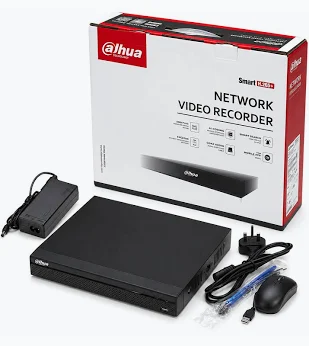
1 — DAHUA DHI-NVR4108HS-8P-4KS2/L |
Frequently Asked Questions
What should I check before purchase?
Confirm that DAHUA DHI-NVR4108HS-8P-4KS2/L is the exact requested SKU, that its connections match your system, and that power and accessories are accounted for.
Can I connect this to any DVR or NVR?
No. The recorder must support the appropriate analog or IP connection, encoding format, and applicable channel and firmware requirements.
Does this product include cables and storage?
Do not assume so. Confirm the sales package and any separate equipment needed before payment.
Is this suitable for an outdoor installation?
Only if the exact model and mounting arrangement have a suitable environmental rating. Verify the official datasheet.
Can I manage it remotely?
This depends on the specific device, recorder, app and secure network configuration; not every camera or accessory offers standalone remote access.
How should I choose between alternatives?
Compare system type, resolution where relevant, power, installation location, recording workflow, and total installed cost.
Additional information
| Product | DAHUA DHI-NVR4108HS-8P-4KS2/L Price in Kenya |
|---|---|
| Category | CCTV Security Cameras |
| Price | KES 14,000.00 |
| Availability | In stock |
Keep exploringMore in CCTV Security Cameras
Related products