Save 15%
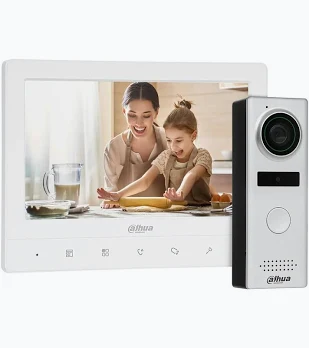
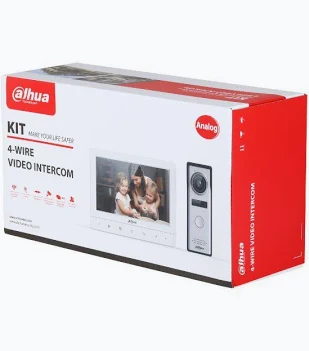
Select an image to view it. Click the main image to enlarge.
DHI-KTA02 Price in Kenya
In stock
KES 11,000.00
KES 13,000.00
You save KES 2,000.00
Buy DHI-KTA02 in Kenya at Reisen. Choose a Dahua video intercom kit with a 7-inch monitor for practical visitor entry systems.
View product detailsNeed help choosing?
Talk to our team at +254 714 804 532
Product details
DHI-KTA02 Price in Kenya
Overview
DHI-KTA02 is offered through Reisen for Kenyan buyers planning a video intercom deployment. The strongest purchase case for this listing is a system in which its actual interfaces, recording method and mounting conditions are understood before installation. Important documented model information includes product: DHI-KTA02 video intercom kit; indoor display: 7-inch TFT, 1024 × 600 pixels; communication: Analog indoor/door-station intercom. Select the complete installation around the final unit, not around a visually similar product family.
For homes, offices, stores, estates, warehouses, and institutions, a reliable matched intercom system components installation depends on correct cabling, equipment compatibility, placement, and long-term maintenance. A well-designed security system should be easy to test, troubleshoot, and expand. This guide explains how to plan the purchase of DHI-KTA02 with those priorities in mind.
How to Buy DHI-KTA02

Confirm the exact SKU, installation context, and required accessories before ordering.
Key Specifications
The following specification fields help match DHI-KTA02 to the correct camera, recorder and supporting installation equipment. Exact hardware editions can differ in features and included accessories; use the full model code when planning a purchase.
|
Item / Specification |
Details |
|
Product model |
DHI-KTA02 |
|
Product |
DHI-KTA02 video intercom kit |
|
Indoor display |
7-inch TFT, 1024 × 600 pixels |
|
Communication |
Analog indoor/door-station intercom |
|
Indoor unit |
VTH1020J |
|
Outdoor station |
VTO1000J |
|
Power for indoor station |
12 V DC, 1 A |
|
Expansion capacity |
Up to 2 door stations + 3 indoor monitors |
Installation Connection Flow

This connection flow shows the supporting equipment classes to review before installation; it does not imply that the accessories are supplied with the product.
Resolution and Technical Planning

The bar graphic compares resolution reference points where model resolution is documented; otherwise it counts editorial planning checks, not a performance claim.
Site Survey Checklist Mix

A chart of twelve practical pre-installation questions, grouped by signal, power, storage and commissioning. These are planning tasks rather than hardware specifications.
Deployment Decisions

The bubbles represent counts of decisions in a sample site-survey framework, not scores assigned to camera performance.
Compatibility Checklist

Use this compatibility matrix to verify the device, power path and selected recording or monitoring equipment before purchase.
Features and Practical Benefits
The most important benefit of correctly specifying DHI-KTA02 is predictability. An installer who matches the power source, signal path, and recording or viewing equipment before deployment can avoid common commissioning delays.
Choose equipment based on the actual environment. Busy commercial sites require dependable access, documented configurations, and a clear maintenance plan. A single device is only one part of a complete security installation.
Suitable Applications
For a residential property, DHI-KTA02 may be considered as part of an appropriately designed entry-point, perimeter, or common-area security system. Confirm whether the chosen technology and mounting position satisfy the required viewing and privacy needs.
For retail, warehouse, and institutional sites, plan the complete matched intercom system components arrangement around camera positioning or system endpoint locations, retention policy, safe cabling, and staff access controls. Do not assume that any one product independently provides recording or remote access.
Compatibility and System Planning
DHI-KTA02 is a door-entry video intercom system rather than a general-purpose IP video recorder. Plan the approved monitor-to-door-station cabling, matching supply and any intended lock interface. Check door hardware and safe exit requirements before installation.
Power requirements must be matched to the equipment label and official datasheet. A PoE switch is a sensible supporting product only for devices confirmed to accept compatible PoE. A separately powered analog device must never be connected to an assumed PoE supply.
Placement and Cable Routing
Position DHI-KTA02 for the required coverage while avoiding glare, accessible cable joints, exposed connectors, and unnecessary cable stress. Survey the route before drilling or pulling cables. Confirm indoor and outdoor suitability of the exact model.
Route the approved intercom wiring between the door station and display for DHI-KTA02, protecting external joints from water and mechanical damage. Keep lock circuits and safe-exit devices within the access-control design and verify release behavior before handover.
How to Install DHI-KTA02
First verify the model number and inspect the supplied unit. Next, survey the installation site, identify suitable mounting points, and confirm the correct upstream equipment and power method.
Route and label the cables, fit the appropriate connectors, and secure the unit without damaging its housing. Connect the intended recorder or application, configure credentials securely, and test viewing, recording, time settings, and recovery after a power cycle.
A Step by Step Guide to Setting Up DHI-KTA02
Step 1: Write down the exact model and hardware revision. Step 2: Check the manufacturer instructions for supply voltage, operating limits, and interfaces. Step 3: Prepare secure mounting and cable routes. Step 4: Connect the correct signal and power pathways.
Step 5: Initialize the device or connected recording system using unique strong credentials. Step 6: Set the correct date and time. Step 7: Test video or data delivery from the actual monitoring position. Step 8: Document configuration and schedule periodic maintenance.
Planning the Supporting Equipment
A complete installation for DHI-KTA02 often requires cabling, suitable switching or recording equipment, and protected power. For IP cameras and NVRs, compare the needs of your camera fleet against the available power, port count, and uplink capacity before ordering.
For analog cameras and connectors, concentrate on a suitable recorder, coaxial cable, secure BNC termination, and the correct power supply. The product category alone does not establish compatibility.
Troubleshooting
If DHI-KTA02 fails to appear in the viewer, verify power at the device, physical connections, input selection, and the configured network or signal mode. Change one variable at a time and retest before replacing hardware.
If images appear unstable, examine connector quality, supply stability, lighting, cable condition, and recorder configuration. For remote-access problems, review network security and connectivity settings rather than immediately opening public ports.
Pros and Considerations
An advantage of selecting DHI-KTA02 from a clearly identified catalog listing is the ability to plan the broader installation around a defined component. Its suitability still depends on the equipment already installed and the project specific needs.
Potential limitations include accessory costs, compatibility constraints, mounting conditions, and the need for professional configuration. Buyers should compare total installed cost rather than treating the device purchase price as the entire project budget.
Buying Advice in Kenya
Before buying DHI-KTA02, ask for confirmation of the exact unit, included accessories, any regional differences, and the seller warranty. Request a complete quote covering cabling, installation, storage, and optional backup power.
For multi-camera projects, test a representative device and document the design before bulk purchasing. This helps reduce mismatched parts, unnecessary returns, and later rework.
What the Exact Model Changes
The engineering and buying case for DHI-KTA02 is not the same as for every product in its category. The kit is for entry communication rather than general CCTV recording. Power, door-release hardware and cable route should be planned as a complete entry system. A sensible procurement decision starts from the printed part number and follows through to the actual installation purpose. When a listing omits a suffix or identifies an older edition, compare the physical ports and supported software functions with the equipment already on site. This is especially important in Kenyan projects involving phased upgrades, where the original recorder and cameras may be several years old. A test unit or complete confirmed equipment schedule is often worth more than a small nominal discount on an incompatible part.
Specifications in Everyday Use
The relevant fields for DHI-KTA02 include product (DHI-KTA02 video intercom kit), indoor display (7-inch TFT, 1024 × 600 pixels), communication (Analog indoor/door-station intercom), indoor unit (VTH1020J). These are not interchangeable marketing terms. A resolution figure affects the amount of image detail available to the recorder, while the power specification determines which injector, supply or switch can be used. Camera transport and codec support establish whether an existing platform can receive a stream at all. Mounting and enclosure details determine whether the design will survive a particular environment. Read the specifications as one connected set of system requirements, rather than selecting on a single headline number.
Planning the Total Cost of Ownership
The purchase price of DHI-KTA02 is only one element of the project budget. Allow for correctly matched cabling, mounting parts, safe power, recording or monitoring equipment, commissioning and future maintenance. An inexpensive device can lead to a costly installation if it forces rewiring or a recorder replacement. In a larger premises, consider technician access, outage recovery and the availability of replacement parts. For a household, ease of use and reliable notifications can matter more than a long list of advanced settings. Ask for a bill of materials and a clearly defined scope so there is no confusion about what is supplied or installed.
Planning the visitor experience
A video intercom installation should be designed around the visitor’s route. Place the door station for a clear view of a person standing at a normal speaking distance, and make sure the indoor display can be reached easily by the intended occupants. With DHI-KTA02, check the entrance lighting, visitor shelter and audible call volume under ordinary site conditions. A system may work perfectly on a bench but feel inconvenient if users must walk across a large office to answer a call. Discuss privacy and retention expectations: an analog entry kit is not automatically a full CCTV recording system.
The right door-release arrangement
An intercom calling feature and an electrically operated door lock are different parts of an entry system. Before installing DHI-KTA02, establish whether the door uses a magnetic lock, electric strike or another approved release mechanism, and check what relay or power interface is available. A locksmith or qualified installer should confirm that fire and emergency egress remain safe. Never assume a display’s small power adapter can supply a separate lock. Choose suitable cable routes, protection and a readily serviceable junction point.
Wiring and expansion
Document the distance from the gate or door station to the indoor monitor before choosing a cable. The correct cores, signal wiring and power arrangement are determined by the actual Dahua diagram, not just the color of the wires. If the premises may need a second entrance or more monitors, review supported expansion early. Route the cable away from sharp metalwork, places where gates pinch wires, and surfaces that stay wet. Label both ends and test the call, video and unlock circuits independently before final wall finishing.
Making the monitor useful indoors
The display should be mounted at a comfortable height, away from harsh glare and close enough to a safe power source. In a small reception, place it where a staff member can answer without exposing the door-release control to visitors. Test the speaker and microphone in both directions while the entrance is noisy, such as during traffic or deliveries. Adjust call volume and screen brightness in the settings supported by DHI-KTA02. An operator guide beside the monitor can reduce mistakes and shorten training for new staff.
Handover and routine care
Test the system under normal operating conditions, not only immediately after wiring. Ask someone to call from outside while an occupant answers, checks the image and triggers the intended opening mechanism. Record which parts are powered by each supply and where the installer placed the isolation point. Clean the door-station window gently and keep water out of external cable joints. If an electric lock is installed, include door mechanics in periodic maintenance; an intercom cannot compensate for a jammed latch or misaligned strike.
Buying the complete entry solution
When comparing DHI-KTA02 with an IP-based door station, consider whether the building needs only visitor calling or also networked management, remote mobile access, access cards and integration with other systems. An analog kit can be appropriate where simple local operation is the priority. More advanced systems may be justified when several entrances, tenants or security desks must coordinate. Compare the total installed cost, including cable, conduit, mounting, lock interface and commissioning, rather than the kit box price alone.
Office reception deployment example
At a small professional office, install DHI-KTA02 so a receptionist can speak to visitors before the entrance is opened. The door station should provide a useful view of a normal-height visitor and be sheltered from direct rain where possible. Before wiring a lock, establish whether the site uses a mechanical latch, electric strike or magnetic lock and preserve safe exit in emergencies. Test visitor calling while traffic or delivery noise is present. A smooth visitor experience depends on monitor position, reliable cabling and proper lock mechanics rather than the size of the display alone.
Model-Specific Acceptance Test
Before accepting DHI-KTA02, run a practical test against the actual installation goal. Confirm product against the supplied unit: DHI-KTA02 video intercom kit. Confirm indoor display against the supplied unit: 7-inch TFT, 1024 × 600 pixels. Confirm communication against the supplied unit: Analog indoor/door-station intercom. Confirm indoor unit against the supplied unit: VTH1020J. Confirm outdoor station against the supplied unit: VTO1000J. Confirm power for indoor station against the supplied unit: 12 V DC, 1 A. Confirm expansion capacity against the supplied unit: Up to 2 door stations + 3 indoor monitors. After the equipment is installed, repeat the scene or signal test under normal operating conditions, check the recording or application path, and confirm that the owner can recover an example event. Note any differences between the installed hardware label and the procurement description before the final handover. These checks provide useful evidence of system readiness without treating unverified product-family features as guarantees.
Recommended Accessories and Related Products
An intercom is one part of a door-entry design; separate access-control and site security products may also be relevant. For an overview of related equipment, review Dahua installation products. Select the final combination only after checking power, video interfaces, scene requirements and what the seller supplies.
For different recorder and camera options in the same ecosystem, review Dahua camera and recorder options while matching model revisions and the planned recording platform.
When selecting alternatives to this model, browse CCTV cameras and surveillance equipment and compare the exact camera type rather than simply the price.
Final Purchase and Handover Checklist
Before checkout, confirm the exact DHI-KTA02 model code, its intended scene, available power, signal or network route, and recording or user interface. Confirm which accessories are included and which must be purchased separately. After installation, ask for a short demonstration of the live feed or operating functions, a sample playback where supported, and the correct method for reporting a fault. Keep the original purchase documentation and a safe record of the system configuration. This approach gives customers a usable installation rather than merely a box of equipment. Reisen can help buyers plan suitable networking and security accessories around a complete equipment schedule.
To review the catalog listing for the exact model, see DHI-KTA02 on Reisen. Verify the selected variant, final quotation and availability before ordering.
What's in the Box
|
Included Item |
Quantity / Description |
|
Indoor video monitor |
1 — VTH1020J as shown in official kit specification |
|
Door station |
1 — VTO1000J as shown in official kit specification |
|
Power adapter |
1 — Documented for indoor monitor |
|
Mounting bracket |
1 — Documented with monitor |
Frequently Asked Questions
What should I check before purchase?
Confirm that DHI-KTA02 is the exact requested SKU, that its connections match your system, and that power and accessories are accounted for.
Can I connect this to any DVR or NVR?
No. The recorder must support the appropriate analog or IP connection, encoding format, and applicable channel and firmware requirements.
Does this product include cables and storage?
Do not assume so. Confirm the sales package and any separate equipment needed before payment.
Is this suitable for an outdoor installation?
Only if the exact model and mounting arrangement have a suitable environmental rating. Verify the official datasheet.
Can I manage it remotely?
This depends on the specific device, recorder, app and secure network configuration; not every camera or accessory offers standalone remote access.
How should I choose between alternatives?
Compare system type, resolution where relevant, power, installation location, recording workflow, and total installed cost.
Additional information
| Product | DHI-KTA02 Price in Kenya |
|---|---|
| Category | CCTV Security Cameras |
| Price | KES 11,000.00 |
| Availability | In stock |
Keep exploringMore in CCTV Security Cameras
Related products