Save 10%
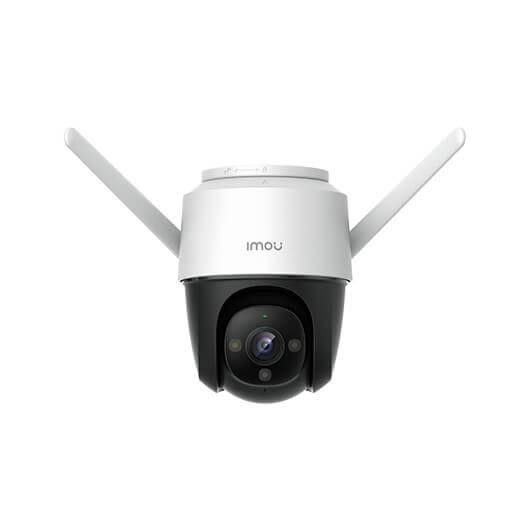
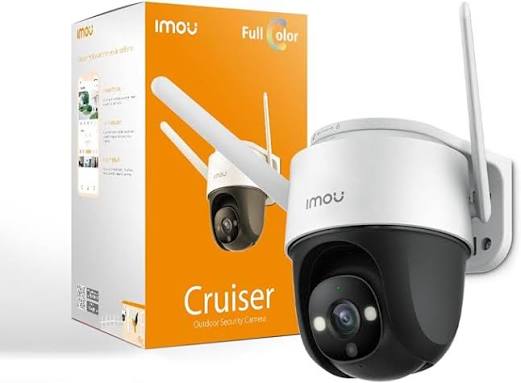
Select an image to view it. Click the main image to enlarge.
IMOU Cruiser IPC-S22FP 1080P H.265 Wi-Fi Pan & Tilt Camera Price in Kenya
In stock
KES 7,000.00
KES 7,800.00
You save KES 800.00
Buy IMOU Cruiser IPC-S22FP in Kenya with 1080p video, pan and tilt, 2-way audio, night vision, and IP66 outdoor protection.
View product detailsNeed help choosing?
Talk to our team at +254 714 804 532
Product details
IMOU Cruiser IPC-S22FP 1080P H.265 Wi-Fi Pan & Tilt Camera Price in Kenya
IPC-S22FP is a cctv security cameras product listed in the Reisen Kenya catalogue. It is designed for a pan-and-tilt monitoring point requiring reliable Wi-Fi. Buyers comparing IPC-S22FP options in Kenya should examine the exact model label, physical and network compatibility, accessories and installation requirements rather than relying solely on the headline price.
Reisen presents IMOU Cruiser IPC-S22FP 1080P H.265 Wi-Fi Pan & Tilt Camera Price in Kenya as a product for customers planning their next equipment purchase. A good buying decision begins with the job itself: the devices already installed, the expected operating environment, how the equipment will connect or function, and who will maintain it. The most valuable specification is the one that prevents an unsuitable purchase.
This guide explains IPC-S22FP in practical language for installers, homeowners, technicians and procurement teams in Kenya. It separates confirmed catalogue information from specifications that still require the manufacturer datasheet or supplied SKU to be checked. When a value is unknown, the description identifies the verification step instead of supplying an unsupported number.
Main Benefits for Kenyan Buyers
· Pan-and-tilt viewing: this is a key decision area when selecting IPC-S22FP for a pan-and-tilt monitoring point requiring reliable Wi-Fi. Confirm how the actual revision handles it, record what has been tested, and select complementary accessories before installation.
· H.265 storage planning: this is a key decision area when selecting IPC-S22FP for a pan-and-tilt monitoring point requiring reliable Wi-Fi. Confirm how the actual revision handles it, record what has been tested, and select complementary accessories before installation.
· Outdoor network design: this is a key decision area when selecting IPC-S22FP for a pan-and-tilt monitoring point requiring reliable Wi-Fi. Confirm how the actual revision handles it, record what has been tested, and select complementary accessories before installation.
· Privacy zones: this is a key decision area when selecting IPC-S22FP for a pan-and-tilt monitoring point requiring reliable Wi-Fi. Confirm how the actual revision handles it, record what has been tested, and select complementary accessories before installation.
Before selecting a location, map which area needs to be visible, where the light will come from, and whether the camera will face glare from windows or headlights. The highest resolution on a catalogue line does not fix a poor angle. Confirm the actual lens and sensor variant, then test a view before drilling. A proper installation protects both image quality and privacy.
Compare ownership and deployment costs alongside the listing. A purchase can involve accessories, cabling, software, configuration, power protection, labour and ongoing maintenance. Price comparisons are most useful when they cover a genuinely equivalent item and do not assume that every installation needs the same supporting parts.
How to Buy IPC-S22FP

A five-stage buying checklist for verifying the exact IPC-S22FP, matching accessories and obtaining a Reisen quotation.
Key Specifications
|
Specification |
Details / Verification Note |
|
Catalogue product |
IMOU Cruiser IPC-S22FP 1080P H.265 Wi-Fi Pan & Tilt Camera Price in Kenya |
|
Product category |
CCTV Security Cameras |
|
Exact model / variant |
IPC-S22FP |
|
Device family |
IMOU Cruiser |
|
Model identifier |
IPC-S22FP |
|
Video designation |
1080p (catalogue) |
|
Compression |
H.265 (catalogue) |
|
Motion |
Pan and tilt (catalogue) |
|
Connectivity |
Wi-Fi (catalogue) |
|
Weather protection |
Verify exact IP rating on model datasheet |
|
Power |
Check actual adapter rating |
|
Regional / hardware revision |
Match the nameplate, package and manufacturer documents |
|
Warranty / returns |
Confirm the seller’s current written terms before purchase |
Only the values identified as confirmed should be used as fixed sales claims. Any entry marked “verify” or “confirm” must be checked against the correct model revision before publication or ordering.
IPC-S22FP Specification Coverage Bar Chart

Counts of specification fields recorded in the Reisen buying table, grouped by connectivity, performance, installation and other topics. This is a document coverage chart, not a device benchmark.
Detailed Features and Their Practical Value
Device family
Device family: IMOU Cruiser. For IPC-S22FP, this field helps the buyer judge whether the product matches the intended task. In a real deployment, check the connected equipment and operating conditions rather than treating a single catalogue number as a complete design.
For procurement, record the value alongside the device revision and the project requirement. Where the specification refers to a power method, optical standard, networking interface or mechanical part, a small mismatch may prevent the entire installation from operating. A technician should check this point during acceptance rather than after equipment has already been mounted.
Model identifier
Model identifier: IPC-S22FP. For IPC-S22FP, this field helps the buyer judge whether the product matches the intended task. In a real deployment, check the connected equipment and operating conditions rather than treating a single catalogue number as a complete design.
For procurement, record the value alongside the device revision and the project requirement. Where the specification refers to a power method, optical standard, networking interface or mechanical part, a small mismatch may prevent the entire installation from operating. A technician should check this point during acceptance rather than after equipment has already been mounted.
Video designation
Video designation: 1080p (catalogue). For IPC-S22FP, this field helps the buyer judge whether the product matches the intended task. In a real deployment, check the connected equipment and operating conditions rather than treating a single catalogue number as a complete design.
For procurement, record the value alongside the device revision and the project requirement. Where the specification refers to a power method, optical standard, networking interface or mechanical part, a small mismatch may prevent the entire installation from operating. A technician should check this point during acceptance rather than after equipment has already been mounted.
Compression
Compression: H.265 (catalogue). For IPC-S22FP, this field helps the buyer judge whether the product matches the intended task. In a real deployment, check the connected equipment and operating conditions rather than treating a single catalogue number as a complete design.
For procurement, record the value alongside the device revision and the project requirement. Where the specification refers to a power method, optical standard, networking interface or mechanical part, a small mismatch may prevent the entire installation from operating. A technician should check this point during acceptance rather than after equipment has already been mounted.
Motion
Motion: Pan and tilt (catalogue). For IPC-S22FP, this field helps the buyer judge whether the product matches the intended task. In a real deployment, check the connected equipment and operating conditions rather than treating a single catalogue number as a complete design.
For procurement, record the value alongside the device revision and the project requirement. Where the specification refers to a power method, optical standard, networking interface or mechanical part, a small mismatch may prevent the entire installation from operating. A technician should check this point during acceptance rather than after equipment has already been mounted.
Connectivity
Connectivity: Wi-Fi (catalogue). For IPC-S22FP, this field helps the buyer judge whether the product matches the intended task. In a real deployment, check the connected equipment and operating conditions rather than treating a single catalogue number as a complete design.
For procurement, record the value alongside the device revision and the project requirement. Where the specification refers to a power method, optical standard, networking interface or mechanical part, a small mismatch may prevent the entire installation from operating. A technician should check this point during acceptance rather than after equipment has already been mounted.
Weather protection
Weather protection: Verify exact IP rating on model datasheet. For IPC-S22FP, this field helps the buyer judge whether the product matches the intended task. In a real deployment, check the connected equipment and operating conditions rather than treating a single catalogue number as a complete design.
For procurement, record the value alongside the device revision and the project requirement. Where the specification refers to a power method, optical standard, networking interface or mechanical part, a small mismatch may prevent the entire installation from operating. A technician should check this point during acceptance rather than after equipment has already been mounted.
Power
Power: Check actual adapter rating. For IPC-S22FP, this field helps the buyer judge whether the product matches the intended task. In a real deployment, check the connected equipment and operating conditions rather than treating a single catalogue number as a complete design.
For procurement, record the value alongside the device revision and the project requirement. Where the specification refers to a power method, optical standard, networking interface or mechanical part, a small mismatch may prevent the entire installation from operating. A technician should check this point during acceptance rather than after equipment has already been mounted.
IPC-S22FP Installation Checklist Pie Chart

Five equally weighted planning areas in a suggested installation checklist: identity, compatibility, site, configuration and testing. Equal sections are editorial checklist steps, not measured engineering proportions.
IPC-S22FP Specification Bubble Chart

Bubble sizes reflect the count of available specification fields for each category. These are document counts, not market share or product performance estimates.
Practical Applications and Deployment Scenarios
Home security and controlled indoor monitoring
IPC-S22FP may be used in home security and controlled indoor monitoring when the installation meets its actual electrical, physical and networking requirements. The project team should first list essential functions and then assess cable reach, mounting, accessories, management and expected servicing. The same model may be suitable in one building but inconvenient in another because local conditions differ.
For Kenyan projects, plan realistic sourcing and support. Document which components are supplied, who will perform commissioning, and how the system will be tested after installation. These details often matter more than a broad “best product” claim because they determine how reliably the equipment can be deployed and maintained.
Retail premises, reception and small offices
IPC-S22FP may be used in retail premises, reception and small offices when the installation meets its actual electrical, physical and networking requirements. The project team should first list essential functions and then assess cable reach, mounting, accessories, management and expected servicing. The same model may be suitable in one building but inconvenient in another because local conditions differ.
For Kenyan projects, plan realistic sourcing and support. Document which components are supplied, who will perform commissioning, and how the system will be tested after installation. These details often matter more than a broad “best product” claim because they determine how reliably the equipment can be deployed and maintained.
Remote monitoring and recorded incident review
IPC-S22FP may be used in remote monitoring and recorded incident review when the installation meets its actual electrical, physical and networking requirements. The project team should first list essential functions and then assess cable reach, mounting, accessories, management and expected servicing. The same model may be suitable in one building but inconvenient in another because local conditions differ.
For Kenyan projects, plan realistic sourcing and support. Document which components are supplied, who will perform commissioning, and how the system will be tested after installation. These details often matter more than a broad “best product” claim because they determine how reliably the equipment can be deployed and maintained.
Camera placement and field of view
Before selecting a location, map which area needs to be visible, where the light will come from, and whether the camera will face glare from windows or headlights. The highest resolution on a catalogue line does not fix a poor angle. Confirm the actual lens and sensor variant, then test a view before drilling. A proper installation protects both image quality and privacy.
Networking and recording
A Wi-Fi camera needs a stable network at its mounting position, not just a strong signal beside the router. Test the signal when doors and walls are in normal use. Plan how recordings will be stored, who may view footage, and what happens when the internet fails. Local storage, cloud storage and event alerts differ by camera and region.
IPC-S22FP Specification Summary Table

Visual table presenting six model-specific fields from the documented specifications, including clearly marked items that require verification.
Compatibility, Accessories and Purchase Checklist
· Confirm the delivered model is exactly IPC-S22FP, including any suffix that changes interfaces, wireless technology, lens, output or power requirements.
· Check upstream and downstream devices for compatible connectors, protocol, power method, physical fitting and management support.
· Confirm every separately purchased accessory: mounting hardware, cable, adapter, module, splitter, controller licence or protection device as relevant.
· Ask for documentation for the exact supplied revision. Do not assume a visually similar device has the same specification.
· Confirm the applicable Reisen warranty, support arrangement, return conditions, price and current stock before payment.
The chosen accessories can be just as important as IPC-S22FP. For instance, a correct connector with the wrong optical polish or PoE voltage can leave an installation unusable. A buyer should identify the existing system first and only then choose the additional components. For cost-sensitive work, compare the price of the complete installed solution rather than the initial hardware listing alone.
How to Choose This Product Instead of Alternatives
Select IPC-S22FP when its confirmed capabilities address the primary technical requirement and there is a documented installation route. An alternative may be preferable if the project requires a different number of ports, a higher verified data rate, stronger environmental protection, a different connector, easier management or compatibility with hardware already owned.
A useful comparison records four things for each option: confirmed specification, fit with current equipment, complete acquisition cost and consequences for future growth. Treat theoretical rates, maximum splitter counts and advertising terminology cautiously. Real installations must be validated under site conditions.
Advantages and Limitations
Advantages
· Pan-and-tilt viewing can make the product suitable for a properly designed application when the relevant capability has been verified on the supplied unit.
· H.265 storage planning can make the product suitable for a properly designed application when the relevant capability has been verified on the supplied unit.
· Outdoor network design can make the product suitable for a properly designed application when the relevant capability has been verified on the supplied unit.
Limitations and Points to Verify
· H.265 storage planning deserves a practical test or datasheet check before the purchase is treated as final.
· Outdoor network design deserves a practical test or datasheet check before the purchase is treated as final.
· Privacy zones deserves a practical test or datasheet check before the purchase is treated as final.
No single product suits every installation. Cable type, topology, environmental limitations and support arrangements need to be considered in the same decision. Do not interpret an unverified specification as a confirmed capability, and do not assume the package includes related accessories unless the supplier confirms them.
How to Install and Set Up IPC-S22FP
A Step by Step Guide to Install and Set Up IPC-S22FP
Check the exact item
Inspect the delivered device and confirm the actual model is IPC-S22FP. Review the product label, hardware revision and any supplier documentation. Set aside accessories that do not match the intended connections.
Plan the installation
Define the intended use: a pan-and-tilt monitoring point requiring reliable Wi-Fi. Map cable routes, mounting or working space, environmental factors and the required performance or workflow. Identify safety requirements before installation.
Check the interfaces and power
Match the actual connectors, supply voltage, optical or networking standards and compatible accessories. Verify that the correct adapter or transceiver is available instead of inferring compatibility from the appearance of the connector.
Prepare and install
Install or position IPC-S22FP according to the appropriate manufacturer instructions. Protect the equipment and cable routes from mechanical damage, excessive heat, moisture and poor cable handling as applicable.
Connect and configure
Make the approved connections. For managed or app-based devices, apply documented authentication and configuration settings; for passive equipment, perform the corresponding physical installation and continuity checks. Do not invent a software menu for hardware that has none.
Test and troubleshoot
Verify the actual operating outcome, not just the presence of power. Check connectivity, optical signal, image, call, or continuity as appropriate. Compare measurements to the project acceptance standard rather than an arbitrary internet example.
Label and hand over
Record the model, configuration, serial/revision details, installed accessories, cable labels, test results and maintenance instructions. Explain who will provide help if there is a fault.
IPC-S22FP Installation Workflow

Illustrative five-step process tailored to the device family; consult the exact manufacturer installation manual and product revision.
Troubleshooting and Maintenance
No power or no operation
Check the correct power method and manufacturer instructions. Do not substitute an adapter with a similar connector but different voltage.
Poor or interrupted service
Inspect the network path, cable integrity, signal or link status and operating environment. Test in smaller sections to find the failing component.
Unexpected compatibility errors
Recheck the exact model, hardware revision, endpoint standards, authentication requirements and supported accessory list.
After installation
Keep connections clean and strain-free, back up managed configurations, and record maintenance actions for the next technician.
Warranty and Return Policy
Confirm the current warranty period, claim procedure, eligibility, return condition and any special exclusions directly with Reisen before purchase. These conditions can depend on the supplied item, distributor and usage. No fixed warranty period or unconditional return promise is stated here without verified seller policy.
Product Guides, Documents and Installation Manuals
Request the official model-specific product datasheet and installation or user guide for IPC-S22FP. The catalogue listing alone does not establish every technical field. Manufacturer manuals are especially important for configuration menus, passive optical loss budgets, camera storage options, PoE pinouts and fibre installation procedures.
Keep a local copy of the applicable revision and record any recommended firmware version or safety notices. Follow the instructions provided for the exact delivered model.
What's in the Box?
|
Package item |
Package details |
|
Main product |
IMOU Cruiser IPC-S22FP 1080P H.265 Wi-Fi Pan & Tilt Camera |
|
Power supply or power accessories |
Confirm whether supplied for the exact product variant. |
|
Mounting or connection accessories |
Confirm included accessories against the seller’s packing list. |
|
User guide and documentation |
Check whether a printed guide, digital manual, or quick-start sheet is provided. |
Frequently Asked Questions
What is IPC-S22FP used for?
It is listed in Reisen’s CCTV Security Cameras category and is intended for a pan-and-tilt monitoring point requiring reliable Wi-Fi. Verify the actual revision and intended site requirements before installation.
Where can I buy IPC-S22FP in Kenya?
You can review the Reisen listing and request a current quotation, compatibility check and availability confirmation for IPC-S22FP.
What accessories does IPC-S22FP require?
The requirements depend on the exact version and installation. Confirm appropriate cables, power, mounts, modules and supporting devices from the manufacturer guide and the supplier.
Can IPC-S22FP be installed without specialist help?
Simple items may be straightforward for a trained user, but network configuration, fibre optic work, powered outdoor equipment and electrical safety can require qualified installers.
What should I check before comparing prices?
Compare the exact model, genuine specifications, included accessories, warranty and delivery. Do not compare a standalone device against a fully configured kit as though they are identical.
Does IPC-S22FP include everything needed for installation?
The included accessories have not been confirmed for the exact Reisen stock. Ask for a package checklist and verify any extras separately.
Buy IPC-S22FP in Kenya from Reisen
When choosing IPC-S22FP, make the buying decision around the project requirements, not only a generic product label. Reisen can be contacted through its product catalogue for the latest available stock, confirmed pricing and model-specific accessories. The product page is available at https://reisenseo.com/shop/imou-cruiser-ipc-s22fp-1080p-h-265-wi-fi-pan-tilt-camera.
Reisen aims to become a leading eCommerce platform in Kenya and a leading eCommerce platform in Africa by helping customers make informed hardware decisions. Clear technical comparisons, responsible installation guidance and transparent verification help make equipment purchases more useful over the full life of a network or security system.
Recommended Accessories and Related Products
Customers planning an installation often need supporting equipment beyond the main product. These related choices can help complete the network or security system; each item must be selected for the exact interfaces, mounting location, and power requirements of the equipment being installed.
Where IP cameras have a wired Ethernet connection, reliable cable routing helps support stable installation. structured Ethernet cabling and fiber installation supplies. Check exact hardware compatibility, interface type, and power budget before ordering.
For a multi-camera IP surveillance system, network switching can simplify device connectivity. network switches intended for IP surveillance systems. Check exact hardware compatibility, interface type, and power budget before ordering.
When a camera explicitly supports standards-based PoE, a suitable powered switch may remove the need for a separate power adapter. PoE switches for supported IP cameras, access points, and phones. Check exact hardware compatibility, interface type, and power budget before ordering.
For a complete quotation, consider installation materials, testing and setup in addition to the main device. Avoid selecting passive-PoE equipment for standard PoE devices, and verify connectors, optical standards, and switch uplink speeds where relevant.
Additional information
| Product | IMOU Cruiser IPC-S22FP 1080P H.265 Wi-Fi Pan & Tilt Camera Price in Kenya |
|---|---|
| Category | CCTV Security Cameras |
| Price | KES 7,000.00 |
| Availability | In stock |
Keep exploringMore in CCTV Security Cameras
Related products