Save 6%
Select an image to view it. Click the main image to enlarge.
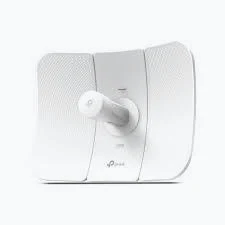
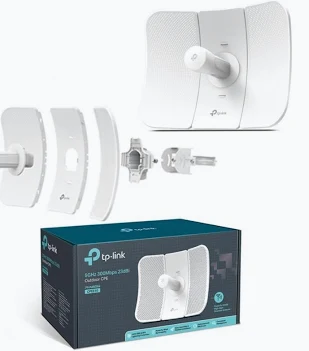
Tp-link CPE610 5GHz 300Mbps 23dBi Outdoor CPE Price in Kenya
In stock
KES 6,300.00
KES 6,700.00
You save KES 400.00
Buy TP-Link CPE610 in Kenya. Build a directional 5GHz wireless link with a 23dBi antenna, passive PoE, and an IP65 outdoor enclosure.
View product detailsNeed help choosing?
Talk to our team at +254 714 804 532
Product details
TP-Link CPE610 5GHz 300Mbps 23dBi Outdoor CPE Price in Kenya
The TP-Link CPE610 is a directional outdoor wireless device for fixed links between locations. It combines a 5GHz radio with a 23dBi antenna, making it suitable for a planned building-to-building connection or a compatible remote client installation.
Its dish concentrates coverage toward the opposite endpoint. This makes it useful where the objective is transporting network traffic along a defined wireless path rather than providing general Wi-Fi throughout a compound.
Key Specification
| Feature | Specification |
|---|---|
| Model | CPE610 |
| Operating band | 5GHz |
| Wireless standard | IEEE 802.11a/n |
| Advertised wireless rate | Up to 300Mbps |
| Antenna gain | 23dBi |
| Ethernet | One 10/100Mbps port |
| Power | Passive PoE |
| Supported input range | 16–27V DC |
| Enclosure rating | IP65 |
| Maximum device consumption | 8.8W |
The wired port is Fast Ethernet. The advertised 300Mbps wireless rate is not an end-to-end Ethernet throughput guarantee. TP-Link United Kingdom
Features and Benefits
Directional antenna: Focuses the link toward a known remote location.
Integrated outdoor assembly: Reduces the need to choose a separate radio and antenna.
Remote network extension: Connect a detached office, warehouse, gatehouse, or another suitable site.
Passive-PoE installation: Keeps the mains power adapter indoors while the Ethernet cable reaches the outdoor radio.
Pharos network options: Supported operating modes allow installation within a compatible Pharos design.
Alternative directional platforms include the MikroTik LHG 5 ac and Ubiquiti LiteBeam AC Gen2 at Tawa. Different platforms require their own compatibility assessment.
How to Set Up a Point-to-Point Link
- Survey both sites. Check line of sight and Fresnel-zone clearance.
- Select compatible endpoints. A new dedicated link normally requires equipment at each end.
- Bench-configure the pair. Use the specified PoE supplies and connect one device at a time.
- Secure administration. Assign strong credentials and unique management addresses.
- Choose wireless roles. Configure an access point at one end and a client at the other.
- Match settings. Set matching security and appropriate channel parameters.
- Set the network mode. Use a suitable transparent bridge arrangement where the upstream router will handle addressing.
- Mount and align. Make small adjustments while checking signal quality.
- Protect and test. Install suitable grounding, surge protection, and outdoor cabling, then test traffic in both directions.
Advantages and Disadvantages
Advantages
- High-gain integrated antenna.
- Suitable for planned outdoor links.
- Compact all-in-one radio endpoint.
- Convenient PoE cable arrangement.
Disadvantages
- Fast Ethernet limits wired throughput.
- Requires a clear wireless path.
- Precise alignment is necessary.
- Not a general-purpose indoor Wi-Fi router.
Troubleshooting and FAQs
The connection drops during windy weather.
Check for pole or bracket movement and recheck alignment.
Can it provide normal Wi-Fi to phones over a large area?
Its directional design is intended for fixed links. Use a suitable access point for local client coverage.
Can maximum transmit power solve every problem?
No. Check alignment, interference, clearance, and permitted operating limits.
Explore Reisen SEO’s outdoor wireless equipment.
Contact Reisen SEO for a matched CPE610 link quotation.
Additional information
| Product | Tp-link CPE610 5GHz 300Mbps 23dBi Outdoor CPE Price in Kenya |
|---|---|
| Category | Tp-link |
| Price | KES 6,300.00 |
| Availability | In stock |
Keep exploringMore in Tp-link