Save 6%
Select an image to view it. Click the main image to enlarge.
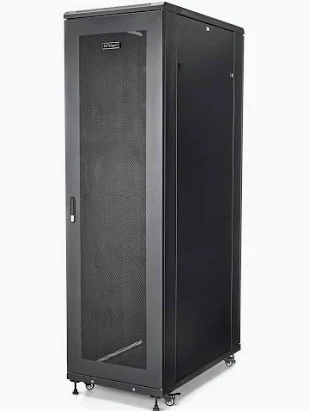
42U 600mm x1000mm Deep Data Cabinet Price in Kenya
In stock
KES 85,000.00
KES 90,000.00
You save KES 5,000.00
Buy a 42U 600mm × 1000mm Deep Data Cabinet in Kenya from Reisen SEO. Organize compatible servers, network equipment, power accessories, and cabling.
View product detailsNeed help choosing?
Talk to our team at +254 714 804 532
Product details
42U 600mm × 1000mm Deep Data Cabinet Price in Kenya
42U 600mm × 1000mm Deep Data Cabinet creates a defined place for a planned network installation. Its 42U mounting format and nominal 600mm × 1000mm enclosure dimensions help you compare height and footprint. Select it from a measured device list, a safe support plan, and the room available for service. The useful result is an orderly working rack with enough space for the actual equipment and its connections.
Request a current 42U 600 × 1000 quotation from Reisen. Confirm the exact model, quantity, package, taxes, warranty, and delivery terms. Include any supporting parts and installation work so the quoted price matches the complete job rather than the main item alone.

Choose the exact model, confirm the quote, then agree payment and fulfillment.
Key Specifications
|
Feature |
Details |
|
Nominal rack capacity |
42U; confirm ordered variant |
|
Nominal external width |
600mm |
|
Nominal external depth |
1000mm |
|
Mounting format |
19-inch rack format; verify supplied rails |
|
Door style |
Confirm supplied door and panel arrangement |
|
Usable mounting depth |
Confirm rail adjustment and connector clearance |
|
Rated load |
Exact model and support method required |
|
Included accessories |
Confirm shelves, fans, PDU, rails and fixing set |
A 42U deep format for a complete room plan
This 42U 600 × 1000 deep cabinet format is suited to review where long equipment and a large mounting schedule are both part of the project. Its nominal depth can offer useful layout options, but the exact rail span and closed-door space still decide fit. Use the server or recorder drawing and approved support kit. Do not rely on the external dimension as a usable chassis limit. The deeper footprint also affects delivery, floor space, and rear access. Measure corridors and lifts using the packaged size. A tall cabinet filled with power and network gear needs a verified floor and stability plan. Confirm assembly, anchoring, rated load, and included accessories. The most practical layout leaves room to remove and service the longest device after the room is fully furnished.
Compatibility

Check the exact model and the full installation before connecting equipment.
Match the complete installation, including the physical connection, power, software, and intended role. Similar names or connectors do not prove compatibility.

Nominal outer width and depth; confirm the supplied drawing and usable rail range.
Turn a group of devices into an organized system
A cabinet gives your network one clear home. Patch panels, switches, recording units, power accessories, and cable guides can share an orderly layout. This helps a technician find the right connection without moving loose gear around a desk. It also lets an owner see which parts belong to the system. The result depends on the layout inside. A large box with tangled cables is still hard to service.
Start with the devices you need today. Add the accessories that let them work safely. These may include shelves, mounting kits, cable managers, and a rated power distribution unit. Then leave space for a realistic next step. This avoids paying for empty capacity you will never use while still giving the network room to grow. Record the proposed layout before buying the cabinet.
Read rack height and enclosure size correctly
The U figure measures vertical mounting space. Each 1U equals 44.45mm. It does not state how many devices fit, how much weight the frame carries, or how tall the complete cabinet is. A 2U device takes twice the mounting height of a 1U device. A shelf can use rack space too. The roof, base, feet, and any casters add to the external height.
Width and depth describe a different part of the purchase. The nominal cabinet width is not the width between the mounting holes. Likewise, external depth is not usable device depth. Doors, rails, power plugs, and cable bends all take room. Compare the exact device drawing with the cabinet drawing. Ask for the rail adjustment range rather than relying on the word deep in a listing.
Start the size and package comparison with same nominal cabinet format and 22U 600 × 800 cabinet. Match the actual supplied dimensions and mounting details; a similar name alone does not prove the same fit.
Check the complete device depth
Measure the chassis from front to rear. Add the space needed by power leads, Ethernet plugs, fiber connectors, and any cable management arm. Check whether the front handles or screen project forward. A device can sit between the rails yet prevent the door from closing. For a rack server, the approved rail kit may need a specific front-to-rear distance.
Do not force a plug against a door to gain a few millimeters. Pressure can damage the socket or lead to an unstable link. Fiber also needs a suitable bend radius. Leave enough service space for the installed equipment to be unplugged and removed. A small depth saving on the order can create a much larger cost during the first service visit.
Match the load to the frame and support method
A cabinet's load limit must come from its exact maker and model. The rating for one 42U rack cannot be applied to every other 42U rack. Add the weight of shelves, power gear, cables, and future devices. A shelf has its own limit as well. The usable load is constrained by every part that carries the equipment.
Heavy devices need the right support. Front mounting ears alone may not be enough for a long or heavy chassis. Use the maker's approved rails or a suitable rated shelf. Keep heavier items low where the installation plan permits. For wall cabinets, the wall, anchors, bracket, and cabinet all form the load path. A qualified installer should assess the wall before equipment is placed inside.
For another enclosure arrangement, review 22U 600 × 1000 cabinet and 32U 600 × 600 cabinet. More depth and more height solve different space limits. Keep door access and the supported equipment weight in the comparison.
Plan cable routes before installing hardware
Separate incoming building cables from short patch leads. Bring each route into the cabinet through a suitable entry point and protect edges. Label both ends of important cables. A room name alone may not be enough when several outlets serve the same room. Use a simple numbering scheme that also appears on the patch panel and port schedule.
Leave a controlled service loop. Too little slack makes repairs hard; large coils can block airflow and hide connections. Use cable ties or hook-and-loop straps without crushing cable jackets. Keep power and data routes arranged to suit the installation rules. Fiber trays and copper patching have different handling needs. The cabinet creates the space, but thoughtful routing makes it useful.
Choose shelves and rails for each device
A desktop router or recorder may have no rack ears. It needs a shelf that fits the cabinet and supports its weight. Measure the device's feet, vents, and plugs before choosing that shelf. A shelf should not block cooling openings underneath the device. Small power adapters also need support so they do not hang from their cables.
Check the rail hole type and use the right cage nuts or fixings. Do not mix a thread into a hole it was not designed for. Position rails while the cabinet is empty where possible. Once equipment is loaded, moving the rails can require taking much of it out. Keep spare fixings in a labeled service bag so future work uses the same approved hardware.
Other enclosure formats include 600 × 800 server rack and 12U cabinet option. Check the full drawing, accessory list, and usable rail range before deciding which package suits the room.
Let the equipment breathe
Cooling starts with the devices and the room. Learn where each device takes in air and where it exhausts it. Avoid placing a hot exhaust directly against another device's intake. Cables, shelves, and blanking panels should support the planned airflow. Filling every visible gap is not always the right cooling plan.
Fans move air; they do not remove heat from a hot room on their own. Check whether the supplied cabinet includes fans, accepts an optional tray, or uses passive ventilation. A fan count in another product listing does not prove what comes with this cabinet. After installation, check temperatures during a normal busy period. A quiet room at startup can behave differently once all devices are working.
Arrange power as part of the rack plan
List each device's maximum electrical demand. Select the PDU, plugs, sockets, circuit, and any UPS as one system. The cabinet itself does not add power capacity. Nor does an unused socket prove that the circuit has spare capacity. Have the electrical work checked by a qualified person who knows the site.
Keep plugs accessible for service and label the supply path. If a device has 2 power supplies, decide whether it will use separate approved supplies or the same circuit. Two cords plugged into the same point do not provide full redundancy. Bond the cabinet and removable metal parts where the maker and electrical design require it. Never use an improvised cable as a substitute for the proper bonding method.
Select a practical location
Choose a dry, controlled indoor area unless the exact enclosure has a verified outdoor rating. Keep the cabinet away from water pipes, cleaning splash, direct rain, and excessive dust. Leave room to open the door and work at the side or rear where the design requires it. The route to the cabinet should stay clear after the room is furnished.
For a tall floor rack, check floor capacity, leveling, and the maker's anti-tip instructions. Do not rely on casters as proof that a loaded cabinet can be rolled safely. Static and moving loads are different. For a wall cabinet, check working height and safe access to the top entries. Good placement makes routine work easier for the next technician as well as the first installer.
The wider rack plan can involve 42U deep cabinet option and MikroTik CRS326 equipment option. An enclosure and the devices placed inside it need separate fit checks. Measure the chassis, support parts, connectors, and airflow needs.
Prepare delivery and assembly
Measure doorways, stairs, corridors, and lifts before delivery. Use the packaged size when planning access. A cabinet that fits the final room may not pass through the route to it. Confirm whether the order arrives assembled or flat packed. Include handling and assembly in the quotation so responsibilities are clear.
Inspect the frame and panels before loading devices. Check squareness, door movement, rail alignment, and the supplied fixing set. Photograph damage while the packaging is still available. Follow the assembly order supplied with the actual cabinet. Do not assume that a similar model from another brand uses the same fixings, panel sequence, or anchoring method.
Build a layout that can be serviced
Put the patch panel near a sensible cable entry and leave room for patch leads to reach the switch. Keep screens and controls visible. Place a recorder where its drives and ports can be reached if the design allows. Leave enough space to remove the chosen device without taking out unrelated gear.
A short rack schedule saves time. Record each occupied U position, device name, power source, and linked port range. Keep a copy with the network records. Update it whenever something moves. If several people work on the system, one shared naming scheme helps prevent accidental disconnections. This is useful in offices, schools, hotels, shops, and small server rooms.
Plan for growth without overcrowding
Growth uses more than spare U positions. It can also need extra power, cooling, cable routes, and floor or wall load. Add the likely next switch or recorder to your plan, then check all those limits again. A cabinet can have free height while its shelves or electrical supply have already reached their limit.
Choose the size around a credible plan. A compact cabinet may suit a small branch with few devices. A larger floor rack makes sense when the equipment and service needs justify it. Leave expansion space where it can be reached. Space buried behind a fixed device or a tight cable bundle is much less useful than it looks in an empty-rack drawing.
For local network equipment, explore UniFi Standard 24 equipment option and TP-Link 16-port equipment option. These are equipment choices, not proof of cabinet or fan fit. Check their installed depth, power demand, mounting support, and cooling route.
Inspect the installation over time
Review locks, fasteners, hinges, cable entries, and visible bonding parts during planned service. Check that added cables have not blocked vents. Clean using a method suitable for the equipment and keep liquids away from powered parts. Changes in noise or temperature can point to a failed fan or a new airflow obstruction.
When adding equipment, revisit the whole layout instead of using the nearest empty opening. Record the new weight and electrical demand. Secure cables before closing panels. Keep keys with an agreed person and retain a service contact. These small habits help the cabinet remain useful long after the first installation day.
Quick Brand Comparison
|
Choice |
Main buying check |
|
Same U size and depth |
Exact drawing, usable depth, load and accessories |
|
Deeper enclosure |
Longer chassis, rear plugs and service clearance |
|
Mesh door format |
Air path, dust environment and supplied panels |
|
Different rack supplier |
Support, package, dimensions and warranty |
Compare the installed role and complete package. A different model can change the support parts, management, power, or service needed. Keep the equipment that already works in the comparison and identify the specific limit the new purchase should solve.
How to Set Up 42U 600 × 1000
1. List the equipment
Write down the exact device models, U heights, chassis depths, weights, plugs, and support kits. Include the shelf, PDU, patch panels, and cable managers. Add a modest planned expansion allowance. This list becomes the basis for the cabinet choice rather than a guess based on the biggest device.
2. Measure the site and delivery route
Check the wall or floor location, doorways, corridors, and lift or stair route. Use the packaged dimensions for delivery planning. Leave working space around the installed cabinet. For wall models, have the wall and anchor design assessed before drilling or placing any load on it.
3. Confirm the delivered configuration
Match the label and dimensions to the order. Inspect the frame, rails, panels, locks, and fixing set. Verify which shelves, fans, feet, casters, and power accessories are actually included. Report damage before installation. Keep the drawing and assembly instructions for this exact cabinet.
4. Secure the empty enclosure
Follow the maker's assembly and mounting order. Level and stabilize a floor rack, or mount a wall unit using the approved support design. Keep the enclosure empty during this step. Do not use equipment weight to settle an unstable frame or to test an uncertain wall fixing.
5. Set rails and power routes
Adjust the rail spacing to the planned equipment and its mounting kits. Check door and cable clearance. Arrange suitable power distribution and required bonding through a qualified installer. Keep electrical ratings, shelf loads, and frame loads within their separate limits. Label the power route clearly.
6. Load according to the layout
Use the approved shelves or rails and the correct fasteners. Install heavier items in the position allowed by the stability plan, usually low in a floor rack. Secure each item before the next. Do not support heavy chassis only by front ears unless their maker expressly permits it.
7. Route and label the cables
Fit patching and cable guides without blocking vents. Label both ends and maintain suitable bend radii. Leave enough slack for removal and service. Check that doors close without pressing on plugs. Record the port map and remove unused loose leads that would confuse future work.
8. Test and hand over
Run the installed devices under a normal useful load. Check temperatures, power, link status, door access, and service clearance. Keep the final rack schedule and keys with the agreed owner. Explain which future additions need another load, power, cooling, or depth check before they are fitted.
Advantages
· Provides defined rack space for compatible equipment.
· Helps organize patching, device support, and power routes.
· Makes a labeled installation easier to service.
· Supports a measured expansion plan.
Disadvantages and Limits
· Outside dimensions do not prove usable device depth.
· Load rating and floor support need exact-model checks.
· Fans, shelves, PDU, and fixing parts may be separate.
· Power or cooling can reach a limit before U space is full.
Troubleshooting
For a door pressing on plugs, check rail position and cable clearance before forcing the latch. For heat, inspect room conditions, device vents, cable bundles, and the planned airflow. Stop loading a rack that rocks or shows movement at fixings. Correct damaged supports before adding more equipment. A larger enclosure alone does not fix an unsafe floor or overloaded shelf.
Frequently Asked Questions
Does the U number equal the number of devices?
No. It measures vertical mounting space. A device can occupy more than 1U, and shelves or cable managers also use space. Prepare a full layout that includes accessories. The load, depth, power, and cooling limits can be reached before all rack positions are filled.
Will every 19-inch device fit?
Not automatically. Rack width is only one check. The chassis depth, rail kit, connector space, weight, shelf support, and door clearance must also match. Ask for the cabinet's usable rail range and compare it with the exact equipment drawing before ordering.
Are fans and a PDU included?
Package contents depend on the supplied cabinet. Request an itemized quote showing fans, shelves, PDU, fixings, rails, and any feet or casters. Do not transfer the accessory list from another enclosure with the same U rating. Installed electrical parts have their own ratings.
Can it go outdoors?
Only if the exact cabinet is designed and rated for that environment. A normal indoor rack is not protected from rain simply because it has doors. Check the actual environmental rating, cable entries, ventilation, and installation method before choosing an exposed location.
Can I put a UPS inside?
Only when its dimensions, weight, support method, airflow, and electrical arrangement are all suitable. A heavy UPS may exceed a shelf or wall mounting limit even when there is enough rack space. Use its approved rails or a properly rated shelf and check the complete load.
How much spare space should I leave?
Base it on the next likely equipment and the cooling plan. There is no single percentage that suits every site. Add the proposed device, cables, power demand, and weight to the layout. Spare height is useful only if the other limits also allow the addition.
Can a loaded rack be moved on casters?
Do not assume so. Rolling and static load ratings can differ, and the floor route affects stability. Follow the cabinet maker's handling instructions. A tall loaded cabinet needs a controlled plan; feet, anchoring, and anti-tip provisions may also be required at its final position.
How do I get the price in Kenya?
Send Reisen the full dimensions, quantity, equipment list, and delivery location. Ask for the current complete quote, including the accessories and installation work you need. Confirm taxes, delivery charges, stock, and warranty terms before paying. Keep the agreed configuration on the order.
Why Shop with Reisen
Reisen brings equipment and supporting accessories into one catalogue, which helps you plan the complete purchase. Ask the team to confirm the exact model, package, current stock, and installation scope before payment. A written bill of materials makes missing parts easier to spot. It also gives everyone a clear record of what the order should include.
Share the equipment already in use and the result the site needs. This makes questions about fit, service, power, and setup easier to answer. Confirm the current warranty, delivery, return, and technical support terms in writing. Keep those terms with the invoice rather than relying on a general statement copied from another product.
Complete the Setup with Reisen
For nearby rack sizes, compare 600mm × 1000mm 42U Network Cabinet With Mesh and 42U Network Cabinets 600mm × 800mm. Check the exact rails, door arrangement, rated load, and package before selecting an alternative.
If the equipment needs a different footprint, review 42U 600mm × 800mm Deep Data Cabinet and 42U Networking Server Cabinet 600mm × 600mm. Check the exact rails, door arrangement, rated load, and package before selecting an alternative.
For another cabinet layout, explore 42U Network Cabinet 600mm × 600mm With Mesh and 32U Data Cabinets Server Racks 600mm × 1000mm. Check the exact rails, door arrangement, rated load, and package before selecting an alternative.
For a small supported enclosure, the Fans for Wall-mount Cabinets 4U–12U listing helps plan a separate ventilation accessory. This range is not a claim that those fans fit this larger cabinet; use the actual cabinet and fan drawings.
A suitable shelf and power plan may support equipment such as MikroTik hAP lite RB941-2nD. Measure the actual case and connectors. A catalogue connection does not guarantee rack fit or electrical capacity.
A suitable shelf and power plan may support equipment such as MikroTik CCR1009-7G-1C-1S+PC Cloud Core Router. Measure the actual case and connectors. A catalogue connection does not guarantee rack fit or electrical capacity.
Browse the Reisen equipment shop for supporting parts. Keep one bill of materials so the main product, accessories, installation work, and service can be checked together before the order is placed.
Contact Reisen sales and support with the exact model, quantity, delivery area, and existing equipment. Ask for the current package, stock, taxes, warranty, and support terms in writing so the final quotation is clear.
Order the Right Package
Send the full product name, model, quantity, delivery location, and target installation date. List the parts already available and ask which compatible accessories are still needed. Confirm the current quote and stock, then agree the payment and collection or delivery process. Keep the quotation and model labels together so the delivered goods can be checked against the order.
Before installation, make sure the site and supporting equipment are ready for the agreed work. Test the completed setup at handover and save its layout or settings where relevant. A useful purchase connects the selected hardware with the actual service, safe installation, and clear ownership needed to keep it working.
Additional information
| Product | 42U 600mm x1000mm Deep Data Cabinet Price in Kenya |
|---|---|
| Category | Network Cabinets |
| Price | KES 85,000.00 |
| Availability | In stock |
Keep exploringMore in Network Cabinets
Related products