
Save 49%

Select an image to view it. Click the main image to enlarge.
Single Mode Bare Fiber Optic PLC Splitters Price in Kenya
In stock
KES 180.00
KES 350.00
You save KES 170.00
Buy single-mode bare fiber PLC splitters in Kenya at Reisen SEO for FTTH distribution, protected splice installations, and compatible optical networks.
View product detailsNeed help choosing?
Talk to our team at +254 714 804 532
Product details
Single Mode Bare Fiber Optic PLC Splitters Price in Kenya
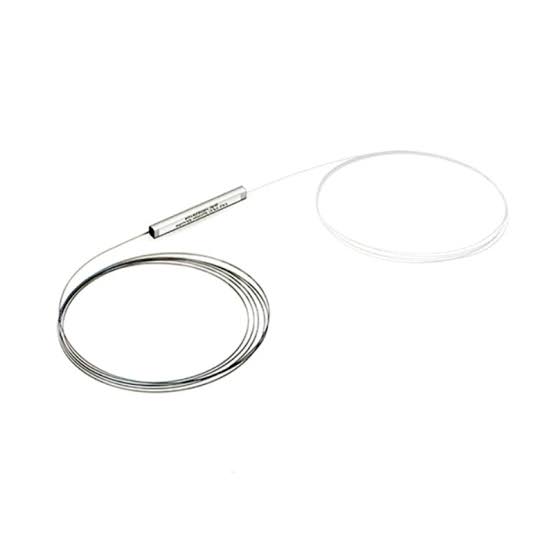
Single Mode Bare Fiber Optic PLC Splitters distribute optical power across multiple fiber paths in a compatible passive optical network. They are used in FTTH deployments, ISP distribution systems, and building access networks where one feeder connection serves several downstream branches.
PLC stands for Planar Lightwave Circuit. A splitter divides the available optical power; it does not amplify the signal or increase the bandwidth supplied by the network.
Bare-fiber versions are intended for integration into protected splice assemblies. Their unconnectorized leads allow technicians to splice the splitter directly into compatible fibers, making them useful where compact installation and organized fiber management are priorities.
Key Specification
| Feature | Details |
|---|---|
| Product category | Passive optical splitter |
| Technology | Planar Lightwave Circuit |
| Fiber mode | Single-mode |
| Termination | Bare-fiber version for splicing |
| Split configuration | Select the required input/output arrangement |
| Electrical power | Not required |
| Installation location | Suitable protected enclosure or splice tray |
| Optical loss | Depends on split ratio and supplied specification |
| Fiber grade and lead length | Confirm the selected version |
| Network suitability | Subject to wavelength compatibility and optical budget |
Features and Benefits
Distributes a feeder connection
A splitter allows a network designer to distribute optical power to several branches without installing an active Ethernet switch at that location. The connected PON equipment still controls communication and subscriber services.
Compact installation
Bare-fiber leads can be organized inside an appropriate enclosure, with the splitter body secured separately from its splice joints.
Choice of distribution capacity
Different split configurations suit different network layouts. More outputs also mean less optical power available per branch, so the largest splitter is not automatically the best choice.
When comparing connectorized alternatives, consider a 1×2 SC/UPC splitter or 1×32 SC/UPC splitter. These are different termination arrangements from an entirely bare-fiber unit.
Recommended Applications
- FTTH subscriber distribution.
- ISP optical access networks.
- Protected splitter installations in distribution boxes.
- Building fiber distribution.
- Replacement or expansion of an existing splitter assembly.
For broader cable planning, explore fiber-optic cable options at Orbitlink Solutions.
How to Install Bare Fiber PLC Splitters
- Confirm the network design. Select the split ratio using the OLT and ONU optical requirements, cable losses, splice losses, and design margin.
- Check the supplied splitter. Verify the input/output arrangement, operating wavelengths, fiber grade, lead lengths, and manufacturer loss specifications.
- Prepare the enclosure. Provide secure mounting for the splitter body and sufficient space for protected splices and service loops.
- Identify every lead. Label the input and outputs before cutting or preparing fibers.
- Prepare and splice. Isolate active optical signals. Fit splice-protection sleeves, then strip, clean, cleave, and splice using suitable equipment.
- Protect the joints. Complete the sleeve-heating process and place cooled joints in the splice tray.
- Route the fibers. Avoid tight bends, pinching, and tension on the splitter leads.
- Test every branch. Measure optical performance using the project’s acceptance method and document the output assignments.
Never look into an optical fiber or port, including when no visible light is present.
Advantages and Disadvantages
| Advantages | Disadvantages |
|---|---|
| No local electrical supply required | Divides optical power between outputs |
| Useful for compact distribution assemblies | Requires splicing tools and skills |
| Supports planned subscriber branching | Must fit the complete optical budget |
| Avoids connector interfaces at direct splices | Replacement can require additional splicing |
Troubleshooting
| Problem | What to check |
|---|---|
| All outputs have low power | Input level, selected ratio, and upstream losses |
| One branch performs poorly | Its splice, bends, connector points, and cable |
| No signal on an output | Lead identification and fiber continuity |
| Fault appears after closing the enclosure | Trapped fiber or disturbed splice routing |
Frequently Asked Questions
Does a splitter increase internet capacity?
No. It distributes optical power within a network whose capacity is determined by the connected equipment and service design.
Can I use it as an Ethernet switch?
No. Optical splitting and Ethernet switching perform different functions.
Are connectors included?
An entirely bare-fiber version has unconnectorized leads. Confirm the supplied configuration before ordering.
Buy Bare Fiber PLC Splitters in Kenya
Contact Reisen SEO with the required split ratio, fiber specification, and installation arrangement for a suitable quotation.
Additional information
| Product | Single Mode Bare Fiber Optic PLC Splitters Price in Kenya |
|---|---|
| Category | CTC Fibre Optics Solutions |
| Price | KES 180.00 |
| Availability | In stock |
Keep exploringMore in CTC Fibre Optics Solutions
Related products


