Save 10%
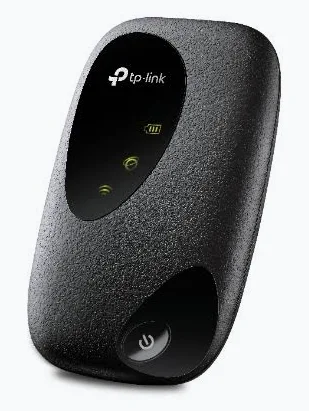
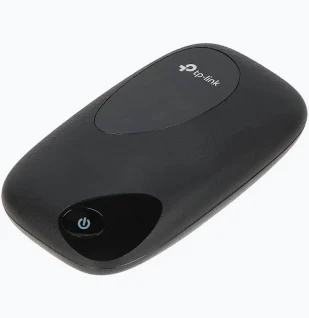
Select an image to view it. Click the main image to enlarge.
Tp-link M7000 4G LTE Mobile Wi-Fi Price in Kenya
In stock
KES 4,500.00
KES 5,000.00
You save KES 500.00
Buy TP-Link M7000 in Kenya. Share a compatible 4G LTE connection with up to 10 devices using a compact rechargeable mobile Wi-Fi hotspot.
View product detailsNeed help choosing?
Talk to our team at +254 714 804 532
Product details
TP-Link M7000 4G LTE Mobile Wi-Fi Price in Kenya
TP-Link M7000 4G LTE Mobile Wi-Fi is a portable 4g hotspot intended for travel connectivity, temporary offices and mobile work. For buyers in Kenya, the main question is not simply whether a device or accessory is available. It is whether the exact model is a sensible fit for the surrounding equipment, site conditions, installation skill and long-term operating costs. This product guide explains how to compare options, plan the installation and purchase the correct version from Reisen without relying on exaggerated performance or unsupported assurances.
Customers searching for TP-Link M7000 4G LTE Mobile Wi-Fi price in Kenya often want a practical answer about use, compatibility and total installation requirements. The catalogue title identifies the listed model, but some technical details may differ by hardware revision, regional bundle or project specification. Reisen buyers should check those details before placing a final order. For accessories such as cables, clamps and splicer electrodes, choosing the correct type matters more than chasing an impressive but irrelevant specification.
Key Benefits and Buyer Advantages
· 4G LTE portable Wi-Fi hotspot. Use this information to decide whether the item fits your planned installation; refer to the exact supplied unit for final confirmation.
· SIM-based mobile internet connection. Use this information to decide whether the item fits your planned installation; refer to the exact supplied unit for final confirmation.
· Battery-powered design. Use this information to decide whether the item fits your planned installation; refer to the exact supplied unit for final confirmation.
· Actual speed and coverage depend on mobile operator. Use this information to decide whether the item fits your planned installation; refer to the exact supplied unit for final confirmation.
A well-chosen portable 4g hotspot helps buyers build a more reliable solution, but it cannot compensate for poor network design. A successful deployment depends on the entire chain: power, connections, physical mounting, compatible end equipment, relevant firmware and maintenance access. Kenya-based installers should also consider practical questions such as where the device will be located, whether a replacement part is locally available and how faults can be isolated later.

How to Buy TP-Link M7000 4G LTE Mobile Wi-Fi
Check the exact TP-Link M7000 4G LTE Mobile Wi-Fi version, assess compatibility, request a quotation from Reisen and confirm delivery arrangements before payment.
Key Specifications
|
Specification |
Details |
|
Brand / model |
TP-Link M7000 4G LTE Mobile Wi-Fi |
|
Equipment category |
Portable 4G Hotspot |
|
Primary application |
Travel connectivity, temporary offices and mobile work |
|
Identifying specifications |
4G LTE portable Wi-Fi hotspot |
|
Additional model detail |
SIM-based mobile internet connection |
|
Connectivity / construction |
Battery-powered design |
|
Version-dependent detail |
Actual speed and coverage depend on mobile operator |
|
Compatible supporting items |
Activated SIM with data plan, USB charging cable |
|
Purchase market |
Kenya; exact availability and current selling terms to be confirmed |
Specification interpretation: this table intentionally separates the catalogue identification from statements that require a manufacturer datasheet or revision check. Rated wireless speeds are link-rate classes, not guaranteed customer internet speed. CCTV cameras require the correct recording standard and power method. Fibre and PoE systems require an independently assessed power or optical budget. Do not substitute a similar-looking model without verifying its part number.
Detailed Features and Practical Meaning
What the product is designed to do
TP-Link M7000 4G LTE Mobile Wi-Fi addresses mobile internet access. In an actual project, define the service needed before selecting a model. The goal may be wireless coverage, surveillance, optical connectivity, endpoint power, data distribution or fibre protection. An item should be chosen according to the function it performs, not just how prominently the seller describes it.
For Kenyan buyers, this distinction matters when comparing online prices. A lower upfront cost may be attractive, but total value includes any compatible accessories, installation effort, reliability, power use and maintenance that the final system needs. Ask the supplier to identify what is supplied with the product and what must be purchased separately.
How the main specification affects performance
The most important model information includes 4g lte portable wi-fi hotspot and sim-based mobile internet connection. These details should be interpreted with the surrounding infrastructure. Strong performance in one area cannot overcome an incompatible connector, weak upstream bandwidth, unsuitable cabling or poor installation.
For Kenyan buyers, this distinction matters when comparing online prices. A lower upfront cost may be attractive, but total value includes any compatible accessories, installation effort, reliability, power use and maintenance that the final system needs. Ask the supplier to identify what is supplied with the product and what must be purchased separately.
How site conditions change the outcome
A practical installation starts by asking where the device will be used. For this category, technicians should verify compatible mobile network and data plan. Temperature, cable exposure, water ingress, electrical safety, interference and access to maintenance can affect the service more than headline marketing figures.
For Kenyan buyers, this distinction matters when comparing online prices. A lower upfront cost may be attractive, but total value includes any compatible accessories, installation effort, reliability, power use and maintenance that the final system needs. Ask the supplier to identify what is supplied with the product and what must be purchased separately.
Network and equipment integration
Installers typically need to insert a compatible activated SIM and charge the battery. A component that performs well in isolation can still create failure if it is linked to equipment with the wrong interface, power method or supported networking standard.
For Kenyan buyers, this distinction matters when comparing online prices. A lower upfront cost may be attractive, but total value includes any compatible accessories, installation effort, reliability, power use and maintenance that the final system needs. Ask the supplier to identify what is supplied with the product and what must be purchased separately.
Maintenance and serviceability
Good equipment selection also means making future maintenance practical. Label cables, keep current configuration backups where applicable, note firmware and hardware revisions, document ports and endpoints, and organise consumables or replacement parts. These ordinary steps reduce diagnosis time after service interruptions.
For Kenyan buyers, this distinction matters when comparing online prices. A lower upfront cost may be attractive, but total value includes any compatible accessories, installation effort, reliability, power use and maintenance that the final system needs. Ask the supplier to identify what is supplied with the product and what must be purchased separately.
What performance claims really mean
The manufacturer may publish maximum rates, range figures or capacity limits for a product category. Those numbers should not be treated as universal outcomes. The actual result will depend on cellular signal, data allowance, device association and battery life. Base a purchase on the conditions of the proposed installation, not on the best-case laboratory value alone.
For Kenyan buyers, this distinction matters when comparing online prices. A lower upfront cost may be attractive, but total value includes any compatible accessories, installation effort, reliability, power use and maintenance that the final system needs. Ask the supplier to identify what is supplied with the product and what must be purchased separately.

TP-Link M7000 4G LTE Mobile Wi-Fi Connection and Deployment Diagram
Conceptual view of how TP-Link M7000 4G LTE Mobile Wi-Fi fits between the appropriate source equipment and its connected endpoint; wiring varies by installation.
Applications in Kenyan Homes, Businesses and Institutions
Home or small-office installations
TP-Link M7000 4G LTE Mobile Wi-Fi may be considered for A compact installation should stay simple: select the right equipment, leave room for cable maintenance and verify that the available uplink, power and physical location suit the planned service. Its relevant application is travel connectivity, temporary offices and mobile work. A site survey and accessory check will determine whether the proposed design is appropriate.
Retail, hospitality and institutional projects
TP-Link M7000 4G LTE Mobile Wi-Fi may be considered for More demanding sites need structured installation notes, approval for cable routes, consistent maintenance access and clear separation of responsibilities between network, power and security work. Its relevant application is travel connectivity, temporary offices and mobile work. A site survey and accessory check will determine whether the proposed design is appropriate.
Installer and integrator projects
TP-Link M7000 4G LTE Mobile Wi-Fi may be considered for Professional installers should document bill of materials, actual part numbers, acceptance tests and handover details so site owners understand what has been supplied and what remains outside scope. Its relevant application is travel connectivity, temporary offices and mobile work. A site survey and accessory check will determine whether the proposed design is appropriate.
Growing and expandable networks
TP-Link M7000 4G LTE Mobile Wi-Fi may be considered for Where expansion is possible, leave sensible spare capacity without buying oversized equipment solely for the sake of future-proofing. Capacity planning should be backed by projected demand and the actual model limitations. Its relevant application is travel connectivity, temporary offices and mobile work. A site survey and accessory check will determine whether the proposed design is appropriate.
Compatibility and Related Accessories
The accessories most likely to be evaluated alongside this product include Activated SIM with data plan, USB charging cable. This does not mean those accessories are included in the carton. A good order combines the correct main item with verified complementary components while avoiding extra hardware that the installation does not need.
Before purchase, confirm the actual model suffix and hardware revision, supported interfaces, power requirements and mounting needs. Carrier coverage and congestion determine real-world data performance. Where a device participates in a managed network, confirm the supported management platform and version. Where it uses passive optical, RF or analogue-video signalling, check both ends of the connection rather than assuming cross-brand interchangeability.

TP-Link M7000 4G LTE Mobile Wi-Fi Compatibility Checklist
Verify model revision, interface or power requirements, intended installation environment and the seller’s applicable terms.
How This Product Compares With Alternatives
TP-Link M7000 4G LTE Mobile Wi-Fi should be compared with alternatives in the same portable 4g hotspot category. A buyer may also consider a different equipment class if the planned network requires additional capability. Comparing a basic component to an enterprise platform using only price is rarely useful. Begin with compatible interfaces and supported use, then compare operating needs, supplied accessories and technical limitations.
|
Specification |
Details |
|
Decision factor |
TP-Link M7000 4G LTE Mobile Wi-Fi |
|
Primary purpose |
Travel connectivity, temporary offices and mobile work |
|
Compatibility priority |
Interfaces, power, physical environment |
|
Cost comparison |
Compare full installed solution, not item price alone |
|
Support consideration |
Check documentation and applicable seller terms |
|
Growth consideration |
Match foreseeable usage to verified capacity |
Comparison should remain factual. For a wireless product, compare bands, link interfaces, mounting rating and management ecosystem. For a camera, compare resolution, output technology, recorder support and lens. For cables and fibre consumables, compare standard, environmental suitability, connector or dimensional compatibility and installation requirements. Each product category has different buying criteria.

TP-Link M7000 4G LTE Mobile Wi-Fi Buyer Decision Comparison
Qualitative comparison of product role, compatibility checks, installation planning and version-specific buying considerations.
How to Activating and Using TP-Link M7000 4G LTE Mobile Wi-Fi
A Step by Step Guide to Activating and Using TP-Link M7000 4G LTE Mobile Wi-Fi
Step 1: Prepare the site
Confirm the exact model, proposed location and the planned service. For TP-Link M7000 4G LTE Mobile Wi-Fi, review 4g lte portable wi-fi hotspot, confirm the compatible accessories and identify installation safety requirements.
If the result is not as expected, isolate one possible fault at a time. Start with the power source, then connections, endpoint compatibility and configuration. Change only one variable between tests to make the diagnosis repeatable.
Step 2: Inspect equipment and accessories
Check the unit or part for visible damage, matching model code, cable integrity and correct connector/power characteristics. Ensure the required supporting equipment (Activated SIM with data plan, USB charging cable) is available.
If the result is not as expected, isolate one possible fault at a time. Start with the power source, then connections, endpoint compatibility and configuration. Change only one variable between tests to make the diagnosis repeatable.
Step 3: Plan connections and mounting
Verify compatible mobile network and data plan. Make a simple diagram of every connection, label relevant ports and check the length and routing of cables or optical paths.
If the result is not as expected, isolate one possible fault at a time. Start with the power source, then connections, endpoint compatibility and configuration. Change only one variable between tests to make the diagnosis repeatable.
Step 4: Install or connect the product
Insert a compatible activated sim and charge the battery. Follow the specific manufacturer guide for the actual revision. Do not assume generic software menus or universal wiring colour codes.
If the result is not as expected, isolate one possible fault at a time. Start with the power source, then connections, endpoint compatibility and configuration. Change only one variable between tests to make the diagnosis repeatable.
Step 5: Apply appropriate settings or physical checks
Where configuration exists, use the supported management method to apply secure credentials and required network settings. Where no software configuration exists, check mechanical fit, safe cable routing and correct termination instead.
If the result is not as expected, isolate one possible fault at a time. Start with the power source, then connections, endpoint compatibility and configuration. Change only one variable between tests to make the diagnosis repeatable.
Step 6: Verify safe operation
Test cellular signal, data allowance, device association and battery life. Confirm that connected devices receive the expected service and observe indicators or test instruments appropriate to this equipment type.
If the result is not as expected, isolate one possible fault at a time. Start with the power source, then connections, endpoint compatibility and configuration. Change only one variable between tests to make the diagnosis repeatable.
Step 7: Document and hand over
Record part numbers, configuration notes, test results and accessory selections. Confirm who is responsible for replacement parts, ongoing servicing and customer support.
If the result is not as expected, isolate one possible fault at a time. Start with the power source, then connections, endpoint compatibility and configuration. Change only one variable between tests to make the diagnosis repeatable.

TP-Link M7000 4G LTE Mobile Wi-Fi Installation Workflow
Installation sequence from site planning and compatibility checks through connection, inspection and final functional testing.
Installation Problems and Troubleshooting
Device or link does not start
Check power and any adapter or PoE method against the actual model before replacing equipment. For professional work, log the condition and retest after correcting the likely cause. Never bypass safe electrical, optical or mounting practices merely to make a device appear to function.
No expected communication
Verify connectors, link partner compatibility, endpoint settings and cable or optical integrity. For professional work, log the condition and retest after correcting the likely cause. Never bypass safe electrical, optical or mounting practices merely to make a device appear to function.
Unstable or disappointing performance
Review cellular signal, data allowance, device association and battery life; identify bottlenecks and ensure published maximum rates are not mistaken for service guarantees. For professional work, log the condition and retest after correcting the likely cause. Never bypass safe electrical, optical or mounting practices merely to make a device appear to function.
Uncertain accessory compatibility
Stop the installation and obtain the part-number-specific manual or supplier confirmation instead of experimenting with incompatible components. For professional work, log the condition and retest after correcting the likely cause. Never bypass safe electrical, optical or mounting practices merely to make a device appear to function.
Advantages and Disadvantages
|
Specification |
Details |
|
Practical advantage |
A clearly defined category and model for targeted purchasing |
|
Practical advantage |
Can support travel connectivity, temporary offices and mobile work when correctly integrated |
|
Consideration |
Exact revision and installation compatibility require checking |
|
Consideration |
Extra cables, supplies or companion equipment may be needed |
|
Consideration |
Project outcomes depend on complete design and correct setup |
Warranty and Return Policy
Before purchasing, request the current written Reisen warranty and returns terms for this specific item. Confirm whether cover applies to the full product, a consumable component or a limited factory defect, and whether proof of purchase or authorised installation is required. Do not assume a fixed warranty duration, exchange window or unconditional refund unless Reisen confirms it in writing.
Inspect goods promptly on delivery and retain the order record and original packaging where possible. For electronic equipment, record the serial number and test the equipment using approved connections. For cables, fibre accessories and small consumables, verify quantity and type before cutting, installing or altering the product. Any after-sales decision will follow the applicable stated terms.
Product Guides and Documents
Ask for documentation matching TP-Link M7000 4G LTE Mobile Wi-Fi and its exact part number or revision. Relevant materials may include a manufacturer datasheet, installation guide, compatibility list, supported operating conditions and technical safety information. Manufacturers may publish several documents for closely related models; selecting the wrong document can lead to unsuitable settings or installation methods. Research material may be consulted to check facts without inserting unapproved manufacturer URLs into the sales copy.
Installation Manuals
For TP-Link M7000 4G LTE Mobile Wi-Fi, obtain the manufacturer instruction set appropriate to the actual hardware. Read the warnings, identify compatible supporting equipment and follow the tested workflow described above. A professional installer should keep a local copy of the documentation and provide site-specific handover notes. Where the item has no user interface, the manual or fitting diagram is still useful for correct physical installation.
What's in the Box?
Package contents should be verified from the actual selling SKU. Do not assume that cable reels include connectors, camera boxes include power supplies, outdoor APs include specific PoE injectors, optical accessories include patch cords, or mounting kits include every site-specific fastener. Confirm the main product, supplied power accessories (if any), mounting kit (if any), documents and country-specific bundle before dispatch.
Frequently Asked Questions
What is TP-Link M7000 4G LTE Mobile Wi-Fi used for?
It is intended for travel connectivity, temporary offices and mobile work. Select it only when the application and surrounding equipment match the manufacturer-supported function.
Can I buy TP-Link M7000 4G LTE Mobile Wi-Fi online in Kenya?
You can view the Reisen listing and enquire about the current product availability, confirmed selling price, applicable terms and delivery options.
How do I know whether TP-Link M7000 4G LTE Mobile Wi-Fi is compatible with my installation?
Compare the actual model code with the requirements of the connected equipment and review Activated SIM with data plan, USB charging cable. For unusual installations, ask a qualified integrator to verify the interface and power specifications.
Does TP-Link M7000 4G LTE Mobile Wi-Fi require professional installation?
The level of expertise depends on the site and task. Verify compatible mobile network and data plan, then follow the verified model-specific instructions and safety procedures.
What should I check before placing an order?
Confirm the model revision, supplied accessories, warranty and returns terms, shipping arrangements and your project requirements. Carrier coverage and congestion determine real-world data performance.
Where to Buy TP-Link M7000 4G LTE Mobile Wi-Fi in Kenya
Reisen provides a catalogue listing for TP-Link M7000 4G LTE Mobile Wi-Fi. Before ordering, request confirmation of the exact version, price, stock, dispatch or collection options and accessories. Be cautious about sales claims such as cheapest, authorised dealer or guaranteed coverage unless supported by actual evidence. The most useful purchasing decision is one that fits your project and can be installed and supported correctly.
Reisen aims to become a leading eCommerce platform in Kenya and a leading eCommerce platform in Africa by providing clear product information, useful equipment comparisons and a practical route to buying suitable networking accessories. These phrases describe the company’s ambition, not a verified market-leadership ranking.
View the product on Reisen: TP-Link M7000 4G LTE Mobile Wi-Fi
Additional information
| Product | Tp-link M7000 4G LTE Mobile Wi-Fi Price in Kenya |
|---|---|
| Category | Routers |
| Price | KES 4,500.00 |
| Availability | In stock |
Keep exploringMore in Routers
Related products