Save 7%
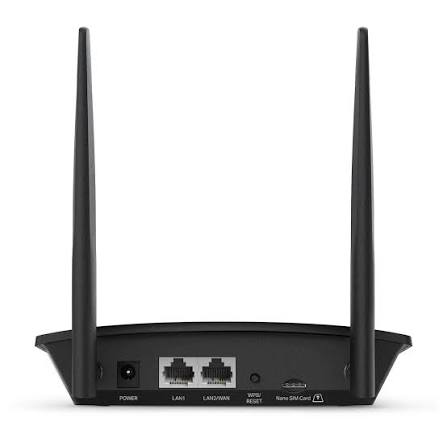
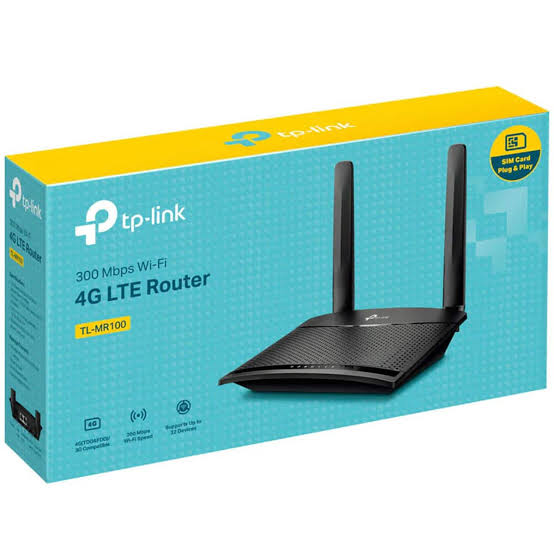
Select an image to view it. Click the main image to enlarge.
Tp-link TL-MR100 300Mbps Wireless 4G LTE Router Price in Kenya
In stock
KES 6,500.00
KES 7,000.00
You save KES 500.00
Buy the TP-Link TL-MR100 4G LTE router in Kenya at Reisen SEO to share a compatible SIM data connection through Wi-Fi and wired Ethernet.
View product detailsNeed help choosing?
Talk to our team at +254 714 804 532
Product details
TP-Link TL-MR100 300Mbps Wireless 4G LTE Router Price in Kenya
Overview
TP-Link TL-MR100 300Mbps Wireless 4G LTE Router is aimed at customers planning SIM-based broadband for homes, site offices and backup links. Before buying, match the exact model code TL-MR100 to the product photo, purchase invoice and technical sheet. A familiar brand name alone does not establish the port count, electrical requirements or accessories supplied. Reisen customers should choose equipment based on the actual network problem rather than the longest feature list. The strongest purchasing decision starts with a network plan: what will connect, how much capacity is needed, and who will maintain it after installation.
Who should buy it?
This product makes the most sense when SIM-based broadband for homes, site offices and backup links is the principal task. Map each planned endpoint, its location, power requirements and expected traffic before ordering. For a simple home installation, ease of operation may matter more than advanced management. An installer handling a business site should care about documentation, diagnostics, spare capacity, safe mounting and clear ownership of passwords. The right choice differs between a single room, several floors and a building-to-building connection.
Key benefits
The main attraction of the TL-MR100 is suitability for SIM-based broadband for homes, site offices and backup links. A carefully selected device can reduce avoidable adapters, shorten installation time and leave a cleaner system for the next technician. Benefits depend on correct design: cabling, power, line of sight, supported network protocols and upstream internet service all affect results. Instead of promising a particular download speed or coverage radius, assess the surrounding equipment and the manufacturer’s test conditions.
Planning before purchase
Start with a hand-drawn sketch of the site showing the incoming internet connection, switch or router, power sockets and target devices. Write down which connections require copper Ethernet, fibre, Wi-Fi, PoE or a different interface. Check the physical distance and cable path to each endpoint. Make room for maintenance and future additions. Ask the seller to confirm the exact TL-MR100 hardware version and whether optional parts are quoted separately. This simple preparation prevents a product from arriving only for an installer to discover the wrong connector or missing power supply.

Figure 144-01: How to Buy TP-Link TL-MR100 300Mbps Wireless 4G LTE Router
Key Specifications
|
Brand |
TP-Link |
|
Exact model |
TL-MR100 |
|
Product type |
4G router |
|
Use case |
SIM-based broadband for homes, site offices and backup links |
|
Main features (check region and revision) |
4G LTE mobile connection with compatible SIM; 2.4 GHz 300 Mbps Wi-Fi class; LAN/WAN connectivity |
|
Official technical reference |
Manufacturer technical documentation (reference only) |
Technical details in context
The relevant catalogue characteristics for TL-MR100 are: 4G LTE mobile connection with compatible SIM; 2.4 GHz 300 Mbps Wi-Fi class; LAN/WAN connectivity. These statements describe device capabilities or product family information; they are not guaranteed field performance. Actual service quality depends on the network design and connected devices. When a revision changes the quantity or speed of ports, follow the label and corresponding official datasheet for the unit being supplied. In particular, theoretical Wi-Fi rates, fibre link capacity and PoE power budgets measure different things and should not be compared as if they were identical.
Network fit and compatibility

Figure 144-02: Typical Network Connection / Deployment Diagram
Confirm compatibility in both directions: the upstream network must have the required port or signal type, and downstream devices must accept the output. A connector fitting physically does not prove electrical or protocol compatibility. Review voltage, power supply, PoE method, fibre wavelength, transceiver type and cable category as applicable. Identify whether the equipment needs a dedicated controller, compatible recorder, subscription, account or separate radio. Plan addressing and management access so the new TL-MR100 is visible during commissioning without exposing administration unnecessarily.
· Compatible equipment checklist: upstream access equipment; receiving interface or client; rated power source; correct cable and connectors; suitable physical mount; management credentials if applicable.
Performance expectations
Performance is best evaluated from the end-user task. A camera may need stable sustained throughput; a phone needs consistent call quality; a wireless backhaul needs good alignment and a clear radio path; a router benefits from enough processing capacity for enabled features. The TL-MR100 should therefore be tested under a realistic load rather than judged from a single advertised number. Document which test devices, cables, signal conditions and software versions were used. A good installation gives repeatable results, not a one-off speed-test screenshot.
Typical applications
In Kenya, SIM-based broadband for homes, site offices and backup links may arise in residences, schools, small offices, retail businesses, hotels, healthcare sites or service-provider networks. Each setting has a different risk profile. Schools may value simple monitoring and controlled access; retail sites may prioritize uptime during trading hours; installers may want easier remote troubleshooting. Select the product only when its interfaces and operating environment suit the job. Where network continuity matters, keep a fallback plan for the failure of a single cable, adapter or upstream service.
· At a home or small office: confirm that TL-MR100 addresses the actual connection problem, not simply the newest advertised feature.
· At a managed commercial site: record the commissioning owner, backup plan and access procedure.
· At a remote or high-maintenance site: evaluate travel, spare parts and whether a trained technician is available.
Installation environment
Choose a clean, stable location that matches the device’s published indoor or outdoor rating. Consider heat, moisture, dust, direct sunlight, lightning exposure, power fluctuations and physical access. Keep cables clear of sharp bends and avoid unnecessary tension on sockets. Outdoor installations may require grounded protection and weather-rated accessories. Do not treat a device as weatherproof merely because it appears sturdy. Record cable labels and the location of upstream equipment for future maintenance.
How to Set Up and Configure the TP-Link TL-MR100 300Mbps Wireless 4G LTE Router
The TL-MR100 should be installed according to the official guide for its exact hardware revision. Before starting, photograph the factory label for records, confirm the power requirement and prepare the intended connections. Plan the management address or account access in advance where configuration is required. Never assume a router configuration tutorial also applies to a passive antenna, camera or unmanaged switch. If a feature described online is not shown in the actual unit interface, verify the firmware and model rather than experimenting on a production system.
A Step by Step Guide to Setting Up and Configuring the TP-Link TL-MR100 300Mbps Wireless 4G LTE Router
Step 1 — Check the supplied item and compare its label with the order. Step 2 — Read the safety and mounting instructions. Step 3 — Prepare the correct power source and data cables; leave equipment powered off when connections require it. Step 4 — Connect the upstream side, then the intended downstream devices. Step 5 — Apply power and observe documented startup indicators. Step 6 — Use the official setup process if this is a configurable product; protect administrator access and save a backup. Step 7 — Test connectivity and the actual workload. Step 8 — Label ports or cables, record the result and hand over access details securely.
Troubleshooting checklist

Figure 144-04: Installation and Testing Workflow
If the TL-MR100 does not work as expected, begin with the simplest checks. Is the correct device powered, and is its supply within the supported range? Are the cables known to work? Does the adjacent device show a physical link? Is the selected port or mode appropriate? For managed networks, inspect addressing, DHCP, VLANs and routing. For wireless links, review alignment, interference and obstructions. For camera systems, match video format and recorder input. Change only one variable at a time and record the outcome, which makes fault isolation faster and safer.
Security and ongoing maintenance
Network equipment is a long-term responsibility. Change factory credentials where the product has an administrator interface, limit who can reach it, and update software from trusted official sources. Back up the working configuration after commissioning. Document serial numbers, firmware versions and responsible contacts. Where the TL-MR100 is unmanaged or passive, focus instead on physical protection, correct power and clear labelling. Do not expose device-management ports directly to the public internet merely to make support easier.
How it compares with alternatives

Figure 144-03: Compatibility and Purchase Checks
Compare TL-MR100 with alternatives on the parts of the design that matter: actual interface types, supported standards, power method, management, mounting, support documentation and expansion capacity. The lowest quoted price may exclude an essential accessory or require additional work. The largest model may add complexity that an ordinary home user does not need. A meaningful comparison uses the exact competing model and its confirmed version, not claims copied from a different device in the same series.
Advantages
A practical advantage of choosing the TL-MR100 for SIM-based broadband for homes, site offices and backup links is that the purchase can be planned around a defined use case. Product selection is easier to defend when every port or feature has a purpose. The availability of model-specific documentation also helps an installer plan commissioning and support. Actual advantages depend on deployment; a feature that is valuable in a service-provider rack may be irrelevant in a simple home installation.
Limitations and trade-offs
No single product solves every network problem. The TL-MR100 has to operate within its interface, power, environmental and software limits. More users, longer cables or more demanding workloads do not automatically justify higher advertised speeds. Some advanced functions require technical skills, dedicated controllers or compatible upstream devices. List any required extra purchases before comparing quotations. If the exact configuration or hardware revision cannot be established, request written confirmation before installation.
Cabling and accessories
Choose cables by service rather than by appearance. Short indoor patch leads, outdoor UV-rated cable, shielded Ethernet, fibre jumpers and dedicated power cable serve different environments. Confirm connector genders and supported media on both ends. Use correctly rated injectors and power supplies rather than substitutes that merely fit the socket. Keep a spare patch lead and label both ends of important runs. Where a rack is involved, allow adequate cooling, cable management and access for servicing.
Network design and scaling
Allow some growth in the design if more users or endpoints may be added later. A switch can run out of usable ports, a wireless link can approach its practical capacity and a router can accumulate new firewall rules. Calculate what future additions would require and where expansion will connect. Segment different traffic classes when the surrounding system supports it and the operator can maintain the settings. Do not overcomplicate a simple installation, but avoid building a network where every later change requires replacing the entire core.
Buying guidance in Kenya
Customers searching for TL-MR100 price in Kenya should confirm the current Reisen quotation rather than relying on a price copied from another website. Check whether the listing refers to the exact version, what currency and tax treatment apply, whether delivery is available to your town and whether installation is quoted separately. Ask about the applicable return procedure before breaking a factory seal or mounting the device. Where possible, share a network diagram with the seller so the right accessories can be identified at the same time.
Reisen and the wider purchasing journey
Reisen aims to be a leading eCommerce platform in Kenya by making product selection clearer and helping buyers find suitable networking equipment. The same customer-focused ambition can support a leading eCommerce platform in Africa, but it is an aspiration rather than a claim of independently verified market ranking. Use product descriptions to decide what to buy; use an itemized quotation to establish cost, delivery, support and what is actually supplied. Do not mistake marketing language for warranty evidence.
Warranty and Return Policy
Warranty and return eligibility depend on the written terms associated with the specific Reisen sale and the manufacturer’s applicable regional support conditions. No particular duration or return window is asserted here. Before ordering TL-MR100, request the current policy, confirm what documentation to retain and ask whether installation or physical damage changes coverage. Keep the invoice, serial label, packaging and support correspondence. An installer should document a fault clearly rather than assume every malfunction is a manufacturing defect.
Product Guides and Documents
Review the official product page or technical documentation for TL-MR100 when planning a purchase. Confirm the revision number matches the label. Useful documents include the datasheet, installation guide, safety instructions, software release information and any compatibility notices. If an unfamiliar menu or interface is shown in a tutorial, stop and check whether it refers to your hardware. Vendor documentation is especially valuable when selecting accessories and identifying restrictions that a short shop listing cannot fully explain.
Installation Manuals
Use the model-specific installation manual before connecting power, fitting outdoor equipment or applying configuration changes. Printed quick-start instructions can be helpful, but longer manuals generally explain conditions and warnings more clearly. For managed devices, record a working configuration after setup. For passive components and unmanaged switches, preserve the physical wiring plan instead. The correct manual should answer how the device is mounted, powered, connected, checked and safely maintained.
What’s in the Box
The package contents for TL-MR100 must be checked against the manufacturer’s packing list and the actual Reisen stock-keeping unit. Do not assume that cables, power adapters, mounting hardware, transceivers, brackets or optional accessories are included just because an illustration shows them. On delivery, compare every item with the invoice and retain a photograph of the package label. Flag missing components before arranging on-site installation so that avoidable visits and delays are minimized.
Frequently asked questions
Is TL-MR100 appropriate for my installation? It may be, provided its interfaces and operating environment suit the design. Can I install it myself? Simple connections may be manageable, while managed routing, fibre access and outdoor alignment often benefit from a technician. Does it guarantee a particular speed? No; real performance depends on upstream service and the total network. Can I use my existing accessories? Only after checking exact standards and power ratings. Where can I get product documents? Start with the manufacturer source and match the hardware revision.
Site survey and acceptance tests
Before committing to TL-MR100, define a test that reflects the intended job: SIM-based broadband for homes, site offices and backup links. Ask who will use the device, which service is upstream, and where the farthest or busiest endpoint sits. Mark the connections on a simple site plan, including where power originates and where equipment can be serviced. At commissioning, check that the intended endpoints become reachable and remain stable during an ordinary working period. Record the basic results: physical link state, assigned addresses where applicable, signal or error indicators, and whether users can complete the intended task. Compare those observations with the planned design rather than simply expecting every device to achieve a manufacturer headline rate. If a test fails, decide whether the limitation is in the equipment, power, cabling, upstream provider, incorrect configuration or installation conditions. A documented acceptance test helps installers and buyers agree on what was actually delivered.
Ownership, handover and support
A successful installation of TL-MR100 should be easy for the next technician to understand. Handover should identify the model and revision, its purpose, where its power comes from, and which cable or wireless link leads to the upstream network. For configurable hardware, record the management method, secure credential custody and whether a backup exists. For passive equipment, document alignment, orientation and the radio or other system to which it connects. Explain to the owner which indicators usually signal a healthy connection and when it is better to contact a trained specialist. Confirm who provides the upstream internet service and who is responsible for equipment faults, because a failed connection may originate outside the newly purchased product. A short written handover saves time, reduces misdiagnosis and supports a more dependable service over the equipment lifetime.
Cost of ownership and purchasing checklist
The purchase price of TL-MR100 is only one part of the decision. Review whether installation requires a mounting structure, power supply, adapter, licensed service, protective enclosure, suitable Ethernet or fibre cabling, compatible endpoint, spare patch cord or qualified technician. Consider electricity needs and site access where the device will run continuously. For a business, the cost of avoidable downtime may exceed the difference between two quotations. Request a clearly itemized offer from Reisen, and check that taxes, delivery, configuration and support are described accurately. Do not treat an online listing from an unrelated shop as confirmation of current Reisen stock or charges. Keep the model name and quantity consistent across the written quotation, invoice and delivered item. That paperwork also helps resolve disputes about missing accessories, incorrect variants and the intended scope of installation.
Practical buying decision

Figure 144-05: Choosing the Correct Network Equipment
Choose TL-MR100 when it meets a defined requirement and its exact configuration can be supported after purchase. If the equipment will be used by people without networking experience, ask how routine recovery works when power fails or settings are lost. If the deployment involves several sites, consider keeping documentation and a standard cable-label scheme consistent across installations. In demanding sites, plan for safe isolation and maintenance rather than assuming hardware never fails. Compare quotations by delivered functionality, including any necessary adapters, installation and future support, not by the headline figure alone. Finally, check the official documentation again if the supplier presents a different hardware revision. It is better to identify an incompatibility before payment than to discover it when installers are already on site. The goal is dependable service and a straightforward purchase, with accurate information rather than oversized promises.
YouTube product demonstration
A model-specific video can help buyers understand the physical device and basic installation, but it should supplement, not replace, the official manual. Search YouTube for “TL-MR100 unboxing” or “TL-MR100 installation”, check the presenter’s hardware revision and publication date, and use the original video URL. No third-party video rights or permission to rehost media are implied by mentioning the search. The video destination has intentionally not been fabricated.
Learn more
Official product or technical reference: Manufacturer technical documentation (reference only) For related networking equipment, browse https://reisenseo.com/ and check current listings for compatible switches, routers, fibre modules, patch leads, racks or PoE accessories. Other approved storefronts can provide supplementary product comparisons where a matching product page is verified, but their prices should never be represented as Reisen pricing.
Explore related equipment: https://reisenseo.com/ | Official documentation: Manufacturer technical documentation (reference only)
Additional information
| Product | Tp-link TL-MR100 300Mbps Wireless 4G LTE Router Price in Kenya |
|---|---|
| Category | Networking Tools & Accessories |
| Price | KES 6,500.00 |
| Availability | In stock |
Keep exploringMore in Networking Tools & Accessories
Related products