Save 17%
Select an image to view it. Click the main image to enlarge.
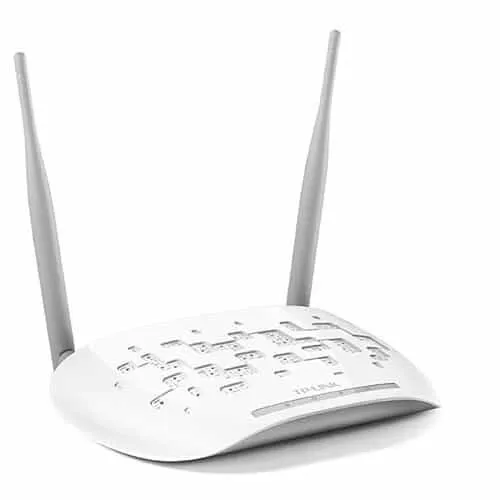
Tp-Link TL-WA801ND Wireless Access Point Price in Kenya
In stock
KES 2,500.00
KES 3,000.00
You save KES 500.00
Explore TP-Link TL-WA801ND price in Kenya at ReisenSEO. Learn about 300Mbps Wireless N, access point modes and setup. Confirm stock and hardware version.
View product detailsNeed help choosing?
Talk to our team at +254 714 804 532
Product details
TP-Link TL-WA801ND 300Mbps Wireless Access Point Price in Kenya
The TP-Link TL-WA801ND adds 2.4GHz wireless access to an existing Ethernet network. It is useful where a router already provides internet access but its Wi-Fi does not reach the intended room, or where a wired device needs a supported wireless-client connection. The N300 design suits modest network requirements and compatible legacy devices. Its 100Mbps Ethernet interface is an important limit when choosing equipment for a faster broadband service.
Explore the TL-WA801ND at Reisen and select the complete model and supplied package needed for your installation.
For product selection, start with TL-WA801ND at Tawa and then compare the EAP225 indoor alternative. Choose around the required radio generation, uplink speed, and management platform rather than the shared TP-Link brand alone.

Confirm your requirements with Reisen, then agree the quote and fulfillment arrangements.
Key Specifications
|
Feature |
Specification |
|
Wireless class |
N300 |
|
Band |
2.4GHz |
|
Standards |
IEEE 802.11b/g/n |
|
Maximum advertised wireless rate |
300Mbps |
|
Ethernet |
1 × 10/100Mbps LAN port |
|
Antennas |
2 detachable omnidirectional antennas |
|
Deployment |
Indoor access point; additional modes depend on revision |
|
Power |
Use the adapter specified for the supplied hardware version |
How It Fits Your Network

Match the access point power source. The gateway remains responsible for internet routing.
Access point placement
A wired connection from the main router to the access point normally provides a more predictable backhaul than repeating a weak wireless signal. Place the unit in the area needing coverage, above desk clutter and away from large metal surfaces. Coverage depends on walls, interference, client antennas, and placement; a fixed whole-building coverage promise would not describe every installation.
Where a newer installation is appropriate, review the EAP610 option and the UniFi access-point range. These are different hardware and management choices, not direct substitutes for every existing deployment.
Selecting an operating mode
Use access-point mode for Ethernet-to-Wi-Fi coverage. Other supported modes, such as client or repeater operation, should be confirmed against the hardware version and firmware. Client mode can serve a suitable Ethernet device that lacks Wi-Fi, while repeater operation relies on receiving a usable upstream signal. Do not select a mode solely because it appears to have the longest list of features.
If cabling to the target area is impractical, compare the TL-WA855RE at Orbitlink and TL-WA855RE at Tawa. Repeating a wireless signal and providing a wired-backhaul access point have different performance implications.

Not a speed test. Shared wireless airtime and protocol overhead reduce usable throughput.
Wireless and Ethernet performance
The 300Mbps figure is a radio link-rate class. It is not an internet-speed guarantee, and application throughput is lower after protocol overhead and shared airtime. Traffic crossing the wired port is also subject to its Fast Ethernet capacity. Choose a newer access point with Gigabit Ethernet and additional bands if that is the requirement.
For an installation needing router functions as well as Wi-Fi, assess the MikroTik RB951Ui-2HnD. For supported powered access points, investigate PoE switch options only after matching the required power standard.
Security and network integration
Use the strongest mutually supported encryption, normally WPA2 with AES for compatible clients, and a unique Wi-Fi password. Keep administrator access separate from guest access. A basic access point extends the network; the existing router still handles upstream routing and usually DHCP. Avoid unintentionally enabling another DHCP server on the same unsegmented LAN.
The physical installation may require Cat6 cable and, for a verified 802.3af endpoint, an appropriate TL-POE150S injector. Neither cable nor injector should be assumed included with every access-point quotation.
When a newer access point is the better purchase
Choose a different class if you need 5GHz, Gigabit Ethernet, or a newer wireless generation. Also reconsider the network layout if the existing gateway must move to obtain coverage: a separate access point with a good cable route may solve the location issue more cleanly. Keep the current model for a defined compatible role rather than assuming it is the best fit for every new broadband plan.
Extend a wired network into a useful Wi-Fi location
The TL-WA801ND is most useful when a suitable Ethernet connection can bring the existing LAN to a location that needs wireless access. This allows the internet router to remain near its service handoff while the access point serves users elsewhere. In a modest office, that can be more effective than leaving the only radio inside a cabinet or behind a reception desk. Decide which room needs coverage and where the cable can terminate safely. The upstream router normally remains responsible for routing, DHCP, and the internet firewall, so the access point should be configured to fit that network.
Understand N300 and the Fast Ethernet uplink
The 300Mbps description refers to a maximum advertised wireless signaling class under compatible conditions. The single wired uplink is 10/100Mbps, and the complete user experience depends on both sides of the connection. Several clients share wireless airtime, and older or distant clients can use that airtime less efficiently. A modern broadband subscription may therefore exceed what this access point can deliver to wireless users. Choose it for a defined 2.4GHz role, such as compatible everyday devices or an existing modest network, rather than assuming the N300 figure is a guaranteed download result for each user.
Place the antennas for the actual rooms
The detachable omnidirectional antennas distribute coverage differently from a narrow outdoor bridge antenna. Install the access point in an appropriate indoor location and test the actual rooms, including areas behind walls and near metal shelving. Do not infer coverage from the appearance of the antennas alone. The client must also transmit back to the access point, so simply raising output power does not guarantee a reliable two-way connection. Keep the unit away from avoidable obstructions and assess channel congestion. A few careful placement tests often reveal more than repeatedly changing settings while leaving the unit in a poor location.
Choose 1 operating mode for a clear purpose
Supported modes depend on the hardware revision and firmware. Check the delivered manual before planning repeater, client, or another special operating mode. For straightforward access-point operation, the Ethernet side carries the existing LAN and the radio provides client access. A repeater arrangement uses wireless backhaul and introduces a different airtime tradeoff. A client arrangement may instead connect an Ethernet device to a compatible wireless network. These are distinct roles, so document the selected mode and test its behavior before leaving the installation. Do not assume that a mode name means every advanced bridging feature is available.
Keep management addressing predictable
Assign management settings that fit the existing LAN and avoid an address already used by another device. If the router reserves an address for the access point, record that reservation for the owner. After changing the unit's address, reconnect using the new address rather than immediately performing a factory reset. Keep administrator credentials separate from the wireless password and restrict management to trusted users where the available settings permit. A stable, documented management address makes later changes easier and reduces the chance of creating an accidental second DHCP server during troubleshooting.
Set wireless security around supported clients
Choose the strongest appropriate security mode supported by both the access point and the intended clients, checking the exact revision's options. Use a unique wireless passphrase and avoid open access for an ordinary private LAN. Separate guest access needs a coherent network design; broadcasting another name alone does not prove that guests are isolated from office devices. Review the router and any switch configuration if separation is required. Also check client support before replacing a legacy network's security settings, so an upgrade does not unexpectedly disconnect essential devices without a migration plan.
Test coverage and capacity as different questions
First check whether a client can associate reliably in the intended location. Then verify addressing, local access, and the applications that matter. A strong signal indicator does not establish adequate capacity during busy periods. Try representative simultaneous activity, such as a meeting alongside a file transfer, if that resembles actual use. Compare a wired test at the upstream router to separate an internet problem from a wireless one. Record where tests were performed and which client was used. This gives a more useful handover than a single speed screenshot taken directly beside the access point.
Decide whether to expand or replace
The TL-WA801ND can serve a defined legacy or modest-capacity role, but a new installation may benefit from newer dual-band hardware and a Gigabit uplink. A larger site may need several coordinated access points with planned channels rather than a chain of repeaters. Compare the total project, including cabling, power, management, and client requirements. If an existing unit is working for low-demand devices, it may still have a useful place within a broader design. Keep the purchase tied to the intended service rather than treating an inexpensive access point as a universal solution for every broadband upgrade.
Build an accurate quotation for TL-WA801ND
An accurate quotation starts with the complete product code, quantity, and intended job. Tell Reisen whether this is a new installation, an expansion, or a replacement for equipment already in service. Include the devices it must connect to and any known revision requirements. Ask for accessories and configuration work to be itemized so the product can be compared fairly with another offer. A lower headline amount may describe a different package or omit necessary components. Confirm the current price directly with Reisen; prices shown by other sellers are not a substitute for a quotation covering your actual order.
Check the package before scheduling installation
Confirm the exact contents supplied with the unit or cable order, including any adapter, mounting parts, or termination components that the project needs. Where an accessory is listed as optional, put it on the order rather than assuming it will be in the box. Check the hardware version and relevant labels before work begins, while discrepancies can still be resolved without interrupting service. Keep packaging and purchase records according to the applicable return process. For several sites, identify which equipment belongs to each location so a correct order is not accidentally mixed during deployment.
Agree what a successful handover will include
Write down a short acceptance checklist based on the intended service. It may include a working client connection, correct addressing, an application test, and a clear record of cable or port assignments. Ask for configuration records where the product has settings, or test results where the installation is primarily passive. A power light or visible network name is only a partial check. Where existing equipment is involved, identify who is responsible for faults outside the new product's scope. This avoids confusing a completed supply order with a complete redesign of the customer's wider network.
Protect the working installation during changes
If replacing existing equipment, record the current connections and configuration before disconnecting anything. Schedule work around the users who depend on the service and retain a practical recovery route. Change 1 part of the system at a time where possible, then test the effect before moving to the next change. Keep administrator details and backups secure rather than including passwords in an openly shared worksheet. A documented installation is easier to maintain and helps the owner distinguish a product fault from a changed cable, account, upstream service, or incompatible replacement accessory.
Compare total project value rather than isolated features
The most useful product is the one that meets the actual requirement with a clear installation and support plan. Consider accessories, compatible neighboring equipment, setup time, and future service access alongside the hardware itself. Do not pay for a feature the project cannot use, but do not omit a necessary capability merely to reduce the initial order. If the requirement has changed since the original specification, reassess the whole connection path before buying an identical replacement. A short description of the site and workload helps Reisen recommend a coherent package without relying on unsupported user counts or coverage claims.
Confirm commercial terms before completing payment
Ask Reisen to confirm availability, the quoted package, applicable warranty and return terms, and the agreed collection or delivery arrangements. These details should come from the current transaction rather than assumptions based on an older listing. If installation or remote setup is required, confirm whether it is included and what access or preparation the customer must provide. Keep the final quotation and the equipment model together in the order record. This makes the purchase easier to check on arrival and gives both parties a clear reference if an accessory or service detail needs clarification.
How to Set It Up
1. Read the hardware-version label and obtain the matching setup guide. Connect using a wired computer for the first configuration.
2. Power the access point with its specified adapter. Identify the management address using the label, guide, or the main router’s client list.
3. Set an administrator password, select access-point mode, and assign a management address that remains reachable without conflicting with other devices.
4. Connect its LAN port to the intended router or switch LAN. Keep DHCP service on the main router unless the documented network design requires otherwise.
5. Create the SSID, choose supported secure encryption, and enter a strong passphrase. Select an appropriate 2.4GHz channel after checking nearby networks.
6. Test a wireless client for an IP address, local access, and internet access. Save the configuration and document the management address.
Troubleshooting
Clients connect but have no internet
Check the wired uplink, DHCP service, and upstream router before changing radio power. Wireless association proves only part of the path. Test a wired client on the same network to distinguish an upstream fault from access-point configuration.
Coverage is uneven
Review placement, nearby metalwork, channel overlap, and the client’s own antenna. Try an appropriate channel and better physical location. Adding repeaters without planning can consume airtime and make diagnosis harder.
Advantages
· Adds Wi-Fi to a wired network without replacing the gateway.
· Detachable antennas allow practical orientation.
· Suitable for compatible devices requiring 2.4GHz Wi-Fi.
Disadvantages and Limitations
· No 5GHz or Wi-Fi 6 radio.
· The 10/100Mbps port limits wired throughput.
· Mode and powering details must match the hardware revision.
Frequently Asked Questions
Is it an internet modem?
No. It needs an existing network and internet connection for internet access.
Can it repeat Wi-Fi?
Check the operating modes supported by the exact hardware and firmware version.
Will it deliver 300Mbps internet?
No such speed is guaranteed. The number describes the maximum advertised wireless link-rate class.
Does it replace my router?
In access-point mode, the main router remains responsible for routing and other gateway functions.
Complete Your Order at Reisen
For a complete installation, also review RDCOM CAT6 UTP Ethernet LAN Cable and TP-Link TL-WA855RE 300Mbps Wi-Fi Range Extender. These have different roles or capabilities; choose them according to the system described above rather than assuming automatic interchangeability.
Request the current TL-WA801ND price in Kenya from Reisen and confirm the exact hardware revision, supplied accessories, quantity, and any configuration work. Use Reisen’s contact page to share your requirements. Confirm applicable warranty, return terms, payment arrangements, delivery or collection options, and any installation charges before completing the order.
Build a Compatible System with Reisen
Consider Reisen’s EAP115 indoor access point as another N300 installation option with revision-specific power and management. Check the required interface, power source, and configuration before adding it to the order.
Consider Reisen’s 8-port Gigabit switch for additional wired connections. Include the extra patch leads and installation work if this component is part of the project.
Consider Reisen’s 16-port Gigabit switch for a larger wired room. Review its separate specifications against the intended workload and the neighboring equipment.
Consider Reisen’s RB5009 router for gateway functions that an access point does not replace. A compatible connection requires more than a similar connector or matching brand name.
Consider Reisen’s TL-WN823N USB adapter for a host computer requiring a compatible Wi-Fi interface. Confirm where it sits in the network so the quotation covers its actual role.
Browse the relevant Reisen product category to assess the rest of the installation, and use the Reisen shop to prepare a combined order. Keep the TL-WA801ND model code in your request so accessories, revision details, and setup work can be confirmed together.
Additional information
| Product | Tp-Link TL-WA801ND Wireless Access Point Price in Kenya |
|---|---|
| Category | Networking Tools & Accessories |
| Price | KES 2,500.00 |
| Availability | In stock |
Keep exploringMore in Networking Tools & Accessories
Related products