Save 10%
Select an image to view it. Click the main image to enlarge.
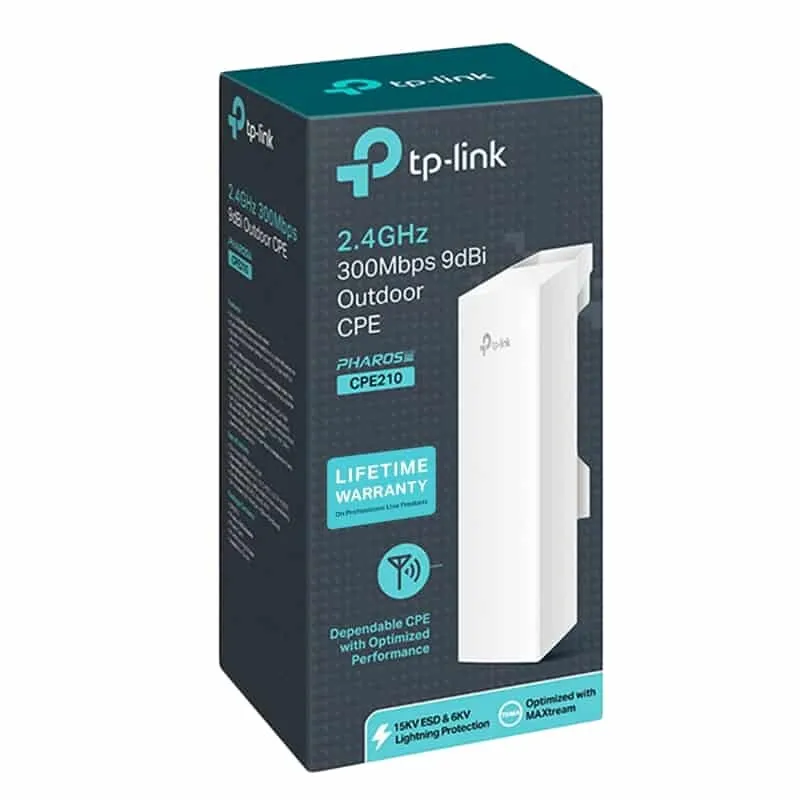
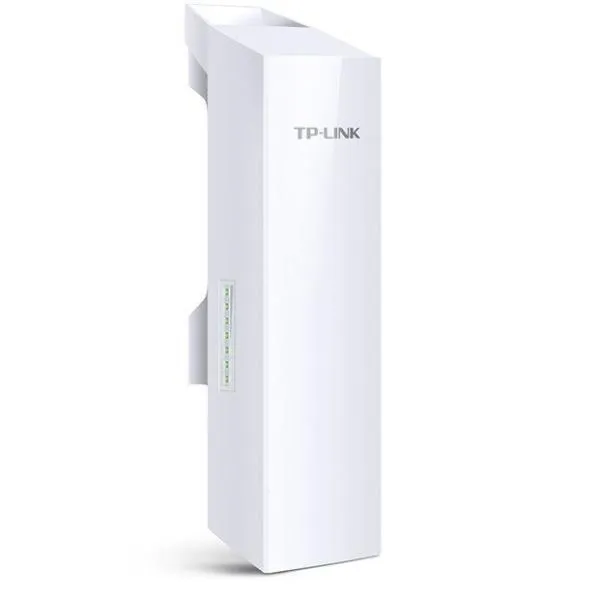
TP-Link CPE210 2.4Ghz 300Mbps 9dBi Outdoor CPE Price in Kenya
In stock
KES 4,500.00
KES 5,000.00
You save KES 500.00
Explore TP-Link CPE210 prices in Kenya, key features, specifications and setup guidance. Connect buildings with a 2.4GHz 9dBi outdoor wireless CPE.
View product detailsNeed help choosing?
Talk to our team at +254 714 804 532
Product details
TP-Link CPE210 2.4GHz 300Mbps 9dBi Outdoor CPE Price in Kenya
The TP-Link CPE210 is a 2.4GHz outdoor customer-premises radio for directional wireless networking. Its integrated 9dBi antenna and N300 radio can be used in a planned building-to-building link or a compatible point-to-multipoint installation. It is designed to connect an identified remote location, rather than provide equal Wi-Fi coverage in every direction. For a business compound, separate office, or other surveyed site, it can provide a wireless path where installing a cable is impractical.
Explore the CPE210 at Reisen and select the complete model and supplied package needed for your installation.
Begin with CPE210 at Tawa and CPE210 at Orbitlink. Confirm the band, hardware revision, and included passive-PoE supply rather than comparing the radio-rate headline alone.

Confirm your requirements with Reisen, then agree the quote and fulfillment arrangements.
Key Specifications
|
Feature |
Specification |
|
Frequency band |
2.4GHz |
|
Maximum advertised wireless rate |
300Mbps |
|
Integrated antenna |
9dBi directional, dual-polarized |
|
Ethernet class |
10/100Mbps; port count depends on hardware revision |
|
Power |
24V passive PoE using the matched supplied adapter |
|
Management |
Pharos web interface; compatible Pharos management tools |
|
Installation |
Outdoor radio with protected indoor power equipment |
|
Link requirement |
Compatible radio and surveyed path at the remote side |
How It Fits Your Network

Schematic only. Each radio needs a matched power source; survey the complete path.
Choose the right band and radio path
The 2.4GHz band may suit an existing compatible link or a site where that spectrum is the deliberate design choice. Check interference before installation; busy neighboring networks can make channel planning more important than the advertised radio rate.
For a different directional link design, assess TP-Link CPE510 and TP-Link CPE610. A different frequency or antenna design may require replacing both ends.
What a complete link requires
A typical private bridge uses 2 compatible radios, with the upstream unit configured as an access point and the remote unit as a client. The path needs line of sight and appropriate Fresnel-zone clearance. Trees, moving vehicles, roof edges, and later construction can affect a link that appears clear at eye level. Survey the route before selecting a distance or promising service.
Alternative platforms include MikroTik DISC Lite5 ac and MikroTik LHG 5 ac. Treat these as complete link-design alternatives, not automatic Pharos replacements.

Different interfaces, not additive. Real throughput is lower; check the hardware revision.
Throughput and directional coverage
The 300Mbps headline is a maximum radio signaling class, not guaranteed usable traffic. The Fast Ethernet connection is another practical ceiling for traffic entering or leaving the radio. Channel width, interference, packet overhead, and alignment all affect results. A directional antenna should point toward the intended station; ordinary phones around the back of the unit are not the design target.
Also compare the NanoStation Loco M2 and NanoStation 5AC Loco only within their own supported band and protocol arrangements. Brand-independent interoperability must never be assumed.
Passive PoE and outdoor protection
Use the matched passive-PoE supply and identify its LAN and PoE sockets before applying power. A passive output is not interchangeable with an ordinary Ethernet socket or every standards-based PoE supply. Keep the mains-powered injector indoors or in a correctly rated protected enclosure. Follow the manufacturer’s grounding and surge-protection instructions. Outdoor construction does not make the installation immune to lightning.
At the remote building, suitable LAN switching options can distribute the Ethernet handoff. For the exposed cable route, evaluate outdoor cable options against the radio’s actual shielding, grounding, and environmental requirements.
Point-to-multipoint planning
For several remote clients, configure a suitable AP and compatible stations sharing the required band, channel, security, and protocol settings. Pharos MAXtream is a proprietary operating option; enabling it changes interoperability requirements. Do not assume airMAX, MAXtream, or other proprietary platforms can associate merely because they use the same band. Plan airtime and traffic across all clients.
What to include in a wireless-link quotation
Specify both endpoints, surveyed mounting locations, radio band, required traffic, outdoor-rated cables, injector arrangements, grounding, and any remote switch or access point. State whether the link must extend a LAN transparently or route a separate subnet. For point-to-multipoint service, identify the base station and all proposed clients. Include commissioning tests so acceptance is based on an operating link rather than a mounting job alone.
Start with the service at the far end
Define what the remote location needs before selecting a radio. Extending the office LAN to an outbuilding, feeding a remote access point, and serving several subscribers are different network designs. The CPE210 provides directional outdoor wireless connectivity; it is not a complete internet subscription or a conventional indoor Wi-Fi system. In a basic point-to-point bridge, the far end needs a compatible radio as well as any switch or access point required for its users. Decide whether the remote network should remain on the same LAN or be routed separately, then configure addressing and security to match that intention.
Survey both line of sight and the surrounding path
A visible roof is a starting point rather than a complete radio survey. Evaluate mounting height, vegetation, future growth, nearby structures, and the space around the direct signal path. Obstacles in the Fresnel zone can degrade a link even when the antennas can apparently see each other. Record practical mounting positions at both ends and consider how the installation can be serviced. Avoid promising a distance from the product name alone. Antenna gain, interference, channel selection, alignment, environmental conditions, and the permitted regional radio settings all affect the completed link.
Choose the band for the site rather than the headline
This model uses 2.4GHz wireless operation and a directional antenna rated at 9dBi. Those characteristics help define its intended role, but they do not establish a guaranteed range. Compare the available channels and interference at the actual installation locations. A different band may be preferable where the present band is crowded, yet switching bands cannot eliminate the need for a clear path and compatible endpoints. Check national and local operating requirements, choose the correct country setting, and use lawful power settings. Extra transmit power does not repair poor alignment or a blocked radio path.
Keep the wired side in the performance calculation
The advertised N300 radio class is a wireless signaling rate, while the Ethernet connection on the relevant hardware is Fast Ethernet. These numbers describe different parts of the path and should not be added together. Application throughput also includes protocol overhead and depends on radio conditions. For a realistic acceptance test, connect capable local test devices on opposite sides of the bridge and measure traffic in each direction. An internet-only speed test can be constrained by the subscription or a remote server and may hide the actual radio performance. Check the delivered hardware revision before finalizing the port arrangement.
Match powering and protect the outdoor cable route
Use the passive PoE injector and supply arrangement specified for the delivered unit. Passive PoE should not be treated as interchangeable with every standards-based PoE switch. Keep the injector and any indoor-only supply in their intended environment. The exposed Ethernet route needs suitably rated cable, protected entries, strain relief, and a grounding and surge-protection plan appropriate to the site. Arrange drip loops where needed and keep connectors from carrying the weight of the cable. A radio that repeatedly restarts may have a power or cabling problem, so investigate the supply path before changing radio settings.
Configure 1 AP and 1 client for a basic bridge
Prepare both radios locally before installing them at height. Give each device a unique management address in the intended management network and record the credentials. Configure the main unit in the appropriate access-point mode and the remote unit as a compatible client. Match band, channel settings, wireless security, and the intended bridge behavior. Use a distinctive link name so it is not confused with a nearby network. Test the pair over a short clear path first, then install and align them at the surveyed locations. This separates basic configuration errors from long-distance alignment problems.
Plan point-to-multipoint service as a separate design
Several clients sharing a base station also share airtime and the upstream connection. The antenna pattern, client directions, distances, traffic demand, and scheduling method must all be considered together. A directional CPE that suits a narrow link should not automatically be treated as a sector solution for clients spread around a site. Pharos-specific features such as MAXtream need compatible participating equipment and appropriate configuration; a similar-looking radio using another proprietary system is not a guaranteed replacement. Document the intended client devices and test representative traffic rather than relying on the sum of their advertised rates.
Accept and maintain the installed link
During commissioning, record management addresses, channel width, signal and noise readings, firmware version, mounting locations, and test results. Check stability with traffic flowing, rather than accepting a connection that only stays associated while idle. Verify the remote users receive the expected addressing and that any VLANs pass correctly. Save the configuration securely and schedule maintenance around the site's operating hours. Reassess alignment, vegetation, cable condition, and interference when performance changes. A documented working baseline helps identify whether a later problem is a radio-path change, a supply fault, or an unrelated upstream service issue.
Build an accurate quotation for CPE210
An accurate quotation starts with the complete product code, quantity, and intended job. Tell Reisen whether this is a new installation, an expansion, or a replacement for equipment already in service. Include the devices it must connect to and any known revision requirements. Ask for accessories and configuration work to be itemized so the product can be compared fairly with another offer. A lower headline amount may describe a different package or omit necessary components. Confirm the current price directly with Reisen; prices shown by other sellers are not a substitute for a quotation covering your actual order.
Check the package before scheduling installation
Confirm the exact contents supplied with the unit or cable order, including any adapter, mounting parts, or termination components that the project needs. Where an accessory is listed as optional, put it on the order rather than assuming it will be in the box. Check the hardware version and relevant labels before work begins, while discrepancies can still be resolved without interrupting service. Keep packaging and purchase records according to the applicable return process. For several sites, identify which equipment belongs to each location so a correct order is not accidentally mixed during deployment.
Agree what a successful handover will include
Write down a short acceptance checklist based on the intended service. It may include a working client connection, correct addressing, an application test, and a clear record of cable or port assignments. Ask for configuration records where the product has settings, or test results where the installation is primarily passive. A power light or visible network name is only a partial check. Where existing equipment is involved, identify who is responsible for faults outside the new product's scope. This avoids confusing a completed supply order with a complete redesign of the customer's wider network.
Protect the working installation during changes
If replacing existing equipment, record the current connections and configuration before disconnecting anything. Schedule work around the users who depend on the service and retain a practical recovery route. Change 1 part of the system at a time where possible, then test the effect before moving to the next change. Keep administrator details and backups secure rather than including passwords in an openly shared worksheet. A documented installation is easier to maintain and helps the owner distinguish a product fault from a changed cable, account, upstream service, or incompatible replacement accessory.
Compare total project value rather than isolated features
The most useful product is the one that meets the actual requirement with a clear installation and support plan. Consider accessories, compatible neighboring equipment, setup time, and future service access alongside the hardware itself. Do not pay for a feature the project cannot use, but do not omit a necessary capability merely to reduce the initial order. If the requirement has changed since the original specification, reassess the whole connection path before buying an identical replacement. A short description of the site and workload helps Reisen recommend a coherent package without relying on unsupported user counts or coverage claims.
Confirm commercial terms before completing payment
Ask Reisen to confirm availability, the quoted package, applicable warranty and return terms, and the agreed collection or delivery arrangements. These details should come from the current transaction rather than assumptions based on an older listing. If installation or remote setup is required, confirm whether it is included and what access or preparation the customer must provide. Keep the final quotation and the equipment model together in the order record. This makes the purchase easier to check on arrival and gives both parties a clear reference if an accessory or service detail needs clarification.
How to Set It Up
1. Bench-configure both radios before mounting. Record each hardware version, label, management address, and approved power adapter.
2. Connect a computer through the injector’s LAN socket and the radio through its PoE socket. Use the initial address and credentials specified for that exact version.
3. Set the correct country or region, a strong administrator password, and separate management addresses within the intended management subnet.
4. Set the upstream radio to AP mode and the remote radio to Client mode for a basic bridge. Match band, SSID, secure encryption, channel, and channel width.
5. Keep proprietary TDMA settings consistent. For a transparent LAN extension, use the appropriate bridge settings and avoid adding an unintended router or DHCP service at the remote side.
6. Mount securely on suitable supports, route outdoor-rated cable, and complete the required grounding and cable-entry protection. Keep power equipment protected.
7. Align in small increments while observing signal quality on both sides. Choose stable quality rather than simply raising transmit power to its maximum.
8. Test addressing and traffic from the remote LAN, monitor errors and link stability, then save backups and document the commissioned settings.
Troubleshooting
Radios associate but the remote LAN has no service
Check bridge versus router mode, management and client addressing, VLAN settings, and the upstream DHCP path. A radio association is not proof that the intended Ethernet service is bridged correctly.
The connection drops or slows
Observe alignment, signal quality, noise, and error behavior on both radios. Inspect the cable and power supply, especially if the radio restarts. Re-survey for vegetation or new interference before changing transmit power.
Only 1 direction performs well
Investigate interference and alignment at both ends. Different transmit settings, receiver conditions, or cable faults can produce an asymmetric result. Test locally across the bridge rather than relying only on an internet speed test.
Advantages
· Integrated directional antenna simplifies radio and antenna matching.
· Passive PoE allows power equipment to remain away from the mounting point.
· Supports planned AP/client outdoor networking.
Disadvantages and Limitations
· Fast Ethernet limits the wired data path.
· Requires a surveyed path and compatible remote radio.
· Not a general-purpose indoor Wi-Fi router or a universal cross-brand bridge.
Frequently Asked Questions
Can 1 unit connect 2 buildings?
A complete bridge needs suitable equipment at both ends. A single unit works only where a compatible upstream radio already exists.
Does 300Mbps mean internet throughput?
No. It is a maximum radio signaling class. Real traffic is lower and also constrained by the Ethernet interface.
Can it work with Starlink?
It can carry an Ethernet network from a suitably connected Starlink installation. It does not replace the dish or provide a Starlink subscription.
Does higher antenna gain guarantee longer range?
No. The link budget, interference, clearances, alignment, and regulatory limits must all be considered.
Complete Your Order at Reisen
For a complete installation, also review TP-Link CPE220 2.4GHz 300Mbps 12dBi Outdoor CPE and TP-Link TL-SF1005D 5-Port 10/100Mbps Desktop Switch. These have different roles or capabilities; choose them according to the system described above rather than assuming automatic interchangeability.
Request the current CPE210 price in Kenya from Reisen and confirm the exact hardware revision, supplied accessories, quantity, and any configuration work. Use Reisen’s contact page to share your requirements. Confirm applicable warranty, return terms, payment arrangements, delivery or collection options, and any installation charges before completing the order.
Build a Compatible System with Reisen
Consider Reisen’s Ethernet cabling for the protected indoor part of the route, with outdoor-rated material selected separately. Check the required interface, power source, and configuration before adding it to the order.
Consider Reisen’s RB5009 gateway for an appropriately configured routed network. Include the extra patch leads and installation work if this component is part of the project.
Consider Reisen’s 8-port Gigabit switch to distribute the remote LAN without increasing the radio link capacity. Review its separate specifications against the intended workload and the neighboring equipment.
Consider Reisen’s EAP115 indoor access point for Wi-Fi inside the destination building. A compatible connection requires more than a similar connector or matching brand name.
Consider Reisen’s MC210CS fiber converter as a different medium choice where an engineered fiber route is practical. Confirm where it sits in the network so the quotation covers its actual role.
Browse the relevant Reisen product category to assess the rest of the installation, and use the Reisen shop to prepare a combined order. Keep the CPE210 model code in your request so accessories, revision details, and setup work can be confirmed together.
Additional information
| Product | TP-Link CPE210 2.4Ghz 300Mbps 9dBi Outdoor CPE Price in Kenya |
|---|---|
| Category | Networking Tools & Accessories |
| Price | KES 4,500.00 |
| Availability | In stock |
Keep exploringMore in Networking Tools & Accessories
Related products