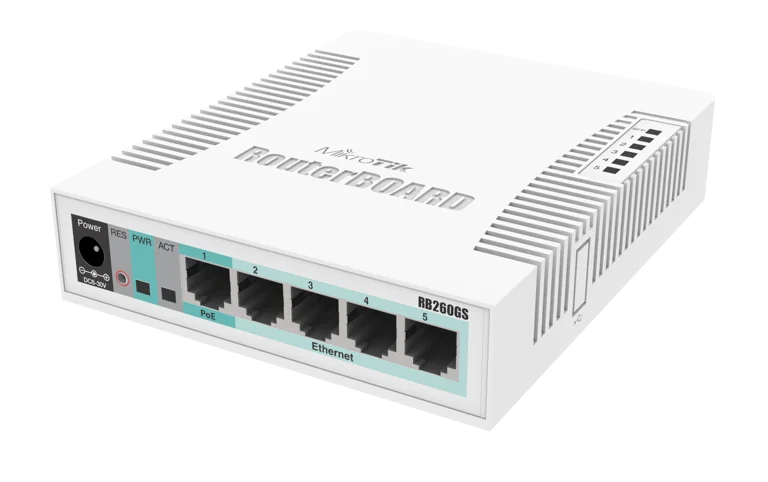
Save 11%
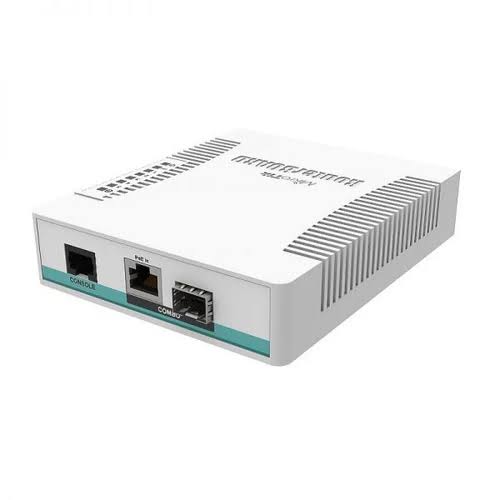
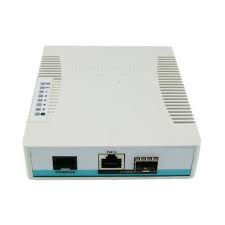
Select an image to view it. Click the main image to enlarge.
MIKROTIC CRS106-1C-5C CLOUD ROUTER SWITCH Price in Kenya
In stock
KES 8,000.00
KES 9,000.00
You save KES 1,000.00
Buy CRS106-1C-5C (catalog; possible CRS106-1C-5S) in Kenya. Compare verified features, installation requirements, practical compatibility and accessories.
View product detailsNeed help choosing?
Talk to our team at +254 714 804 532
Product details
MikroTik CRS106-1C-5C (Catalog Model — Verify Exact SKU)
MikroTik CRS106-1C-5C (Catalog Model — Verify Exact SKU) is offered through Reisen as a optical-interface aggregation switch. For Kenyan customers planning fiber distribution and ISP edge technicians, the relevant purchasing question is not simply whether a unit carries an appealing price or headline rating. A sound choice starts with the intended task, site environment, upstream network or cable path, and the accessories needed to make the system reliable. The catalog price is KSh 8,000; installation, optional components, taxes and final seller quotation must be checked separately.
This description explains how to evaluate CRS106-1C-5C (catalog; possible CRS106-1C-5S) without confusing a label with a performance guarantee. Its most useful capabilities or purchasing considerations include fiber uplink mapping, SFP module compatibility checks, careful switch-versus-router distinction, model-label verification. Each technical value below is presented in its proper context; optional items and regional kit variations should always be matched to the exact hardware offered for sale.
Who Should Consider This Product
A practical installation begins with a clear use case. The MikroTik CRS106-1C-5C (Catalog Model — Verify Exact SKU) is positioned as a optical-interface aggregation switch for fiber distribution and ISP edge technicians. The relevant selection factors are correct optical transceiver, fiber polarity, management interfaces, port assignment and model verification. A buyer who specifies these points at quotation stage is less likely to pay for replacement cabling, an unsuitable power adapter or an avoidable second site visit.
Think about the service the equipment must deliver after installation, not merely the object in its box. For CRS106-1C-5C (catalog; possible CRS106-1C-5S), that means documenting the connected devices, the upstream and downstream interfaces, the expected operating schedule, access for maintenance and the effect of an outage. Those questions determine whether this unit is a sensible match or whether a larger, smaller or differently equipped model would be a better purchase.
In a Kenyan office or installation project, price is only one component of the decision. The uploaded Reisen catalog lists this item at KSh 8,000. The completed system may also require properly rated supplies, cable, mounting consumables, testing, transport and configuration. An accurate quotation should state what the supplied package contains instead of treating optional accessories as included by default.
How to Buy MikroTik CRS106-1C-5C (Catalog Model — Verify Exact SKU)
Begin with the job, not a photograph. Assess correct optical transceiver, fiber polarity, management interfaces, port assignment and model verification. Next, inspect the equipment designation and choose the correct variant. Verify supporting cabling, adapters, configuration and commissioning tasks before accepting a quotation. The illustrated purchasing sequence below describes that process for CRS106-1C-5C (catalog; possible CRS106-1C-5S) and helps prevent the wrong hardware or an incomplete installation kit from reaching the site.

Buying decision graphic: establish the installation objective, select the exact model, calculate supporting components, and verify the supplied SKU before deployment.
Key Specifications
|
Specification |
Documented detail |
|
Catalog code |
CRS106-1C-5C |
|
Comparable official model |
CRS106-1C-5S (NOT confirmed identical) |
|
Product role |
Fiber aggregation / managed switching (conditional) |
|
Physical port inventory |
Pending device-label verification |
|
Power / PoE input |
Pending exact SKU verification |
A specification table is a comparison tool, not an invitation to assume features that are absent from the manufacturer's record. Confirm the label, hardware revision and regional software before purchasing CRS106-1C-5C (catalog; possible CRS106-1C-5S); this is particularly important for power options, interface counts and functions that can differ between similarly named devices.
Features and Real-World Benefits
Fiber uplink mapping
Fiber uplink mapping. This is relevant to the role of CRS106-1C-5C (catalog; possible CRS106-1C-5S) because it influences how the equipment behaves in a complete field system. Consider the upstream service, endpoint expectations and likely maintenance tasks together. Two similarly named CRS products are not necessarily interchangeable. A combo port typically shares physical resources between copper and SFP options, so treat the device’s exact faceplate and source documentation as authoritative rather than counting both connector shapes as simultaneous dedicated links. For purchasing, describe the actual application in the equipment schedule and require a written answer about which accessories, optics, cables or services are necessary. A clearer deployment brief is more useful than an impressive but context-free specification.
Sfp module compatibility checks
Sfp module compatibility checks. This is relevant to the role of CRS106-1C-5C (catalog; possible CRS106-1C-5S) because it influences how the equipment behaves in a complete field system. Consider the upstream service, endpoint expectations and likely maintenance tasks together. Two similarly named CRS products are not necessarily interchangeable. A combo port typically shares physical resources between copper and SFP options, so treat the device’s exact faceplate and source documentation as authoritative rather than counting both connector shapes as simultaneous dedicated links. For purchasing, describe the actual application in the equipment schedule and require a written answer about which accessories, optics, cables or services are necessary. A clearer deployment brief is more useful than an impressive but context-free specification.
Careful switch-versus-router distinction
Careful switch-versus-router distinction. This is relevant to the role of CRS106-1C-5C (catalog; possible CRS106-1C-5S) because it influences how the equipment behaves in a complete field system. Consider the upstream service, endpoint expectations and likely maintenance tasks together. Two similarly named CRS products are not necessarily interchangeable. A combo port typically shares physical resources between copper and SFP options, so treat the device’s exact faceplate and source documentation as authoritative rather than counting both connector shapes as simultaneous dedicated links. For purchasing, describe the actual application in the equipment schedule and require a written answer about which accessories, optics, cables or services are necessary. A clearer deployment brief is more useful than an impressive but context-free specification.
Model-label verification
Model-label verification. This is relevant to the role of CRS106-1C-5C (catalog; possible CRS106-1C-5S) because it influences how the equipment behaves in a complete field system. Consider the upstream service, endpoint expectations and likely maintenance tasks together. Two similarly named CRS products are not necessarily interchangeable. A combo port typically shares physical resources between copper and SFP options, so treat the device’s exact faceplate and source documentation as authoritative rather than counting both connector shapes as simultaneous dedicated links. For purchasing, describe the actual application in the equipment schedule and require a written answer about which accessories, optics, cables or services are necessary. A clearer deployment brief is more useful than an impressive but context-free specification.
Engineering and System Planning
Two similarly named CRS products are not necessarily interchangeable. A combo port typically shares physical resources between copper and SFP options, so treat the device’s exact faceplate and source documentation as authoritative rather than counting both connector shapes as simultaneous dedicated links.
The major design risks for this optical-interface aggregation switch are usually integration risks: a system with the right core hardware but the wrong supply, optic, connector, management design or environmental protection can still fail. Write down the expected connected equipment, interface speed, tolerable interruption, required tests and future access before choosing every component. For CRS106-1C-5C (catalog; possible CRS106-1C-5S), reviewing the whole data or optical path is more reliable than comparing a single headline attribute.
The catalog code is listed as CRS106-1C-5C for the reference documented here. This specification should be considered alongside the site survey, accessory compatibility, maintenance needs and the real workload. It is an input to selecting a suitable installation, not a stand-alone promise about field performance or package contents.
The comparable official model is listed as CRS106-1C-5S (NOT confirmed identical) for the reference documented here. This specification should be considered alongside the site survey, accessory compatibility, maintenance needs and the real workload. It is an input to selecting a suitable installation, not a stand-alone promise about field performance or package contents.
The product role is listed as Fiber aggregation / managed switching (conditional) for the reference documented here. This specification should be considered alongside the site survey, accessory compatibility, maintenance needs and the real workload. It is an input to selecting a suitable installation, not a stand-alone promise about field performance or package contents.
For optical-interface aggregation switch, the physical port inventory entry is Pending device-label verification. Buyers should distinguish physical connector count from negotiated speed, management support and shared interface restrictions. A matching plug alone is not proof of fiber-transceiver or power compatibility, so the entire link should be qualified before ordering costly accessories.
Power / PoE input matters because an installation with the CRS106-1C-5C (catalog; possible CRS106-1C-5S) must satisfy both electrical compatibility and continuous-load planning. The documented value is Pending exact SKU verification. Do not infer backup time, power delivery to every port or connector wiring from a nearby product name; verify the actual source, cable and load as a complete electrical path.
Bar Chart: Verified Technical Comparison

This chart compares documented numeric values with units shown. Different interfaces or operating modes should not be added together to claim real-world throughput or power capacity.
Planning and Capacity Visualization

The planning wheel represents nonnumeric evaluation steps when meaningful percentage data is unavailable. Where the product has directly comparable port counts, the chart instead illustrates their verified physical shares. It is not a benchmark of total application speed.
Performance, Compatibility, and Buying Decisions
The three-dimension decision graphic compares practical design priorities for CRS106-1C-5C (catalog; possible CRS106-1C-5S). Compare fiber uplink mapping, SFP module compatibility checks, and careful switch-versus-router distinction in the context of the actual site; no invented scores, efficiency percentages or field-test measurements are used to enlarge the circles. A useful buying decision is specific about what must work on day one and how success will be tested.

Compatibility Matrix and Integration Checks
Confirm each compatibility requirement at both ends of the connection. The matrix below distinguishes documented support from issues that require further verification. For example, optical modules must match optical interfaces and fiber type; an IEEE PoE port is different from passive DC power; and a SIP telephone requires an IP calling service. These checks protect a customer from buying a system that appears complete but has an unsupported link.

What’s in the Box
|
Item / supplied element |
Confirmation basis |
|
Confirm packaging against actual CRS106 label before final listing |
Manufacturer or catalog reference; verify exact regional carton |
Accessories are included in this table only where manufacturer or catalog information supports them; otherwise the entry explicitly calls for seller confirmation. Separate parts such as additional SFP modules, mounting poles, splitters, batteries, PoE injectors, specialist cables or hand tools must not be assumed included because they appear in an installation example.
How to Configure MikroTik CRS106-1C-5C (Catalog Model — Verify Exact SKU)
Installation or configuration should be completed by a person competent in the relevant electrical, network, optical or telecommunications work. The following workflow covers planning, safe connection, initial setup and verification for CRS106-1C-5C (catalog; possible CRS106-1C-5S). It supplements—not replaces—the current manufacturer's instructions and the requirements of the project site.
A Step by Step Guide to Configure MikroTik CRS106-1C-5C (Catalog Model — Verify Exact SKU)
Step 1: Verify the exact product label. Start by writing down the operational objective and the conditions at the deployment location. List the devices or fibers that depend on this step; doing so gives the installer an acceptance criterion before any configuration changes. For CRS106-1C-5C (catalog; possible CRS106-1C-5S), check how the intended role fits the rest of the system rather than selecting hardware from price alone.
Step 2: Confirm the intended optical module family. Record the exact labeling and revision on the supplied unit. Look for inconsistencies between the packaging, product data sheet, purchase order, and proposed bill of materials before committing a mounting or power decision. If the exact model differs from the published family name, stop and confirm the correct product before claiming specifications for CRS106-1C-5C (catalog; possible CRS106-1C-5S).
Step 3: Plan single-mode or multimode reach. Trace the complete connection route and establish which links carry data, optical signal, or electrical power. Mark each termination so a later fault can be isolated without disconnecting unrelated services. Keep the path for optical module choice, link budget, and port identity clear in the as-built record, including which cables or ports are shared and which are dedicated.
Step 4: Check switch power and management design. Check the limits that are most likely to be overlooked: load, input voltage, interface family, reach, thermal environment, and safe access. Document any value that must be measured rather than guessed. Any incompatible supply, connector, or optical component should be corrected before energy or a live signal is introduced.
Step 5: Mount in a protected indoor location. Prepare and secure the mounting, support, or interface location. Avoid unapproved adapters and make enough physical space for strain relief, cooling, fiber slack, or safe operation as applicable. Site conditions can change the final method; do not transfer a mounting or preparation technique blindly from a different product family.
Step 6: Install suitable modules with power safe. Connect the upstream service and test that connection independently before joining downstream endpoints. An upstream problem can mimic a defect in the new device when the system is considered as one undivided unit. If upstream connectivity is uncertain, use a known-good test endpoint before changing the configuration of CRS106-1C-5C (catalog; possible CRS106-1C-5S).
Step 7: Connect and label fiber pairs. Apply only the settings required for the planned service. Keep a record of credentials, firmware, VLANs, call profiles, optical programs, or other configuration inputs so the installation can be restored. Use documented manufacturer controls; avoid activating unverified features or leaving default administrator access exposed.
Step 8: Configure only documented supported features. Test normal operation and one sensible failure condition. Observe the service from the perspective of an end user, and confirm that the connection or protected load behaves as designed. Confirm the required service under realistic conditions rather than relying only on physical power or status LEDs.
Step 9: Test link negotiation and traffic flow. Capture the measurements that establish acceptance: link speed, loss, load, alarm state, coverage or call completion as applicable. A useful handover shows recorded results, not only screenshots of a setup wizard. If the result is outside the acceptance threshold, isolate the likely stage of optical module choice, link budget, and port identity and repeat a focused test.
Step 10: Save port map and asset identification. Finish by labeling every relevant connection and recording the installed model, accessory list and maintenance interval. Explain to the site owner which signs warrant a return visit and where the service documentation is stored. Keep the final record with the purchase and any valid support information so replacements can match the installed design.
Installation Diagram: Real Connection Path

Connection diagram: devices are shown as labeled equipment illustrations, with separate data, fiber, radio or electrical links as relevant. This is a topology guide, not an approval to substitute an undocumented power source or omit manufacturer safety instructions.
Site Safety and Long-Term Reliability
Do not look into fiber connectors, insert incompatible SFP transceivers or assume passive PoE compatibility without reading the specific device label. Keep spares capped and clean before each insertion.
A reliable deployment of CRS106-1C-5C (catalog; possible CRS106-1C-5S) should be documented. Keep the actual hardware code, firmware revision where relevant, placement photographs, test results, cable identifiers and a record of accessories supplied. These details make repairs safer and help the owner distinguish a defective device from a power, fiber, radio or upstream-network problem. For shared infrastructure, maintain a change log so later contractors can identify which port or splice was assigned to which service.
Troubleshooting Without Guesswork
Fiber link failures usually need independent checks of module data rate, wavelength, connector polish, polarity and loss, then software port state. Avoid changing multiple variables at once: capture module diagnostics and optical power when available.
SKU and revision. Read the label on CRS106-1C-5C (catalog; possible CRS106-1C-5S) and compare it with the catalog title; suffixes can change powering, ports, management or supplied items. If the expected condition is not met, isolate that part of the installation before replacing other devices. Capture a reproducible observation and test the path from its upstream source toward the endpoint so the repair addresses the actual cause.
Power and compatibility. Match input supply, UPS sizing or PoE class to the exact product; do not treat every device bearing the same brand as electrically compatible. If the expected condition is not met, isolate that part of the installation before replacing other devices. Capture a reproducible observation and test the path from its upstream source toward the endpoint so the repair addresses the actual cause.
Physical and environmental fit. Check placement, ventilation, rain and dust exposure, mounting hardware, cable entry, bend radius and safe service access for the optical-interface aggregation switch. If the expected condition is not met, isolate that part of the installation before replacing other devices. Capture a reproducible observation and test the path from its upstream source toward the endpoint so the repair addresses the actual cause.
Management and ecosystem. Ensure any required controller, SIP PBX, SIM plan, NVR, optical module or monitoring workflow is available before the installation begins. If the expected condition is not met, isolate that part of the installation before replacing other devices. Capture a reproducible observation and test the path from its upstream source toward the endpoint so the repair addresses the actual cause.
How This Product Compares With Alternatives
There is no universal 'best' optical-interface aggregation switch. Compare CRS106-1C-5C (catalog; possible CRS106-1C-5S) with alternatives according to the work it must do, physical form factor, compatible ports, feature licensing, service quality and installed lifecycle cost. The most meaningful comparisons are within the same engineering category: a managed switch should be assessed against port speed and software features, while a fiber box should be assessed against its available openings, seal kit and splice management. A low purchase price can be deceptive if an adapter, compatible SFP, replacement battery or certified field visit is omitted. Ask suppliers for comparable scope, not merely comparable sticker prices.
A useful Reisen comparison is MIKROTIK CRS310-8G+2S+IN. Compare its documented role and power/media requirements with this product before using either as a substitute.
A useful Reisen comparison is MikroTik CRS510-8XS-2XQ-IN. Compare its documented role and power/media requirements with this product before using either as a substitute.
A useful Reisen comparison is TP-Link TL-SG3452XP – 48-Port Gigabit PoE+ Switch with 10G SFP+ Uplinks. Compare its documented role and power/media requirements with this product before using either as a substitute.
Recommended Accessories and Related Products
Think in terms of a complete, serviceable installation. Common supporting elements for optical-interface aggregation switch include items such as suitable rated power, correctly specified cable or optics, mounting materials, testing tools, and any necessary managed network or recording platform. Their real compatibility must be demonstrated by documentation or a qualified system designer; a product from the same brand is not automatically interoperable.
For a relevant external comparison of switching categories, review managed and fiber switches in Kenya and confirm exact interface speed and required optics.
For primary technical verification, consult the manufacturer model reference. Manufacturer documentation takes precedence over summaries and catalog wording where they conflict.
Frequently Asked Questions
Is CRS106-1C-5C (catalog; possible CRS106-1C-5S) suitable for every installation?
No. Suitability depends on correct optical transceiver, fiber polarity, management interfaces, port assignment and model verification. Confirm the full system requirement and physical site conditions before treating a catalog model as a fit.
Does the headline speed, capacity or rating guarantee performance?
No. A published label must be interpreted according to the underlying interface and test definition. Two similarly named CRS products are not necessarily interchangeable. A combo port typically shares physical resources between copper and SFP options, so treat the device’s exact faceplate and source documentation as authoritative rather than counting both connector shapes as simultaneous dedicated links.
Can I use accessories from another model?
Only after checking the exact electrical, mechanical and software requirements. A connector that appears to fit may still have the wrong pinout, load rating or optics. CRS106-1C-5C (catalog; possible CRS106-1C-5S) should be matched by documented specifications.
How do I reduce installation failures?
Follow a documented installation and acceptance checklist. Fiber link failures usually need independent checks of module data rate, wavelength, connector polish, polarity and loss, then software port state. Avoid changing multiple variables at once: capture module diagnostics and optical power when available.
What should a Kenyan buyer confirm before paying?
Ask for the label photo, hardware revision, detailed quoted contents, written warranty terms, taxes, delivery and configuration scope. The catalog price is KSh 8,000, but it is not a guaranteed current quote.
What maintenance should be scheduled?
Keep installation records, test the relevant electrical or optical/wireless paths, check software/firmware security where applicable, and inspect wear items. Do not look into fiber connectors, insert incompatible SFP transceivers or assume passive PoE compatibility without reading the specific device label. Keep spares capped and clean before each insertion.
Final Buying and Acceptance Checklist
· SKU and revision: Read the label on CRS106-1C-5C (catalog; possible CRS106-1C-5S) and compare it with the catalog title; suffixes can change powering, ports, management or supplied items.
· Power and compatibility: Match input supply, UPS sizing or PoE class to the exact product; do not treat every device bearing the same brand as electrically compatible.
· Physical and environmental fit: Check placement, ventilation, rain and dust exposure, mounting hardware, cable entry, bend radius and safe service access for the optical-interface aggregation switch.
· Management and ecosystem: Ensure any required controller, SIP PBX, SIM plan, NVR, optical module or monitoring workflow is available before the installation begins.
· Testing and handover: Specify what must be measured, recorded and demonstrated at acceptance instead of relying on a powered-on LED or a catalog screenshot.
· Commercial completeness: Request confirmation of local stock, tax treatment, delivery, seller warranty, return policy and any accessory cost that is outside KSh 8,000 catalog price.
For MikroTik CRS106-1C-5C (Catalog Model — Verify Exact SKU), the purchase is most successful when equipment selection, installation and acceptance testing form one documented process. Request the exact SKU, verify all required components, arrange a suitable delivery and plan a handover that proves the desired service works. This avoids turning an apparently attractive equipment-only quotation into a project with unexpected missing parts or avoidable return visits.
Additional information
| Product | MIKROTIC CRS106-1C-5C CLOUD ROUTER SWITCH Price in Kenya |
|---|---|
| Category | Mikrotik |
| Price | KES 8,000.00 |
| Availability | In stock |
Keep exploringMore in Mikrotik
Related products