Save 3%
Select an image to view it. Click the main image to enlarge.
MikroTik RB5009UG+S+IN Price in Kenya
In stock
KES 29,000.00
KES 29,999.99
You save KES 999.99
Check MikroTik RB5009UG+S+IN price in Kenya. Explore verified specifications, 2.5G Ethernet and 10G SFP+ connectivity. Contact Reisen SEO for a quote.
View product detailsNeed help choosing?
Talk to our team at +254 714 804 532
Product details
MikroTik RB5009UG+S+IN Router Price in Kenya
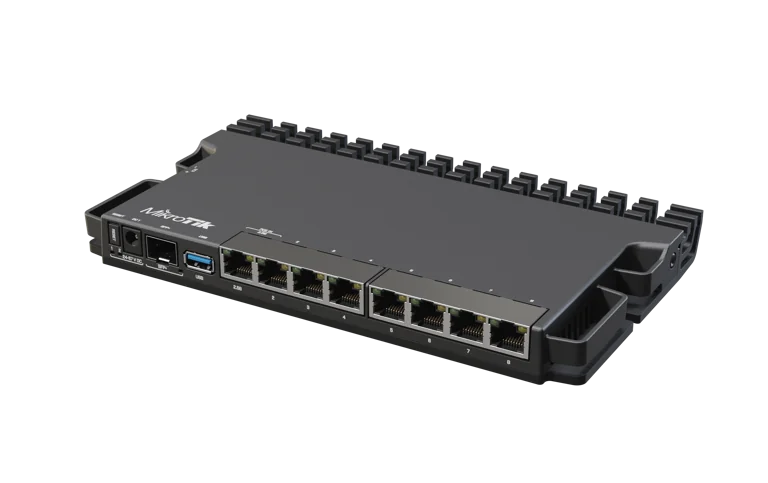
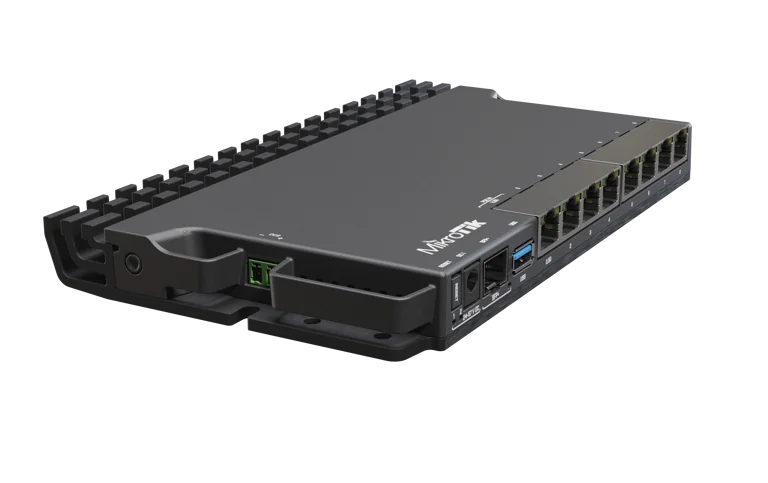
The MikroTik RB5009UG+S+IN is a compact wired router for businesses, advanced home networks, branch offices, and installers who need flexible network control with faster Ethernet connections. It combines 7 × Gigabit Ethernet ports, 1 × 2.5 Gigabit Ethernet port, and 1 × 10G SFP+ port with RouterOS v7.
This combination lets you connect ordinary Gigabit devices while reserving faster interfaces for a suitable internet handoff, managed switch, server, or network backbone. Its compact metal enclosure makes it practical for a desktop installation or a carefully planned equipment cabinet.
The RB5009UG+S+IN is especially useful when a basic router’s settings or interfaces have become restrictive. It provides the tools to organize separate networks, control traffic, establish VPN connections, and manage how devices reach the internet.
This model has no built-in Wi-Fi and no PoE output. Add a separate wireless access point for Wi-Fi and an appropriate PoE switch or injector where powered devices require one.
Quick Buying Summary
· Best suited to: business gateways, advanced home networks, branch offices, and professionally configured installations.
· Wired interfaces: 8 × RJ45 Ethernet ports plus 1 × SFP+ port.
· Faster connectivity: 1 × 2.5G RJ45 interface and 1 × 10G SFP+ interface.
· Software: RouterOS v7 with a Level 5 license.
· Wireless: requires a separate access point.
· PoE: supports PoE input; does not supply PoE output.
· Installation: indoor placement with suitable ventilation and accessible cabling.
· Before ordering: confirm your ISP connection type, required accessories, and whether you need the alternative PoE-output model.
You can review the MikroTik RB5009UG+S+IN purchase page at Reisen when preparing your order and confirming the exact product.

Confirm your requirements with Reisen, then agree the quote and fulfillment arrangements.
Key Specifications
|
Specification |
Details |
|
Product model |
RB5009UG+S+IN |
|
Product type |
Wired Ethernet router |
|
CPU |
Marvell 88F7040 |
|
CPU architecture |
ARM 64-bit |
|
CPU cores |
4 |
|
Nominal CPU frequency |
1.4GHz |
|
RAM |
1GB DDR4 |
|
Storage |
1GB NAND |
|
Gigabit RJ45 ports |
7 |
|
2.5G RJ45 ports |
1 |
|
10G SFP+ ports |
1 |
|
USB |
1 × USB 3.0 Type-A |
|
Operating system |
RouterOS v7 |
|
RouterOS license |
Level 5 |
|
Power-input connections |
DC jack, PoE input, and 2-pin terminal |
|
Built-in Wi-Fi |
No |
|
PoE output |
No |
|
Dimensions |
220 × 125 × 22mm |
|
Cooling |
Passive cooling through the metal enclosure |
Understand the Port Speeds Before You Buy
The router provides 3 interface-speed classes. Most everyday wired devices can use the Gigabit ports, while the faster interfaces support equipment with matching capabilities.

Interface classes only. Routed throughput depends on configuration and workload.
These figures describe interface line rates. They are not guaranteed internet speeds or routed throughput results. Actual performance depends on the internet service, connected equipment, packet sizes, software configuration, firewall processing, and enabled features.
A 10G SFP+ connection can provide a faster physical link to a compatible switch, but it does not make a slower broadband subscription faster. Similarly, the 2.5G port reaches its intended speed only when the equipment and cabling at the other end support that connection.
Why Choose the MikroTik RB5009UG+S+IN?
The RB5009 brings together a useful mix of interfaces and configurable routing software. Rather than replacing every network component at once, you can retain suitable Gigabit equipment and introduce faster connections where they provide a practical benefit.
For example, an office might connect its existing computers through a Gigabit access switch while using the SFP+ interface for the switch uplink. Another installation might use the 2.5G port for an Ethernet internet handoff, leaving the SFP+ port available for the internal network.
The exact assignment is configurable. The faster RJ45 port does not have to remain the WAN interface if your network design benefits from using it elsewhere.
For like-for-like product identification, the RB5009UG+S+IN listing at MikroTik Kenya provides another reference for the same model. Check the complete model code when comparing quotations.
RouterOS Control for Business Networks
RouterOS gives administrators control over addressing, routing, firewall rules, network segmentation, and remote connectivity. This makes the RB5009 attractive when a network needs more than a single shared connection.
A business can plan separate networks for staff, visitors, and connected equipment. Traffic between those networks can then be permitted or restricted according to operational requirements.
The benefit comes from the configuration. Creating different network names alone does not protect business devices: VLAN membership, routing, firewall rules, and access-point settings must work together.
For organizations comparing the same hardware from different suppliers, the RB5009UG+S+IN at Tawa is another exact-model reference. Compare the supplied accessories and service scope without assuming that every quotation includes configuration.
2.5G Ethernet for a Faster Copper Connection
The 2.5G RJ45 interface provides a useful step above Gigabit Ethernet without requiring an optical connection at that interface.
It can suit a compatible ISP handoff, switch, or other Ethernet device. Before assigning it, consider where the network’s actual bottleneck sits. A faster WAN connection offers little advantage if every route to the users passes through an overloaded internal link.
Check negotiated link speed after installation. A port configured for automatic negotiation may connect below its maximum capability if the other device, cable, or termination cannot support the faster link.
For another like-for-like reference, see the MikroTik RB5009UG+S+IN at Orbitlink Solutions. The model code should match the product being supplied.
10G SFP+ for a Compatible Network Backbone
The SFP+ interface gives the RB5009 a high-speed connection option for suitable network equipment.
Depending on the installation, you may use a supported direct-attach cable or compatible optical modules and fiber. The connection must match at both ends, including module support, link speed, optical standard, and fiber requirements.
An SFP+ port does not automatically connect directly to a GPON service. Many fiber internet installations still require the provider’s ONT and approved service configuration. Confirm the ISP’s handoff before buying modules.
A high-speed switch should be selected with verified port and module compatibility. Check the complete connection path rather than choosing an SFP+ accessory solely by connector shape.
Compact Metal Enclosure and Passive Cooling
The metal enclosure helps dissipate heat without a cooling fan. This makes the RB5009 useful in offices and small equipment spaces where fan noise would be undesirable.
Passive cooling still requires airflow. Avoid stacking heat-producing equipment directly against the enclosure, covering it with paperwork, or placing it in a sealed cupboard.
Its small dimensions make cable planning important. Leave room for Ethernet plugs, the power connection, and any SFP+ module or cable. Installation clearance will therefore be greater than the router’s enclosure dimensions alone.
MikroTik offers the optional K-79 mounting arrangement for compatible rack installations. Confirm the mounting accessories required for your layout rather than assuming a complete rack kit is included.
Power Options and PoE Limitations
The RB5009UG+S+IN provides 3 power-input connections: a DC jack, PoE input, and a 2-pin terminal.
For a straightforward installation, the manufacturer-specified power adapter is usually the simplest starting point. Alternative powering arrangements should be checked against the exact device documentation, supply rating, and installation requirements.
PoE input does not mean PoE output. This router can receive power through its designated Ethernet input, but it cannot power an access point or camera from its LAN ports.
If powering attached devices is central to your design, compare the RB5009UPr+S+IN PoE-output version. Confirm the complete power budget and endpoint compatibility before selecting that model.
How the RB5009 Fits into a Network

This model has no built-in Wi-Fi or PoE output. Power access points from a suitable source.
The router manages the connection between networks. A switch provides additional wired connections, and an access point supplies Wi-Fi.
Where you only need more Ethernet sockets on an existing network, a switch may be sufficient. For example, the fiber switching range at Network Switch Kenya is a switching option to assess separately; it does not replace the RB5009’s gateway functions.
Can the RB5009 Be Used with Starlink?
The RB5009 can serve as a downstream router when the Starlink installation provides a suitable Ethernet connection.
The required connection arrangement depends on the Starlink hardware generation. Some systems provide Ethernet directly; others require a matching accessory. Confirm the appropriate connection arrangement for the supplied Starlink generation before planning the link.
Decide whether to retain the upstream router or use a supported bypass arrangement. Keeping 2 routers in sequence can create double NAT, which may complicate some remote-access and inbound-connection requirements.
The RB5009 does not power the Starlink dish. It also cannot remove restrictions imposed by the upstream service, such as carrier-grade NAT. Remote access may require an appropriate VPN design rather than ordinary port forwarding.
Who Should Buy This Router?
Small and medium businesses: useful where staff, guest, and equipment networks need deliberate separation and management.
Advanced home users: suitable for a wired network with separate access points, managed switches, and more demanding configuration requirements.
Branch offices: appropriate where an administrator needs VPN connectivity and defined access policies.
Installers: useful when a compact wired gateway with both 2.5G and SFP+ interfaces fits the project.
Choose equipment according to the workload rather than an unsupported “maximum users” figure. A lightly used network and a busy installation with many queues or encrypted connections place different demands on the router.
If a simpler deployment does not need these faster interfaces, compare the MikroTik L009UiGS-RM. If your priority is managing a UniFi environment through its own gateway ecosystem, consider the Ubiquiti Cloud Gateway Ultra as a different platform choice.
Build an accurate quotation for RB5009UG+S+IN
An accurate quotation starts with the complete product code, quantity, and intended job. Tell Reisen whether this is a new installation, an expansion, or a replacement for equipment already in service. Include the devices it must connect to and any known revision requirements. Ask for accessories and configuration work to be itemized so the product can be compared fairly with another offer. A lower headline amount may describe a different package or omit necessary components. Confirm the current price directly with Reisen; prices shown by other sellers are not a substitute for a quotation covering your actual order.
Check the package before scheduling installation
Confirm the exact contents supplied with the unit or cable order, including any adapter, mounting parts, or termination components that the project needs. Where an accessory is listed as optional, put it on the order rather than assuming it will be in the box. Check the hardware version and relevant labels before work begins, while discrepancies can still be resolved without interrupting service. Keep packaging and purchase records according to the applicable return process. For several sites, identify which equipment belongs to each location so a correct order is not accidentally mixed during deployment.
Agree what a successful handover will include
Write down a short acceptance checklist based on the intended service. It may include a working client connection, correct addressing, an application test, and a clear record of cable or port assignments. Ask for configuration records where the product has settings, or test results where the installation is primarily passive. A power light or visible network name is only a partial check. Where existing equipment is involved, identify who is responsible for faults outside the new product's scope. This avoids confusing a completed supply order with a complete redesign of the customer's wider network.
Protect the working installation during changes
If replacing existing equipment, record the current connections and configuration before disconnecting anything. Schedule work around the users who depend on the service and retain a practical recovery route. Change 1 part of the system at a time where possible, then test the effect before moving to the next change. Keep administrator details and backups secure rather than including passwords in an openly shared worksheet. A documented installation is easier to maintain and helps the owner distinguish a product fault from a changed cable, account, upstream service, or incompatible replacement accessory.
Compare total project value rather than isolated features
The most useful product is the one that meets the actual requirement with a clear installation and support plan. Consider accessories, compatible neighboring equipment, setup time, and future service access alongside the hardware itself. Do not pay for a feature the project cannot use, but do not omit a necessary capability merely to reduce the initial order. If the requirement has changed since the original specification, reassess the whole connection path before buying an identical replacement. A short description of the site and workload helps Reisen recommend a coherent package without relying on unsupported user counts or coverage claims.
Confirm commercial terms before completing payment
Ask Reisen to confirm availability, the quoted package, applicable warranty and return terms, and the agreed collection or delivery arrangements. These details should come from the current transaction rather than assumptions based on an older listing. If installation or remote setup is required, confirm whether it is included and what access or preparation the customer must provide. Keep the final quotation and the equipment model together in the order record. This makes the purchase easier to check on arrival and gives both parties a clear reference if an accessory or service detail needs clarification.
How to Set Up the MikroTik RB5009UG+S+IN
1. Record Your Internet Connection Requirements
Before disconnecting the existing router, obtain the ISP connection details.
Determine whether the service uses DHCP, PPPoE, or static addressing. Also confirm whether an ISP VLAN tag or another specific requirement applies.
Keep a record of the existing configuration and cable destinations so you can restore service if necessary.
2. Connect a Computer on the LAN Side
For a router retaining its factory configuration, connect a computer to a LAN-side Ethernet port, such as ether2, and power the unit using the supplied compatible adapter.
Keep the internet connection disconnected during the initial inspection. This gives you time to verify the configuration and administrator credentials.
3. Access the Router
Try the default management address, 192.168.88.1, from the connected computer.
If IP access is unavailable, use MikroTik WinBox and check whether the router appears in neighbor discovery. Where supported, a MAC connection can help reach the device before its IP configuration is complete.
Use the credentials supplied with the unit or shown on its label. Do not assume every shipped unit has a blank password.
4. Secure the Administrator Account
Set a strong, unique administrator password and give the router an identifiable name.
Review management access and restrict it to trusted networks. Avoid exposing management services directly to the internet.
If the router already contains configuration, save a backup before making changes.
5. Inspect the WAN and LAN Configuration
Confirm which interface is assigned to the internet connection and which ports belong to the LAN bridge.
The WAN interface must remain separate from the ordinary LAN bridge. Accidentally bridging the ISP connection into the internal network can cause addressing and security problems.
Retaining a suitable factory firewall is usually safer than deleting all configuration before understanding its purpose.
6. Configure the ISP Connection
For DHCP service, configure or verify the DHCP client on the intended WAN interface.
For PPPoE, enter the provider’s credentials on the appropriate interface. For static service, apply the supplied address, prefix, gateway, and DNS settings.
If the ISP requires a VLAN, configure it according to the provider’s instructions before expecting the service to connect.
7. Check LAN Addressing and DHCP
Choose a LAN subnet that does not conflict with the upstream network or another site you intend to reach through a VPN.
Verify the bridge address, DHCP pool, gateway, and DNS information supplied to clients. Reconnect the computer if addressing changes.
Check that ordinary clients receive addresses from the intended DHCP server.
8. Verify Firewall and NAT Rules
Review both traffic directed at the router and traffic passing through it.
Where internet access requires source NAT, confirm that the rule applies to the correct outbound interface. Keep management access restricted and preserve appropriate connection-tracking rules.
If enabling IPv6, configure its addressing and firewall deliberately as well.
9. Update RouterOS
Once basic connectivity is working, check the appropriate RouterOS update channel and review the release information.
Use a stable power source during the update and plan a maintenance window for a production installation. Afterward, confirm that the router and connected clients still operate correctly.
10. Add VLANs and Wireless Access Points
Plan VLAN IDs, subnets, trunk links, and access ports before enabling filtering.
Configure the connected switch and access points consistently. Define firewall rules governing traffic between networks.
Use a recovery method such as WinBox Safe Mode when making changes that could interrupt management access.
11. Test and Save the Installation
Check internet access, DNS resolution, negotiated port speeds, and any VPN or segmentation requirements.
Test from an ordinary client as well as from the router. Save a backup and an export securely, record cable assignments, and document the final configuration.
Advantages
· Flexible interface mix: combines Gigabit access with 2.5G and SFP+ connectivity.
· Compact installation: fits smaller workspaces and equipment areas.
· Passive cooling: avoids fan noise.
· Configurable software: supports detailed control over network behavior.
· Separate wireless design: allows access points to be positioned where coverage is needed.
· Expansion options: can connect to suitable switches without replacing the gateway immediately.
For buyers who need more physical Gigabit connections in a different enclosure format, compare the MikroTik RB4011iGS+RM against the actual port layout and workload.
Disadvantages and Purchase Considerations
· No built-in Wi-Fi: an additional access point is required.
· No PoE output: powered endpoints need another suitable power source.
· Configuration requires care: advanced features are valuable only when implemented correctly.
· SFP+ accessories add cost: modules, fiber, or direct-attach cables may be separate purchases.
· Only 1 SFP+ interface: a design needing several high-speed links may require an additional switch.
· Interface speed is not a throughput guarantee: routing and security workloads affect results.
For fiber-heavy routing projects, a MikroTik CCR2004-1G-12S+2XS represents a different interface class to evaluate rather than assuming 1 SFP+ port will suit every deployment.
What Is Included and What Else Might You Need?
MikroTik’s documentation lists a 24V 1.5A adapter, a fastening set, and adhesive pads among the standard accessories. Confirm the actual supplied package and local plug arrangement when ordering.
Depending on the installation, you may also need:
· Ethernet patch cables and structured cabling.
· A wireless access point.
· A suitable PoE switch or injector.
· Compatible SFP+ modules, fiber, or a direct-attach cable.
· Optional rack-mount accessories.
· Backup power covering the router and other essential network equipment.
The included RouterOS license does not replace an internet subscription. Configuration services, third-party systems, and additional accessories should be itemized separately in the quotation.
Frequently Asked Questions
Does the RB5009UG+S+IN provide Wi-Fi?
No. Connect a separate access point to provide wireless coverage.
Can it power cameras or access points?
This model has no PoE output. Use a compatible PoE switch, injector, or a different router model designed for that requirement.
Is the 2.5G port only for internet?
No. Its role depends on the configuration. It can be assigned where the network benefits from the faster copper connection.
Will the 10G port give me 10Gbps internet?
Only a suitable service and complete network design could support that result. The port’s nominal speed does not establish the router’s throughput under every configuration.
Can it connect directly to my fiber provider?
Confirm the provider’s handoff. A standard SFP+ port alone does not establish compatibility with GPON or another access-network technology.
Does it require a cloud controller?
Basic RouterOS administration does not require purchasing a separate cloud controller. Management access must still be configured securely.
Is it suitable for a beginner?
A basic installation can be manageable, but VLANs, VPNs, multiple WANs, and advanced firewall policies benefit from experienced configuration.
Order the MikroTik RB5009UG+S+IN from Reisen
Choose the RB5009UG+S+IN when your network needs a compact wired gateway with RouterOS control, 2.5G Ethernet, and a 10G SFP+ connection option.
For an accurate quotation, provide your ISP connection type, required Wi-Fi coverage, switch connections, VPN needs, and any mounting or backup-power requirements. Confirm the current Reisen price, supplied accessories, configuration scope, warranty terms, and delivery arrangements before completing the order.
Compare the Complete Gateway Requirement
For a different wired interface layout, compare the MikroTik RB4011iGS+RM. For a smaller MikroTik gateway role, assess the hEX S. These alternatives are different hardware platforms; select them only after checking the required interfaces, workload, and configuration.
Build a Compatible System with Reisen
Consider Reisen’s RDCOM Cat6 cable for correctly specified permanent Ethernet runs. Check the required interface, power source, and configuration before adding it to the order.
Consider Reisen’s 8-port Gigabit switch for a small access layer. Include the extra patch leads and installation work if this component is part of the project.
Consider Reisen’s 16-port Gigabit switch for more wired endpoints. Review its separate specifications against the intended workload and the neighboring equipment.
Consider Reisen’s 24-port Gigabit switch for a larger non-PoE shared LAN. A compatible connection requires more than a similar connector or matching brand name.
Consider Reisen’s EAP115 access point for a defined indoor wireless role. Confirm where it sits in the network so the quotation covers its actual role.
Consider Reisen’s TL-WA801ND access point for another N300 application. Check the required interface, power source, and configuration before adding it to the order.
Consider Reisen’s MC210CS converter only where its fixed optical Ethernet interface matches the designed link. Include the extra patch leads and installation work if this component is part of the project.
Browse the relevant Reisen product category to assess the rest of the installation, and use the Reisen shop to prepare a combined order. Keep the RB5009UG+S+IN model code in your request so accessories, revision details, and setup work can be confirmed together.
Ask Reisen to confirm the exact package and configuration scope before payment.
Additional information
| Product | MikroTik RB5009UG+S+IN Price in Kenya |
|---|---|
| Category | Mikrotik |
| Price | KES 29,000.00 |
| Availability | In stock |
Keep exploringMore in Mikrotik
Related products