Save 20%
Select an image to view it. Click the main image to enlarge.
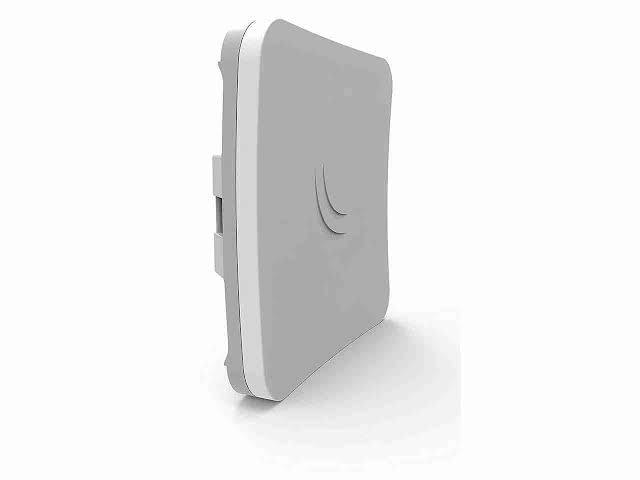
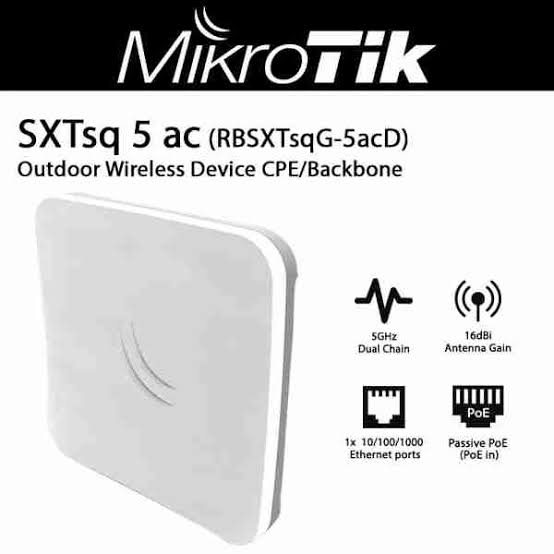
Mikrotik SXT SQ 5AC RBSXTSQG-5ACD Priced in Kenya
In stock
KES 7,000.00
KES 8,700.00
You save KES 1,700.00
Buy MikroTik SXTsq 5 ac RBSXTsqG-5acD in Kenya at Reisen SEO. Connect buildings with a compact 5GHz outdoor radio and Gigabit Ethernet.
View product detailsNeed help choosing?
Talk to our team at +254 714 804 532
Product details
MikroTik SXTsq 5 ac RBSXTsqG-5acD Price in Kenya
MikroTik SXTsq 5 ac RBSXTsqG-5acD is an outdoor MikroTik radio for a supported network link. Use it where the surveyed path, antenna arrangement, far-end radio, license, and power design fit the job. It carries a planned network connection rather than creating an internet subscription or replacing a normal indoor access point for every client.
Request a current RBSXTsqG-5acD quotation from Reisen. Confirm the exact model, quantity, package, taxes, warranty, and delivery terms. Include any supporting parts and installation work so the quoted price matches the complete job rather than the main item alone.

Choose the exact model, confirm the quote, then agree payment and fulfillment.
Key Specifications
|
Feature |
Details |
|
Model or range |
RBSXTsqG-5acD |
|
Wireless |
5GHz 802.11a/n/ac, 2 chains |
|
Antenna |
16dBi integrated directional antenna |
|
Ethernet |
1 × 10/100/1000Mbps RJ45 |
|
Maximum wireless PHY rate |
867Mbps; not guaranteed user throughput |
|
CPU and memory |
4-core IPQ4018; 256MB RAM; 16MB flash |
|
Software license |
RouterOS Level 3; station/CPE role |
|
Power input |
10–28V passive PoE |
|
Maximum consumption |
7W |
|
Enclosure |
IP55; correct outdoor installation required |
An integrated 16dBi ac station with a Level 3 license
The SXTsq 5 ac combines a 16dBi directional antenna with a 5GHz ac radio and 1 Gigabit Ethernet port. That makes a compact outdoor station format without a separately selected RF antenna. The important license detail is RouterOS Level 3. Build a supported CPE or station arrangement with a suitably licensed compatible access point rather than assuming 2 units create an unrestricted AP-to-client pair. Its 867Mbps maximum PHY rate is not an end-to-end speed guarantee. The path, peer, spectrum, and configuration decide usable results. Power it only through an approved passive PoE path within its stated input range. The IP55 enclosure still needs correct cable entry, mounting, and protection. This model is distinct from SXTsq Lite5 and newer ax products, so keep the full RBSXTsqG-5acD code on the order.
Compatibility

Check the exact model and the full installation before connecting equipment.
Match the complete installation, including the physical connection, power, software, and intended role. Similar names or connectors do not prove compatibility.

Conceptual data path. Each active end needs supported radios, correct roles and approved local power.
Build an outdoor link around a clear role
A MikroTik outdoor radio can connect a remote location to a planned network without a continuous data cable between the buildings. It still needs a working source network, a compatible far-end radio, and approved power at each active end. Define whether this device is a station, an access point, or another supported role before choosing settings. RouterOS license and hardware limits matter as much as the frequency printed on the case.
Start with the service you need to carry. A remote office, a small subscriber connection, and a shared sector have different demands. Record the number of users and the applications they use during the busy period. Then check the path and supported radio arrangement. A radio cannot repair an unreliable internet service upstream, and its maximum link rate is not a promise of end-user speed.
Match the radio family and license
The SXTsq 5 ac and BaseBox 5 are different products. The SXTsq 5 ac uses an integrated directional antenna and an ac radio with a Level 3 license. It is suited to a supported station or CPE role. The BaseBox 5 uses an older 802.11a/n radio, external antenna connections, and a Level 4 license. Its outdoor AP possibilities require a suitable antenna and a planned supported client system.
Do not assume that 2 units using 5GHz will pair in every mode. Radio protocol, security, channel width, firmware, country settings, and license must all permit the intended link. Proprietary airMAX, Nv2, and other radio modes are not interchangeable just because the band is shared. For a new installation, select and test the complete supported pair before mounting either end high above the ground.
Start with RBSXTsqG-5acD model listing and different MikroTik antenna and radio format. Check the exact radio, antenna arrangement, license, and supported peer. A different wireless family may require a complete matched system.
Survey more than a visible straight line
Look at the actual path from each mounting position. Buildings, trees, roof edges, and moving obstacles can affect it. The radio path needs clearance around the direct line, known as the Fresnel zone. A narrow visible gap is not always a good link. Trees can also grow or become wet, changing a route that looked clear during the first visit.
Use suitable planning tools and an installer who can assess the route. Account for mounting height, distance, background noise, and legal operating limits. Do not select a fixed range from an advertisement and treat it as a guarantee. Keep notes and photographs of the intended mounting positions so the installation team and the owner agree on what has been surveyed.
Choose the antenna arrangement on purpose
An integrated antenna keeps the radio and antenna in one compact assembly. This reduces separate RF parts, but its pattern and gain are fixed by the model. Aim it at the intended far end. It is not an all-around room access point. A compact case still needs firm mounting and a clear view through the planned outdoor path.
A connectorized radio needs a compatible external antenna. Match the frequency, polarization arrangement, RF connector type, cable, and mounting system. Antenna gain belongs to the chosen antenna, not the bare BaseBox case. A sector and a dish serve different patterns. Include the correct parts and weather sealing in the quote instead of leaving the antenna as an unexplained extra at installation time.
For other MikroTik outdoor formats, compare MikroTik DISC Lite5 ac comparison and MikroTik LHG 5 ac comparison. Gain, antenna pattern, protocol, and installation clearance matter more than a shared band name.
Read speed figures without confusing the layers
Wireless PHY rate is the radio signaling rate. Useful data throughput is lower because airtime is shared with acknowledgments, control traffic, and protocol overhead. Signal quality and the supported peer also affect the usable result. The wired Ethernet rate is another limit. A Gigabit port avoids a 100Mbps interface cap, but it cannot guarantee a Gigabit wireless service.
Test a realistic traffic mix between suitable wired hosts at both ends. A local test helps separate the radio path from an internet provider limit. Also watch latency and packet loss while the link is busy. A high single speed figure can hide poor response time. The service should be judged by the applications the remote site will actually use.
Use channels that fit the site and country
Select the correct country and legal operating mode. Allowed channels, transmit power, antenna gain entries, and DFS behavior depend on the location and supported software. Do not use a different country merely to expose extra power or frequencies. The installer should follow the applicable operating rules and the exact device guide.
Survey nearby activity before choosing a channel width. A wider channel can use more spectrum and collect more interference. A narrower channel may suit a noisy path better even though its maximum headline rate is lower. Test the complete link after each controlled change. Keep a baseline so later noise or alignment problems can be compared with the original healthy readings.
Integrated alternatives include PowerBeam AC Gen2 system alternative and NanoStation Loco5AC system alternative. These are different systems, not guaranteed drop-in peers for the radio described here. Verify both ends before mixing equipment.
Power the radio through the correct path
Both models use passive PoE, but their accepted voltage ranges differ. Check the exact model and supplied injector. Match voltage, polarity, pinout, current, and Ethernet support before applying power. A cable labeled PoE does not identify one universal electrical standard. Do not plug a passive power output into an ordinary laptop or an endpoint that was not designed for it.
Use sound outdoor cable and suitable connectors. Cable length and conductor quality can affect voltage at the radio under load. A weak supply may let the unit start and then reset as demand rises. Keep the indoor adapter dry and supported. Label the injector's LAN and powered output so future service does not send power toward the wrong device.
Protect the outdoor cable route
Use cable intended for the outdoor environment and follow the radio maker's shielding and grounding guidance. Protect entries from water and strain. A drip loop helps keep running water from following the cable into the equipment or building. Follow the supplied sealing method rather than wrapping every opening with an improvised material that traps moisture.
Plan grounding and surge protection with the site installation. An outdoor case rating does not make the Ethernet route immune to surge events. A protector needs the correct ground path and placement to perform its intended role. It is not a guarantee against direct lightning. Have elevated mounting and electrical work handled by people equipped for those tasks.
Keep management reachable and private
Assign a documented management address that fits the site plan. Avoid using the same address at both ends. Keep administrator access on a trusted path and use strong unique credentials. Restrict unnecessary management services where supported. The remote radio should not expose its control interface to the whole internet merely because its data link carries internet traffic.
Before an update, check the exact model, processor architecture, installed packages, and supported release. SXTsq and BaseBox are not the same architecture. Save a backup and a readable record of important settings. Do not load a firmware image or wireless driver chosen for another product because its name looks similar. Test a planned update while local recovery is still possible.
For a sector-style network, review LiteAP 120 sector alternative and LiteAP GPS sector alternative. A sector layout serves a different coverage pattern from a directional building link and needs compatible clients.
Decide between bridging and routing
A transparent Layer 2 link and a routed link need different configurations. The supported wireless mode must also handle the intended Ethernet behavior. Some station arrangements do not act like an unlimited transparent multi-device bridge without a suitable matching mode at the access point. Verify the actual RouterOS design instead of assuming that selecting station carries every remote MAC address as intended.
For a routed remote site, plan separate subnets, routes, and address services. For a supported bridged segment, prevent duplicate DHCP servers and accidental loops. Keep the design clear for the owner. When a link fails, the technician should know whether to check wireless registration, a route, or the LAN bridge before changing unrelated settings.
Align using measured results
Start with a safe bench test and known settings. After mounting, aim both ends in small steps and observe signal, chain balance, error rates, and real traffic. A strong-looking signal alone does not show that the link is clean. Reflections or interference can still cause retries. Secure the mount after final alignment and recheck because tightening can move the aim.
Save the final readings and test time. Note the normal workload used for the check. Later changes in signal, errors, or latency become easier to explain when there is a baseline. A loose pole, new tree growth, damaged cable, and a noisy new neighbor produce different patterns. Good records reduce the urge to reset the radio every time a client reports slow access.
Budget the complete installation
The radio is one part of the purchase. The finished link may need a peer radio, antenna, mounting brackets, outdoor cable, grounding parts, surge protection, power, and configuration work. A remote building may also need a local switch and a client access point. Put these in one clear list so the quoted price matches a working service rather than a bare unit.
Ask for the exact included package and current condition before payment. Outdoor radios from earlier product generations may be offered in different regional or package versions. Check support and available software for the supplied hardware. Keep the invoice and labels. A correctly matched older radio can serve a defined task, while a newer wireless generation may be the better choice for a new high-capacity network.
The complete installation can also involve managed switches for the local LAN and Starlink Kenya Installers. Keep the upstream internet service, local switch, outdoor radio transport, and endpoint power as separate parts of one supported network.
Quick Brand Comparison
|
Outdoor system |
Main distinction |
|
MikroTik SXTsq 5 ac |
Integrated ac CPE; Level 3 station role |
|
MikroTik BaseBox 5 |
External antenna; a/n radio; Level 4 |
|
Ubiquiti Rocket Prism 5AC Gen2 |
airMAX AC, external antenna, airPrism and GPS |
|
Integrated airMAX AC radio |
Fixed antenna pattern and supported airMAX peers |
Compare the installed role and complete package. A different model can change the support parts, management, power, or service needed. Keep the equipment that already works in the comparison and identify the specific limit the new purchase should solve.
Can It Work in a Starlink-fed Network?
It can form part of a suitable downstream Ethernet network supplied by Starlink. The Starlink hardware must provide the appropriate Ethernet handoff to the intended gateway or local network. This product does not talk directly to satellites or replace the dish. Keep its approved power separate from proprietary dish-power connections. The provider plan, gateway policy, and local equipment capacity still affect the final service.
How to Set Up RBSXTsqG-5acD
1. Survey and choose roles
Check distance, line of sight, Fresnel clearance, mounting access, and interference. Select a supported peer and wireless mode. For the SXTsq 5 ac, keep the Level 3 station/CPE role in the design. For the BaseBox, choose a matched external antenna and supported AP or station configuration.
2. Check the complete power kit
Read the exact radio and injector labels. SXTsq 5 ac accepts 10–28V passive PoE; BaseBox 5 accepts 8–30V passive PoE. Match the approved voltage, wiring, polarity, and current. Keep the LAN and powered outputs clearly identified and use suitable cable at both ends.
3. Configure locally before mounting
Bench-test the radio and supported peer. Use the current guide for initial local access and credentials. Set unique management addresses and strong passwords. Save the starting configuration. Check the exact architecture and supported software before loading any update or changing wireless packages.
4. Set the legal radio configuration
Select the correct country and allowed operating settings. Match channel width, supported protocol, security, and SSID to the far end. Enter the correct antenna gain where required. Use the appropriate license and mode rather than copying an AP configuration into a station-only deployment.
5. Build the data handoff
Choose a supported bridge or routed design for the required remote clients. Assign VLANs, addressing, and DHCP ownership intentionally. Test more than one remote device when the job needs a multi-device LAN. Keep management reachable through the final arrangement before removing the bench cables.
6. Install and protect the route
Use a firm suitable mount and the maker-approved antenna arrangement. Follow outdoor cable, sealing, grounding, and surge protection instructions. Keep RF connectors protected and use a controlled drip loop. Elevated work and grounding need a competent installer with safe access to the site.
7. Align and verify traffic
Move the aim in small steps while observing both signal chains and errors. Tighten the mount and check again. Test local traffic, latency, packet loss, and a normal application across the completed link. Check Ethernet negotiation and supply stability before blaming the wireless settings for every slowdown.
8. Save the operating baseline
Record the final channel, legal settings, software, signal readings, port rate, and test results. Keep backups and a labeled route diagram. Explain that client Wi-Fi at the remote room may need a separate access point. Recheck mounting and cabling during planned service or after severe weather.
Advantages
· Supports a planned outdoor Ethernet network link.
· Provides RouterOS controls for a compatible radio design.
· Includes a Gigabit Ethernet handoff.
· Offers integrated or external antenna formats depending on model.
Disadvantages and Limits
· License, radio generation, and antenna roles differ by model.
· Requires a supported peer and clear surveyed path.
· Passive PoE needs exact electrical matching.
· Mounts, protection, cabling, and setup add to the finished cost.
Troubleshooting
Separate Ethernet, radio, power, and provider faults. Compare current signal and errors with the saved baseline. Check passive supply labels, cable condition, water entry, and mounting before changing channels. If radio registration is healthy but clients fail, inspect the bridge or routes and DHCP plan. A reset is not a substitute for finding the failing layer.
Frequently Asked Questions
Will any 5GHz radio pair with it?
No. Both ends need compatible protocols, modes, channel settings, security, firmware, and licenses. A shared 5GHz label does not make airMAX and MikroTik proprietary modes interchangeable. Plan and bench-test a supported pair before committing to the elevated outdoor installation.
Does it include an antenna?
The SXTsq 5 ac has a 16dBi integrated directional antenna. The BaseBox 5 has 2 RP-SMA connections and requires a matched external antenna. Keep those models distinct. Confirm the package and any separate antenna, RF cable, mount, and weather-sealing parts before payment.
Can 2 SXTsq units be treated as a normal AP pair?
Do not assume an unrestricted access point role from the Level 3 license. Design the SXTsq as a supported station/CPE and provide an appropriately licensed compatible far end for the chosen setup. Verify the actual mode, license, and required Layer 2 behavior before purchase.
Is BaseBox 5 an ac radio?
No. This BaseBox 5 code uses a 5GHz 802.11a/n N300 radio. Its Gigabit Ethernet port does not change its wireless generation. The SXTsq 5 ac is a different ac model. Compare the supported peers and real throughput needs rather than combining the names.
Can I use any PoE injector?
No. Match the exact accepted passive PoE voltage range, pinout, polarity, current, and data support. SXTsq 5 ac and BaseBox 5 have different input ranges. A standard PoE label or matching RJ45 connector does not prove electrical compatibility. Follow the model guide and supplied injector label.
What distance does it guarantee?
There is no fixed distance guarantee for every site. Path clearance, noise, legal power, antenna choice, mounting, and the peer all matter. Survey the route and test real traffic. A clear visual line alone may not provide adequate Fresnel-zone clearance or acceptable performance.
Does it provide ordinary room Wi-Fi at the remote end?
Its planned outdoor transport role is different from client coverage inside a room. Use an appropriate local access point when the remote users need indoor Wi-Fi. Keep the radio handoff, local switch, address plan, and client wireless coverage as separate parts of the working setup.
What should a complete link quote include?
Include the exact radio and far end, path details, antenna where needed, mounts, outdoor cable, approved power, grounding, surge protection, configuration, and testing. Add any remote LAN switch or access point. Confirm stock, package, warranty, and installation responsibilities with Reisen before placing the order.
Why Shop with Reisen
Reisen brings equipment and supporting accessories into one catalogue, which helps you plan the complete purchase. Ask the team to confirm the exact model, package, current stock, and installation scope before payment. A written bill of materials makes missing parts easier to spot. It also gives everyone a clear record of what the order should include.
Share the equipment already in use and the result the site needs. This makes questions about fit, service, power, and setup easier to answer. Confirm the current warranty, delivery, return, and technical support terms in writing. Keep those terms with the invoice rather than relying on a general statement copied from another product.
Complete the Setup with Reisen
For a separate desk calling requirement, read ZT1800G GSM Fixed Wireless Telephone. Match that product to its own service, interfaces, power, and software. It fills a different or separately verified role rather than being an automatic substitute.
For a MikroTik outdoor link format, compare MikroTik BaseBox 5 RB912UAG-5HPnD-OUT. Match that product to its own service, interfaces, power, and software. It fills a different or separately verified role rather than being an automatic substitute.
For a light indoor RouterOS access role, review MikroTik hAP lite RB941-2nD. Match that product to its own service, interfaces, power, and software. It fills a different or separately verified role rather than being an automatic substitute.
For a light indoor RouterOS access role, review MikroTik hAP lite TC RB941-2nD-TC. Match that product to its own service, interfaces, power, and software. It fills a different or separately verified role rather than being an automatic substitute.
For a wired gateway with a different lifecycle and capacity, examine MikroTik CCR1009-7G-1C-1S+PC Cloud Core Router. Match that product to its own service, interfaces, power, and software. It fills a different or separately verified role rather than being an automatic substitute.
For a separate airMAX AC outdoor platform, explore Ubiquiti airMAX Rocket Prism 5AC Gen2. Match that product to its own service, interfaces, power, and software. It fills a different or separately verified role rather than being an automatic substitute.
For a planned equipment enclosure, review 22U Data Cabinets Networking Racks 600mm × 1000mm. Check the device support, usable depth, cable clearance, heat load, and room access against the actual cabinet drawing.
Browse the Reisen equipment shop for supporting parts. Keep one bill of materials so the main product, accessories, installation work, and service can be checked together before the order is placed.
Contact Reisen sales and support with the exact model, quantity, delivery area, and existing equipment. Ask for the current package, stock, taxes, warranty, and support terms in writing so the final quotation is clear.
Order the Right Package
Send the full product name, model, quantity, delivery location, and target installation date. List the parts already available and ask which compatible accessories are still needed. Confirm the current quote and stock, then agree the payment and collection or delivery process. Keep the quotation and model labels together so the delivered goods can be checked against the order.
Before installation, make sure the site and supporting equipment are ready for the agreed work. Test the completed setup at handover and save its layout or settings where relevant. A useful purchase connects the selected hardware with the actual service, safe installation, and clear ownership needed to keep it working.
Additional information
| Product | Mikrotik SXT SQ 5AC RBSXTSQG-5ACD Priced in Kenya |
|---|---|
| Category | Mikrotik |
| Price | KES 7,000.00 |
| Availability | In stock |
Keep exploringMore in Mikrotik
Related products