Save 3%
Select an image to view it. Click the main image to enlarge.
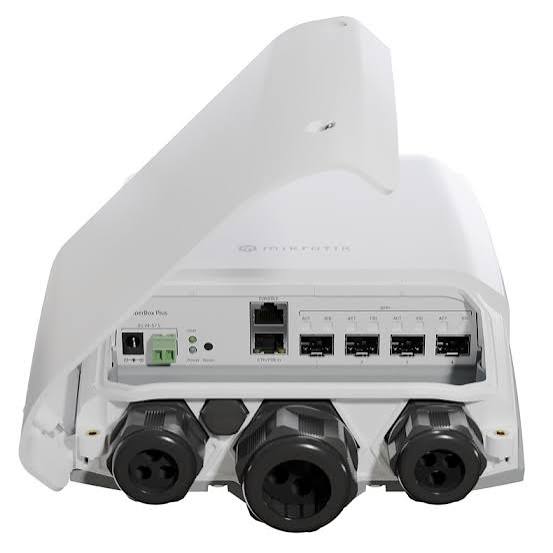
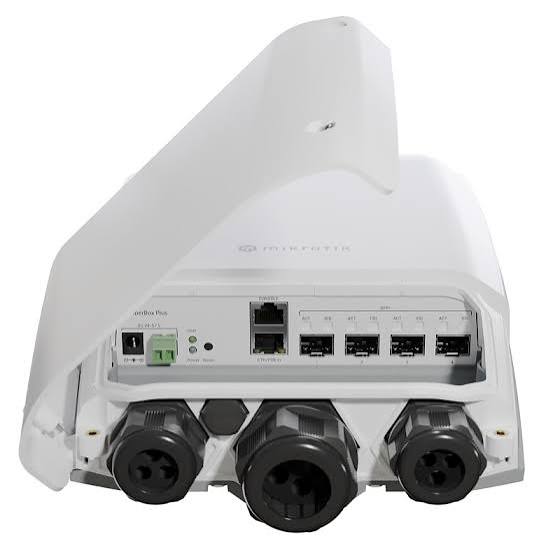
MikroTik CRS305-1G-4S+OUT Price in Kenya
In stock
KES 33,000.00
KES 34,000.00
You save KES 1,000.00
Buy MikroTik FiberBox Plus CRS305-1G-4S+OUT in Kenya. Check verified features, installation fit, compatibility and available accessories at Reisen SEO.
View product detailsNeed help choosing?
Talk to our team at +254 714 804 532
Product details
MikroTik FiberBox Plus CRS305-1G-4S+OUT
Product Overview
The MikroTik FiberBox Plus CRS305-1G-4S+OUT is a wired Ethernet switch for interconnecting compatible network devices. For Kenyan ICT teams, its value begins with expanding appropriate physical network ports without confusing switching, routing and internet service. This listing addresses the product named in the Reisen SEO inventory, not an assumed alternate model or silently upgraded configuration. Before approving a bulk order, the buyer should confirm the exact marking on the supplied unit and reconcile the technical specifications with any manufacturer revision or accessory package.
Choosing the right MikroTik FiberBox Plus CRS305-1G-4S+OUT requires attention to the actual installation rather than a headline specification alone. Switching capacity, port speed and support for optical transceivers or power delivery must be evaluated separately. A label that includes Gigabit does not necessarily mean that every port supplies PoE or that a switch can perform router functions. In practice, a reliable purchase is one where the physical product, connections, environmental conditions, labor plan and testing method agree with the job. The information below separates confirmed manufacturer evidence from attributes that the catalog name cannot establish.
This Reisen SEO listing is identified by the catalog name “MikroTik CRS305-1G-4S+OUT.” Buyer decisions should begin with the functional role and exact identity of the product. Pricing, stock availability, taxes and delivery terms must be confirmed at checkout, and a network design should not be changed simply to match a temporary stock picture or marketing headline.
Key Buying Benefits
• SFP+ transceivers and fiber jumpers need to be selected separately. Match the item supplied to the actual network or worksite requirement; do not generalize its capability from a similarly named model.
• The unit is an active Ethernet switch, not a passive fiber termination box. Match the item supplied to the actual network or worksite requirement; do not generalize its capability from a similarly named model.
• Compatible optical modules require matching speed, wavelength and reach at both ends. Match the item supplied to the actual network or worksite requirement; do not generalize its capability from a similarly named model.

MikroTik FiberBox Plus CRS305-1G-4S+OUT: verified attributes are separated from checks still requiring an exact variant or supplier packing list.
Product Features and Technical Design
The central design requirement of the MikroTik FiberBox Plus CRS305-1G-4S+OUT is to perform its intended role without introducing a new point of incompatibility. Before inserting a switch into an existing LAN, map the uplink, address plan, VLAN requirements, power source and failure domains. Unmanaged devices have different operational controls than managed switching platforms, and transceiver-based links require matching optical specifications. A complete specification must address the exact item, its input and output connections, any active power requirements and the medium or material with which the item will operate. These factors frequently matter more to network reliability than the marketing category alone.
Part number: CRS305-1G-4S+OUT. The buyer should verify this attribute against the delivered label, the approved design and any applicable revision-specific technical data.
Fiber interfaces: Four 10G SFP+ cages. The buyer should verify this attribute against the delivered label, the approved design and any applicable revision-specific technical data.
Copper Ethernet: One 10/100/1000 port. The buyer should verify this attribute against the delivered label, the approved design and any applicable revision-specific technical data.
Software: RouterOS v7 / SwOS dual boot. The buyer should verify this attribute against the delivered label, the approved design and any applicable revision-specific technical data.
RAM: 256 MB. The buyer should verify this attribute against the delivered label, the approved design and any applicable revision-specific technical data.
Enclosure protection: IP66. The buyer should verify this attribute against the delivered label, the approved design and any applicable revision-specific technical data.
Power inputs: PoE-in, DC jack, 2-pin terminal. The buyer should verify this attribute against the delivered label, the approved design and any applicable revision-specific technical data.
Voltage: 24–57V DC for jack/terminal; PoE 42–57V. The buyer should verify this attribute against the delivered label, the approved design and any applicable revision-specific technical data.
Maximum consumption: 17 W per official specification. The buyer should verify this attribute against the delivered label, the approved design and any applicable revision-specific technical data.
Practical Engineering Considerations
A switching design begins with a clear topology. Identify the upstream gateway, number of endpoints, VLAN needs and any optical backbone handoff. The label Gigabit ordinarily describes an Ethernet interface class, not a promise of end-to-end application bandwidth. Users can encounter bottlenecks in the router, internet subscription, slow endpoint port, patch cord or upstream link. An unmanaged desktop model and a RouterOS-capable fiber switch meet different operational needs, even where both have Ethernet ports.
Fiber interfaces require additional care. A physical SFP or SFP+ cage cannot carry data until a suitable approved optical or copper module is fitted, with matching wavelength, strand count, interface speed and fiber type at the far end. A bidirectional optic is not interchangeable with an arbitrary duplex pair. Clean the optical ends and document both transceiver labels; trouble tickets become much simpler when the link budget and each port assignment are recorded from the start.
Power and environment are independent checks. A unit may accept PoE-in yet supply no PoE-out for access points or cameras. An indoor switch should not be mounted in an exposed position without an appropriate, manufacturer-approved housing, while a ruggedized outdoor switch still needs correct glands, earth arrangements and cable practices. Allow airflow as directed and avoid crowding power adapters in wet or inaccessible spaces. These practical details often determine reliability more than a marketing switching-capacity figure.
Commissioning should prove normal traffic can travel in both directions at the intended speed. Verify the uplink, each endpoint, VLAN policy where available, and the absence of an accidental network loop. For managed platforms, document administrator access, software version, secure management and backups. For unmanaged platforms, label the cables and keep topology notes; the product may not expose the same troubleshooting interfaces as a managed switch.
Where to Use the Product
1. Outdoor isp aggregation points. A well-planned deployment starts with a site survey and the required system role. For outdoor ISP aggregation points, the installer should establish capacity, environment, service access and a practical way to inspect the finished installation. The MikroTik FiberBox Plus CRS305-1G-4S+OUT may be appropriate when its exact documented features match that environment. It is not a universal recommendation for every building, campus, cable type or provider network.
2. Tower and mast fiber distribution. A well-planned deployment starts with a site survey and the required system role. For tower and mast fiber distribution, the installer should establish capacity, environment, service access and a practical way to inspect the finished installation. The MikroTik FiberBox Plus CRS305-1G-4S+OUT may be appropriate when its exact documented features match that environment. It is not a universal recommendation for every building, campus, cable type or provider network.
3. Multi-building ethernet backbones. A well-planned deployment starts with a site survey and the required system role. For multi-building Ethernet backbones, the installer should establish capacity, environment, service access and a practical way to inspect the finished installation. The MikroTik FiberBox Plus CRS305-1G-4S+OUT may be appropriate when its exact documented features match that environment. It is not a universal recommendation for every building, campus, cable type or provider network.

Three application scenarios for the MikroTik FiberBox Plus CRS305-1G-4S+OUT; each requires a site-specific compatibility check.
Compatibility and What to Verify
Product compatibility is a series of independent checks. Switching capacity, port speed and support for optical transceivers or power delivery must be evaluated separately. A label that includes Gigabit does not necessarily mean that every port supplies PoE or that a switch can perform router functions. If one critical interface or physical property is missing from the supplier data, a buyer should mark it as unresolved rather than borrowing a measurement or certification from a superficially similar item. This is particularly important when replacing an installed component with a different brand or revision.
Buying check — Plan each SFP+ link and module pair. Obtain practical evidence such as the printed part number, official installation sheet, port photograph or documented test result. Record the answer on the purchase order. A successful system design should still work when inspected by the next technician who did not originally buy the equipment.
Buying check — Budget DC or PoE-in power correctly. Obtain practical evidence such as the printed part number, official installation sheet, port photograph or documented test result. Record the answer on the purchase order. A successful system design should still work when inspected by the next technician who did not originally buy the equipment.
Buying check — Use suitable enclosure seals and mounting. Obtain practical evidence such as the printed part number, official installation sheet, port photograph or documented test result. Record the answer on the purchase order. A successful system design should still work when inspected by the next technician who did not originally buy the equipment.
Buying check — Select RouterOS or SwOS administration. Obtain practical evidence such as the printed part number, official installation sheet, port photograph or documented test result. Record the answer on the purchase order. A successful system design should still work when inspected by the next technician who did not originally buy the equipment.

MikroTik FiberBox Plus CRS305-1G-4S+OUT: four decisions to resolve before a compatible configuration can be promised.

Compatibility matrix: every row is a check tied to this product, not a generic guarantee.
How to Install and Use the MikroTik FiberBox Plus CRS305-1G-4S+OUT
A Step by Step Guide to Installing and Using the MikroTik FiberBox Plus CRS305-1G-4S+OUT
The following workflow is a general field checklist for a trained technician. It is not a substitute for the missing exact-SKU manual where one has not been identified. Before inserting a switch into an existing LAN, map the uplink, address plan, VLAN requirements, power source and failure domains. Unmanaged devices have different operational controls than managed switching platforms, and transceiver-based links require matching optical specifications. Confirm the correct cabling, personal safety precautions, tools and manufacturer warranty conditions before touching live equipment or preparing fiber and copper connections.
1. Record network endpoints, physical locations and the required copper or optical link types.
2. Confirm exact device identity, port counts and required accessories against the box and manufacturer information.
3. Select a dry and adequately ventilated site or an approved outdoor location for weather-rated hardware.
4. Connect the approved power source; never infer PoE-out merely from a PoE-in statement.
5. Attach the existing router or core-switch uplink using the appropriate medium.
6. Connect endpoint devices, observing optic type and copper cabling compatibility where relevant.
7. Check link indicators, negotiate speeds and test reachability across the intended network segments.
8. Document port-to-device labels, software/firmware details when relevant and operational handoff.
After commissioning, the person responsible for the system should record the final acceptance results, any unverified aspects that have subsequently been resolved, the physical location and the service contact. A consistent handover makes later troubleshooting faster and helps distinguish a product fault from an installation or compatibility issue.

Connection and installation topology for MikroTik FiberBox Plus CRS305-1G-4S+OUT. This is a conceptual engineering guide, not an exact packaging photograph.
Mistakes to Avoid Before Ordering
An unmanaged switch does not automatically provide VLAN configuration, security policy or internet routing. In commercial product descriptions, this must remain clearly stated even if a shorter marketing claim might seem more attractive. Incorrect compatibility, model identity or performance expectations can increase the customer’s true installation cost, create avoidable downtime and undermine confidence in the equipment.
An SFP+ cage is an interface, not an included optical transceiver. In commercial product descriptions, this must remain clearly stated even if a shorter marketing claim might seem more attractive. Incorrect compatibility, model identity or performance expectations can increase the customer’s true installation cost, create avoidable downtime and undermine confidence in the equipment.
Power-input specifications are different from PoE-output capability. In commercial product descriptions, this must remain clearly stated even if a shorter marketing claim might seem more attractive. Incorrect compatibility, model identity or performance expectations can increase the customer’s true installation cost, create avoidable downtime and undermine confidence in the equipment.
For the listed item specifically: Official MikroTik documentation confirms CRS305-1G-4S+OUT is FiberBox Plus, and it must not be confused with the different indoor CRS305-1G-4S+IN. This warning is part of the product’s truth-mode review, and any claim that cannot be tied to the actual supplied hardware must stay qualified until the seller or manufacturer confirms it.
Recommended Accessories and Related Products
The MikroTik FiberBox Plus CRS305-1G-4S+OUT may require extra components to make a complete system or work kit. Buyers should start with the necessary cable, power, connectors, mounting supplies or testers for the intended job, not with a one-size-fits-all accessory bundle. The key principle is to confirm mechanical, electrical and protocol compatibility before adding a related item to the order.
For compatible supply categories, compare networking equipment at Tawa. Product availability does not establish exact compatibility, so verify the relevant individual listing and manufacturer documentation.
Related products within Reisen SEO: D-Link DGS-F108 8-Port Gigabit Desktop Switch • TP-Link EAP650 AX3000 Wi-Fi 6 Dual-Band Outdoor Access Point • Ubiquiti UniFi U7-LR WiFi 7 Long-Range Access Point
When considering alternatives, ask whether the substituted model changes the intended installation diagram, requires additional adapters or introduces a different power, fiber or testing condition. A related product is an option to evaluate, not an automatic one-for-one substitute. Document why each accessory is needed and how it will be commissioned.
How to Buy the MikroTik FiberBox Plus CRS305-1G-4S+OUT
To order the MikroTik FiberBox Plus CRS305-1G-4S+OUT, confirm the part number and the target application first. Then verify the connections and installation environment, check the actual contents of the supplier package, and request the applicable official manual or technical datasheet. For volume purchases, request one sample or a photograph of the factory label where the model and revision are otherwise ambiguous. Confirm current stock, taxes, delivery conditions and after-sales handling before paying.
Avoid deciding solely by a catalog photo. Accessories can be sold in different configurations, and the listed name may not state everything included. A precise purchase order should name any required spare blades, fiber adapter finish, PoE power input, optical module, connector pack size or instrument test range, as appropriate to the MikroTik FiberBox Plus CRS305-1G-4S+OUT.

How to Buy MikroTik FiberBox Plus CRS305-1G-4S+OUT: four checks before purchase, positioned directly before Key Specifications.
Key Specifications
|
Specification / item |
Verified status or description |
|
Part number |
CRS305-1G-4S+OUT |
|
Fiber interfaces |
Four 10G SFP+ cages |
|
Copper Ethernet |
One 10/100/1000 port |
|
Software |
RouterOS v7 / SwOS dual boot |
|
RAM |
256 MB |
|
Enclosure protection |
IP66 |
|
Power inputs |
PoE-in, DC jack, 2-pin terminal |
|
Voltage |
24–57V DC for jack/terminal; PoE 42–57V |
|
Maximum consumption |
17 W per official specification |
|
Exact-model verification |
EXACT MODEL OFFICIALLY VERIFIED |
|
Installation caution |
Official MikroTik documentation confirms CRS305-1G-4S+OUT is FiberBox Plus, and it must not be confused with the different indoor CRS305-1G-4S+IN. |
What's in the Box
|
Specification / item |
Verified status or description |
|
FiberBox Plus switch |
Official model device |
|
48V 0.95A adapter |
Listed on manufacturer included-parts page |
|
K-41/K-72 fastening sets |
Listed by manufacturer |
|
Gigabit PoE injector and hose clamp |
Listed by manufacturer |
|
Optical SFP+ modules |
Not shown as included |
|
Other accessories not listed |
Do not assume included; verify the supplied bill of materials |
The packing table identifies named or officially documented components and separates them from items that require verification. If the physical contents differ, the supplier packing list and the correct manufacturer part number take precedence over this generic planning note. Keep purchase documents and product label photographs for warranty and installation records.
Frequently Asked Questions
What is the main purpose of this product?
The MikroTik FiberBox Plus CRS305-1G-4S+OUT is a wired Ethernet switch for interconnecting compatible network devices. It should be chosen for expanding appropriate physical network ports without confusing switching, routing and internet service, subject to the exact model and job requirements.
Is every specification in the product title independently verified?
No. Verification status: EXACT MODEL OFFICIALLY VERIFIED. Details identified as not verified should be confirmed against an official datasheet or the delivered SKU before publication.
Can I substitute a similar-looking model?
Not without checking port type, rated capacity, mechanical fit, power input, connector or cable compatibility, and the actual use case. For this item, sfp+ transceivers and fiber jumpers need to be selected separately.
Are all accessories already included?
No blanket inclusion is implied. The package table states only what is supported by the current evidence. Official MikroTik documentation confirms CRS305-1G-4S+OUT is FiberBox Plus, and it must not be confused with the different indoor CRS305-1G-4S+IN.
What should the installer test before handover?
Follow the manufacturer and project acceptance method. Check link indicators, negotiate speeds and test reachability across the intended network segments. If a capability is not documented for this item, use a properly identified external test instrument.
What is the safest way to purchase it in Kenya?
Confirm the listing’s current price, exact model identity, compatibility with the installed network and the written packing list. Buy the required accessories only after resolving all unverified technical claims.
Practical Procurement Checklist for Kenyan Buyers
Technicians ordering the MikroTik FiberBox Plus CRS305-1G-4S+OUT for a project in Nairobi, Kiambu, Mombasa or another Kenyan county should prepare a short bill of materials showing the number of units, a meaningful technical description and any physical accessories needed to complete the installation. Include photographs or documentation for ambiguous configurations, and make the installation contractor responsible for verifying actual compatibility with existing equipment.
Pricing, taxes, delivery costs and warranty conditions can change; for that reason, a dashboard snapshot is recorded as editorial context and not made into a guaranteed published offer. For tenders and institutional purchases, clearly separate supply-only costs from installation, testing, commissioning and post-installation support. The best product choice is the one that can be installed and maintained to the project standard with the least ambiguity.
Official Technical Reference and Verification Notes
Manufacturer technical reference: official manufacturer documentation
Manufacturer reference status: if the listing is an exact, identifiable model, use the manufacturer information to support the explicitly confirmed specifications. If the item is generic, the manufacturer reference explains an analogous technology or connector standard and does NOT prove the listed item’s actual performance or contents.
The links in this section follow the Reisen external-linking rule: only designated commercial domains and direct official manufacturer documentation are permitted. Internal Reisen shop product links are used for cross-selling, not characterized as external backlinks.
Additional information
| Product | MikroTik CRS305-1G-4S+OUT Price in Kenya |
|---|---|
| Category | Mikrotik |
| Price | KES 33,000.00 |
| Availability | In stock |
Keep exploringMore in Mikrotik
Related products