Select an image to view it. Click the main image to enlarge.
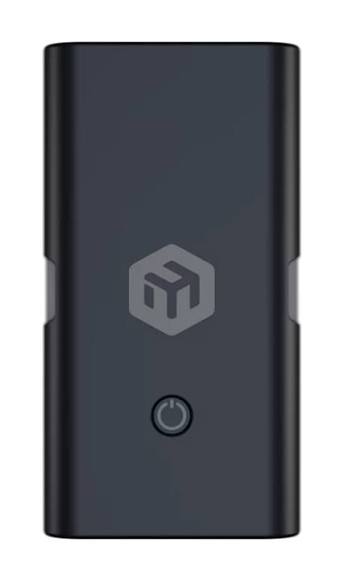
MikroTik GPOE-USB Gigabit PoE Injector with USB Power Output Price in Kenya
Out of stock
Contact us for a price
Buy MikroTik GPOE-USB PoE-to-USB-C Power Adapter with 2.5G Ethernet in Kenya. Review key specs, compatibility, setup guidance and accessories at Reisen SEO.
View product detailsNeed help choosing?
Talk to our team at +254 714 804 532
Product details
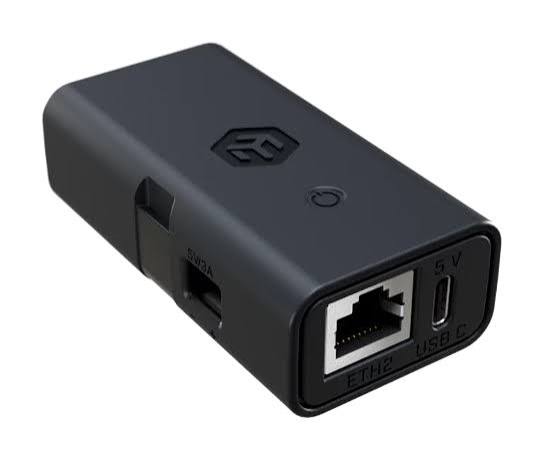
MikroTik GPOE-USB PoE-to-USB-C Power Adapter with 2.5G Ethernet
MikroTik GPOE-USB PoE-to-USB-C Power Adapter with 2.5G Ethernet is a PoE-powered USB-C and Ethernet adapter intended for projects in Kenya where the equipment needs to fit an identifiable network design. Its purpose is to solve a defined connection problem: USB-C-powered IoT equipment at a PoE-fed endpoint. Before selecting equipment for a site, consider the required interface, the power source, the connected endpoints, and the services the new device must support. That is how the correct model becomes a useful part of the network.
It can be considered when compact computer or tablet with network connection is part of the project. Its important capabilities include converts negotiated PoE input into practical USB-C-powered endpoint deployment and two 2.5G Ethernet ports for appropriate high-speed connectivity. A site can benefit from these functions only when the upstream equipment and the physical installation are compatible. Reisen focuses on the exact model identity so that buyers can distinguish it from similar-looking hardware with different power, radio or network interfaces.
For retrofit where a qualified PoE switch already supplies power, the equipment should fit an end-to-end design with the correct input, output, installation location and operating conditions. Make the primary buying decision from the specifications below, then match cables, power, controls and any required supporting hardware. An orderly installation plan also makes commissioning and ongoing maintenance simpler for the next technician who works on the system.
Key Features and Benefits
· Converts negotiated PoE input into practical USB-C-powered endpoint deployment
· Two 2.5G Ethernet ports for appropriate high-speed connectivity
· Reduces the need for a local wall socket at supported endpoints
· Compact accessory for indoor IoT and computing installations
How to Buy MikroTik GPOE-USB PoE-to-USB-C Power Adapter with 2.5G Ethernet
Before ordering, confirm the model identity, 802.3af/at PSE port, and device-specific USB-C voltage and wattage compatibility. The four buying decisions below help match the product to the intended installation and supporting equipment.
How to Buy MikroTik GPOE-USB PoE-to-USB-C Power Adapter with 2.5G Ethernet: Match the model, interfaces, site requirements and order.
Key Specifications
|
Specification |
Details |
|
Model |
GPOE-USB |
|
Power input |
IEEE 802.3af/at PoE |
|
Ethernet |
2 × 2.5 Gigabit Ethernet |
|
USB |
USB-C power output for compatible endpoint devices |
|
Ingress protection |
IP20 (indoor) |
|
Mounting accessory |
K-96 fastening set |
Choosing the Right Model for Your Site
Exact-model selection matters. The listing refers to MikroTik GPOE-USB PoE-to-USB-C Power Adapter with 2.5G Ethernet; compare that identity with the print on the unit and the manufacturer documentation. Related products may have different radio bands, power requirements, uplink interfaces or management capabilities. Do not choose a near match from a search result simply because the brand and the visible enclosure resemble the intended hardware.
Build a complete bill of materials. Typical additional requirements for this model can include 802.3af/at PoE switch, appropriate USB-C cable, Ethernet patch cords. When those are already available, confirm they really match the specified standards; if they are not available, add them to the installation budget. An apparently inexpensive component can be the wrong economic choice when it needs replacement cables or incompatible optics.
Estimate the practical installation work. A site requiring compact computer or tablet with network connection may need access permissions, a network outage window, cable termination, physical mounting, firmware updates and final performance measurements. The chosen product should simplify the technical architecture and make servicing predictable. A quotation should distinguish hardware cost from labor and supporting equipment.
Consider long-term ownership. Preserve product code, firmware version, management credentials, configuration backup and cable labels in a handover record. This supports later troubleshooting, changes of Internet provider, additional users and accessory replacement. For high-importance applications, arrange a maintenance procedure or spare hardware rather than relying on ad hoc repair once service fails.
Product Architecture and Technical Functions
MikroTik GPOE-USB PoE-to-USB-C Power Adapter with 2.5G Ethernet: Hardware features and interface selection guide.
Converts negotiated PoE input into practical USB-C-powered endpoint deployment. For USB-C-powered IoT equipment at a PoE-fed endpoint, this feature is valuable when it fits the wider network architecture. In practical purchasing terms, the associated consideration is 802.3af/at PSE port. A technician should test this capability at the equipment interface and with the intended endpoint, rather than assuming it will behave identically in every environment. This helps distinguish MikroTik GPOE-USB PoE-to-USB-C Power Adapter with 2.5G Ethernet from products that look similar but use a different network or power standard.
Two 2.5G Ethernet ports for appropriate high-speed connectivity. For compact computer or tablet with network connection, this feature is valuable when it fits the wider network architecture. In practical purchasing terms, the associated consideration is device-specific USB-C voltage and wattage compatibility. A technician should test this capability at the equipment interface and with the intended endpoint, rather than assuming it will behave identically in every environment. This helps distinguish MikroTik GPOE-USB PoE-to-USB-C Power Adapter with 2.5G Ethernet from products that look similar but use a different network or power standard.
Reduces the need for a local wall socket at supported endpoints. For retrofit where a qualified PoE switch already supplies power, this feature is valuable when it fits the wider network architecture. In practical purchasing terms, the associated consideration is network link type expected by endpoint. A technician should test this capability at the equipment interface and with the intended endpoint, rather than assuming it will behave identically in every environment. This helps distinguish MikroTik GPOE-USB PoE-to-USB-C Power Adapter with 2.5G Ethernet from products that look similar but use a different network or power standard.
Compact accessory for indoor IoT and computing installations. For USB-C-powered IoT equipment at a PoE-fed endpoint, this feature is valuable when it fits the wider network architecture. In practical purchasing terms, the associated consideration is indoor protected environment. A technician should test this capability at the equipment interface and with the intended endpoint, rather than assuming it will behave identically in every environment. This helps distinguish MikroTik GPOE-USB PoE-to-USB-C Power Adapter with 2.5G Ethernet from products that look similar but use a different network or power standard.
Understanding Each Key Specification
Model: GPOE-USB. When planning USB-C-powered IoT equipment at a PoE-fed endpoint, use this stated parameter alongside 802.3af/at PSE port. The manufacturer specification describes the product's capability; a complete system also requires matching counterparts and realistic site conditions. Keep this detail in the equipment schedule so installation and purchasing teams use the same model.
Power input: IEEE 802.3af/at PoE. When planning compact computer or tablet with network connection, use this stated parameter alongside device-specific USB-C voltage and wattage compatibility. The manufacturer specification describes the product's capability; a complete system also requires matching counterparts and realistic site conditions. Keep this detail in the equipment schedule so installation and purchasing teams use the same model.
Ethernet: 2 × 2.5 Gigabit Ethernet. When planning retrofit where a qualified PoE switch already supplies power, use this stated parameter alongside network link type expected by endpoint. The manufacturer specification describes the product's capability; a complete system also requires matching counterparts and realistic site conditions. Keep this detail in the equipment schedule so installation and purchasing teams use the same model.
USB: USB-C power output for compatible endpoint devices. When planning USB-C-powered IoT equipment at a PoE-fed endpoint, use this stated parameter alongside indoor protected environment. The manufacturer specification describes the product's capability; a complete system also requires matching counterparts and realistic site conditions. Keep this detail in the equipment schedule so installation and purchasing teams use the same model.
Ingress protection: IP20 (indoor). When planning compact computer or tablet with network connection, use this stated parameter alongside 802.3af/at PSE port. The manufacturer specification describes the product's capability; a complete system also requires matching counterparts and realistic site conditions. Keep this detail in the equipment schedule so installation and purchasing teams use the same model.
Mounting accessory: K-96 fastening set. When planning retrofit where a qualified PoE switch already supplies power, use this stated parameter alongside device-specific USB-C voltage and wattage compatibility. The manufacturer specification describes the product's capability; a complete system also requires matching counterparts and realistic site conditions. Keep this detail in the equipment schedule so installation and purchasing teams use the same model.
Technical Selection Guide
Technical decision guide: Interpret the model specifications in a network design.
Power standard interoperability
IEEE 802.3af and 802.3at negotiate with compliant powered devices. Passive PoE, by contrast, can present voltage without the same negotiation behavior. Never connect a device solely because its plug fits an RJ45 socket; compare input standard, power class and actual output type in the specific device documentation.
Cable and power budget
Budget for the entire power path, not just the port label. A powered device may have startup loads and cable losses, and long or poorly terminated runs can contribute to voltage drop. Gigabit operation requires all Ethernet pairs to be properly terminated, so install compliant cable and test both data and power behavior.
Install and maintain
Place injectors and adapters where heat can dissipate and where power can be isolated safely. Label Data In and Power+Data Out on service drawings, especially when several models sit together. If the endpoint fails, distinguish mains/PoE failure from link negotiation and higher-layer networking issues.
Typical Applications in Kenya
Usb-c-powered iot equipment at a poe-fed endpoint
A practical example is USB-C-powered IoT equipment at a PoE-fed endpoint. In this environment, converts negotiated PoE input into practical USB-C-powered endpoint deployment can provide a useful technical building block, provided that the chosen topology actually needs the device's functions. Start by drawing the upstream connection, the intended endpoint and the power path. The total solution may include cable, a switch, fiber modules, mounted endpoints or a managed gateway. Making those dependencies explicit during procurement can prevent a correct product from being installed in the wrong role.
For this use case, pay attention to 802.3af/at PSE port. A buyer can compare purchase options by asking what the technician must do before the system becomes serviceable. One of the relevant tasks is to check the receiving device USB-C power specification. That task is easier when mounting access, labeling, firmware and acceptance tests are considered before equipment arrives on site. After installation, check the actual client experience or service behavior rather than assuming the model's marketing rating is the site result.
Compact computer or tablet with network connection
A practical example is compact computer or tablet with network connection. In this environment, two 2.5G Ethernet ports for appropriate high-speed connectivity can provide a useful technical building block, provided that the chosen topology actually needs the device's functions. Start by drawing the upstream connection, the intended endpoint and the power path. The total solution may include cable, a switch, fiber modules, mounted endpoints or a managed gateway. Making those dependencies explicit during procurement can prevent a correct product from being installed in the wrong role.
For this use case, pay attention to device-specific USB-C voltage and wattage compatibility. A buyer can compare purchase options by asking what the technician must do before the system becomes serviceable. One of the relevant tasks is to confirm the PoE switch is standards compliant. That task is easier when mounting access, labeling, firmware and acceptance tests are considered before equipment arrives on site. After installation, check the actual client experience or service behavior rather than assuming the model's marketing rating is the site result.
Retrofit where a qualified poe switch already supplies power
A practical example is retrofit where a qualified PoE switch already supplies power. In this environment, reduces the need for a local wall socket at supported endpoints can provide a useful technical building block, provided that the chosen topology actually needs the device's functions. Start by drawing the upstream connection, the intended endpoint and the power path. The total solution may include cable, a switch, fiber modules, mounted endpoints or a managed gateway. Making those dependencies explicit during procurement can prevent a correct product from being installed in the wrong role.
For this use case, pay attention to network link type expected by endpoint. A buyer can compare purchase options by asking what the technician must do before the system becomes serviceable. One of the relevant tasks is to connect upstream PoE to the labeled input. That task is easier when mounting access, labeling, firmware and acceptance tests are considered before equipment arrives on site. After installation, check the actual client experience or service behavior rather than assuming the model's marketing rating is the site result.
Compatibility and Planning Matrix
Compatibility matrix: Verify interfaces, power and installation prerequisites.
802.3af/at PSE port: This is not a traditional PoE injector for adding power to a cable; it receives PoE. For USB-C-powered IoT equipment at a PoE-fed endpoint, identify the actual counterpart device and compare the physical interface, power or radio standard. Confirm the relevant requirement while planning the materials list, not when the installer reaches the site. This makes the final installation more predictable and reduces avoidable returns caused by mismatched accessories.
Device-specific USB-C voltage and wattage compatibility: A USB-C connector alone does not guarantee all laptop power requirements. For compact computer or tablet with network connection, identify the actual counterpart device and compare the physical interface, power or radio standard. Confirm the relevant requirement while planning the materials list, not when the installer reaches the site. This makes the final installation more predictable and reduces avoidable returns caused by mismatched accessories.
Network link type expected by endpoint: Check output profile rather than assuming universal PD compatibility. For retrofit where a qualified PoE switch already supplies power, identify the actual counterpart device and compare the physical interface, power or radio standard. Confirm the relevant requirement while planning the materials list, not when the installer reaches the site. This makes the final installation more predictable and reduces avoidable returns caused by mismatched accessories.
Indoor protected environment: This is not a traditional PoE injector for adding power to a cable; it receives PoE. For USB-C-powered IoT equipment at a PoE-fed endpoint, identify the actual counterpart device and compare the physical interface, power or radio standard. Confirm the relevant requirement while planning the materials list, not when the installer reaches the site. This makes the final installation more predictable and reduces avoidable returns caused by mismatched accessories.
How to Install and Use MikroTik GPOE-USB PoE-to-USB-C Power Adapter with 2.5G Ethernet
Installation topology: Trace the upstream interface, PoE-powered USB-C and Ethernet adapter and downstream service.
A Step by Step Guide to MikroTik GPOE-USB PoE-to-USB-C Power Adapter with 2.5G Ethernet
Step 1: Check the receiving device USB-C power specification. Check the observed interface or service status before advancing, and document any cable, power or configuration setting that another technician would need to reproduce the result. At handover, retain a record of the equipment identity and acceptance test outcome.
Step 2: Confirm the PoE switch is standards compliant. Check the observed interface or service status before advancing, and document any cable, power or configuration setting that another technician would need to reproduce the result. At handover, retain a record of the equipment identity and acceptance test outcome.
Step 3: Connect upstream PoE to the labeled input. Check the observed interface or service status before advancing, and document any cable, power or configuration setting that another technician would need to reproduce the result. At handover, retain a record of the equipment identity and acceptance test outcome.
Step 4: Connect the USB-C device and Ethernet path as required. Check the observed interface or service status before advancing, and document any cable, power or configuration setting that another technician would need to reproduce the result. At handover, retain a record of the equipment identity and acceptance test outcome.
Step 5: Measure device startup and link negotiation. Check the observed interface or service status before advancing, and document any cable, power or configuration setting that another technician would need to reproduce the result. At handover, retain a record of the equipment identity and acceptance test outcome.
Step 6: Verify expected load without exceeding PSE budget. Check the observed interface or service status before advancing, and document any cable, power or configuration setting that another technician would need to reproduce the result. At handover, retain a record of the equipment identity and acceptance test outcome.
Testing, Commissioning and Maintenance
Deployment checklist: Plan, configure, test and document the installed device.
This is not a traditional PoE injector for adding power to a cable; it receives PoE. If a fault occurs, check the physical power and link state first, then confirm that the intended task—connect upstream PoE to the labeled input—was completed. Change only one part of the setup at a time and compare the result with the original acceptance measurements. This separates a faulty component from a mismatched supply, configuration problem or environmental constraint.
A USB-C connector alone does not guarantee all laptop power requirements. If a fault occurs, check the physical power and link state first, then confirm that the intended task—connect the USB-C device and Ethernet path as required—was completed. Change only one part of the setup at a time and compare the result with the original acceptance measurements. This separates a faulty component from a mismatched supply, configuration problem or environmental constraint.
Check output profile rather than assuming universal PD compatibility. If a fault occurs, check the physical power and link state first, then confirm that the intended task—measure device startup and link negotiation—was completed. Change only one part of the setup at a time and compare the result with the original acceptance measurements. This separates a faulty component from a mismatched supply, configuration problem or environmental constraint.
What's in the Box
|
Specification |
Details |
|
1 |
GPOE-USB unit |
|
2 |
K-96 fastening set |
Package presentation and included accessories may differ with region, hardware revision, distribution bundle or the specific configured system. Check the product supplied against the identified model and order description.
Recommended Accessories and Related Products
A complete PoE-powered USB-C and Ethernet adapter deployment may also require 802.3af/at PoE switch, appropriate USB-C cable, Ethernet patch cords. Choose accessories by the actual site design and ensure each part is compatible with the specified hardware. Related products from the Reisen catalog can help complete a system without mixing unrelated power or network standards.
· Related: TP-Link Omada EAP245 AC1750 Dual-Band Ceiling Mount Access Point
· Related: TP-Link TL-POE160S 30 W Gigabit PoE+ Injector
· Related: TP-Link Omada EAP615-Wall AX1800 Wall Plate Wi-Fi 6 Access Point
For exact technical specifications and model-specific documentation, consult the MikroTik official product reference.
Frequently Asked Questions
What is MikroTik GPOE-USB PoE-to-USB-C Power Adapter with 2.5G Ethernet designed to do?
It is a PoE-powered USB-C and Ethernet adapter intended for applications such as USB-C-powered IoT equipment at a PoE-fed endpoint and compact computer or tablet with network connection. Its role should be defined from the endpoint and the upstream network. Converts negotiated PoE input into practical USB-C-powered endpoint deployment. Choosing the right model means checking the required connection type and operating conditions, not simply selecting the highest advertised number.
How can I check compatibility with existing equipment?
Start with the manufacturer's product code and the exact hardware revision. Compare the required 802.3af/at pse port and device-specific usb-c voltage and wattage compatibility. Then check interface standards, available power and relevant firmware. If a converter, gateway or radio is involved, also confirm the counterpart technology. The documentation and as-built network plan should agree before the device is powered.
Will the advertised speed or capacity be achieved everywhere?
No marketing data-rate label guarantees application throughput at every site. The effective result depends on the selected interfaces, client capability, cable quality, upstream service, and installation conditions. For retrofit where a qualified PoE switch already supplies power, measure the actual end-to-end path and compare it against the real business requirement rather than assuming one headline rating describes all connected users.
Which accessories should I order with this product?
The appropriate accessories depend on the project and supplied package. Consider 802.3af/at PoE switch, appropriate USB-C cable, Ethernet patch cords. Separate optional supporting equipment from what the manufacturer states is supplied. For a network extension, ask whether the far-end device, power source and matched cable or optics are already on site.
What should the installer test before handover?
Check power stability, physical fit, correct link or radio negotiation, secure management access and expected application traffic. One important task is to verify expected load without exceeding PSE budget. Record the outcome and label serviceable connections so future troubleshooting starts from evidence.
Can the product be expanded as the business grows?
Expansion depends on interfaces, management features and the wider network design. Reduces the need for a local wall socket at supported endpoints. A larger deployment may require additional compatible access points, switches, fiber links, controller resources or a change in gateway capacity. Plan the next stage around real endpoint counts and traffic rather than assuming all similarly named models are interchangeable.
What should a Kenyan buyer confirm before placing an order?
Confirm the exact model and hardware revision, the current selling price, availability, delivery destination and any installation accessories. Also confirm network link type expected by endpoint and indoor protected environment. If the offered product is intended for a special regulatory band, application or power class, obtain the appropriate confirmation before installation.
Buy MikroTik GPOE-USB PoE-to-USB-C Power Adapter with 2.5G Ethernet in Kenya
Choose MikroTik GPOE-USB PoE-to-USB-C Power Adapter with 2.5G Ethernet when its confirmed capabilities match your network design. Compare the listed product with the existing PoE-powered USB-C and Ethernet adapter requirements, review any additional components before installation and use the Reisen product page to check the current price and order details. For a larger project, prepare the expected quantity, installation location and connection specifications before requesting a quotation.
Additional information
| Product | MikroTik GPOE-USB Gigabit PoE Injector with USB Power Output Price in Kenya |
|---|---|
| Category | Mikrotik |
| Price | Contact us for a price |
| Availability | Out of stock |
Keep exploringMore in Mikrotik
Related products