Save 6%
Select an image to view it. Click the main image to enlarge.
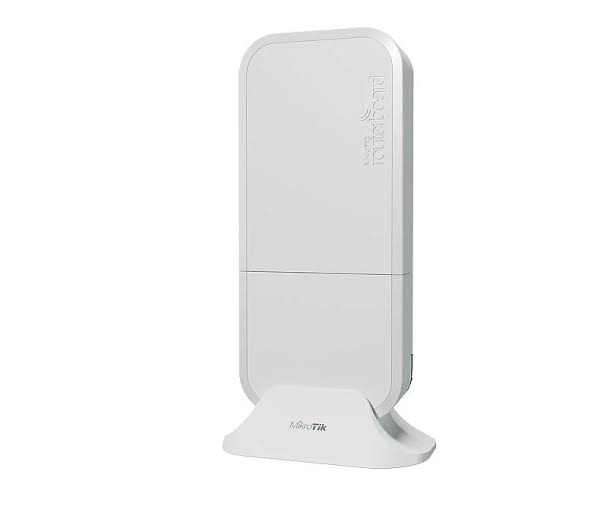
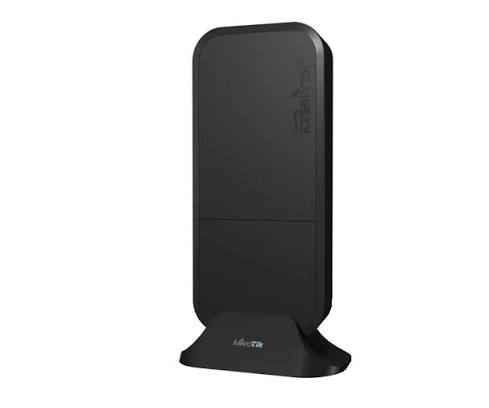
MIKROTIK wAP AC RBWAPG-5HACD2HND Price in Kenya
In stock
KES 15,000.00
KES 16,000.00
You save KES 1,000.00
Buy MikroTik wAP ac RBwAPG-5HacD2HnD in Kenya. Get dual-band Wi-Fi, Gigabit Ethernet, flexible mounting, and RouterOS configuration.
View product detailsNeed help choosing?
Talk to our team at +254 714 804 532
Product details
MikroTik wAP ac RBwAPG-5HacD2HnD Price in Kenya
The MikroTik wAP ac RBwAPG-5HacD2HnD is a compact dual-band access point for local wireless coverage. It is suitable for offices, homes, hospitality areas, and appropriately installed exterior locations.
Its unobtrusive housing supports wall, pole, and ceiling placement. RouterOS allows the wireless and wired configuration to be adapted to the network rather than limiting the device to one simple operating arrangement.
Key Specification
| Feature | Specification |
|---|---|
| Model | RBwAPG-5HacD2HnD |
| Wireless bands | 2.4GHz and 5GHz |
| 2.4GHz advertised rate | Up to 300Mbps |
| 5GHz advertised rate | Up to 867Mbps |
| Ethernet | Two Gigabit ports |
| Processor | Quad-core ARM |
| RAM | 128MB |
| Storage | 16MB |
| RouterOS license | Level 4 |
| Environmental rating | IP54 |
| Maximum power consumption | 10W |
| Power options | DC input and supported PoE input |
Hardware revisions matter when comparing wAP ac products. Confirm the complete product code rather than assuming every device sold as “wAP ac” has the same ports and processor.
Features and Practical Benefits
Dual-band access: Provides local Wi-Fi for compatible clients on 2.4GHz and 5GHz.
Discreet mounting: Useful where the access point should blend into the premises rather than occupy a desk.
Gigabit wired connectivity: Avoids a Fast Ethernet uplink restriction.
RouterOS flexibility: Configure a bridged access point, separate networks, or other supported arrangements.
Protected exterior placement: The housing supports suitable outdoor installation when cable entries and mounting instructions are followed. IP54 does not mean submersible or suitable for every exposure.
For alternative outdoor coverage platforms, compare the EAP225-Outdoor and UniFi UAP-AC-M.
How to Set It Up
- Confirm the hardware revision and power requirements.
- Connect locally through Ethernet. Configure before final mounting.
- Secure RouterOS administration. Set credentials and management restrictions.
- Choose the network role. A bridged AP is appropriate when an upstream router handles routing.
- Configure the management address. Use DHCP or a suitable static address.
- Configure the wireless radios. Set country, network names, and supported security.
- Assign interfaces to the intended network. Avoid accidentally creating unwanted DHCP servers or duplicate routing.
- Mount correctly. Protect cable entries and maintain the intended orientation.
- Test coverage. Check both bands and actual client experience.
- Save the configuration.
Advantages and Disadvantages
Advantages
- Compact dual-band design.
- Two Gigabit interfaces on this revision.
- Flexible mounting.
- RouterOS configuration options.
Disadvantages
- Wi-Fi 5 rather than Wi-Fi 6.
- Advanced setup requires networking knowledge.
- Environmental protection has limits.
- Exact revision must be checked.
Troubleshooting and FAQs
Clients connect but receive no address.
Check bridging, VLAN assignment, and the upstream DHCP service.
The radio names differ from a setup guide.
RouterOS version and installed wireless packages can change the interface layout.
Can it provide a long-distance building-to-building link?
Use equipment designed and surveyed for that purpose rather than assuming a local-coverage AP is suitable.
Browse Reisen SEO’s wireless access points and MikroTik range.
Contact Reisen SEO to confirm the supplied revision and accessories.
Additional information
| Product | MIKROTIK wAP AC RBWAPG-5HACD2HND Price in Kenya |
|---|---|
| Category | Mikrotik |
| Price | KES 15,000.00 |
| Availability | In stock |
Keep exploringMore in Mikrotik
Related products