Save 9%
Select an image to view it. Click the main image to enlarge.
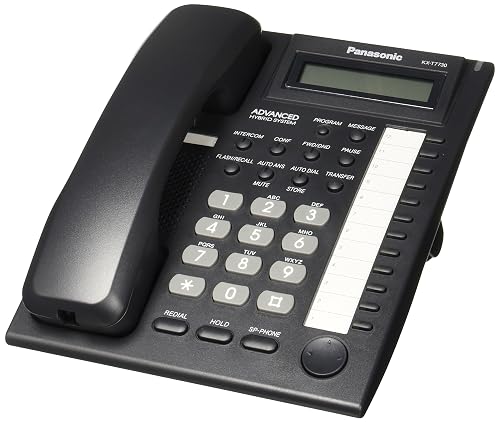
Panasonic KX-T7730 Telephone Price in Kenya
In stock
KES 10,000.00
KES 11,000.00
You save KES 1,000.00
Buy Panasonic KX-T7730 Telephone in Kenya for compatible Panasonic PBX systems. Explore its calling features, benefits and detailed setup guide.
View product detailsNeed help choosing?
Talk to our team at +254 714 804 532
Product details
Panasonic KX-T7730 Telephone Price in Kenya
Panasonic KX-T7730 Telephone gives a desk a fixed place for supported voice calls. The right choice depends on the telephone service and system behind the outlet. Match the exact model to that connection before comparing buttons or price. This matters for a new office desk as well as a replacement handset.
Request the current KX-T7730 quotation from Reisen. Ask for the complete package, delivery terms, taxes, warranty, and any installation work needed. A model-only price does not show the cost of the full working setup.

Choose the exact model, confirm the quote, then agree payment and fulfillment.
Key Specifications
|
Feature |
Details |
|
Model |
KX-T7730 |
|
Product role |
Corded telephone |
|
Connection |
Compatible Panasonic proprietary PBX extension |
|
Power |
From compatible PBX extension |
|
Display |
1-line LCD |
|
Line and function keys |
12 flexible CO keys |
|
Compatibility |
Supported Panasonic PBX and matching proprietary port |
|
Direct SIP or Ethernet |
Not supported |
A PBX handset for supported Panasonic systems
The KX-T7730 is an analog proprietary Panasonic telephone, not a normal plug-in replacement for every single-line handset. Its 1-line LCD and 12 flexible CO keys are intended for work with a supported Panasonic PBX and the correct extension port. The PBX controls much of the calling behavior and programming. Before ordering, give Reisen the exact system model and extension-card details. A standard analog FXS port or Ethernet switch is not an equivalent connection. This phone can be useful at a desk that needs supported line access and call handling within an existing compatible system. If the business is moving to a modern SIP platform, plan that as a system change. Do not assume the T7730 will register to a SIP account or operate from an arbitrary RJ11 outlet.
Compatibility

Check the exact model and the full installation before connecting equipment.
Match every connection in the complete system. A shared connector, brand name, U height, or frequency label alone does not prove a suitable fit.

Connection roles only. A corded phone does not create its own line, PBX or calling subscription.
Choose the phone around the line you already have
A corded phone is useful when a desk needs a fixed place for calls. It can serve a reception point, office, shop counter, or home work area. The first buying question is the connection type. A normal analog phone, a proprietary PBX phone, and a SIP phone may look alike but need different services and ports.
Find the model of the existing phone system before ordering. Note whether the desk uses an analog extension, a supported proprietary extension, or an Ethernet network. If no system is installed, decide how calls will reach the building. The handset does not supply a phone number, network subscription, PBX, or internet calling account by itself.
Keep analog and IP connections distinct
An analog telephone connects to an approved analog phone line or analog extension. A SIP phone uses a data network and a suitable calling service. An adapter with an FXS output can sometimes bridge those systems for an analog handset. It needs configuration and a supported service; a passive cable adapter cannot do the same job.
Do not plug a telephone lead into an Ethernet PoE source. A connector that seems to fit is not proof of electrical compatibility. Proprietary PBX handsets need an additional check because their signaling differs from standard analog service. Tell Reisen which system and port the phone must use. That detail matters more than the number of buttons on the case.
Start with KX-T7730 listing and KX-TS500 basic analog phone. Match the exact phone code and the line or PBX type before comparing desk features.
Match features to daily call work
Think about how the desk handles calls. A simple handset may be enough for a small room that only answers and makes occasional calls. A busy desk may benefit from stored numbers, caller information, a speakerphone, or system line keys. Choose features that fit the work rather than paying for a long list that nobody will use.
Caller ID, transfer, outside-line access, and hold behavior can depend on the service or PBX. A key on the phone does not create a missing feature in the connected system. Confirm the complete setup when a feature is essential. This is especially useful when replacing a phone in an older business where several types of extension exist in the same building.
Put the handset where calls are easy to handle
Choose a stable desk surface within reach of the user. Keep the handset cord free from drawers and chair wheels. Place the base where it will not slide when the handset is lifted. Leave the line cord with enough slack for normal movement, but avoid loops that can catch on feet or cleaning equipment.
For a wall installation, use the phone's supported wall mounting method and suitable fixings. Check whether the handset retaining tab must be adjusted. Do not hang the base by its cable. A good location also reduces background noise. At a public counter, place it so callers' details are not easily overheard by everyone nearby.
For a different Panasonic desk role, review KX-TS880MX analog desk phone and KX-T7705 alternative. Basic analog and proprietary PBX connections must remain distinct.
Use the correct cord and wall outlet
The handset cord connects the receiver to the base. The line cord connects the base to the approved telephone outlet. These cords have different jobs and should go into the labeled sockets. A replacement cord must match the device wiring and plug type. Similar-looking coiled cords are not always interchangeable.
Test the outlet with a known-working compatible phone when possible. If the desk is connected through building wiring, check that the outlet reaches the expected extension. An unlabeled wall point can belong to an old system. Labeling the working line and extension number makes later moves easier and helps staff report a fault accurately.
Read caller ID as a service-dependent feature
Where the handset supports caller ID, the network or PBX must send a compatible signal. The service may need activation. Some calls can still arrive without a visible number, such as withheld or unavailable caller details. That does not automatically mean the display has failed.
Set the date, time, and any required regional options in the supplied manual. Check the exact regional suffix before copying instructions from a different version. Battery requirements and memory behavior may also differ. Test with a normal incoming call before relying on caller information for office work. Keep private numbers and call records out of publicly visible notes.
If the office is planning a move to SIP, look at Yealink SIP-T31P IP alternative and Yealink SIP-T33G IP alternative. These are alternative system choices, not plug-in upgrades for every analog outlet.
Set the ringer and listening level
Choose a ringer level that staff can hear during a normal busy period. A quiet morning test may not represent a shop or reception desk later in the day. If the phone has an off position, ensure it has not been left there during cleaning or a move. Keep the volume comfortable for the actual user.
Adjust receiver or speaker volume only using the controls the model provides. More volume will not repair a damaged handset cord or poor line. If speech crackles when the cord moves, test that cord before changing the whole system. If the far caller hears noise, compare another compatible phone on the same line to separate handset and service faults.
Program stored numbers with care
On models with number memory, agree which contacts belong on the desk. Enter the number in the format needed by the connected line or PBX. Some systems need an outside-line prefix or a pause. Do not assume that a number copied from a mobile phone will dial correctly through every business system.
Make a test call after storing each important number. Use a safe contact rather than an emergency number for testing. Label quick keys clearly without displaying private information. Keep a separate approved contact list so numbers can be restored if the phone is replaced. A few well-kept entries are more useful than a large memory full of outdated contacts.
Treat flash and transfer as system settings
The flash function briefly signals the connected service. Its timing must match that service or PBX. The wrong setting may fail to activate a feature or may end the call. Use the supplied manual and the phone system's instructions when setting it. Do not try several timings during a live customer call.
For transfers, first learn the correct extension and sequence from the system administrator. Practice with another member of staff. Hold, transfer, and conference behavior can be set by the PBX rather than the desk phone alone. A clear one-page desk guide can help new staff use the supported features without changing system programming.
A different IP desk setup could use Grandstream GXP1625 IP alternative and Fanvil X303P IP alternative. It needs a compatible calling platform, network, and power arrangement.
Check how calls behave during a power cut
A corded handset can still depend on powered equipment upstream. An analog gateway, fiber terminal, PBX, or service provider device may stop when power is lost. A line-powered phone therefore does not guarantee calls during every outage. Check the whole route from the desk to the provider.
If backup calling is important, ask for a suitable power and service plan. Size any UPS for the equipment actually needed, including the PBX or gateway. Test the approved backup arrangement during a planned window. Keep an alternative contact method where the business needs one. Do not advertise emergency calling resilience based only on the fact that the handset has a cord.
Plan a phone move before unplugging it
Write down the existing extension, outlet label, system model, and any programmed keys. Ask whether the extension follows the port or needs a system change. Moving a phone to a different room can change its number or permissions. A working handset at one outlet is not proof that every outlet in the building supports it.
Make one change at a time. Keep the old connection record until the new location has been tested. Check incoming calls, outgoing calls, and any required transfer feature. Tell staff the new extension and remove old labels only after the move is complete. This small plan avoids missed calls caused by a desk move that looked purely physical.
Find faults by testing the path in order
If there is no dial tone, inspect the line cord and approved outlet first. Compare a known-working compatible phone on that line, or test this phone on a known-working compatible line. For a proprietary handset, both tests must use supported PBX ports. Never use an unknown live socket as a trial connection.
If calls connect but audio is poor, check the handset cord and receiver. If several phones fail at once, inspect the shared PBX, gateway, power, or service before replacing individual handsets. Write down whether the fault affects incoming calls, outgoing calls, ringing, or speech. A precise report helps support staff choose the right next test.
For meeting-room or cordless needs, explore Yealink conference phone alternative and Yealink cordless IP alternative. Those choices change the use case and may need extra system work rather than a simple handset swap.
Keep the phone useful after handover
Show users how to answer, end, redial, and adjust the controls that exist on their model. Explain any system prefix or transfer sequence. Keep the correct manual with the office records. Label the extension in a way that can be updated without hiding buttons or vents.
Clean the case using a suitable dry or lightly damp method from the maker's guidance, keeping liquid away from sockets. Check cords for damage during normal office maintenance. Retain the product label and invoice. If the business later changes from analog service to SIP, reassess the connection path before assuming the same phone can plug into the new network unchanged.
Quick Brand Comparison
|
Phone family |
Best comparison point |
|
Panasonic analog single-line |
Line support and needed desk features |
|
Panasonic proprietary PBX |
Exact PBX and extension-port compatibility |
|
Yealink or Fanvil SIP |
Calling platform, network and power needs |
|
Grandstream IP |
SIP service and full system requirements |
Compare the complete role and installed cost. A different brand can require a different management platform, power source, mounting kit, or service. Keep an existing useful system in the comparison rather than replacing it solely to match a new product name.
How to Set Up KX-T7730
1. Identify the service
Find the phone system model and the desk's outlet type. For the KX-T7730, confirm a supported Panasonic proprietary extension port. Do not use an unknown network socket as a test connection.
2. Check the supplied version
Read the full model suffix and supplied manual. Confirm the handset cord, line cord, stand or mounting parts, and any required batteries. Regional versions can differ in dial settings and memories. Keep the actual model on the order and service record.
3. Place and connect the phone
Put the base on a stable desk or use the approved wall mounting method. Connect the handset cord to its labeled socket and the line lead to the approved outlet. Leave enough slack for normal use without creating a trip hazard or straining the connector.
4. Apply supported basic settings
Set only controls present on this model, such as ringer and receiver level. For a display model, follow its date, time, and battery procedure. Match tone or pulse dialing and flash time to the connected service where those settings are available.
5. Set contacts or PBX keys
Have the Panasonic system administrator assign supported CO keys, extension details, and calling permissions. Use the manual for the actual PBX. Do not copy generic analog-phone or SIP instructions. Test each assigned key with another staff member before the desk handles live customer calls.
6. Test incoming and outgoing calls
Call a safe known number and ask someone to call the desk. Check ringing and speech in both directions. Test caller ID only on a model and service that support it. A dial tone alone is not a complete acceptance test.
7. Check required office features
Test transfer, hold, or system line selection only where the phone and PBX support them. Practice with another staff member. Do not change system programming during a live customer call. Record any needed access prefix and explain it clearly to the user.
8. Hand over the working desk
Label the extension, keep the correct manual, and show the user the basic controls. Record the outlet and system model for support. Explain that outage behavior depends on the entire provider, gateway, or PBX path, even when the handset itself uses line power.
Advantages
· Provides a fixed desk position for supported voice calls.
· Uses familiar corded handset controls.
· Can suit an existing compatible office phone system.
· Keeps the selected desk role clear without a mobile SIM in the handset.
Disadvantages and Limits
· Needs the correct analog or proprietary PBX connection.
· Does not register directly as a SIP phone.
· Some call features depend on the service or PBX.
· Outage behavior depends on powered equipment elsewhere in the path.
Troubleshooting
For no dial tone, check the approved line and correct lead before replacing the handset. For poor speech, test the right handset cord. If several desks fail together, check the shared PBX, gateway, supply, and provider. Keep the test specific to incoming calls, outgoing calls, ringing, or audio so the cause is easier to isolate.
Frequently Asked Questions
Will it work on every phone socket?
No. Confirm the line type and the system behind the outlet. Standard analog phones need an approved analog line or extension. The KX-T7730 needs a supported Panasonic proprietary PBX port. Do not test by plugging the handset into an unknown live outlet or an Ethernet power source.
Can it connect directly to a SIP account?
These models are not native SIP desk phones. A compatible analog handset may use a suitable configured FXS adapter or gateway, but the proprietary T7730 has different needs. If the business wants direct SIP registration, choose a suitable IP phone and plan its network and service.
Is caller ID always available?
Only a model with caller ID support can display it, and the connected service must send compatible information. The KX-TS500 has no caller ID screen. On a supported display model, test a real incoming call and confirm service activation before treating a blank number as a handset fault.
Will calls continue in a power cut?
That depends on the full service path. The PBX, analog gateway, fiber terminal, or other provider equipment may need power even if the handset uses the line. Check backup power and service behavior as a whole. A corded design alone does not guarantee outage or emergency calling.
Can I use any handset cord?
Use a cord with the right plugs and wiring for the model. Coiled cords that look similar can differ. If audio crackles when the lead moves, test a correct known-good cord. Keep handset and line cords in their labeled sockets and avoid pulling either by the cable.
Do hold and transfer work without a PBX?
Available behavior depends on both the handset and connected service. A desk key cannot add a feature the line does not support. On a business system, use the administrator's approved sequence and timing. Test with another staff member before relying on it during a customer call.
Can I move the phone to another desk?
First confirm that the new outlet supports the same phone type and the intended extension. Record the old setup and test incoming and outgoing calls after the move. Proprietary systems can depend on the port or PBX programming. Update labels only after the new position works correctly.
What should I confirm before buying?
Give Reisen the exact system model, outlet type, desired features, and quantity. Ask for the full regional phone code, included cords, battery needs, current price, and warranty terms. If replacing an old unit, a clear photo of its label and the PBX model can help identify the right match.
Why Shop with Reisen
Reisen brings network equipment and accessories into one catalogue, so you can plan the full job around the main product. Ask the team to check the exact model, package, and stock before payment. A clear parts list can reduce missed accessories and repeat orders. Keep the quotation tied to your real site rather than a generic product name.
Technical questions are easier to resolve when the order records the equipment already in use. Share the model labels, the intended role, and the result you need. Confirm current support, delivery, return, and warranty terms in writing. This gives you a useful purchase record and a clearer basis for help after the equipment arrives.
Complete the Setup with Reisen
For a basic analog handset, read KX-TS500. Match the connection type first. This alternative may change the required service or system port.
For a single-line desk with more controls, read KX-TS880MX. Match the connection type first. This alternative may change the required service or system port.
A move to network calling is a separate system choice. Compare the Yealink SIP-T31P and Fanvil X303W with a supported SIP service. Neither is a direct analog-line substitute.
If the wider office uses IP calling, start with the RB260GS data switch only for suitable network devices. It does not make an analog handset into an IP phone and provides no PoE-out.
Browse the Reisen equipment shop for the rest of the planned parts. Keep a single bill of materials so the selected devices, accessories, and installation work can be checked together.
Use Reisen contact support to request the current package and stock details. Include the model, quantity, delivery area, and any existing equipment that must stay in the system.
Order the Right Package
Send the full model code and quantity with your location and target installation date. Include the parts you already own and ask which supplied accessories are still needed. Confirm the current price and stock, then agree payment and collection or delivery details. Keep the invoice, model labels, and final quote together.
Before booking installation, make sure the equipment and site are ready for the agreed work. Test the complete system at handover and save its layout or settings where relevant. A purchase is most useful when the selected product, supporting parts, and owner's needs fit the same clear plan.
Additional information
| Product | Panasonic KX-T7730 Telephone Price in Kenya |
|---|---|
| Category | Networking Tools & Accessories |
| Price | KES 10,000.00 |
| Availability | In stock |
Keep exploringMore in Networking Tools & Accessories
Related products