Save 14%
Select an image to view it. Click the main image to enlarge.
Ubiquiti ETH-SP Ethernet Surge Protector Price in Kenya
In stock
KES 3,000.00
KES 3,500.00
You save KES 500.00
Buy Ubiquiti ETH-SP Ethernet Surge Protector in Kenya. Explore Gigabit compatibility, PoE support, grounding requirements and installation steps.
View product detailsNeed help choosing?
Talk to our team at +254 714 804 532
Product details
Ubiquiti ETH-SP Ethernet Surge Protector Price in Kenya
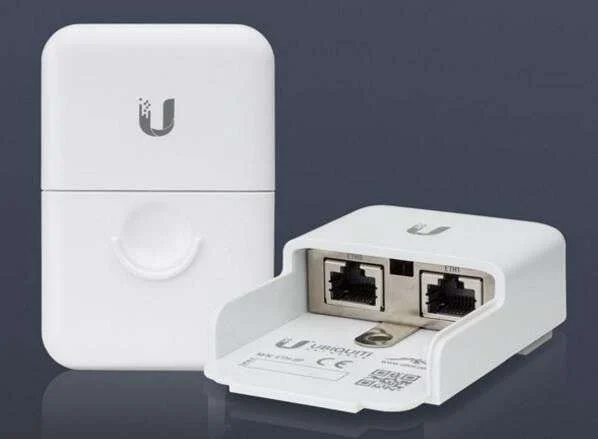
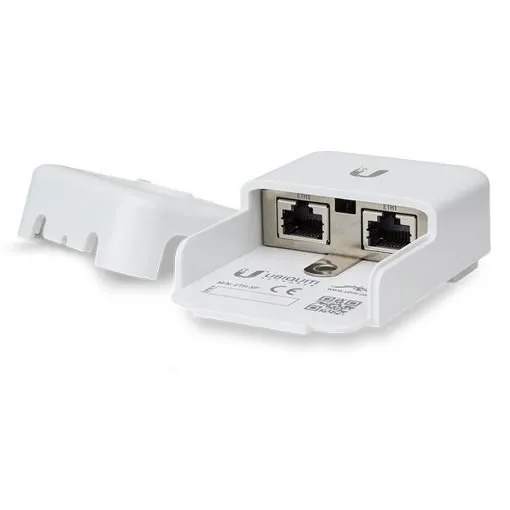
Ubiquiti ETH-SP Ethernet Surge Protector adds grounded surge protection to a suitable Ethernet cable route. It is useful in a planned outdoor radio installation where exposed network cabling needs an additional protection point. The exact product revision, ground path, cable layout, and installation method determine how it belongs in the system.
Request the current ETH-SP quotation from Reisen. Ask for the complete package, delivery terms, taxes, warranty, and any installation work needed. A model-only price does not show the cost of the full working setup.

Choose the exact model, confirm the quote, then agree payment and fulfillment.
Key Specifications
|
Feature |
Details |
|
Model |
ETH-SP |
|
Product role |
Grounded Ethernet surge protector |
|
Connection |
2 × RJ45 female; 10/100/1000Mbps |
|
Power |
Passive inline protection; requires grounding |
|
Original ETH-SP dimensions |
91 × 61 × 32.5mm |
|
Protection role |
ESD and transient surge reduction; not direct lightning immunity |
|
Revision |
ETH-SP and ETH-SP-G2 have different ratings |
Protection for the cable rather than the radio signal
The ETH-SP is the original Ubiquiti Ethernet surge protector. Its job is to add grounded protection to a suitable Ethernet cable route. Its 2 RJ45 female sockets let it sit between cable sections without acting as a switch. It supports the 10/100/1000Mbps network classes described for this original model. Do not replace those ratings with ETH-SP-G2 claims simply because the housings look similar. The important buying details are the exact revision, the planned location, and the ground path. A unit left without correct grounding cannot be treated as a completed protection point. For an outdoor radio link, ask the installer to include the entry point and the cable near the CPE in the protection design. The result should be a documented system rather than a loose accessory added beside a router.
Compatibility

Check the exact model and the full installation before connecting equipment.
Match every connection in the complete system. A shared connector, brand name, U height, or frequency label alone does not prove a suitable fit.

Conceptual route only. Grounding and full site protection require an approved installation design.
Add a protection point to an outdoor Ethernet route
An outdoor Ethernet cable can carry more than useful data. Static discharge and electrical transients can reach connected equipment along the cable path. An inline surge protector adds a planned place for suitable transients to be directed toward ground. It belongs within a complete installation that also includes the cable, connectors, bonding, and the building's electrical protection.
The ETH-SP does not replace a network switch or power injector. It is a small protective device inserted into the Ethernet cable run. It does not create internet access, supply new PoE power, or repair a weak wireless signal. Its value comes from doing a specific job in the right place with a working ground connection.
Grounding is part of the product's operation
The ground path is essential. A protector attached to an ungrounded bracket does not automatically gain a useful discharge route. Painted metal, loose joints, and corrosion can also affect continuity. The installer should follow the model's grounding instructions and the site's electrical design.
Use the approved mounting point and suitable bonding materials. The ground connection should be planned by a qualified installer, not improvised after the Ethernet cable is in place. Do not bond to a convenient pipe or unknown piece of metal. Record how the protector reaches the site's grounding system so future service work preserves that path.
Check the source and endpoint power path using 24V PoE source for a separately matched endpoint and 48V PoE source for a separately matched endpoint. These are different power supplies, not surge protectors. The ETH-SP does not convert one output voltage into another.
Distinguish ETH-SP from ETH-SP-G2
The original ETH-SP and the later ETH-SP-G2 share a similar purpose but do not have identical ratings. A listing that says only Ethernet surge protector is not enough to transfer every specification from one revision to another. Read the full label on the offered unit and keep it on the quotation.
For this product, the original ETH-SP is the reference model. It supports 10/100/1000Mbps Ethernet and has 2 RJ45 female connections. Do not silently assign newer G2 performance claims to it. If Reisen offers the G2 version, confirm the replacement model and its own specifications before ordering. A clear model code makes the comparison straightforward.
Preserve the intended data link
The protector sits in the cable path, so the complete path still needs to meet the required Ethernet standard. Good connectors, correct termination, appropriate cable, and suitable total length remain important. Adding a protector cannot turn damaged or unsuitable cable into a reliable Gigabit link.
Test the negotiated rate before and after the planned installation. Keep a record of error counters and useful local traffic. A link light alone does not prove full data performance. If a rate drops after installation, inspect the new patch lead and terminations as well as the protector. Change one part at a time to avoid replacing good equipment without evidence.
Outdoor endpoints such as LiteBeam AC Gen2 alternative and NanoBeam AC Gen2 alternative can place Ethernet on an exposed route. Follow each exact device guide for cabling, grounding, and a suitable protection design.
Keep PoE support separate from PoE conversion
The original ETH-SP is intended for suitable PoE and non-PoE Ethernet paths. That does not mean it converts one power method into another. The source voltage, wiring, current, and endpoint requirements still need to match. A passive 24V radio and an 802.3af phone do not become interchangeable when a protector is added.
Map the source and load before connecting cables. Label any powered lead so it is not later moved to an ordinary laptop port. Check the exact protector and device manuals for the planned power arrangement. If the radio needs a matched injector, keep that injector in the system. The surge protector is an added protection stage, not a substitute supply.
Put protection where the route needs it
Ubiquiti's original guidance describes using protection near the outdoor CPE and at the building entry point. Each location serves a part of the exposed route. The exact placement and grounding method must fit the site, cable layout, and applicable installation rules.
Do not choose a location solely because it is easy to reach. The unit needs the intended ground path and cable protection. At a building entry, plan how the cable is supported, sealed, and kept away from water. At the outdoor device, leave safe access for inspection. A neat plan made before cable pulling is usually easier to install well.
A network built around NanoStation Loco5AC comparison and PowerBeam AC Gen2 comparison still needs the right power and cable protection. These radios are examples of equipment in the system, not replacements for the ETH-SP.
Design the cable route as one system
Use outdoor cable where the route is exposed and follow the radio maker's requirements for shielded cable and grounding. Keep cable jackets protected from sharp metal, repeated rubbing, and excessive pulling. Use suitable entries and strain relief. Water should not be given a path into the equipment or building.
Avoid unnecessary exposed joints. Every added connection creates another place for moisture, dirt, or poor termination to affect the link. Make any needed joints with the correct rated parts. Keep the outdoor section's identification clear so later work does not replace a required cable type with an ordinary indoor patch lead.
Understand the limits of protection
A surge protector can reduce risk from events within its design. It does not guarantee survival from every surge or a direct lightning strike. It also cannot replace a building lightning protection system where one is required. The full design must address the exposure of the site and the connected equipment.
No single small accessory makes a mast installation immune to storms. Avoid product claims that promise total lightning protection or guaranteed equipment survival. Instead, choose a complete grounded installation and maintain it. Ask the installer to explain which parts protect the Ethernet route and which parts address the broader electrical and structural system.
Support the unit and its connections
Mount the protector according to the supplied instructions. Keep the ground contact and fasteners secure. Ethernet plugs should not carry the weight of long cable runs. Leave controlled slack for service and keep cable bends within the cable maker's limits. Do not trap leads under the enclosure or mounting strap.
Check the supplied package before going to site. Some mounting items, grounding wire, and other materials may need separate purchase. Add them to the job list in advance. A missing fixing can lead to a temporary installation that remains in use much longer than planned. It is better to quote the complete protection point from the start.
For another outdoor installation context, review LiteAP 120 sector alternative and MikroTik LHG 5 ac alternative. Keep the supported radio system separate from the Ethernet grounding and protection checks.
Test before and after mounting
First check the normal network path with suitable known-good leads. Record link speed, local traffic, and PoE operation where relevant. Then install the protector and test the same functions again. This gives a useful comparison and reduces the chance of leaving a new cable fault hidden in the system.
The ground connection needs the appropriate professional checks for the installation. A working internet connection does not prove that grounding is correct. Keep those checks distinct. Record the test results and the unit's label with the site documents. That record helps when a later repair changes part of the route.
Inspect after changes and harsh conditions
Routine inspection should cover visible cable damage, loose mounting parts, moisture, corrosion, and the ground connection. Follow the maker's service guidance after a suspected surge event. A protector may need replacement even if its case looks normal. Do not open or modify it as a way to restore a failed path.
If the route has been changed, check that the protector still serves the intended exposed cable. A new cable entry or relocated radio may leave the old protection point in the wrong place. Update the drawing and labels when the work is done. Protection should follow the current installation, not an outdated layout.
Separate network faults from surge damage
A dead endpoint can have several causes: loss of power, a failed injector, damaged cable, water ingress, or a surge event. Do not decide the cause from the symptom alone. Inspect the complete route and use suitable known-good parts in a controlled test. Keep unsafe or visibly damaged electrical equipment out of service.
If local data works but internet access fails, check the router and provider too. If power is missing at the remote device, verify the source and its approved wiring. Never bypass protection permanently simply because one quick test worked without it. Diagnose the cause, replace unsuitable parts, and restore the complete planned route.
The wider architecture may include managed switches for the local LAN and Starlink Kenya Installers. Protect only a suitable standard Ethernet segment after checking the exact interface; this accessory is not a proprietary dish-power protection device.
Plan protection for new links and repairs
A new installation is a good time to include cable protection in the full bill of materials. It is easier to choose entries, ground points, and mounting positions before the outdoor cable is secured. For an existing site, survey the route before adding parts. A protector should solve a documented need rather than hide a poor cable layout.
Ask for the full model, quantity, mounting materials, test work, and any required electrical assessment on the quote. Keep supply and installation responsibilities clear. A well-described protection point is easier to maintain and compare than an unexplained line called accessories. It also gives the owner a clearer picture of what was actually installed.
Quick Brand Comparison
|
Choice |
What must match |
|
Ubiquiti ETH-SP |
Original model ratings and ground path |
|
Ubiquiti ETH-SP-G2 |
Separate revision and specifications |
|
Other Ethernet protector |
Data, power, grounding and environmental ratings |
|
Fiber alternative |
Different route design and powered endpoints |
Compare the complete role and installed cost. A different brand can require a different management platform, power source, mounting kit, or service. Keep an existing useful system in the comparison rather than replacing it solely to match a new product name.
Can It Be Used with Starlink?
It can be part of a suitable downstream Ethernet cable route in a Starlink-fed LAN when the exact electrical and installation requirements match. Do not insert it into a proprietary dish power cable or treat it as an approved Starlink power accessory. The installer must verify the cable interface, PoE path, and ground design.
How to Set Up ETH-SP
1. Survey the exposed route
Identify the outdoor device, cable entry, power method, and building grounding system. Decide where protection is needed near the device and entry point. A qualified installer should plan the ground path and assess broader lightning and electrical protection needs.
2. Confirm the revision
Check whether the supplied unit is ETH-SP or ETH-SP-G2. Keep that code on the quotation and site record. Use the matching installation instructions and ratings. Do not copy a newer model's discharge or network-speed claims onto the original unit.
3. Prepare the installation materials
Check suitable Ethernet leads, shielded cable where required, mounting parts, grounding components, and weather protection for the route. Confirm which items are separate from the product package. Keep network power off while making the planned physical connections.
4. Mount the protector
Use the model's approved wall or pole arrangement. Support the unit and cable runs so socket latches do not carry cable weight. Leave access to the ground connection. Avoid sharp bends and positions where water can collect around connectors.
5. Complete the ground path
Follow the maker's grounding method and the site's electrical design. Have the connection professionally checked. A working data link cannot prove grounding quality. Do not attach to an unknown pipe or assume any painted metal support is a reliable ground.
6. Connect the Ethernet path
Insert the unit into the planned run using suitable cables and terminations. Preserve the intended PoE source and endpoint pairing. The protector does not convert voltage or power standard. Label powered sections and protect all entries as required.
7. Restore power and test
Check the endpoint starts, the Ethernet rate is correct, and local traffic passes without new errors. Compare with the baseline taken before installation. Test the actual remote service as well. Investigate a new rate drop rather than accepting a link light as full proof.
8. Record and maintain
Save the model, location, grounding route, cable labels, and test results. Include inspection in site maintenance. After suspected surge damage or changes to the outdoor route, have the system checked and follow the maker's replacement guidance. Restore the full design after repairs.
Advantages
· Adds a grounded protection point to a suitable Ethernet route.
· Supports original-model Gigabit Ethernet paths.
· Can be used in an approved PoE or non-PoE path.
· Fits a planned outdoor-device and building-entry protection design.
Disadvantages and Limits
· Correct grounding is essential.
· Does not guarantee survival from a direct lightning strike.
· Does not create PoE power or convert voltage.
· Revision, installation materials and route condition must be checked.
Troubleshooting
Check the entire exposed route after a suspected surge event. A failed endpoint may also have lost power or developed water damage. Test with suitable known-good parts and have grounding checked separately. Do not permanently bypass the protector after a quick test; repair the cause and restore the planned installation.
Frequently Asked Questions
Does it protect against every lightning strike?
No. It can reduce risk from suitable transients within its design. It does not guarantee survival from a direct strike or replace a complete building lightning protection system. The Ethernet route, grounding, electrical protection, and site exposure all need a coordinated installation plan.
Does it work without a ground?
A correct ground path is essential to the intended protection. Data may pass even when the grounding is wrong, so internet access is not a grounding test. Have the installation checked using the appropriate professional method. Do not attach it to an unknown pipe or assume any metal bracket is grounded.
Is ETH-SP the same as ETH-SP-G2?
No. The later G2 has its own ratings and documentation. Use the full product code on the quotation and read the matching guide. This description treats the original ETH-SP as the listed model. If the supplied version changes, verify its specifications rather than silently mixing the 2 products.
Will it increase network speed?
It is a protection device, not a speed booster. The original ETH-SP supports 10/100/1000Mbps network paths when the rest of the cable system is suitable. It cannot repair poor terminations or increase the provider package. Check negotiated rate and actual local traffic after installation.
Does it supply PoE?
It does not create a new power source or convert a power standard. The source, cable path, protector, and endpoint must support the intended arrangement. Keep the matched injector or switch in the design. A 24V passive endpoint does not become a universal PoE device through this accessory.
Where should it be installed?
Ubiquiti describes protection near the outdoor CPE and at the building cable entry. The precise arrangement depends on the route and grounding design. Let a qualified installer choose the correct positions and materials. Do not leave a unit in an easy location with no valid discharge path.
Can I reuse it after a suspected surge?
Have the route and connected equipment assessed and follow the maker's replacement guidance. A normal-looking case is not proof that protection remains effective. Record the event and avoid opening or modifying the unit. Replace failed parts and restore the complete planned grounding and cable arrangement.
What belongs in the full quote?
Include the exact revision, quantity, leads, mounting materials, ground connection work, and required testing. Add any cable repairs found during the survey. Confirm the responsibilities for electrical assessment and broader site protection. This makes the installed cost and scope much clearer than an unspecified accessory line.
Why Shop with Reisen
Reisen brings network equipment and accessories into one catalogue, so you can plan the full job around the main product. Ask the team to check the exact model, package, and stock before payment. A clear parts list can reduce missed accessories and repeat orders. Keep the quotation tied to your real site rather than a generic product name.
Technical questions are easier to resolve when the order records the equipment already in use. Share the model labels, the intended role, and the result you need. Confirm current support, delivery, return, and warranty terms in writing. This gives you a useful purchase record and a clearer basis for help after the equipment arrives.
Complete the Setup with Reisen
For an integrated directional AC link, review PBE-5AC-Gen2 Check the dish mount, clear path, and approved 24V power.
For a larger reflector format, compare PBE-5AC-620 A different dish changes mounting and alignment needs rather than guaranteeing a fixed distance.
Where a compact endpoint fits the survey, look at Loco5AC Include its separate power supply in the complete quote.
If the full NanoStation format is useful, examine NS-5AC Check both Ethernet roles and the exact power guide.
For a radio with a separately selected antenna, explore R5AC-Lite Match the RF connections, antenna pattern, and supported peers.
The local network can use RB260GSP Passive PoE-out is only for approved voltage and wiring matches.
For local data ports and a 1Gbps SFP handoff, choose a suitable setup around RB260GS This model does not power attached endpoints.
Browse the Reisen equipment shop for the rest of the planned parts. Keep a single bill of materials so the selected devices, accessories, and installation work can be checked together.
Use Reisen contact support to request the current package and stock details. Include the model, quantity, delivery area, and any existing equipment that must stay in the system.
Order the Right Package
Send the full model code and quantity with your location and target installation date. Include the parts you already own and ask which supplied accessories are still needed. Confirm the current price and stock, then agree payment and collection or delivery details. Keep the invoice, model labels, and final quote together.
Before booking installation, make sure the equipment and site are ready for the agreed work. Test the complete system at handover and save its layout or settings where relevant. A purchase is most useful when the selected product, supporting parts, and owner's needs fit the same clear plan.
Additional information
| Product | Ubiquiti ETH-SP Ethernet Surge Protector Price in Kenya |
|---|---|
| Category | Networking Tools & Accessories |
| Price | KES 3,000.00 |
| Availability | In stock |
Keep exploringMore in Networking Tools & Accessories
Related products