Save 17%

Select an image to view it. Click the main image to enlarge.
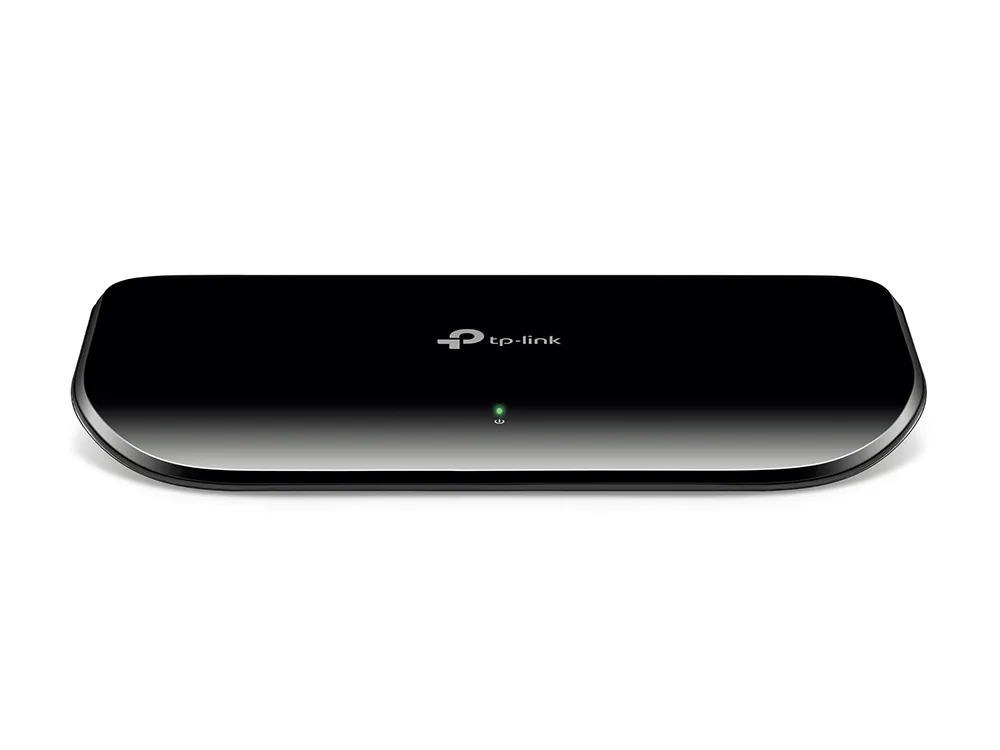
Tp-link TL-SG1008D 8-Port Gigabit Desktop Switch Price in Kenya
In stock
KES 2,500.00
KES 2,999.97
You save KES 499.97
Buy TP-Link TL-SG1008D 8-Port Gigabit Desktop Switch in Kenya. Expand your wired network with 1000Mbps ports, plug-and-play setup and fanless operation.
View product detailsNeed help choosing?
Talk to our team at +254 714 804 532
Product details
TP-Link TL-SG1008D 8-Port Gigabit Desktop Switch Price in Kenya
The TP-Link TL-SG1008D expands an existing wired network with 8 Gigabit RJ45 connections. It is an unmanaged switch, so ordinary installation does not require an administrator login, software controller, or per-port programming. Connect a router or existing LAN to the switch, then attach compatible Ethernet devices. It is a practical choice when straightforward wired expansion matters more than VLAN administration or centralized monitoring.
Explore the TL-SG1008D at Reisen and select the complete model and supplied package needed for your installation.
For an exact-model cross-check, review TL-SG1008D at Orbitlink and TL-SG1008D at Network Switch Kenya. Keep the full model suffix consistent when comparing equipment.

Confirm your requirements with Reisen, then agree the quote and fulfillment arrangements.
Key Specifications
|
Feature |
Specification |
|
Network interfaces |
8 × 10/100/1000Mbps RJ45 |
|
Management |
Unmanaged; no web-admin configuration required |
|
Port negotiation |
Automatic speed negotiation and Auto MDI/MDIX |
|
PoE output |
No |
|
Wireless |
No built-in Wi-Fi |
|
Installation |
Desktop |
|
Cooling |
Fanless |
|
Forwarding |
Store and forward |
|
Calculated full-duplex port aggregate |
16Gbps; not a single-link speed |
|
Power |
Matched external adapter |
How It Fits Your Network

Illustrative allocation. Every additional inter-switch connection consumes another port.
Choose the right port count
This 8-port Gigabit model suits a home office or small workgroup sharing printers, network storage, and an existing router. It can remove the 100Mbps port restriction of an older Fast Ethernet switch when the remaining equipment and cabling also support Gigabit. It does not upgrade the broadband subscription.
When reassessing port count or speed, compare the TL-SG1016D alternative with the TL-SF1016D alternative. These are separate products, so check their respective interface class before substitution.
Understand the speed class
Each RJ45 interface can negotiate a Gigabit connection when the endpoint and cabling support it. A legacy 100Mbps device remains limited by its own interface. A faulty cable can also cause a lower negotiated speed. Gigabit provides useful headroom for local file traffic, but the internet service remains a separate limit.
For a larger Gigabit workgroup, assess the TL-SG1016D at Tawa; for a smaller Fast Ethernet arrangement, review the TL-SF1008D at Tawa. Select around the required traffic and connection count.

Line rates are not internet-speed guarantees or measured application throughput.
Uplink capacity and network layout
For a simple installation, reserve 1 of the 8 ports for the router or upstream LAN. That leaves 7 ports for endpoint connections. Traffic heading through the uplink shares that connection, even where several local devices communicate at once. Use a deliberate topology and avoid connecting multiple cables between unmanaged switches to seek extra speed; that can create a network loop.
If configurable network control is required, compare the MikroTik switch range and UniFi switch range. Management and power capabilities must be checked for the actual alternative.
What unmanaged operation means
The switch learns Ethernet addresses and forwards traffic without a normal management interface. DHCP, NAT, internet authentication, and firewall policies remain with the router. It does not provide configurable VLAN separation or become a security gateway. If the project needs an isolated guest network, per-port monitoring, or controlled trunks, select a suitable managed switch and design the complete network accordingly.
The gateway and cabling remain separate parts of the installation. Assess a MikroTik hEX S gateway where routing is needed, and suitable Cat6 installation cable for the physical network.
Power and installation quality
These are data ports, not PoE power outputs. Cameras, access points, and phones that need PoE require an appropriate separate supply or a different switch. Keep the enclosure ventilated and use the supplied or approved power arrangement. Route patch leads so they do not pull on the sockets. A link LED confirms a connection, but it is not a complete cable-performance test.
Choose the switch around the whole installation
Count current devices, upstream connections, and sensible spare capacity. Check whether any endpoint needs PoE, whether staff and guests require separate VLANs, and whether local transfers need Gigabit or faster connections. An unmanaged switch suits a simple shared LAN; a managed or PoE model is a different purchase where those capabilities are necessary. Include appropriate patching and mounting hardware rather than selecting only by the front-panel port count.
Understand the difference between local switching and internet service
The TL-SG1008D links Ethernet devices on the same local network. A computer can exchange traffic with a printer or local server through the switch while the router handles traffic leaving that network. These jobs should be considered separately when diagnosing performance. A slow internet subscription does not become faster because more switch sockets are available, and a working local file transfer does not prove that the internet gateway is configured correctly. For an ordinary installation, retain a suitable router with the required DHCP and firewall services. Use the switch to distribute that approved LAN, keeping the purpose of each device clear for the person who will maintain it.
Budget ports for the complete topology
Count the upstream connection as well as the devices that people see on their desks. With 1 port used for an uplink, a 8-port switch has 7 ports remaining for endpoints in that simple arrangement. Another switch, a local server, an access point, and a network printer each consume a connection too. Leave some sensible expansion capacity if the installation is likely to grow. Avoid buying several small switches without checking how they will connect together: the result can be harder to maintain and may put several busy groups behind a single shared link. A port schedule makes these tradeoffs visible before the order is placed.
Match the Ethernet speed to real activity
The nominal per-port class for this model is 10/100/1000Mbps. That describes the physical connection capability, rather than a promise about every application. Browsing, cloud software, local backups, and large file transfers place different demands on a network. A lightly used printer connection may need little sustained capacity, while several computers reading a local storage device can share a busy path. Check the interfaces of the router, server, and computers before attributing every limitation to the switch. For a mixed installation, each link negotiates according to its supported capabilities and cable condition; attaching a faster device does not upgrade a slower port.
Consider shared uplinks when adding another room
A common layout puts the switch in a second room and connects it to the main network using 1 cable. This is convenient because several nearby devices can share that backhaul, but traffic leaving the room still traverses the same connection. The number of available sockets should therefore be considered alongside the expected simultaneous traffic. A local printer in that room may communicate without using the router, whereas cloud traffic must reach the gateway. If a single uplink is insufficient, select equipment and a topology designed for the required capacity. Do not improvise additional parallel links on an unmanaged network as a substitute for a supported design.
Keep a loop-free physical layout
Connect the switch according to a documented tree or another deliberately engineered topology. An accidental second cable between the same unmanaged segments can create a loop and disrupt many devices at once. Some hardware revisions may provide limited physical loop-prevention options, but these should be checked against the delivered model rather than assumed. Such options do not turn the unit into a fully managed switch with administrator-defined aggregation and spanning-tree policies. Label uplinks clearly, especially where spare wall outlets return to the same cabinet. If performance collapses immediately after a cable change, investigate that change before resetting the router or replacing unrelated equipment.
Separate power delivery from data connectivity
This model does not provide PoE output. A camera, access point, or phone connected by Ethernet may therefore need its own approved adapter or a compatible injector. If several endpoints need centralized power, compare a PoE switch with the correct standard and total budget instead of adding an injector without checking the whole system. Never assume that any device described as PoE uses the same voltage or detection method. Include power outlets and backup power in the plan for the switch itself. A passive data connection will only be useful when the endpoint and all essential upstream devices are powered correctly.
Know when management features become necessary
A simple shared LAN can work well with an unmanaged switch. Requirements such as distinct staff and guest networks, configurable access ports, monitored uplinks, and detailed troubleshooting may justify a managed alternative. VLAN separation must be implemented consistently across the gateway, switch, and access points; an ordinary unmanaged model does not provide administrator-defined VLAN assignments. Likewise, adding this switch does not create a security policy between attached users. Choose according to the actual control required, rather than assuming that a greater port count automatically means more management capability. A clear network diagram helps decide whether simplicity or additional control is the better purchase.
Commission the network with ordinary users in mind
After connecting the TL-SG1008D, check more than the power light. Verify an address from the intended DHCP server, local printer access, normal internet browsing, and any required business application. Check the negotiated Ethernet speed at important endpoints. For a suspected capacity issue, test a local transfer between suitable devices as well as an internet test, because the 2 measurements examine different paths. Use known-good short patch leads to isolate faults before investigating permanent cabling. Record which socket connects to the upstream router so a future cable move does not accidentally isolate the entire group.
Plan placement, cabling, and future service access
Place the switch where its ventilation and cable connections remain accessible. Follow the mounting arrangement actually supported by the delivered hardware, and do not assume that every desktop model includes rack brackets. Keep adapters and mains connections protected from accidental disconnection, and avoid supporting cable bundles by their plugs. In a rack, label the corresponding patch-panel positions so service work can happen without unplugging every lead. In an office, choose a location that staff will not cover with paperwork or cleaning materials. These simple installation choices help preserve the benefit of an uncomplicated switch without adding unnecessary configuration tasks.
Build an accurate quotation for TL-SG1008D
An accurate quotation starts with the complete product code, quantity, and intended job. Tell Reisen whether this is a new installation, an expansion, or a replacement for equipment already in service. Include the devices it must connect to and any known revision requirements. Ask for accessories and configuration work to be itemized so the product can be compared fairly with another offer. A lower headline amount may describe a different package or omit necessary components. Confirm the current price directly with Reisen; prices shown by other sellers are not a substitute for a quotation covering your actual order.
Check the package before scheduling installation
Confirm the exact contents supplied with the unit or cable order, including any adapter, mounting parts, or termination components that the project needs. Where an accessory is listed as optional, put it on the order rather than assuming it will be in the box. Check the hardware version and relevant labels before work begins, while discrepancies can still be resolved without interrupting service. Keep packaging and purchase records according to the applicable return process. For several sites, identify which equipment belongs to each location so a correct order is not accidentally mixed during deployment.
Agree what a successful handover will include
Write down a short acceptance checklist based on the intended service. It may include a working client connection, correct addressing, an application test, and a clear record of cable or port assignments. Ask for configuration records where the product has settings, or test results where the installation is primarily passive. A power light or visible network name is only a partial check. Where existing equipment is involved, identify who is responsible for faults outside the new product's scope. This avoids confusing a completed supply order with a complete redesign of the customer's wider network.
Protect the working installation during changes
If replacing existing equipment, record the current connections and configuration before disconnecting anything. Schedule work around the users who depend on the service and retain a practical recovery route. Change 1 part of the system at a time where possible, then test the effect before moving to the next change. Keep administrator details and backups secure rather than including passwords in an openly shared worksheet. A documented installation is easier to maintain and helps the owner distinguish a product fault from a changed cable, account, upstream service, or incompatible replacement accessory.
Compare total project value rather than isolated features
The most useful product is the one that meets the actual requirement with a clear installation and support plan. Consider accessories, compatible neighboring equipment, setup time, and future service access alongside the hardware itself. Do not pay for a feature the project cannot use, but do not omit a necessary capability merely to reduce the initial order. If the requirement has changed since the original specification, reassess the whole connection path before buying an identical replacement. A short description of the site and workload helps Reisen recommend a coherent package without relying on unsupported user counts or coverage claims.
Confirm commercial terms before completing payment
Ask Reisen to confirm availability, the quoted package, applicable warranty and return terms, and the agreed collection or delivery arrangements. These details should come from the current transaction rather than assumptions based on an older listing. If installation or remote setup is required, confirm whether it is included and what access or preparation the customer must provide. Keep the final quotation and the equipment model together in the order record. This makes the purchase easier to check on arrival and gives both parties a clear reference if an accessory or service detail needs clarification.
How to Set It Up
1. Count the required endpoints and add the uplink connection. Confirm that the selected speed class and absence of PoE meet the installation needs.
2. Place the switch on a stable surface or install the compatible rack brackets for a rack-capable model. Keep airflow and cable access clear.
3. Connect the approved power source and check the power indicator. Do not substitute a random DC adapter on externally powered models.
4. Connect a router LAN port or the intended existing LAN to 1 switch port using a known-good cable. Avoid a second parallel uplink.
5. Connect endpoints individually. Verify their link indicators and confirm that clients receive addressing from the intended router or DHCP server.
6. Test local traffic and internet access. Check the negotiated speed where the client exposes it, label the patching, and document any reserved spare ports.
Troubleshooting
A client has no network connection
Check power, the uplink cable, port indicators, and endpoint network settings. Try a known-good patch lead and a known-working port. If several devices fail together, inspect the shared uplink and router first.
Traffic becomes unstable after another cable is connected
Check for an Ethernet loop or an unintended second link between switches. Disconnect the suspect extra path and restore the documented topology. Do not use parallel links as an improvised capacity upgrade.
A client receives no address
The unmanaged switch normally does not supply DHCP. Verify the intended DHCP server and its connection to the LAN. A manually assigned address should only be used when it fits the approved network plan.
Advantages
· 8 wired connections in a simple unmanaged design.
· Automatic negotiation reduces ordinary installation work.
· Fanless operation avoids fan noise.
· No separate software-controller requirement for basic switching.
Disadvantages and Limitations
· Gigabit ports are not multi-gigabit or 10G.
· No PoE output for powered endpoints.
· No configurable managed-switch VLAN or monitoring features.
Frequently Asked Questions
Does it provide internet by itself?
No. It extends a LAN supplied by a suitable router and internet connection.
Does it provide Wi-Fi?
No. Add a wireless access point where wireless coverage is required.
How many devices fit after connecting the router?
With 1 uplink and no other inter-switch links, 7 ports remain for endpoints.
Can it power an IP camera?
No. Use an appropriate camera power supply, PoE injector, or PoE switch.
Do I need a driver?
Normal Ethernet switching does not require a switch driver or controller application.
Complete Your Order at Reisen
For a complete installation, also review TP-Link TL-SF1008D 8-Port 10/100Mbps Desktop Switch and TP-Link TL-SG1016D 16-Port Gigabit Desktop and Rackmount Switch. These have different roles or capabilities; choose them according to the system described above rather than assuming automatic interchangeability.
Request the current TL-SG1008D price in Kenya from Reisen and confirm the exact hardware revision, supplied accessories, quantity, and any configuration work. Use Reisen’s contact page to share your requirements. Confirm applicable warranty, return terms, payment arrangements, delivery or collection options, and any installation charges before completing the order.
Build a Compatible System with Reisen
Consider Reisen’s RDCOM Cat6 installation cable for planned permanent links. Check the required interface, power source, and configuration before adding it to the order.
Consider Reisen’s MikroTik RB5009 gateway for routing and firewall control. Include the extra patch leads and installation work if this component is part of the project.
Consider Reisen’s TL-WA801ND access point for a compatible indoor Wi-Fi extension. Review its separate specifications against the intended workload and the neighboring equipment.
Consider Reisen’s EAP115 access point when ceiling placement suits the room. A compatible connection requires more than a similar connector or matching brand name.
Consider Reisen’s MC210CS media converter only where a correctly matched optical Ethernet route is required. Confirm where it sits in the network so the quotation covers its actual role.
Browse the relevant Reisen product category to assess the rest of the installation, and use the Reisen shop to prepare a combined order. Keep the TL-SG1008D model code in your request so accessories, revision details, and setup work can be confirmed together.
Additional information
| Product | Tp-link TL-SG1008D 8-Port Gigabit Desktop Switch Price in Kenya |
|---|---|
| Category | Network Switches |
| Price | KES 2,500.00 |
| Availability | In stock |
Keep exploringMore in Network Switches
Related products