Save 23%
Select an image to view it. Click the main image to enlarge.
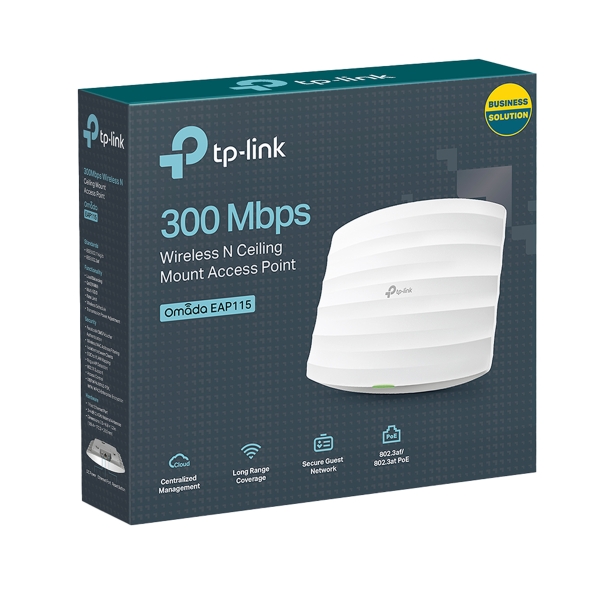
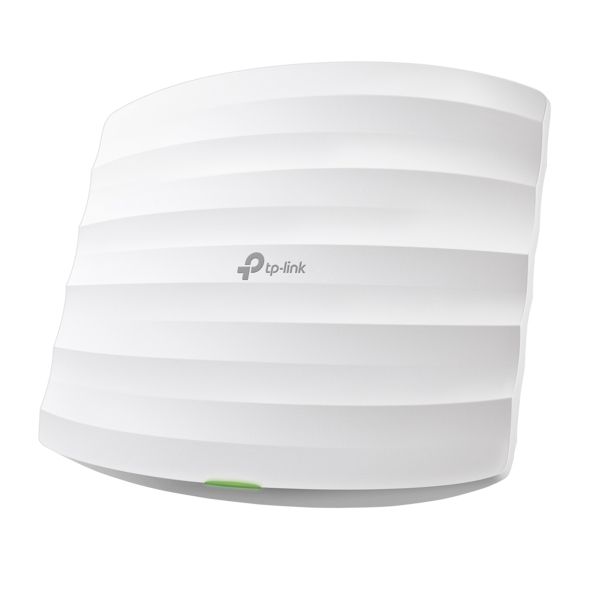
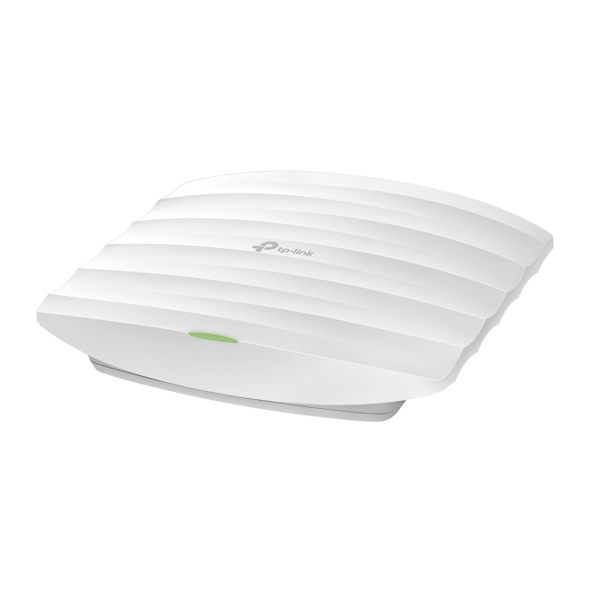
Tp-link TL-EAP115 Wireless Access Point Price in Kenya
In stock
KES 5,000.00
KES 6,500.00
You save KES 1,500.00
Explore TP-Link EAP115 prices in Kenya, specifications and setup. Add 2.4GHz indoor Wi-Fi with a ceiling-mount access point supporting standard 802.3af PoE.
View product detailsNeed help choosing?
Talk to our team at +254 714 804 532
Product details
TP-Link EAP115 N300 Ceiling Mount Access Point Price in Kenya
The TP-Link EAP115 provides indoor 2.4GHz Wi-Fi in a ceiling- or wall-mounted format. It suits modest office, reception, classroom, and guest-access installations where reliable placement and manageable configuration matter more than the latest wireless generation. A wired uplink connects it to the existing network, while compatible Omada management can help organize supported access points across a site.
Explore the EAP115 at Reisen and select the complete model and supplied package needed for your installation.
For product selection, start with EAP110 indoor alternative and then compare the EAP225 indoor alternative. Choose around the required radio generation, uplink speed, and management platform rather than the shared TP-Link brand alone.

Confirm your requirements with Reisen, then agree the quote and fulfillment arrangements.
Key Specifications
|
Feature |
Specification |
|
Wireless class |
N300, 2.4GHz |
|
Maximum advertised wireless rate |
300Mbps |
|
Ethernet |
1 × Fast Ethernet RJ45 port |
|
Power for documented V4 |
IEEE 802.3af PoE or specified 9V DC supply |
|
Antennas |
2 internal omnidirectional antennas |
|
Mounting |
Indoor ceiling or wall |
|
Management |
Standalone or compatible Omada controller |
|
Revision check |
Confirm hardware and controller compatibility before adoption |
How It Fits Your Network

Match the access point power source. The gateway remains responsible for internet routing.
A business access point with a wired uplink
Position the access point where people need coverage, and route Ethernet back to the appropriate switch. Ceiling placement can improve the practical path to clients compared with hiding a router in a cabinet. The building layout, client devices, and neighboring networks still determine coverage. Survey the intended rooms rather than ordering solely by floor area.
Where a newer installation is appropriate, review the EAP610 option and the UniFi access-point range. These are different hardware and management choices, not direct substitutes for every existing deployment.
Standalone or Omada management
A single unit can be configured through its supported local method. Multiple supported EAPs can be managed using a compatible Omada controller. Check the exact EAP115 hardware revision against the controller version before adoption. Controller availability and configuration influence features such as guest portals and centralized administration; the model name alone does not guarantee every feature in every firmware release.
If cabling to the target area is impractical, compare the TL-WA855RE at Orbitlink and TL-WA855RE at Tawa. Repeating a wireless signal and providing a wired-backhaul access point have different performance implications.

Not a speed test. Shared wireless airtime and protocol overhead reduce usable throughput.
PoE selection
The documented V4 supports IEEE 802.3af power input as well as its specified DC option. Confirm the supplied revision and whether a separate adapter is included. A passive 24V injector used for outdoor radios is not a substitute merely because the connector fits. Choose a suitable PoE switch or standards-based injector for the actual unit.
For an installation needing router functions as well as Wi-Fi, assess the MikroTik RB951Ui-2HnD. For supported powered access points, investigate PoE switch options only after matching the required power standard.
Capacity and security expectations
N300 describes a maximum radio link class shared by associated clients. The Fast Ethernet uplink also constrains traffic crossing to the rest of the network. For faster plans, more demanding clients, or additional spectrum, assess a dual-band Gigabit access point. Use supported secure encryption, maintain a protected management network, and apply guest isolation and VLAN settings consistently across the gateway and switch.
The physical installation may require Cat6 cable and, for a verified 802.3af endpoint, an appropriate TL-POE150S injector. Neither cable nor injector should be assumed included with every access-point quotation.
Plan a complete wireless installation
List the rooms, client types, required networks, mounting locations, switch connections, and power sources. Check controller support and the operation of any guest portal before promising a managed service. Use a site-specific design for several access points so they provide useful coverage without unnecessary overlap. Include configuration and cabling in the quotation where they are required; the access point alone is not a complete business network.
Design indoor wireless around coverage and management
The EAP115 is an indoor access point for extending a wired LAN with 2.4GHz Wi-Fi. Its ceiling or wall installation can place the radio more usefully than an internet router left in a corner. Before choosing positions, identify the rooms, wall construction, likely client locations, and cable routes. In a business with several access points, decide how settings will be maintained and which compatible Omada controller release supports the exact hardware revision. The access point remains 1 component of the network: the gateway, switch, power source, and wireless design must all support the intended service.
Match power before attaching the access point
Check whether the installation will use the specified DC adapter or an appropriate standards-based PoE source for the supplied revision. A non-PoE switch can pass data but cannot energize the access point. An unrelated passive injector is not automatically suitable just because it uses Ethernet connectors. Include the source port's available power and the complete cable path in the plan. If backup power is required, it must cover the active power source as well as the gateway. Confirming these points before installation avoids discovering that an otherwise usable ceiling cable cannot provide the required power arrangement.
Account for the limits of an N300 access layer
The N300 designation describes the advertised wireless class, while the wired uplink on this model is Fast Ethernet. The figures are not additive, and 300Mbps is not a guaranteed application result. A modest group of compatible clients may fit this role, but a demanding new deployment should evaluate modern dual-band alternatives and faster uplinks. Different clients and traffic types use airtime differently, so avoid selecting access points solely from an unsupported maximum-user claim. Consider simultaneous activity, signal conditions, and the wired path to the internet or local server when deciding whether this model is appropriate.
Choose standalone or controller operation deliberately
A small installation may be managed locally using the options available on its hardware and firmware. A compatible controller can support more coordinated administration, but support should be verified before promising a particular centralized feature. Record whether the unit has been adopted and which system owns its configuration. Changing local settings on an adopted device may not be the correct management workflow. If replacing a controller, plan migration instead of assuming the access point can be moved between systems without preparation. Keep a secure record of accounts and backups so future service does not depend on 1 person's computer.
Use guest access as a network policy
Guest Wi-Fi should be designed around what visitors may reach, how they receive addresses, and whether any portal or usage restrictions are required. A separate wireless name alone does not establish separation from staff equipment. Where the selected revision and system support VLAN mapping, configure the corresponding switch ports and gateway policies consistently. Test a guest client against the actual prohibited resources as well as the internet. If the requirement exceeds this model's supported features, choose another access point and network design rather than presenting an incomplete configuration as a secure guest service.
Plan channels for neighboring access points
Several access points close together can compete for the same 2.4GHz airtime. Survey the environment and choose a channel plan suitable for local conditions and regional settings. Excessive overlap or unnecessarily wide channel use can harm the experience even when every client shows a strong signal. Position access points around the rooms they serve and the expected client density, rather than maximizing radio power everywhere. Test the transition between coverage areas with representative devices, understanding that client behavior also affects roaming. A controller does not remove the physical limits of radio propagation or shared airtime.
Commission the ceiling installation safely and accessibly
Prepare configuration on a bench before mounting the access point. Label the cable and record the switch port and power source so the unit can be identified later without removing several ceiling devices. Confirm the mounting surface and fasteners are suitable, leaving access for maintenance. After mounting, verify that the wired uplink and wireless clients still behave as expected. Check ordinary client addressing, DNS, business applications, and any management restrictions. Save the tested configuration and firmware details. If a fault appears only after installation, inspect the cable and power path before assuming the controller is responsible.
Decide what would justify a newer platform
Newer access points may offer 5GHz service, newer wireless standards, faster uplinks, or capabilities better suited to dense offices. These differences matter when the users, applications, and broadband service can benefit from them. For a simple existing 2.4GHz installation, the EAP115 may still match a carefully defined requirement. Compare the full cost, including compatible PoE, mounting, cabling, and controller needs. Choosing a newer model does not eliminate the need for good placement, and choosing this model should not be accompanied by unsupported promises about whole-building coverage or uninterrupted roaming.
Build an accurate quotation for EAP115
An accurate quotation starts with the complete product code, quantity, and intended job. Tell Reisen whether this is a new installation, an expansion, or a replacement for equipment already in service. Include the devices it must connect to and any known revision requirements. Ask for accessories and configuration work to be itemized so the product can be compared fairly with another offer. A lower headline amount may describe a different package or omit necessary components. Confirm the current price directly with Reisen; prices shown by other sellers are not a substitute for a quotation covering your actual order.
Check the package before scheduling installation
Confirm the exact contents supplied with the unit or cable order, including any adapter, mounting parts, or termination components that the project needs. Where an accessory is listed as optional, put it on the order rather than assuming it will be in the box. Check the hardware version and relevant labels before work begins, while discrepancies can still be resolved without interrupting service. Keep packaging and purchase records according to the applicable return process. For several sites, identify which equipment belongs to each location so a correct order is not accidentally mixed during deployment.
Agree what a successful handover will include
Write down a short acceptance checklist based on the intended service. It may include a working client connection, correct addressing, an application test, and a clear record of cable or port assignments. Ask for configuration records where the product has settings, or test results where the installation is primarily passive. A power light or visible network name is only a partial check. Where existing equipment is involved, identify who is responsible for faults outside the new product's scope. This avoids confusing a completed supply order with a complete redesign of the customer's wider network.
Protect the working installation during changes
If replacing existing equipment, record the current connections and configuration before disconnecting anything. Schedule work around the users who depend on the service and retain a practical recovery route. Change 1 part of the system at a time where possible, then test the effect before moving to the next change. Keep administrator details and backups secure rather than including passwords in an openly shared worksheet. A documented installation is easier to maintain and helps the owner distinguish a product fault from a changed cable, account, upstream service, or incompatible replacement accessory.
Compare total project value rather than isolated features
The most useful product is the one that meets the actual requirement with a clear installation and support plan. Consider accessories, compatible neighboring equipment, setup time, and future service access alongside the hardware itself. Do not pay for a feature the project cannot use, but do not omit a necessary capability merely to reduce the initial order. If the requirement has changed since the original specification, reassess the whole connection path before buying an identical replacement. A short description of the site and workload helps Reisen recommend a coherent package without relying on unsupported user counts or coverage claims.
Confirm commercial terms before completing payment
Ask Reisen to confirm availability, the quoted package, applicable warranty and return terms, and the agreed collection or delivery arrangements. These details should come from the current transaction rather than assumptions based on an older listing. If installation or remote setup is required, confirm whether it is included and what access or preparation the customer must provide. Keep the final quotation and the equipment model together in the order record. This makes the purchase easier to check on arrival and gives both parties a clear reference if an accessory or service detail needs clarification.
How to Set It Up
1. Confirm the EAP115 hardware revision and its supported power source. Decide whether the installation will be standalone or controller-managed.
2. Install the mounting hardware on a suitable indoor surface and run the Ethernet cable without placing tension on the access point.
3. Connect the EAP to a compatible PoE switch or approved supply arrangement. Verify that the upstream network can assign or reach its management address.
4. Use the supported local setup method or adopt it into a compatible Omada controller. Create a unique administrator account or secure controller access.
5. Configure the intended SSIDs, supported security, and any VLAN assignments. Make sure the switch trunk and router interfaces support those same networks.
6. Test staff and guest clients separately. Check addressing, internet access, intended restrictions, and signal quality before saving the final settings.
Troubleshooting
The controller cannot adopt the access point
Confirm the hardware is supported by the controller release and that management addressing is reachable. Check existing controller association and the required network paths. Do not reset an installed unit until its configuration and service impact are understood.
The access point has no power
Verify the actual power standard at the source and the Ethernet cable path. An ordinary non-PoE switch cannot supply power, and a passive injector may not match the required standard. Test using a known approved source.
Advantages
· Ceiling or wall mounting supports deliberate coverage placement.
· Compatible Omada management can simplify multi-AP administration.
· Documented versions accept standard 802.3af power.
Disadvantages and Limitations
· 2.4GHz-only N300 wireless.
· Fast Ethernet uplink.
· Controller and power support require a hardware-version check.
Frequently Asked Questions
Is EAP115 a router?
It is an access point. An upstream gateway still provides routing and normally DHCP.
Does it need a controller for basic Wi-Fi?
Basic standalone use is supported; controller-dependent features require the appropriate management arrangement.
Can I power it with any PoE adapter?
No. Match the power standard and hardware revision.
Is it weatherproof?
Treat this as an indoor access point, not an exposed outdoor radio.
Complete Your Order at Reisen
For a complete installation, also review RDCOM CAT6 UTP Ethernet LAN Cable and TP-Link TL-SG1016D 16-Port Gigabit Desktop and Rackmount Switch. These have different roles or capabilities; choose them according to the system described above rather than assuming automatic interchangeability.
Request the current EAP115 price in Kenya from Reisen and confirm the exact hardware revision, supplied accessories, quantity, and any configuration work. Use Reisen’s contact page to share your requirements. Confirm applicable warranty, return terms, payment arrangements, delivery or collection options, and any installation charges before completing the order.
Build a Compatible System with Reisen
Consider Reisen’s TL-WA801ND access point as a distinct N300 alternative with different management and powering. Check the required interface, power source, and configuration before adding it to the order.
Consider Reisen’s 8-port Gigabit switch for a data connection where a separate approved power source is supplied. Include the extra patch leads and installation work if this component is part of the project.
Consider Reisen’s 24-port Gigabit switch for a larger non-PoE access layer. Review its separate specifications against the intended workload and the neighboring equipment.
Consider Reisen’s RB5009 router for the upstream gateway. A compatible connection requires more than a similar connector or matching brand name.
Consider Reisen’s TL-WN823N adapter where a supported computer needs 2.4GHz Wi-Fi. Confirm where it sits in the network so the quotation covers its actual role.
Browse the relevant Reisen product category to assess the rest of the installation, and use the Reisen shop to prepare a combined order. Keep the EAP115 model code in your request so accessories, revision details, and setup work can be confirmed together.
Additional information
| Product | Tp-link TL-EAP115 Wireless Access Point Price in Kenya |
|---|---|
| Category | Networking Tools & Accessories |
| Price | KES 5,000.00 |
| Availability | In stock |
Keep exploringMore in Networking Tools & Accessories
Related products