Save 20%
Select an image to view it. Click the main image to enlarge.
Ubiquiti POE-24 24V 0.5A Price in Kenya
In stock
KES 2,000.00
KES 2,500.00
You save KES 500.00
Buy Ubiquiti POE-24 24V 0.5A PoE Adapter in Kenya. Explore pricing, 12W output, compatibility, Ethernet variants and step-by-step setup.
View product detailsNeed help choosing?
Talk to our team at +254 714 804 532
Product details
Ubiquiti POE-24 24V 0.5A Adapter Price in Kenya
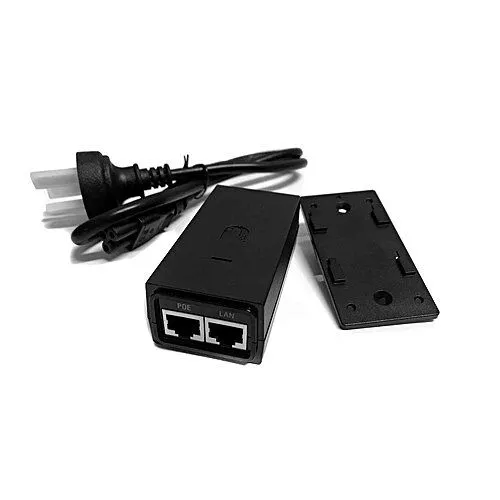
The Ubiquiti POE-24 24V 0.5A Adapter sends power and Ethernet data to one correctly matched endpoint. It is useful when an existing router or switch has a data port but cannot give the required power. It can also replace an old supply with the same approved output and data features. The full model code matters because voltage, power method, and Ethernet speed can differ between similar-looking adapters.
Best fit: A correctly matched 24V outdoor radio or replacement power supply. Passive PoE. POE-24-12W and POE-24-12W-G have different Ethernet features.
See the POE-24-12W product page at Reisen to check the model when preparing your order. Ask for the exact supplied version and a full parts list. This makes it easier to compare a complete working package with a bare device.
For the same model or the nearest listed option, start with POE-24-12W at Orbitlink and POE-24-12W at Ubiquiti UniFi Kenya. Read the full product code on each page. Any alternative named here has its own limits and may need changes elsewhere in the system. Compare the package and the job it must do, rather than the case shape alone.

Choose the exact model, get a current quote, then agree payment and fulfillment.
Key Specifications
|
Feature |
Details |
|
Model |
POE-24-12W |
|
Product type |
Ethernet power injector |
|
Ethernet |
10/100Mbps on POE-24-12W; choose -G for Gigabit |
|
Power |
24V DC, 0.5A; 12W nominal |
|
Setup |
No software setup on the injector |
|
Package |
Confirm the exact supplied accessories before ordering |
Choose the 24V adapter and data speed together
The 24V 0.5A rating gives a 12W nominal output. In Ubiquiti model names, POE-24-12W and POE-24-12W-G have different Ethernet features. The plain model is a Fast Ethernet choice. The -G version supports Gigabit data. Choose the exact supply required by the endpoint, rather than assuming every POE-24 box is the same. Many legacy outdoor radios use 24V passive power, but that is not a blanket approval for all radios. A 48V-only access point needs another source. If the old adapter failed, inspect the cable route and grounding too. A new supply will not fix water inside a damaged outdoor connector.
Compatibility

Match the delivered hardware and its manual. A similar connector is not proof of compatibility.
Power and data through one cable
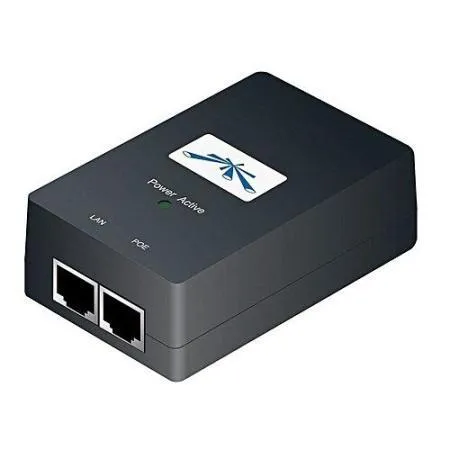
The POE-24-12W adds power to an Ethernet path for a supported device. The LAN input receives data from a router or switch. The powered output sends data and the approved DC supply to the endpoint. This can remove the need for a power socket beside that endpoint. The injector itself still needs a suitable power feed. Use it for one matched device. It does not add extra network ports or give internet service on its own.

LAN input receives ordinary data. The powered output goes only to an electrically compatible endpoint.
Start with the device you want to power
Write down the full model of the access point, radio, camera, or phone. Read its power label and manual. A product may accept one PoE method but reject another. The correct adapter must match voltage, power method, wiring, and load. A similar case or the same brand name does not settle those points. For a replacement, send Reisen clear label details from the old supply and the powered device. This is the most useful starting point for a safe match.
Understand the power rating
The stated power arrangement is 24V DC, 0.5A; 12W nominal. A supply rating describes its output capacity. It is not a promise that every connected device can use that amount. Cable losses also reduce the power that reaches the far end. The endpoint draws what its supported design needs within the system limits. Do not select an injector by the largest watt figure alone. A lower-voltage device may be damaged by the wrong passive source even if that source has spare power capacity.
A further comparison is 48V adapter for different endpoints. Keep the radio family, power method, and data interface in view. Where the linked item is a newer model or another voltage, treat it as a separate choice. It is not a blanket replacement for the POE-24-12W.
Keep passive and standards-based PoE distinct
Standards-based PoE uses a defined process to detect a supported device. Passive PoE puts the specified voltage on its powered pins without that same process. Those systems are not freely interchangeable. The exact method on the POE-24-12W is stated in the product details above. Match it to the endpoint's approved input. Some devices support more than one method, but many do not. A proper converter can solve certain cases only when it is designed for that exact power conversion.
Choose the right Ethernet version
The data interface is 10/100Mbps on POE-24-12W; choose -G for Gigabit. A power supply can be electrically correct while its data path is too slow for the job. This matters when replacing an older injector on a faster radio or access point. Check the full suffix on the label, not only the front-page name. After fitting the new unit, verify the negotiated link speed at the endpoint. A port that drops to a lower speed may have a cable or termination fault rather than a power problem.
Put each cable in the correct port
Label the normal LAN lead and the powered lead before connecting them. The LAN side goes toward the unpowered router or switch port. The powered side goes toward the approved endpoint power input. Do not connect a passive powered output to a laptop as a test. Keep the port labels visible after setup. If a later technician swaps the leads, clear labels make the error easier to spot. Power off before changing a cable whose electrical role is uncertain.
Other supply choices include the 48V adapter and 48V adapter option. They suit their own approved endpoints. Compare the full output and data path. Do not plug a different-voltage passive source into the endpoint as a trial.
Check the whole cable run
Good cable quality matters for power as well as data. The conductor material, joints, plugs, length, and load affect the result. A poor connection can create heat or cause a radio to restart under load. Avoid hidden joins and damaged clips. Use a known-good short cable for an initial bench test. Then test the full installed route. Passing a simple continuity test does not prove that a long run can carry the required power and data reliably.
Keep the injector dry and ventilated
Many injectors are meant for indoor use even when they power an outdoor radio. Place the unit in its rated environment. Keep it clear of water, dust buildup, and heat from other gear. Protect the mains lead from being pulled loose. Where a cabinet is used, allow enough space for plugs and airflow. Do not seal an indoor adapter into a wet outdoor box without a proper enclosure design. The powered endpoint and its supply can have different environmental ratings.
Ground the installation as a system
An injector may form part of the maker's grounding and surge-protection plan. That plan also depends on the mains earth, shielded cable, connectors, and any required surge protectors. Follow the exact gear guidance. A protected adapter does not guarantee protection from every lightning event. Outdoor cables need a site-specific route and earth plan. Ask the installer to check the complete path. Do not remove an earth connection just to make an unrelated plug or extension fit.
A MikroTik 48POW supply is a separate DC supply for suitable gear, not a complete Ethernet injector. For several endpoints, inspect the PoE switch range. Match the required standards and total load before replacing single injectors.
Test power and data separately
First check that the endpoint starts and stays on. Next verify its Ethernet link. Then test normal network traffic. These checks answer different questions. A power light on the injector alone does not prove that the remote device has enough power. A link light does not prove that the router gives out addresses or has internet service. Record which test fails before changing parts. This saves time and avoids replacing a good adapter for an upstream network fault.
Plan a useful spare
A matched spare can shorten a repair visit. Keep its full model and output details with the gear record. Store it dry with its approved lead and label it for the intended endpoint. If several sites use different voltages, keep those spares apart. Do not mark every injector simply as PoE. Before using a spare, recheck the device label in case the endpoint was changed. A small amount of clear record keeping prevents a quick repair from becoming a costly mismatch.
Choose one injector or a PoE switch
An injector can make sense for one supported endpoint. Several endpoints may be easier to run from a PoE switch with the right standards and power budget. That choice depends on the devices and the site. A modern PoE switch may still need a converter for a legacy passive radio. Keep data speed, port count, and total power in the comparison. Include backup power if service must stay up during short outages. The whole network path needs power, not just this adapter.
Complete the wired side with the right cable, such as an appropriately specified Cat6 cable option. If the setup needs a separate gateway, compare the MikroTik RB5009. Check cable suitability, power, and interface speeds before approving the whole package.
Quick Brand Comparison
|
Choice |
What to compare |
|
TP-Link standards-based injector |
Match 802.3af or the stated higher class; Gigabit does not imply more power. |
|
Ubiquiti passive adapter |
Match full model, voltage, pins, load, and Ethernet suffix. |
|
MikroTik power accessory |
Check whether the item is a DC supply, injector, or PoE-capable router. |
|
PoE switch |
Match each endpoint and the shared power budget. |
Brand names help narrow a search, but the model does the job. Start with the same product when checking a replacement. If a close alternative is needed, compare the whole connection. A different power method, radio family, or software platform can change the parts and setup needed.
Can It Be Used with Starlink?
It can support a matched endpoint on a LAN whose internet feed comes from Starlink. The injector must still match that endpoint. It is not a power supply for a Starlink dish or router. Do not connect the powered output to Starlink hardware unless the exact electrical method is explicitly supported. Use the normal Ethernet handoff on the data side.
For the satellite side, review Starlink Kenya Installers and check the generation and handoff before ordering local network parts. Keep the satellite subscription, indoor LAN, and any remote link as clear parts of the plan. Changing the local gear does not remove provider limits such as carrier-grade NAT.
How to Set Up the POE-24-12W
1. Identify the powered device
Read the endpoint model and its approved power methods. Note the old adapter code if this is a replacement. Check voltage, power class, wiring, and data speed. Keep the gear unpowered until those details match.
2. Check the supply package
Check that the injector, DC supply or mains lead, and any mount are the right items for this version. Read the labels before connecting cables. Do not mix a loose power adapter from another device into the order without a verified match.
3. Place the injector safely
Choose a dry, rated location with room for the cables and airflow. Follow the earth and surge plan for outdoor endpoints. Keep the mains connection protected from strain, water, and accidental unplugging.
4. Connect ordinary LAN data
Run a known-good Ethernet lead from the router or switch to the injector LAN or Data input. This is the normal network side. Label it clearly so it is not swapped with a passive powered output later.
5. Connect the approved endpoint
Run the correct cable from the powered output to the endpoint power input. Check both port labels once more. Keep a passive powered lead away from a normal laptop or unsupported network device.
6. Apply the matched power
Use the approved supply and a sound power socket. Watch the endpoint startup, not only the injector light. If it restarts, disconnect and check the load, cable, and power match before repeating the test.
7. Check the data path
Verify Ethernet link speed and normal client traffic. Power and data are separate checks. If the device starts but has no network, inspect the LAN lead, address settings, upstream switch, and router.
8. Label and record the result
Note the injector code, endpoint model, cable destination, and test result. Keep the correct spare model in the record. If a lower-speed version was chosen, make that clear so a future upgrade does not overlook the injector.
Advantages
· Adds endpoint power while keeping a suitable existing data switch.
· Combines data and matched power in one Ethernet run.
· Requires no software settings on the injector itself.
· A correctly matched spare can speed up a future repair.
Disadvantages and Limits
· Only the stated electrical method and approved endpoints are suitable.
· Powers one connection rather than adding a bank of switch ports.
· Wrong passive power or wiring can damage unsupported gear.
· Cable loss and data-speed variants need to be checked.
Troubleshooting
The replacement does not solve the fault
Check the full chain around the new part. The power supply, leads, connectors, remote gear, and cable route may still contain the cause. Test a simple known-good path before replacing another item. Keep unsupported voltages or radio combinations out of the test.
The result changes with weather or movement
Inspect outdoor joints, mount stability, cable strain, and water entry. Use the correct protection and rated parts. Record the fault conditions and measurements. A temporary improvement after moving a cable can point to a damaged lead or plug rather than a settings issue.
Frequently Asked Questions
Will it power anything labeled PoE?
No. Match the exact voltage, method, wiring, power class, and load. Passive output needs special care because it does not use the same device-detection process as standards-based PoE. The endpoint manual is the starting point. Share the full model when asking for a replacement.
Does a larger watt rating make it better?
Only when the voltage, method, and endpoint support also fit. Extra power capacity does not make an incorrect passive voltage safe. Cable loss and device startup demand must be included too. Choose an approved supply rather than the highest number on a comparison page.
Can the injector increase internet speed?
It passes data and adds power; it does not upgrade the provider service or radio. The right Ethernet version helps avoid a lower-speed bottleneck. Check the full model suffix and cable pairs. Then verify the actual negotiated link at both connected devices.
Why does the remote device keep restarting?
Check the approved supply, device load, cable length, conductor quality, and plugs. A weak power path can fail only when the endpoint is busy. Use a known-good short cable for a bench test. Inspect outdoor water entry before assuming that a new injector alone will fix it.
Can I install it outside beside the radio?
Only if its own rating and enclosure plan allow that use. Many supplies are intended for a protected indoor location. The outdoor rating of a radio does not extend to its mains adapter. Follow the maker’s power, cable, earth, and surge guidance for the complete route.
What information makes a replacement order easier?
Give the endpoint code and the old injector label. State the required Ethernet speed and where the gear is used. Ask for the full new supply code and included lead. Keep a matched spare labeled for that endpoint so different voltages do not get mixed.
Check the package before you book installation
Ask for a clear list of what comes with the POE-24-12W. Match the model code, power parts, mounts, and cable items to the quote. Some accessories may be separate. Check the labels before the installer travels to site. If the order covers several places, label each set for its destination. Keep the invoice and relevant packaging. This makes it easier to resolve a missing part without guessing what the original order was meant to include.
Make the first test easy to repeat
Start with a known-good cable and a simple network path. Use one change at a time. Record the result before moving to the next step. If the full site fails but a short bench test works, focus on the route and neighboring gear. A simple test plan saves time. It also gives the owner useful proof that the supplied product, the chosen accessories, and the installed path work together.
Plan for service and future changes
Leave room to reach plugs, read labels, and replace a cable. Save settings securely where the product has software. For a passive part, keep the exact model and the test record instead. A future upgrade may change power or data needs. Recheck the full connection before reusing old accessories. Good records help a technician keep useful parts and change only the section that needs work. This can reduce avoidable cost and downtime.
Why Shop with Reisen
Reisen brings routers, wireless links, switches, access points, and cable products into one shop. This lets you build a more complete order around the job. Start with the model you need, then check the parts around it. Ask the team to check the exact package and current availability. You can also request a quote that lists setup and delivery separately. Clear stock details and a clear parts list are more useful than a vague promise.
Get a quote that covers the whole job
Send the product model, quantity, location, and main use to Reisen. Mention any existing hardware that must stay. Ask for the current price in Kenya and the terms that apply to that order. Check payment, collection or delivery, warranty, returns, and support before paying. If setup is needed, agree on the scope and the test that will show the job is complete. Keep those details with the order so both sides have the same reference.
Build the Rest of Your Network
The RB5009 wired router can give a LAN gateway, but this model does not supply PoE output. A separately matched power source serves the endpoint.
An 8-port Gigabit switch adds normal data sockets. Each powered endpoint still needs a suitable injector or a PoE switch.
Choose Ethernet setup cable by conductor type, jacket, and the planned load. A category label alone is not a complete PoE design.
The EAP115 access point is one example of an indoor wireless endpoint. Check its version and approved power before choosing an injector.
Compare TP-Link TL-POE150S Gigabit PoE Injector when its different form or role fits the job. Match the full system before treating it as a replacement.
For another product choice, open Ubiquiti 48V 0.5A Gigabit PoE Adapter. Its own band, power, and setup needs still apply.
Round out the shortlist with Ubiquiti UniFi AC Pro Access Point. Check the exact model against your site plan and the devices that stay in service.
Browse related gear at Reisen and the full Reisen shop to prepare one parts list. Keep the POE-24-12W code beside the quote so the supplied model stays clear.
Ready to order? Contact Reisen with your quantity and site needs. Check the current price, exact package, and agreed terms before payment. Include setup, delivery or collection, and any extra parts in the same request.
Additional information
| Product | Ubiquiti POE-24 24V 0.5A Price in Kenya |
|---|---|
| Category | Ubiquiti Network Devices |
| Price | KES 2,000.00 |
| Availability | In stock |
Keep exploringMore in Ubiquiti Network Devices
Related products