Save 10%
Select an image to view it. Click the main image to enlarge.
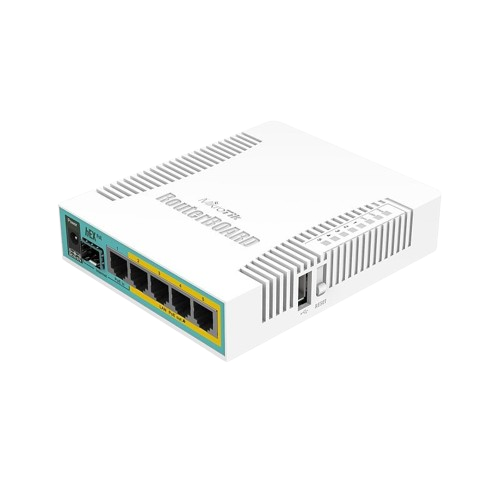
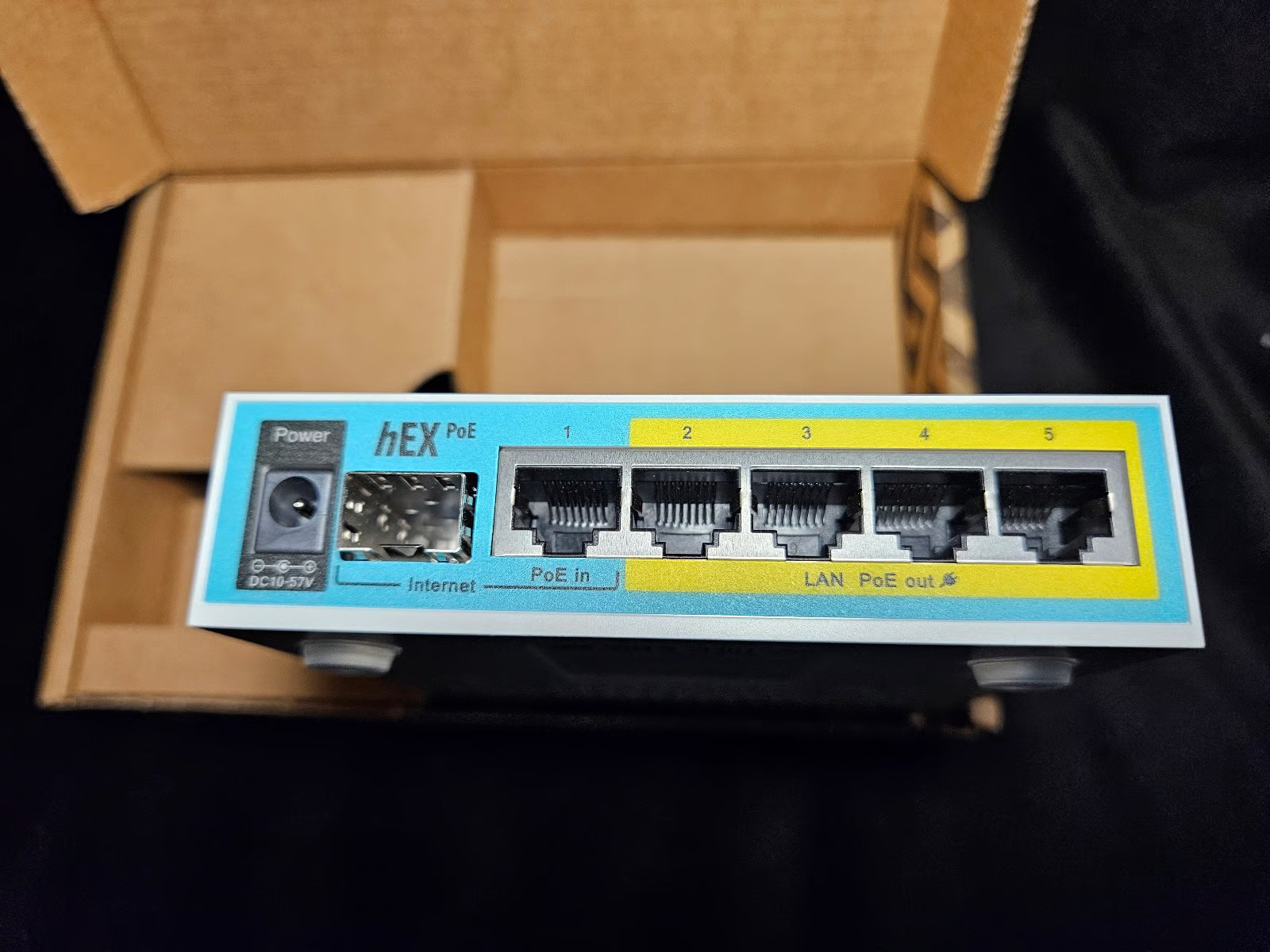
MikroTik hEX PoE RB960PGS Price in Kenya
In stock
KES 13,000.00
KES 14,500.00
You save KES 1,500.00
Buy MikroTik hEX PoE RB960PGS in Kenya at Reisen SEO. Explore a five-port Gigabit router with four PoE outputs, SFP connectivity, and RouterOS.
View product detailsNeed help choosing?
Talk to our team at +254 714 804 532
Product details
MikroTik hEX PoE RB960PGS Price in Kenya
MikroTik hEX PoE RB960PGS gives a planned network a RouterOS gateway with the interfaces and power roles of its exact model. Choose it around the provider handoff, local traffic, required policy, and any supported powered endpoints. Match the software workload to the hardware rather than selecting it from a port count alone.
Request a current RB960PGS quotation from Reisen. Confirm the exact item, quantity, supplied package, taxes, warranty, and delivery terms. Include the required supporting parts and installation work so the order covers the intended working setup.

Choose the exact item, confirm the full quote, then agree payment and fulfillment.
Key Specifications
|
Feature |
Details |
|
Model or product |
RB960PGS |
|
Copper ports |
5 × Gigabit Ethernet |
|
Optical interface |
1 × 1Gbps SFP; not SFP+ 10G |
|
CPU and memory |
800MHz QCA9557; 128MB RAM; 16MB flash |
|
Software |
RouterOS Level 4; MIPSBE |
|
Power inputs |
12–57V DC jack or passive PoE |
|
Powered ports |
Ether2–Ether5; output follows input voltage |
|
48V standard endpoint use |
802.3af/at mode B requires suitable 48–57V input |
|
Current limits |
1A low voltage / 450mA high voltage per port; 2A total |
|
Package supply |
Manufacturer lists 24V adapter; verify actual kit |
|
Wireless |
No built-in Wi-Fi |
Gigabit routing with a conditional standard PoE output role
The RB960PGS combines 5 Gigabit copper ports, a 1Gbps SFP cage, and PoE output on Ether2–Ether5. The optical cage is SFP, not a 10G SFP+ uplink. Its most important power detail is that output follows the applied input voltage. The manufacturer supports suitable mode B 802.3af/at devices when an appropriate 48–57V input is used. The listed 24V package supply is therefore not a universal power source for every 48V endpoint. Check each device before connection. The specified low- and high-voltage per-port limits differ, and the shared output current is another separate limit. Size the actual supply and endpoint set together. RouterOS Level 4 provides routing controls, but the single-core hardware should be tested with the intended rules and traffic. This is an indoor wired router with no built-in Wi-Fi.
Compatibility

Check fit, interfaces, power and the complete intended role.
Match the whole installation: intended role, physical fit, power, signal, software, and the equipment at the other end. Similar connectors or product names alone do not establish a working combination.

Interface counts do not state throughput or simultaneous full-power capacity.
A gateway selected for its real workload
A MikroTik RouterOS router can provide the gateway policy for a planned office, branch, home, or small service network. Its useful role depends on the physical interfaces and the configuration kept in service. Routing, firewalling, queues, VPN encryption, and connection tracking all use resources. A long software feature list is not a promise that every feature can run at maximum rate at the same time.
Write down the provider method, expected traffic, and services the router must handle. Then test those services with the real rules enabled. Packet size and traffic direction can affect the result. Watch load and response time rather than relying only on a large advertised port number. Keep the design as simple as the site allows, with a clear reason for each extra service.
Match the exact PoE method before powering endpoints
PoE output varies between the router models in this range. Some outputs are passive and follow the supplied input voltage. A suitable standard PoE output may also require a specific input range and supported wiring mode. Do not assume that the word PoE means every camera, access point, or telephone can be connected safely. Check the source, endpoint, and actual supply together.
Calculate the permitted current or power at each port and across the whole device. Leave room for startup demand and cable losses as required by the design. A power adapter's nameplate rating is not automatically the same as the allowed output budget of the router. Add endpoints one at a time and check stable operation. Keep powered ports labeled and disable unneeded passive output through the supported controls.
Start the product comparison with hEX PoE RB960PGS listing and RB4011 wired gateway. Start with the full model code, measured workload, actual ports, and package.
Treat management as a separate protected service
Use the initial access details from the supplied label and current guide. Set a strong unique administrator password. Restrict management to trusted interfaces or a properly planned secure remote path. An internet-facing router should not expose its control services to everyone simply because remote access would be convenient. Review the firewall before connecting an untrusted provider cable.
Save a known-good backup before large changes. Keep a readable record of addresses and interface roles, with secrets protected. Check the exact processor architecture and available storage before a software update. A file meant for another MikroTik family is not a safe substitute. Keep a tested recovery route so a failed change does not leave the owner without local management.
Add Wi-Fi only where the model provides it
A wired router does not create wireless coverage from Ethernet ports alone. Use a suitable separate access point where the chosen model has no radio. Where a model includes 2.4GHz Wi-Fi, that does not add a 5GHz band or a newer wireless generation. Match the actual client needs and room layout instead of assuming every RouterBOARD has the same wireless features.
For a separate access point, plan its cable, power, address, and security. Place it near the intended users rather than wherever the provider cable enters the building. Keep a clear distinction between indoor coverage and an outdoor point-to-point radio link. They solve different parts of the network. A sound gateway paired with a well-placed access point can make both roles easier to manage.
For another system option, review RB951Ui-2HnD wireless router and hEX PoE lite alternative. A different RouterOS model can change endpoint power, wireless support, and available interfaces.
Test provider access and resilience deliberately
DHCP, PPPoE, static addressing, and provider VLANs are different handoff methods. Use the details supplied for the actual account. Avoid putting the provider port into the trusted LAN bridge merely to make traffic pass. Check NAT and firewall behavior against the intended topology, especially when another gateway already sits upstream. Double NAT can affect some remote access workflows.
A second provider or supply needs a tested plan. Connecting another cable does not guarantee automatic failover. Check loss and return of the primary path and explain what happens to active sessions. If backup power is required, include the upstream modem or fiber terminal and local switch. A powered router cannot keep a service available when an essential connected part is off.
Plan the whole network before choosing the box
Start with a short map of the site. Mark the provider handoff, the gateway, the local switches, and the devices that need a wired or wireless connection. Give each part a clear job. This helps avoid buying a switch when the real need is a router, or buying another router when a few local ports would solve the problem. Keep the existing equipment labels in the plan so the new product can be checked against them.
Count the connections needed today and the likely next addition. Include uplinks and management connections rather than counting only user devices. A port used to connect another switch is already occupied. Leave a practical amount of spare capacity based on the site, not a fixed percentage copied from another installation. Growth may need more power, cooling, or management as well as more ports.
For a different layout, explore hEX S wired alternative and hEX S package option. Check the required provider handoff and whether client Wi-Fi needs a separate access point.
Match port rate to the traffic that will use it
The link rate is the speed negotiated between 2 interfaces. It is not the same as useful application speed or the internet package. Both ends and the cable must support the intended rate. A faster device can usually use a supported lower common speed, but that does not upgrade the slower interface. Check the actual product specification rather than the shape of the socket.
Think about local transfers as well as internet access. A computer copying files to local storage can use the LAN even when the provider connection is idle. Several users sharing an uplink may compete for that same path. Test the network with a realistic mix of work. A single short speed test cannot show how it will behave during a busy office session.
Keep the gateway and address services clear
A switch forwards local data, while a router connects different networks and applies the intended gateway policy. A network often needs both. The upstream equipment may already provide addressing and internet routing. Decide where those jobs belong before adding another device. Two unintended DHCP servers can make clients receive different gateways and create faults that appear to come and go.
Use non-overlapping subnets where routing separates networks. Keep the management address in a documented trusted range. If a device is used only for switching or access, do not enable a second gateway role by accident. Write down where clients get addresses and DNS. A simple clear plan makes later troubleshooting easier for someone who did not perform the original setup.
The complete parts plan may also include L009 wired gateway alternative and TP-Link 16-port local switch. A local switch adds data connections but does not replace the gateway policy or internet subscription.
Install sound cable and protect the connections
Use suitable cable and terminations for the desired data rate and route. Check both ends of each run. A damaged connector, poor termination, or unsuitable patch lead can reduce negotiation or create errors. Replace a suspect lead with a known-good one before changing a long list of software settings. Label important runs at both ends and match the labels to a port record.
Support cables so their weight does not pull on sockets. Leave controlled slack for service without filling vents with large coils. Keep copper and fiber handling requirements separate. A fiber connector needs suitable cleaning and bend control, while a copper run needs all required pairs and sound termination. The equipment can only work with the quality of the connections attached to it.
Choose a location that allows service and cooling
Keep indoor equipment dry and ventilated. Leave room to reach power, data ports, and any console interface. Do not pack adapters against a heatsink or place a warm exhaust directly against another device's intake. Check the airflow direction of the exact model. A cabinet needs a room-level heat plan as well as open space around the device.
Mount the unit with suitable support. A rack ear, shelf, or desktop position has to suit the actual case and weight. Measure connector clearance before closing cabinet doors. Keep a safe service route so one failed cable can be changed without pulling unrelated links. Small planning choices at installation can save a much larger disruption during a working day.
For the wider installation, review UniFi Lite 8 PoE local switch. Plan the downstream equipment as a separate part of the complete network.
Record a useful operating baseline
Test one client and one path at a time before connecting every device. Check the negotiated rate, address, local access, and provider access separately. Once the full system is working, repeat a normal busy task and note any errors or unexpected delays. Keep those results with the final settings. A saved healthy baseline helps explain later reports of slow access.
Use the record when troubleshooting. If one client fails, start with that client and its cable. If many clients fail, inspect the shared uplink, gateway, and power path. If local transfers work but the internet does not, test the provider side as a separate stage. Changing several unrelated settings at once makes it harder to learn which change fixed or caused the fault.
Price the installed result rather than an isolated item
The main product may need a supply, optics, cable, mounting parts, a cabinet shelf, or setup work. Include the useful supporting parts in the quotation. Check whether they are already available and compatible. This avoids paying for duplicates while also preventing the installer from reaching the site without a required part. A complete bill of materials is easier to check than several informal messages.
Confirm current stock, taxes, warranty, delivery, and the scope of technical help before payment. Keep the full model and any hardware revision on the order. Similar product names can hide different port layouts or power methods. Keep the invoice and final package list with the equipment record. That gives the owner a clear basis for support and future replacement.
Quick Brand Comparison
|
Gateway choice |
What to compare |
|
Exact MikroTik model |
Port rates, CPU workload, software and power method |
|
Another RouterOS gateway |
Required interfaces and measured configuration |
|
UniFi or other managed platform |
Different management and complete system needs |
|
Separate switch and access point |
Local ports and coverage as distinct functions |
Compare the complete role and installed package. A change of brand or model can change the supporting parts, service, management, and setup work. Start with the task the site needs and keep useful existing equipment in the decision. A similar name is not enough to prove a matched replacement.
Can It Be Used with Starlink?
It can work within a suitable downstream Ethernet network supplied by Starlink, provided the hardware, capacity, and configuration match the job. Use the appropriate Starlink Ethernet handoff to the gateway and local LAN. This product does not replace the dish or connect directly to satellites. For the wider service and installation plan, see Starlink Kenya Installers. Keep proprietary dish-power connections separate from the local device’s approved power path. The internet plan and the local link rates remain separate limits.
How to Set Up RB960PGS
1. Confirm the model and role
Read the full product code, hardware label, supplied guide, and power rating. Decide whether the unit is the main gateway or part of an existing routed network. Obtain the provider handoff method and credentials. Record the current configuration before changing a device that has already been used.
2. Prepare trusted local access
Use the approved supply and a suitable local computer connection. Identify any passive powered ports before inserting leads. Use the label or documented discovery method to open WinBox or WebFig. Set a strong unique administrator password and keep the provider cable disconnected until interface roles and firewall policy are clear.
3. Build the address and port plan
Assign the WAN and LAN interfaces, non-overlapping subnets, DHCP ownership, and a reachable management path. Keep the provider interface out of the trusted bridge in a routed design. Check any port-group or hardware-switching limits in the exact model documentation before treating all bridged ports as an identical forwarding path.
4. Configure the actual provider service
Apply DHCP, PPPoE, static addressing, or the specified VLAN as required by the account. Keep a suitable firewall and use NAT where the design needs it. Test the WAN and a wired client separately. Do not disable protection or bridge an untrusted link into the LAN merely to make a test pass.
5. Add endpoints with the correct power
Match every powered endpoint to the router’s permitted voltage, wiring mode, current, and total budget. Output can follow input voltage. Leave unneeded passive outputs disabled through supported settings. Add one device at a time. A model accepting one PoE input method does not automatically provide the same method on its outputs.
6. Test the intended workload
Check wired negotiation, addressing, DNS, local traffic, and internet access. Test any included Wi-Fi only on the model that has it. Watch CPU and memory with the real queues, firewall, or VPN settings active. A maximum port rate does not guarantee the same rate through all configured services.
7. Update and recover deliberately
Check the exact architecture, supported release, packages, and available storage before updating. Save a known-good backup and readable configuration record first. Use the documented recovery method for that model. Keep a local access path and a maintenance window for changes that could interrupt the gateway.
8. Save the final handover
Label the WAN, LAN, and powered outputs. Record supply ratings, endpoint loads, management address, and software. Test any backup provider or power behavior with the owner. Keep credentials protected and confirm who can change settings. Save the tested configuration after the complete network passes its normal tasks.
Advantages
· Provides RouterOS controls for a planned gateway role.
· Offers a defined set of wired interfaces for local devices and uplinks.
· Can reduce separate endpoint adapters when the exact PoE arrangement matches.
· Supports a documented configuration and recovery plan.
Disadvantages and Limits
· Actual throughput depends on the model and configured services.
· PoE output needs exact supply and endpoint matching.
· Wi-Fi, fiber and port rates differ between models.
· Configuration and ongoing software care need a responsible owner.
Troubleshooting
Separate provider, local Ethernet, client Wi-Fi where present, and endpoint power faults. Check negotiated rates, addressing, supply labels, and CPU load before resetting the router. If an endpoint restarts, inspect its power path and load budget. Save the working configuration before a large change. A controlled test of one layer is more useful than changing several unrelated settings at once.
Frequently Asked Questions
Does the router include an internet subscription?
No. The hardware needs a compatible working provider handoff and the account settings for that service. Confirm whether the connection uses DHCP, PPPoE, a static address, or a provider VLAN. A router can share and control a service, but it does not create the subscription.
Will every port deliver the same application speed?
No. Link rate, port groups, processing, rules, packet size, and the attached devices can affect results. Test the configuration the site will use. Do not convert a port count or a combined test figure into a guarantee for every client or every routed service.
Can any PoE endpoint be connected?
No. Check the exact output method, input supply, voltage, polarity, wiring mode, per-port limit, and shared budget. Passive PoE is not universally interchangeable with standards-based PoE. Use a supported endpoint and source combination and keep unneeded passive outputs off through the supported settings.
Can it be used with an existing gateway?
Yes, in a suitable planned topology. Decide which device routes, supplies DHCP, and performs NAT. Avoid overlapping subnets and accidental duplicate address servers. A secondary router or access role needs an appropriate configuration; connecting another gateway without a plan can make the network harder to support.
Does RouterOS remove the hardware limits?
No. The software license and supported feature list do not increase CPU, RAM, storage, or physical port rates. Complex queues and encryption can reduce capacity. Choose the model around the workload and test the real rule set rather than relying only on a software feature name.
How should management access be protected?
Use strong unique credentials and a trusted management path. Avoid exposing control services directly to the internet. Keep a backup before large changes and verify the exact architecture and supported software. The owner should know who holds administrator access and how recovery works after a failed change.
What is needed beyond the router?
The complete setup may need an access point, switch, approved endpoint power, optics, cabling, a cabinet shelf, or configuration work. Start with the site plan and current equipment. Ask for an itemized quote so included parts and separate requirements are clear before installation.
How do I request the current price in Kenya?
Send Reisen the full product code, quantity, provider service, endpoint list, and delivery location. Include any PoE load, optical link, VPN, or backup requirement. Confirm stock, taxes, warranty, package contents, delivery charges, and the agreed setup scope before payment.
Why Shop with Reisen
Reisen brings network, security, and supporting accessories into one catalogue, which makes a complete parts list easier to prepare. Ask the team to confirm the exact product, package, and stock before payment. A clear quotation helps you spot missing items and avoid buying the wrong accessory for a familiar-looking device. Keep the order tied to the real installation.
Technical questions are easier to answer when the team has the current equipment labels, site details, and intended result. Share those details and ask for the available installation and after-sales support. Confirm delivery charges, timing, return conditions, and warranty terms in writing. Keep the agreed information with the invoice so later help can start from a clear purchase record.
Complete the Setup with Reisen
For a separate gateway or endpoint-power role, review MikroTik RB4011iGS+RM Router. Match its own interfaces, ratings, package, and intended function to the site. It is a related planning choice rather than proof that the 2 products can be substituted directly.
For a separate gateway or endpoint-power role, review MikroTik RB951Ui-2HnD Wireless Router. Match its own interfaces, ratings, package, and intended function to the site. It is a related planning choice rather than proof that the 2 products can be substituted directly.
For a controlled switching or optical uplink plan, compare D-Link DGS-1210-28P 28-Port Gigabit PoE Smart Managed Switch. Match its own interfaces, ratings, package, and intended function to the site. It is a related planning choice rather than proof that the 2 products can be substituted directly.
For a controlled switching or optical uplink plan, compare D-Link DGS-1210-52MP 52-Port Gigabit PoE Smart Managed Switch. Match its own interfaces, ratings, package, and intended function to the site. It is a related planning choice rather than proof that the 2 products can be substituted directly.
For a separate gateway or endpoint-power role, review MikroTik hEX PoE lite RB750UPr2. Match its own interfaces, ratings, package, and intended function to the site. It is a related planning choice rather than proof that the 2 products can be substituted directly.
For a controlled switching or optical uplink plan, compare MikroTik CRS326-24S+2Q+RM Cloud Router Switch. Match its own interfaces, ratings, package, and intended function to the site. It is a related planning choice rather than proof that the 2 products can be substituted directly.
For indoor client Wi-Fi, explore MikroTik cAP ac RBcAPGi-5acD2nD Wireless Access Point. Match its own interfaces, ratings, package, and intended function to the site. It is a related planning choice rather than proof that the 2 products can be substituted directly.
Browse the Reisen equipment shop for the rest of the parts list. Keep one clear order record with the main product, compatible accessories, and installation work. Check existing parts before adding duplicates or assuming a required accessory is already included.
Contact Reisen sales and support with the exact product, quantity, location, and existing system details. Ask for the current stock and complete quotation. Confirm taxes, delivery, warranty, and setup scope in writing before payment so the agreed package is easy to verify.
Order the Right Package
Send the full product name, model or required accessory drawing, quantity, and delivery location. Add the existing equipment and target installation date. Confirm the current price and stock, then agree payment and collection or delivery. Keep the final package list and invoice together so the delivered parts can be checked before the installation begins.
Additional information
| Product | MikroTik hEX PoE RB960PGS Price in Kenya |
|---|---|
| Category | Mikrotik |
| Price | KES 13,000.00 |
| Availability | In stock |
Keep exploringMore in Mikrotik
Related products