
Save 29%
Select an image to view it. Click the main image to enlarge.
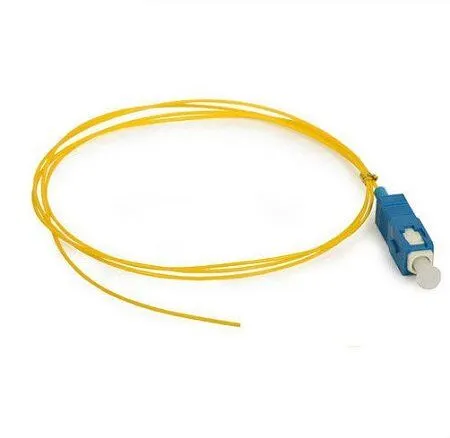
Simplex SC/UPC Single Mode Fiber Optic Pigtail Price in Kenya
In stock
KES 50.00
KES 70.00
You save KES 20.00
Buy simplex SC/UPC single-mode fiber pigtails in Kenya at Reisen SEO for optical distribution panels, protected splices, and compatible fiber terminations.
View product detailsNeed help choosing?
Talk to our team at +254 714 804 532
Product details
Simplex SC/UPC Single Mode Fiber Optic Pigtail Price in Kenya
Create a clean SC/UPC termination on an installed single-mode fiber by splicing in a factory-terminated pigtail. It suits protected fiber distribution work where the permanent cable must be joined to a practical front-facing connector.
Specify UPC at the mating adapter and patch cord. A connector with the same SC shape can still have the wrong polish. The tail needs proper stripping, cleaning, cleaving, fusion splicing, protection, and tray storage.
Ask Reisen for the current Simplex SC/UPC Pigtail package and a quotation matched to the job. Choose the exact specification before ordering so the installer has the correct parts and documentation on site.

Choose the exact item, confirm the package and quotation, then agree payment and fulfillment.
Key Specifications
|
Item |
Details |
|
Fiber count |
1, simplex |
|
Fiber type |
Single-mode |
|
Connector |
SC/UPC |
|
Termination |
1 connectorized end and 1 splice tail |
|
Length and fiber subtype |
Confirm supplied item |
|
Housing |
Install in a suitable protected termination point |
Compatibility at a Glance

Match the exact supplied item to the planned installation before ordering.
A UPC patching point for a building cable
This pigtail suits a design that specifically requires SC/UPC presentation. It can finish a selected single-mode core at a panel so the building team has a practical testing and patching point. The connector format must be carried through to the matching adapter and front lead; a nearby APC panel is not interchangeable merely because its opening accepts an SC body.
Before ordering several pigtails, confirm the required length and coating construction with the installer. A short tail may make tray routing difficult, while an unnecessarily long tail can crowd a small box. A sample assembly can reveal the actual space needed for the sleeve, routing guides, and adapter. Test the sample before repeating the same termination across the project.
Turn an installed fiber into an accessible connector
A fiber pigtail has a connector at one end and a tail intended for splicing at the other. It is useful when a permanent cable needs to finish at an ODF or terminal box. The factory connector provides the patching interface, while the splice joins the tail to the selected cable core. Both the splice and the remaining fiber need a protected tray or enclosure; the pigtail is not a loose indoor extension lead.
In a building installation, the main cable is first anchored by its jacket or approved strength members. The selected fiber then reaches the splice tray. A matching pigtail is spliced to that fiber and routed to the adapter position. A separate patch cord connects the front of the adapter to the active equipment. This arrangement keeps routine unplugging away from the permanent cable and the protected splice.
Match fiber and polish before splicing
The connector end must match the planned patching interface, including SC format and APC or UPC polish. The splice end must be suitable for the installed fiber and the chosen splicing process. Single-mode is a broad description; record the exact fiber type where the project requires it. A change in fiber properties can affect test interpretation even when a splice appears mechanically sound.
The coating or buffer size matters to the stripping tools and holders. Do not remove an arbitrary length of coating. Follow the splicer and sleeve instructions so enough glass is prepared for the process while the finished joint is properly covered. Handle the cleaned glass only through the intended tooling. Keep cleaved waste in a closed fiber-sharps container rather than brushing it onto the floor or bench.
Protect the splice and preserve service access
A fusion splice needs a suitable protection sleeve and a place to hold it without bending the joint. Allow the sleeve to cool before placing it in the tray holder. Route the remaining fiber around the tray guides in broad curves. A lid that closes only by pressing down on loose fiber is a sign that the routing needs to be corrected. Leave enough service length for the approved repair method, without overfilling the tray.
Use a fiber schedule that connects the cable core to the splice position and adapter port. The color of a fiber alone is not always enough once several cables share an enclosure. Record cable identifiers and tray numbers as well. This is especially useful when a later customer needs activation or a fault must be isolated without disturbing working users. The pigtail's value is strongest when it forms part of an orderly, tested termination.

Follow the matching product instructions for exact dimensions, settings and acceptance.
Quick Product Comparison
|
Product type |
Main distinction |
|
Patch cord |
Connectorized link between matching interfaces |
|
Pigtail |
1 connector and a tail for protected splicing |
|
Fast connector |
Field termination using its specific preparation method |
|
PLC splitter |
Passive branch distribution in a designed optical network |
How to Install Simplex SC/UPC Single Mode Fiber Optic Pigtail
Step by Step Guide to Installing Simplex SC/UPC Single Mode Fiber Optic Pigtail
Step 1 Confirm the fiber schedule and parts
Match the cable core, pigtail fiber, connector polish, adapter position, splice sleeve, and tray. Check the actual buffer or coating size for the stripping tools and splicer holders. Label the intended termination before cutting anything. A written schedule helps prevent a clean splice from being made onto the wrong customer fiber.
Step 2 Prepare a controlled work area
Set out a stable preparation surface, fiber-sharps container, cleaning materials, cleaver, and suitable fusion splicer. Keep dust and wind away from exposed glass. Follow the operator’s isolation and eye-safety procedure. Do not look into a fiber end, and keep food and drink away from the preparation area.
Step 3 Anchor the permanent cable first
Secure the incoming cable using the enclosure’s approved strain-relief arrangement. Route the chosen fiber and pigtail to the tray without pulling on bare glass. Check that the tray can move as designed and that enough service length remains. Fit the protection sleeve onto the correct side before making the splice.
Step 4 Strip and clean both fiber ends
Use the required stripping length and the correct tool. Remove residue with the approved fiber-cleaning process. Avoid nicking the glass or touching it after cleaning. If the fiber is damaged, prepare a fresh end rather than trying to hide the defect inside a sleeve. Keep the prepared ends protected from the work surface.
Step 5 Cleave and fusion splice
Use the cleaver and holders specified for the splicer and fiber. Transfer each end directly to the splicer and select the appropriate program. Follow the machine’s prompts and inspect any reported problem. A displayed estimated splice loss is useful process feedback, but it is not a substitute for the project’s independent optical acceptance test.
Step 6 Protect the joint and route the tail
Center the sleeve over the joint and use the approved heating cycle. Allow it to cool before fitting it into the tray holder. Route the spare fiber in broad curves and seat the pigtail connector in the matching adapter. Keep the sleeve and bare glass clear of cover edges, screws, and cable-entry hardware.
Step 7 Verify optical performance
Inspect and clean the patching interface, then carry out the required continuity and optical-loss tests. Use OTDR measurements where the plan calls for fault location or splice assessment. Record direction and wavelength. If a result is poor, inspect the test leads and connector surfaces before deciding to cut out the new splice.
Step 8 Close and document the enclosure
Close the tray and enclosure while watching the fiber path. Recheck the relevant result if the closure could have changed routing. Record cable ID, core, pigtail polish, tray, adapter position, and test outcome. Retain the schedule where the maintenance team can find it and protect unused ports with the correct caps.
Advantages
· Provides a factory connector for a permanent fiber route.
· Supports organized front-facing patching through a matching adapter.
· Separates routine patch-lead changes from the protected cable splice.
Disadvantages and Limits
· Requires suitable splicing tools and trained installation.
· Needs sleeve protection and tray space.
· Fiber type, length, and connector polish must be matched.
Frequently Asked Questions
Is a pigtail the same as a patch cord?
No. A pigtail normally has 1 connector and a tail intended for splicing. A patch cord has connectors at both ends. Select the product that matches the planned termination method and enclosure layout.
Are splice sleeves included?
Do not assume they are. Confirm the packing list, sleeve dimensions, and tray compatibility. A connectorized tail still needs proper splice protection when it is joined to the installed cable.
Can I leave the joint outside the tray?
A completed splice needs approved protection and storage. Bare glass or a loose sleeve should not carry cable loads or sit where it can be bent or crushed. Use the enclosure’s designed holders and routes.
Where can I buy Simplex SC/UPC Single Mode Fiber Optic Pigtail in Kenya?
You can request the product from Reisen using the exact name and intended application. Ask for the current quotation, available package, required accessories, and agreed delivery or collection terms. Supply any important compatibility details so the order can be checked before dispatch.
What should I send for a compatibility check?
Send the exact existing model or part specification, the installation purpose, and clear photographs of labels or interfaces where useful. Include the relevant dimensions, fiber details, or network design. A photo alone may not prove optical, electrical, or mechanical compatibility, so retain the written specifications too.
Can I order installation or testing with the product?
Ask Reisen for a separate scope stating the work, materials, tests, and handover records required. Confirm the price and responsibility for site access before scheduling. Do not assume that a hardware quotation automatically includes installation, configuration, or a complete acceptance report.
Complete the installation with Reisen
Plan related parts around Fiber Optic SC/APC Fast Connector and Fiber Patch Cord 2M Single Mode SC/APC-SC/UPC. Select each for its own role and match its exact dimensions, interfaces, or mechanical requirements to the job.
For another part of the installation, review Simplex SC/APC 9/125 Single-mode Fiber Optic Pigtail alongside Fiber Patch Cord 9/125 2mm 2m LC/UPC-SC/UPC. These are complementary choices where the design calls for them; the shared project does not make their functions interchangeable.
The preparation or service plan may also need Single Mode Bare Fiber Optic PLC Splitters and S09 Fiber Cleaver. Ask for the correct tools, protection parts, and test method before adding items to the order.
For a wider route or distribution point, examine Fiber OTDR ZS-1000A and Fiber ATB Loaded with LC/APC Adapters. Check the actual package and how the parts fit the written installation plan.
Keep the full project in view when selecting Fiber Optic 12 Core ODF with SC/APC Connector or Fiber Optic 24 Core ODF with SC/APC Connector. Confirm which items are essential now and which are optional, spares, or alternatives so the quotation is easy to review.
Compare matching parts and related equipment
For a matching product listing, review SC/UPC pigtail. Check the exact supplied specification and package; a matching name does not establish every revision or included accessory.
To plan the surrounding fiber path, review SC/APC pigtail and SC/APC to SC/UPC patch cord. Match each choice to its actual role. These links help with selection; they are not a promise that every item is bundled or directly interchangeable.
For another required part of a complete route, examine LC/UPC to SC/UPC patch cord and 12-core SC/APC ODF. Match each choice to its actual role. These links help with selection; they are not a promise that every item is bundled or directly interchangeable.
When choosing preparation and maintenance materials, compare 24-core SC/APC ODF and 24–48-core dome enclosure. Match each choice to its actual role. These links help with selection; they are not a promise that every item is bundled or directly interchangeable.
For the distribution or equipment side of the design, review S09 fiber cleaver and ZS-1000A OTDR. Match each choice to its actual role. These links help with selection; they are not a promise that every item is bundled or directly interchangeable.
To check other installation options, explore fiber cable stripper and fiber cabling options at Orbitlink. Match each choice to its actual role. These links help with selection; they are not a promise that every item is bundled or directly interchangeable.
For a final package comparison, look at fiber switches at Network Switch Kenya. Match each choice to its actual role. These links help with selection; they are not a promise that every item is bundled or directly interchangeable.
Choosing the right package in Kenya
If you are asking where to buy Simplex SC/UPC Single Mode Fiber Optic Pigtail in Kenya, start with the exact job and the required quantity. Send Reisen the product name, the planned installation, and the interfaces or mechanical parts it must work with. Include a photograph of the existing label where that helps identify a replacement. A clear order is easier to check than a request for something that looks the same.
Ask for a current quotation that separates hardware, accessories, installation, and testing. Confirm whether taxes, transport, and any agreed technical work are included. A low item price does not describe the cost of a complete installation if the required small parts or tools are missing. Compare packages against the same written requirement and retain the approved version of the quotation.
For repeated installations, ask whether a sample can be checked before the full project quantity is committed. The sample should be assessed against the actual cable, equipment, or support arrangement. Keep the approved part identification with the project record. A later delivery should match that approved specification rather than only sharing a broad product description.
What’s in the Box
Confirm the delivered package against the quotation. Items to check are:
· SC/UPC pigtail in the ordered quantity
· Protective connector cap as supplied
Tools, test equipment, and complementary installation materials are not included unless the quotation lists them. Check the package before using or modifying the item. Keep the invoice, label, and any batch or serial information. Report a missing part or visible shipping damage promptly with the order reference so the supplier can assess the issue accurately.
Warranty
Ask Reisen to confirm the applicable warranty duration, coverage, exclusions, and claim process in writing before payment. Confirm whether assessment is handled locally and which evidence is needed. For equipment, retain the serial number and supplied documents; for installation materials, retain the package and batch details where available. This description does not establish a new warranty term.
Keep a record of installation conditions and the problem observed. A compatibility issue, handling damage, and a manufacturing fault can require different checks. Do not alter a suspect item before receiving the applicable claim instructions. Where work has already started, keep the removed part and relevant test or inspection evidence so the issue can be reviewed without guesswork.
Return Policy
Confirm Reisen’s current return window, eligibility, assessment process, and responsibility for transport charges before ordering. Ask specifically about opened, cut, fitted, assembled, configured, or specially sourced items where those conditions apply. Do not assume that a product can be returned after installation or that a refund is automatic. The written purchase terms and the circumstances of the order govern the process.
If the wrong item arrives, keep it protected and contact the team with the order reference before using it. Retain the supplied packaging and accessories while the issue is assessed. Checking the exact specification before dispatch is usually easier than arranging an exchange after the installation crew has traveled to site or material has been cut to length.
Product Guides and Documents
Keep the product identification, approved specification, packing list, quotation, and installation record together. Request the document that matches the delivered model or construction. A guide for a related item can explain a general principle, but it should not be used to transfer a load rating, optical limit, preparation dimension, or software feature to a different product.
Where a specification is essential to the project, record it in the approved order. This can include dimensions, fiber type, material, interface, capacity, module class, or mechanical rating as appropriate. Good documentation helps with replacement parts and later expansion. It also gives the installer a clear point of reference if the delivered item differs from the expected package.
Installation Manuals
Use the matching installation instructions as the final reference for dimensions, preparation, assembly, supported tools, and testing. The step-by-step guide on this page explains the working sequence, but exact model instructions remain necessary. Ask for the matching document before a crew travels to site, especially where a special jig, holder, seal, mounting part, or console connection may be required.
Keep the final layout and test or inspection result with the manual. Record any approved change made during installation so the next technician does not rely on an old drawing. When replacing an item, check the revised part and instructions again. Similar appearance does not guarantee that a new batch or model uses the same procedure.
Why Shop with Reisen
Reisen brings network equipment, connection parts, and installation materials into one catalog so buyers can plan a complete order. Ask the team to confirm the model, quantity, package, and suitable accessories for the intended job. Confirm current stock, delivery arrangements, and the scope of any technical support before making payment.
We’re working to make Reisen a Leading eCommerce platform in Kenya and a Leading eCommerce platform in Africa through clear product information and useful buying support. For your order, focus on the written commitments in the quotation: the exact goods, agreed price, included parts, delivery terms, and support scope. Keep those details so follow-up questions can be handled against a clear record.
Order Simplex SC/UPC Pigtail from Reisen
Ready to buy Simplex SC/UPC Single Mode Fiber Optic Pigtail in Kenya? Open Simplex SC/UPC Single Mode Fiber Optic Pigtail and request confirmation of the current package. Share the quantity, location, intended use, and any compatibility requirement. If installation or testing is needed, ask for its scope and charge separately. Confirm the supplied items and order terms before arranging collection or delivery.
On arrival, compare the delivery with the approved order before the installation date. Retain the invoice and product documents, then complete the required physical and service tests. A good buying decision includes the correct product, the right supporting parts, and a clear record of what was supplied and installed.
Additional information
| Product | Simplex SC/UPC Single Mode Fiber Optic Pigtail Price in Kenya |
|---|---|
| Category | CTC Fibre Optics Solutions |
| Price | KES 50.00 |
| Availability | In stock |
Keep exploringMore in CTC Fibre Optics Solutions
Related products


