Save 2%
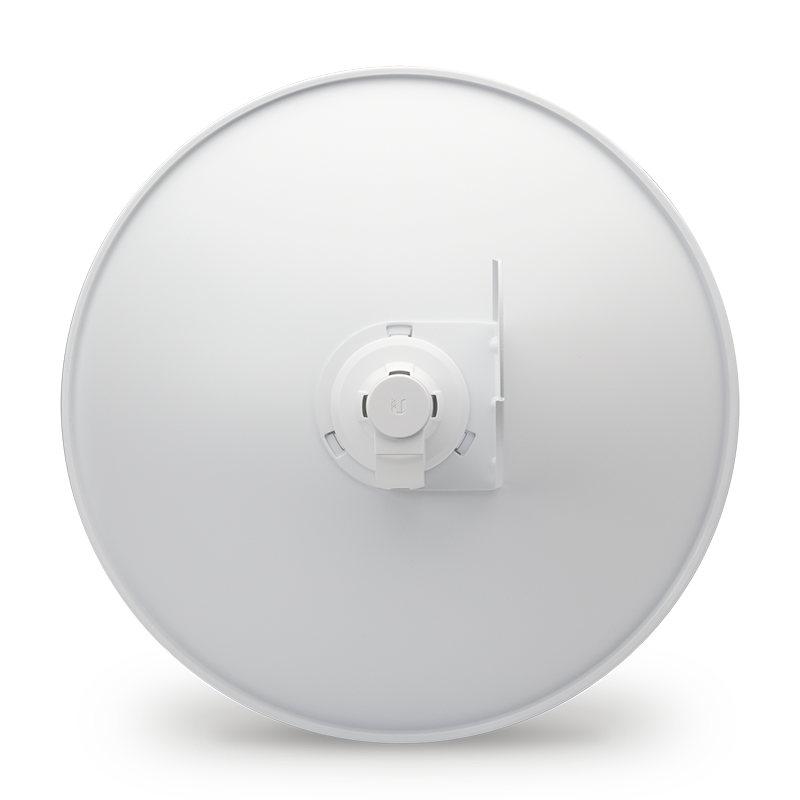
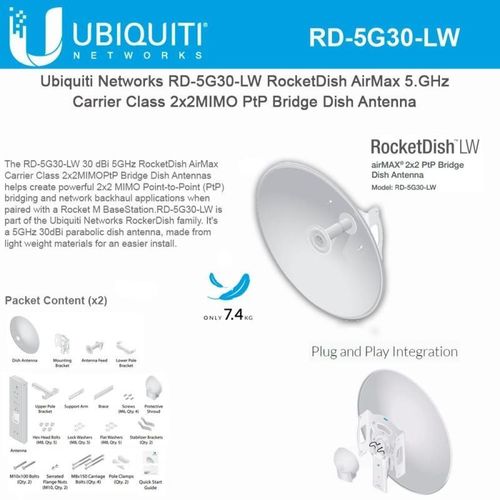
Select an image to view it. Click the main image to enlarge.
Ubiquiti AirMax RocketDish 5GHz 30dBi RD-5G30 Price in Kenya
In stock
KES 22,500.00
KES 23,000.00
You save KES 500.00
Buy Ubiquiti RocketDish RD-5G30 in Kenya. Explore its 30dBi directional antenna, compatible radio requirements, specifications and setup guide.
View product detailsNeed help choosing?
Talk to our team at +254 714 804 532
Product details
Ubiquiti airMAX RocketDish 5GHz 30dBi Price in Kenya
The Ubiquiti airMAX RocketDish 5GHz 30dBi is a passive antenna for a planned outdoor radio system. It works with a separate supported radio and suitable gear at the far end. It does not include a complete wireless link. Choose it around the antenna pattern, band, radio support, and site structure. A clear order should name each part needed to turn the antenna into a working network path.
Best fit: A narrow point-to-point link with a separately chosen matched radio. Passive dual-polarized dish; matched radio sold separately. Check RD-5G30 versus RD-5G30-LW on the order.
See the RD-5G30 product page at Reisen to check the model when preparing your order. Ask for the exact supplied version and a full parts list. This makes it easier to compare a complete working package with a bare device.
For the same model or the nearest listed option, start with RD-5G30 at Ubiquiti UniFi Kenya and PowerBeam AC integrated-radio alternative. Read the full product code on each page. Any alternative named here has its own limits and may need changes elsewhere in the system. Compare the package and the job it must do, rather than the case shape alone.

Choose the exact model, get a current quote, then agree payment and fulfillment.
Key Specifications
|
Feature |
Details |
|
Model |
RD-5G30 |
|
Product type |
Passive outdoor antenna |
|
Band |
5GHz |
|
Antenna gain |
30dBi nominal class |
|
Ethernet |
No Ethernet port |
|
Power |
No direct power input |
|
Setup |
Configure the attached radio; antenna has no software |
|
Package |
Confirm the exact supplied accessories before ordering |
Check the exact RocketDish suffix
RD-5G30 and RD-5G30-LW are related 30dBi-class dish names, but they are not the same mechanical product. Reisen’s page address uses the word lightweight, so check the full label in the quotation. The description here covers the RD-5G30 antenna role and does not assume LW mounting parts. A matched radio is separate. If the project uses airFiber rather than a Rocket radio, verify the required antenna support and any adapter kit. Never treat the dish as a powered radio. It has no Ethernet port. The complete order must include the radio, RF connections, power, mount, and a suitable remote end.
Compatibility

Match the delivered hardware and its manual. A similar connector is not proof of compatibility.
The antenna is one part of the link
The RD-5G30 shapes the radio signal in an outdoor wireless system. It is a passive antenna. It has no Ethernet socket, software login, or built-in internet service. A separate matched radio creates the signal. RF leads carry that signal between the radio and antenna. The far end also needs suitable radio gear. Build the order around that complete path. This helps avoid buying an antenna when the site actually needs a ready-to-use radio and antenna assembly.

Connect with the correct RF leads. The antenna has no Ethernet port and does not provide internet by itself.
Choose a pattern that fits the job
The design is a narrow directional dish. A sector spreads the signal across a planned angle. A dish focuses it toward one main path. Those patterns suit different jobs. A sector can serve several client locations in front of the base station. A dish is often used for a link between 2 fixed points. Neither one gives equal coverage in every direction. Map the client locations first. The drawing should show direction and height as well as the distance from the mast.
Read antenna gain in context
The gain is 30dBi nominal class. Gain describes how the antenna shapes energy compared with a reference. It is not extra internet bandwidth and does not create radio power by itself. A high-gain pattern may need more precise aiming. The full system must also meet local radio limits. Match gain to the radio settings and the planned path. Do not promise a distance based only on the dBi figure. A clear path and a clean channel remain vital to a steady link.
A further comparison is RocketDish lightweight listing; verify exact suffix. Keep the radio family, power method, and data interface in view. Where the linked item is a newer model or another voltage, treat it as a separate choice. It is not a blanket replacement for the RD-5G30.
Match the radio before ordering
Check band, RF connector type, number of signal chains, antenna support, and mounting method. This antenna is for the 5GHz class of link. A radio on a different band is not a match. A radio with 2 RF chains needs the correct arrangement for both. Do not leave an unused chain disconnected without checking the design. If an adapter kit is needed for a different radio family, verify that kit before purchase. Similar brackets do not prove electrical support.
Keep both polarizations connected
A dual-polarized antenna supports 2 signal paths with different polarizations. The matching radio and RF leads must preserve those paths. Label the leads and follow the maker's port arrangement. A damaged or loose lead can weaken one side of the link. The result may look like poor alignment even when the mount is aimed well. Inspect the connections before changing transmit settings. Use the correct weather sealing for exposed RF joints and keep the leads free of sharp bends.
Survey the full radio path
A line on a map is useful, but a site visit shows the real mounting choices. Check roofs, trees, terrain, nearby masts, and future obstructions. The signal needs space around the direct path, called the Fresnel zone. A low mount may lose that clearance even when the far building is visible. Record both mount heights and the route. If the proposed link is weak on paper, change the site plan before buying a larger antenna as a last-minute fix.
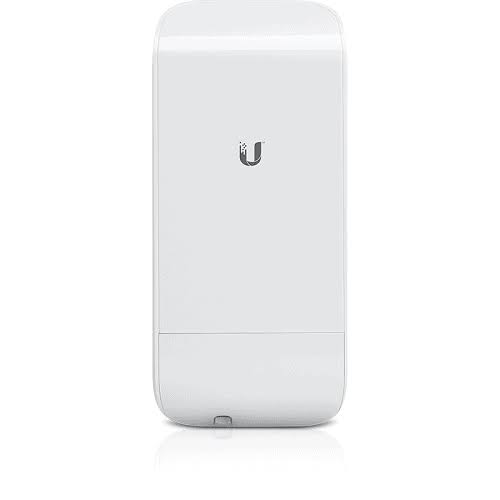
Broader link choices include the Loco M5 and NanoStation radio alternative. These have different bands, antenna forms, or radio generations. Choose a supported pair or a planned full upgrade. A similar name alone does not make the far end accept a new radio.
Build a stable mounting point
The mount must hold the antenna steady in the site's conditions. Dish size and wind load matter to the structure. A loose pole can cause service drops as it moves. Choose suitable supports and fasteners with a qualified installer. Keep the antenna away from overhead power lines. Leave safe service access for alignment and inspection. The bracket supplied with an antenna is not proof that every wall, roof edge, or mast can support the completed radio system.
Protect RF leads and cable entries
Keep RF leads short and correct for the setup. Unneeded joins can add loss or become water-entry points. Tighten connectors as the maker directs and apply the proper weather protection. Route the radio's Ethernet cable with strain relief and a drip loop where needed. The antenna itself has no PoE input; the attached radio receives power. This distinction helps when labeling the setup. Follow the radio maker's grounding and surge plan for the whole assembly.
Align with measurements at both ends
Start with the mapped direction and the planned tilt. Make slow, small changes while reading both radios. Check the signal on each chain where the software shows it. A balanced, stable result is more useful than chasing one large number. Tighten the mount and recheck the readings. Then pass traffic across the link. An antenna that looks straight from the ground may still be aimed poorly. Keep the final direction and signal record for later maintenance.
For another platform, review the MikroTik LHG 5 ac. Its radio system has its own setup rules. The copper LAN beyond a radio link may also need network switching gear. A switch serves local sockets; it does not solve an incompatible wireless pair.
Plan sectors as shared systems
Several client radios on a sector share radio time and the upstream connection. The antenna cannot create extra internet capacity for each customer. Client position, signal quality, and traffic demand shape the result. Plan the busiest period and leave room for growth. A client near the edge of the useful pattern may need a different base-station plan. Check any radio timing features as a system. They belong to the radios and software, not to the passive sector panel itself.
Separate antenna faults from network faults
If a link slows down, check RF joints, alignment, and radio readings. Also inspect the radio power supply and Ethernet path. A failed DHCP service or poor internet feed can affect users while the antenna works correctly. Test local traffic across the radio pair to narrow the cause. Rain inside a damaged connector may create a changing fault. Find and repair the water entry rather than only turning up power. Keep tests and repairs in the site record.
Compare complete assemblies
A separate radio and antenna gives flexibility when each part is chosen well. An integrated radio such as a PowerBeam combines those parts in one design. Compare the full cost, mounting space, power supply, RF leads, and setup work. The passive RD-5G30 should not be priced as if it includes a complete access point. Ask Reisen to list each required part. For a replacement, keep the working radio details so the new antenna matches the system already on the mast.
Complete the wired side with the right cable, such as an appropriately specified Cat6 cable option. If the setup needs a separate gateway, compare the MikroTik RB5009. Check cable suitability, power, and interface speeds before approving the whole package.
Quick Brand Comparison
|
Choice |
What to compare |
|
Ubiquiti airMAX |
Match M or AC family, band, antenna, and the far end. |
|
MikroTik outdoor wireless |
A separate platform choice; design a supported complete link. |
|
Ubiquiti UniFi |
Primarily client Wi-Fi here; can serve users on a LAN beyond a bridge. |
|
TP-Link Pharos |
A different outdoor-radio system; do not assume proprietary modes interoperate. |
Brand names help narrow a search, but the model does the job. Start with the same product when checking a replacement. If a close alternative is needed, compare the whole connection. A different power method, radio family, or software platform can change the parts and setup needed.
Can It Be Used with Starlink?
Yes, as part of a separate downstream radio system. Starlink first gives a suitable Ethernet handoff to the LAN. A matched powered radio can then use this antenna in a planned wireless link. The antenna cannot connect to satellites or replace the Starlink dish. The gateway, both radio ends, and the correct power sources remain part of the design.
For the satellite side, review Starlink Kenya Installers and check the generation and handoff before ordering local network parts. Keep the satellite subscription, indoor LAN, and any remote link as clear parts of the plan. Changing the local gear does not remove provider limits such as carrier-grade NAT.
How to Set Up the RD-5G30
1. Confirm the full antenna code
Match the actual label to the order, including any LW or other suffix. Check band, gain class, connectors, and supplied mount. List the separate radio and RF leads required for the complete assembly.
2. Survey the link
Record both locations, mounting heights, clearances, client directions, and expected traffic. Check the signal path and space around it. A long-range claim alone is not enough to approve the setup.
3. Approve the support structure
Use a suitable pole, bracket, or other structure for the antenna and site conditions. Leave safe access for service. Keep well clear of power lines. A qualified installer should assess difficult roof or mast work.
4. Fit the radio and RF leads
Connect the supported radio to both required antenna paths. Match the RF connectors and follow the chain labels. Keep leads free of sharp bends and avoid extra joins. Seal exposed connections as directed.
5. Complete the power and earth plan
Power goes to the radio, not to the passive antenna. Use the radio-approved supply. Follow the maker’s cable shield, grounding, and surge guidance for the whole installed system.
6. Configure the attached radio
Use the radio’s setup interface to choose country, lawful power, band, channel, mode, and security. Enter the correct antenna information where the radio requires it. The passive antenna itself has no settings page.
7. Aim and secure the assembly
Start from the surveyed direction and tilt. Read both radios while making small changes. Check each chain where possible. Tighten all mounts as directed, then check that the readings stay stable.
8. Test the complete service
Run traffic across the link and check the actual user workload. Save radio settings and record the final aim, signal, and cable labels. Agree what the owner should check first if performance changes.
Advantages
· Lets the radio and antenna be chosen around a planned path.
· Gives a defined directional or sector antenna pattern.
· Has no separate software setup or direct power input.
· Can support a matched radio assembly without buying an integrated unit.
Disadvantages and Limits
· Does not include the radio or an internet connection.
· Needs a suitable mount, RF leads, and alignment.
· Gain alone cannot establish range or link speed.
· Different antenna suffixes may need different mounting parts.
Troubleshooting
The replacement does not solve the fault
Check the full chain around the new part. The power supply, leads, connectors, remote gear, and cable route may still contain the cause. Test a simple known-good path before replacing another item. Keep unsupported voltages or radio combinations out of the test.
The result changes with weather or movement
Inspect outdoor joints, mount stability, cable strain, and water entry. Use the correct protection and rated parts. Record the fault conditions and measurements. A temporary improvement after moving a cable can point to a damaged lead or plug rather than a settings issue.
Frequently Asked Questions
Does the antenna provide internet on its own?
No. A separate matched radio and a suitable remote endpoint create the link. The antenna shapes that radio signal. It has no Ethernet connection or software to configure. Include the radio, RF leads, power, mount, and setup when pricing the complete system.
Does 30dBi or 19dBi mean a fixed distance?
No. Gain describes the antenna pattern relative to a reference. The path, noise, radio power, legal limits, and remote end also matter. A clear, well-aligned path can behave very differently from a blocked one. Use site measurements and a link plan before setting a range target.
Can the same antenna serve every 5GHz radio?
Not automatically. Check RF connectors, signal chains, supported antenna type, band, and mount. Some radio families need documented adapter hardware. Mechanical fit alone is not enough. Do not leave a radio chain open or use an improvised lead just to complete an order.
Is a sector the same as a dish?
No. A sector serves a planned angle in front of a base station. A dish focuses toward a narrower main path. Choose around the client locations and traffic plan. A passive sector still needs a radio; an integrated sector access point is a different complete product.
Why is one signal chain weaker?
A bad lead, loose connector, water entry, alignment, or polarization error may affect it. Inspect those parts and compare readings at both ends. Do not start by raising power. A local traffic test and a saved working baseline help show whether the fault is new.
Which details belong on the quotation?
Use the full antenna code and suffix. Add the radio, leads, mount, approved power gear, outdoor cable, and protection items. State whether survey, alignment, and testing are included. A clear parts list avoids comparing a bare antenna with an integrated radio package.
Check the package before you book installation
Ask for a clear list of what comes with the RD-5G30. Match the model code, power parts, mounts, and cable items to the quote. Some accessories may be separate. Check the labels before the installer travels to site. If the order covers several places, label each set for its destination. Keep the invoice and relevant packaging. This makes it easier to resolve a missing part without guessing what the original order was meant to include.
Make the first test easy to repeat
Start with a known-good cable and a simple network path. Use one change at a time. Record the result before moving to the next step. If the full site fails but a short bench test works, focus on the route and neighboring gear. A simple test plan saves time. It also gives the owner useful proof that the supplied product, the chosen accessories, and the installed path work together.
Plan for service and future changes
Leave room to reach plugs, read labels, and replace a cable. Save settings securely where the product has software. For a passive part, keep the exact model and the test record instead. A future upgrade may change power or data needs. Recheck the full connection before reusing old accessories. Good records help a technician keep useful parts and change only the section that needs work. This can reduce avoidable cost and downtime.
Why Shop with Reisen
Reisen brings routers, wireless links, switches, access points, and cable products into one shop. This lets you build a more complete order around the job. Start with the model you need, then check the parts around it. Ask the team to check the exact package and current availability. You can also request a quote that lists setup and delivery separately. Clear stock details and a clear parts list are more useful than a vague promise.
Get a quote that covers the whole job
Send the product model, quantity, location, and main use to Reisen. Mention any existing hardware that must stay. Ask for the current price in Kenya and the terms that apply to that order. Check payment, collection or delivery, warranty, returns, and support before paying. If setup is needed, agree on the scope and the test that will show the job is complete. Keep those details with the order so both sides have the same reference.
Build the Rest of Your Network
A RB5009 wired router can handle the gateway role when the site needs that level of control. Set its LAN and firewall to match the planned link.
Use an 8-port Gigabit switch to add local sockets beyond the link. It does not raise the speed of a slower radio or wired handoff.
For the protected indoor route, choose RDCOM Cat6 cable only after checking its conductor and jacket. Exposed routes need correctly rated cable of their own.
An EAP115 indoor access point can add a defined indoor Wi-Fi role at the far LAN. It needs its own approved power source.
Compare Ubiquiti airMAX AM-5G19-120 Sector Antenna when its different form or role fits the job. Match the full system before treating it as a replacement.
For another product choice, open Ubiquiti LiteAP AC LAP-120 Access Point. Its own band, power, and setup needs still apply.
Round out the shortlist with Ubiquiti PowerBeam 5AC-500. Check the exact model against your site plan and the devices that stay in service.
Browse related gear at Reisen and the full Reisen shop to prepare one parts list. Keep the RD-5G30 code beside the quote so the supplied model stays clear.
Ready to order? Contact Reisen with your quantity and site needs. Check the current price, exact package, and agreed terms before payment. Include setup, delivery or collection, and any extra parts in the same request.
Additional information
| Product | Ubiquiti AirMax RocketDish 5GHz 30dBi RD-5G30 Price in Kenya |
|---|---|
| Category | Ubiquiti Network Devices |
| Price | KES 22,500.00 |
| Availability | In stock |
Keep exploringMore in Ubiquiti Network Devices
Related products