
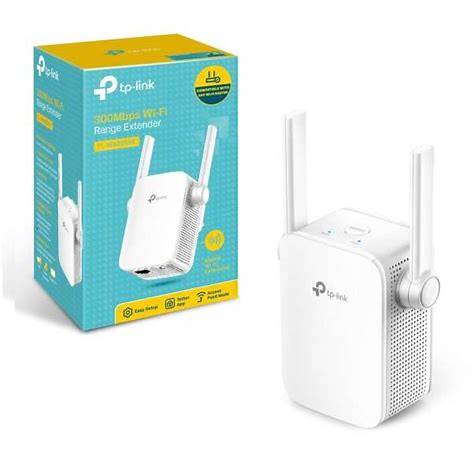
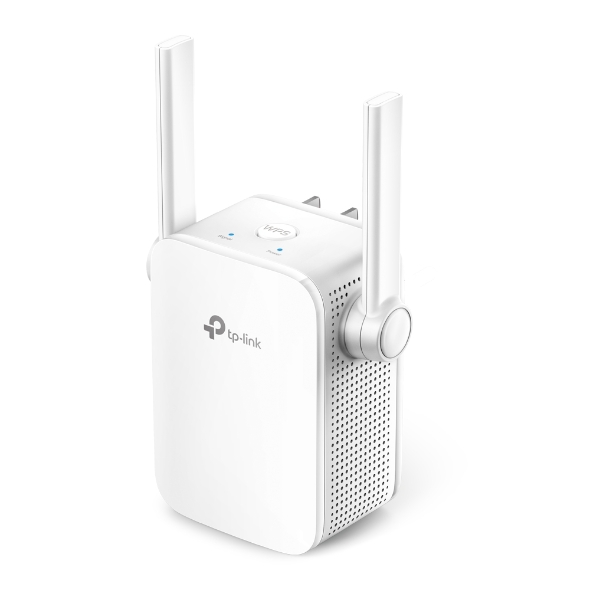
TP-Link TL-WA855RE 300Mbps Wi-Fi Range Extender Price in Kenya
The TP-Link TL-WA855RE extends an existing 2.4GHz Wi-Fi network into an area with weak coverage. Its wall-plug format makes it useful for a bedroom, study, or small office corner where a permanent Ethernet installation is not immediately practical. It must still receive a usable signal from the main router. Installing an extender inside the dead zone does not create a strong upstream connection.
Explore the TL-WA855RE at Reisen and select the complete model and supplied package needed for your installation.
For like-for-like selection, compare TL-WA855RE at Orbitlink and TL-WA855RE at Tawa. Check the hardware revision and supported setup modes.

Confirm your requirements with Reisen, then agree the quote and fulfillment arrangements.
Key Specifications
|
Feature |
Specification |
|
Wireless |
2.4GHz IEEE 802.11b/g/n |
|
Advertised wireless rate |
Up to 300Mbps |
|
Ethernet |
1 × 10/100Mbps RJ45 |
|
Antennas |
2 external antennas |
|
Format |
Indoor wall-plug range extender |
|
Modes |
Range extender; access-point mode on supported revisions |
|
Setup |
Supported web/app method or WPS |
|
Power |
Mains outlet; confirm the regional plug |
How It Fits Your Network

Illustrative locations, not a coverage map. Access-point mode depends on hardware support.
Place it between the router and weak area
Start setup near the router, then move the extender to a location that retains a good upstream connection while improving coverage toward the target room. The best position is not always the midpoint by distance: walls, floors, metal appliances, and sockets affect the radio path. Use the signal indication and practical tests in the intended room.
If only 1 computer lacks Wi-Fi, consider TL-WN725N at Orbitlink or TL-WN725N at Tawa instead. A USB adapter equips its host; it does not extend coverage for the room.
What repeating changes
A repeater receives and retransmits wireless traffic, sharing radio airtime. It can improve where a client connects without increasing the broadband subscription or guaranteeing the same throughput as a nearby wired access point. If the router’s signal is already unreliable at the proposed socket, choose a better location or a wired access-point arrangement.
For a different USB adapter class, review TL-WN823N at Orbitlink and TL-WN823N at Tawa. Driver support remains a separate purchase requirement.

Repeating shares airtime. These values are not guaranteed end-to-end or internet speeds.
Ethernet and access-point options
The Fast Ethernet socket can connect a suitable wired device in the supported extender configuration. Some hardware revisions also provide access-point mode using an Ethernet uplink. Confirm the delivered version before buying specifically for that role. The 100Mbps socket is not a Gigabit interface, regardless of the wireless headline.
If replacing the source network is the better solution, compare a MikroTik RB951Ui-2HnD router with a design using a separate UniFi access point. Their configuration and power requirements differ.
Compatibility and secure setup
Use an upstream 2.4GHz network with supported security. This model does not extend a 5GHz-only SSID. An app may simplify configuration on supported revisions, while WPS requires compatible router settings. Keep the administrator password secure and verify that clients reach the intended network rather than an accidental duplicate SSID.
For a wired alternative or an access-point uplink, assess TP-Link switching options and suitable Cat6 cabling. Ethernet can avoid a weak wireless hop where a cable route is feasible.
Choose coverage extension or a wired access point
An extender can be practical when a suitable outlet receives good upstream Wi-Fi. A wired access point is worth evaluating where a cable route exists and more consistent backhaul is important. Large or multi-floor premises may need a planned multi-access-point system rather than several uncoordinated repeaters. Match the solution to the rooms and client activity instead of buying around a claimed whole-house coverage number.
Use the extender to solve a defined coverage gap
The TL-WA855RE receives a compatible 2.4GHz wireless connection and extends access to a location that needs better coverage. It is most useful when a practical wall socket still receives a reliable upstream signal. A socket inside the original dead zone may be convenient, but it leaves the extender trying to repeat an already poor connection. Identify the room and devices that need help, then test an intermediate position. The extender does not replace the internet subscription, and it cannot make an overloaded or disconnected upstream router healthy.
Separate signal strength from usable performance
A nearby extender can make the client signal indicator look much stronger while the path back to the router remains weak. Check both parts of the connection. Repeating on shared wireless airtime also means the advertised N300 class is not a guaranteed end-to-end result. A useful test compares the same activity near the main router, near the extender, and at the intended final location. Include the applications that matter, such as a call or ordinary browsing, rather than judging success solely by whether the network name appears.
Pair locally before choosing the final socket
Start close to the main router so the initial setup is not affected by marginal reception. Use the supported browser interface, app, or WPS procedure for the delivered revision, and verify association with the correct network. When setup is complete, move the extender to a suitable intermediate location and check the indicator guidance in its manual. Give the extended network a recognizable name if that helps users distinguish it during testing. Keep a record of the management method and credentials so a later router password change can be handled without guesswork.
Understand the role of the Ethernet socket
The Fast Ethernet socket can provide a wired connection in the supported operating arrangement, but it does not become a Gigabit uplink. Some hardware versions support access-point operation using a wired backhaul; confirm that capability before planning the installation. In an access-point arrangement, the cable back to the LAN can avoid the repeating airtime tradeoff. In a repeater arrangement, a wired device attached locally still depends on the wireless path back to the router. These uses should be explained clearly so a visible Ethernet cable is not mistaken for a completely wired connection to the internet.
Check network band and security compatibility
This model is a 2.4GHz N300 device. A 5GHz-only network is not a compatible upstream choice, even if a modern router supports both bands in other configurations. Check the security settings supported by the delivered hardware and firmware as well as by the router. Use a suitable protected network rather than leaving the extender open for convenience. If the main router uses a combined network name, make sure the extender has actually associated with its supported band. Record the working configuration before changing several router settings at once.
Consider the layout before adding more repeaters
Several extenders can create a complicated shared-airtime network that is hard for users to understand. A large building may be better served by planned access points with wired backhaul or another coordinated design. Assess the floor layout, wall construction, and the location of the internet router. If only 1 room needs occasional access and there is a good intermediate socket, a simple extender may be a practical choice. If several rooms need sustained capacity, compare the wider installation cost instead of buying additional repeaters each time another weak area appears.
Test movement and client behavior realistically
Clients decide when to change their wireless association, and behavior varies between phones and computers. Using a familiar network name does not guarantee an uninterrupted transition during a call. Test the actual devices while moving between the intended areas, especially if voice or video is important. A device that remains attached to a distant radio may need a different network design rather than another power increase. Keep expectations grounded in the capabilities of the extender, main router, and clients instead of promising seamless whole-house roaming from the product name alone.
Maintain the connection after router changes
A new main-router password, replaced router, changed security mode, or disabled 2.4GHz band can interrupt the extender's upstream connection. Check those changes first if the extended network remains visible but has no internet. Reconfigure using the documented procedure and test beside the router before returning to the final socket. Avoid repeated factory resets when the underlying service is down. Save the model and hardware revision with the installation record, and use matching firmware and support information when maintenance is needed.
Build an accurate quotation for TL-WA855RE
An accurate quotation starts with the complete product code, quantity, and intended job. Tell Reisen whether this is a new installation, an expansion, or a replacement for equipment already in service. Include the devices it must connect to and any known revision requirements. Ask for accessories and configuration work to be itemized so the product can be compared fairly with another offer. A lower headline amount may describe a different package or omit necessary components. Confirm the current price directly with Reisen; prices shown by other sellers are not a substitute for a quotation covering your actual order.
Check the package before scheduling installation
Confirm the exact contents supplied with the unit or cable order, including any adapter, mounting parts, or termination components that the project needs. Where an accessory is listed as optional, put it on the order rather than assuming it will be in the box. Check the hardware version and relevant labels before work begins, while discrepancies can still be resolved without interrupting service. Keep packaging and purchase records according to the applicable return process. For several sites, identify which equipment belongs to each location so a correct order is not accidentally mixed during deployment.
Agree what a successful handover will include
Write down a short acceptance checklist based on the intended service. It may include a working client connection, correct addressing, an application test, and a clear record of cable or port assignments. Ask for configuration records where the product has settings, or test results where the installation is primarily passive. A power light or visible network name is only a partial check. Where existing equipment is involved, identify who is responsible for faults outside the new product's scope. This avoids confusing a completed supply order with a complete redesign of the customer's wider network.
Protect the working installation during changes
If replacing existing equipment, record the current connections and configuration before disconnecting anything. Schedule work around the users who depend on the service and retain a practical recovery route. Change 1 part of the system at a time where possible, then test the effect before moving to the next change. Keep administrator details and backups secure rather than including passwords in an openly shared worksheet. A documented installation is easier to maintain and helps the owner distinguish a product fault from a changed cable, account, upstream service, or incompatible replacement accessory.
Compare total project value rather than isolated features
The most useful product is the one that meets the actual requirement with a clear installation and support plan. Consider accessories, compatible neighboring equipment, setup time, and future service access alongside the hardware itself. Do not pay for a feature the project cannot use, but do not omit a necessary capability merely to reduce the initial order. If the requirement has changed since the original specification, reassess the whole connection path before buying an identical replacement. A short description of the site and workload helps Reisen recommend a coherent package without relying on unsupported user counts or coverage claims.
Confirm commercial terms before completing payment
Ask Reisen to confirm availability, the quoted package, applicable warranty and return terms, and the agreed collection or delivery arrangements. These details should come from the current transaction rather than assumptions based on an older listing. If installation or remote setup is required, confirm whether it is included and what access or preparation the customer must provide. Keep the final quotation and the equipment model together in the order record. This makes the purchase easier to check on arrival and gives both parties a clear reference if an accessory or service detail needs clarification.
How to Set It Up
1. Read the hardware revision and confirm that the upstream router offers a compatible 2.4GHz network.
2. Plug the extender into an indoor outlet close to the router. Use its supported setup app, web interface, or WPS procedure.
3. Select the correct upstream SSID and enter its Wi-Fi password securely. Set an appropriate management password and extended-network name.
4. Allow association to complete, then relocate to a socket with a reliable upstream signal and useful coverage toward the target room.
5. Test browsing and local access from the previously weak location. Compare stability at more than 1 socket before settling on placement.
6. If using Ethernet or access-point mode, confirm the revision supports that role and connect the LAN cable according to its guide.
Troubleshooting
The extended network is visible but has no internet
Verify association with the correct upstream SSID and password. Check internet access beside the original router before changing extender settings.
Coverage improves but speed remains low
Move the extender to a socket with a stronger upstream signal. Test closer to it, check interference, and compare a wired-access-point alternative if sustained capacity matters.
Advantages
· Convenient wall-plug format.
· Can improve usable coverage where a good upstream signal remains.
· Ethernet socket supports an additional connection role.
Disadvantages and Limitations
· No 5GHz radio or Gigabit Ethernet.
· Repeated traffic shares wireless airtime.
· Poor upstream signal cannot be fixed by placement in the dead zone.
Frequently Asked Questions
Will it increase my internet package speed?
No. Its purpose is coverage extension, not a faster subscription.
Can it extend 5GHz Wi-Fi?
No. This is a 2.4GHz model.
Can I use it as an access point?
Check access-point-mode support for the exact hardware revision.
Where should I plug it in?
Where it receives a good router signal while reaching toward the weak area.
Complete Your Order at Reisen
For a complete installation, also review TP-Link TL-WA801ND 300Mbps Wireless Access Point and TP-Link TL-WN725N 150Mbps Nano Wireless USB Adapter. These have different roles or capabilities; choose them according to the system described above rather than assuming automatic interchangeability.
Request the current TL-WA855RE price in Kenya from Reisen and confirm the exact hardware revision, supplied accessories, quantity, and any configuration work. Use Reisen’s contact page to share your requirements. Confirm applicable warranty, return terms, payment arrangements, delivery or collection options, and any installation charges before completing the order.
Build a Compatible System with Reisen
Consider Reisen’s Ethernet cable when a wired-backhaul alternative is practical. Check the required interface, power source, and configuration before adding it to the order.
Consider Reisen’s EAP115 indoor access point for a separate wired access-point design. Include the extra patch leads and installation work if this component is part of the project.
Consider Reisen’s 8-port Gigabit switch to distribute a cabled LAN. Review its separate specifications against the intended workload and the neighboring equipment.
Consider Reisen’s TL-WN823N adapter where the issue is a computer lacking Wi-Fi rather than room coverage. A compatible connection requires more than a similar connector or matching brand name.
Consider Reisen’s RB5009 wired router for gateway control alongside separately planned wireless equipment. Confirm where it sits in the network so the quotation covers its actual role.
Browse the relevant Reisen product category to assess the rest of the installation, and use the Reisen shop to prepare a combined order. Keep the TL-WA855RE model code in your request so accessories, revision details, and setup work can be confirmed together.