Save 14%
Select an image to view it. Click the main image to enlarge.
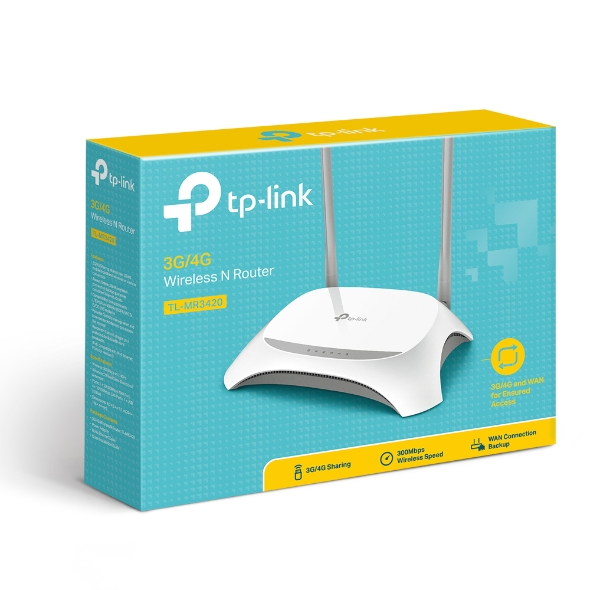
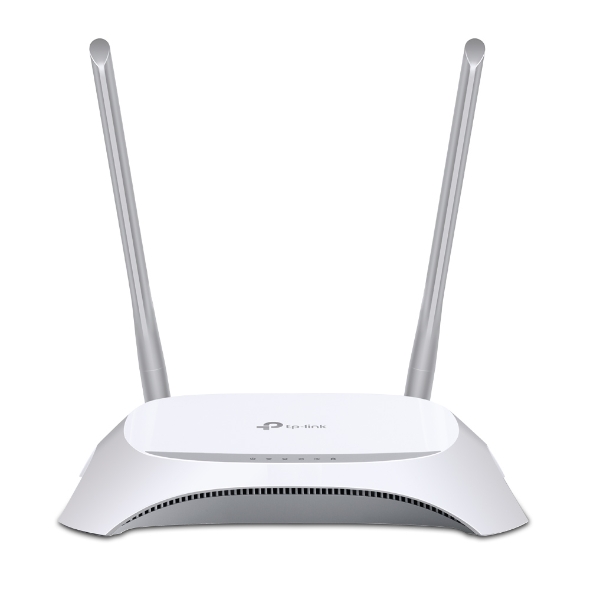
TP-Link TL-MR3420 3G/4G Wireless Router Price in Kenya
In stock
KES 3,000.00
KES 3,500.00
You save KES 500.00
Buy TP-Link TL-MR3420 3G/4G Wireless Router in Kenya. Share a compatible USB modem or wired internet connection with 300Mbps Wi-Fi and four LAN ports.
View product detailsNeed help choosing?
Talk to our team at +254 714 804 532
Product details
TP-Link TL-MR3420 3G and 4G Wireless Router Price in Kenya
The TP-Link TL-MR3420 shares a compatible USB mobile-broadband connection over Wi-Fi and Ethernet. It is intended for buyers who already have a supported 3G/4G USB modem or who want a documented combination of router and modem. It can also use a suitable wired WAN connection. The distinction matters: the MR3420 does not contain the SIM-based LTE modem found in an integrated 4G router.
Explore the TL-MR3420 at Reisen and select the complete model and supplied package needed for your installation.
Start with the TL-MR3420 USB-modem router and compare the TL-MR6400 integrated LTE router where the mobile-broadband architecture matters. An integrated SIM modem and a router requiring a USB modem have different purchasing requirements.

Confirm your requirements with Reisen, then agree the quote and fulfillment arrangements.
Key Specifications
|
Feature |
Specification |
|
Wi-Fi |
2.4GHz Wireless N, up to 300Mbps advertised rate |
|
Mobile broadband |
Requires a separately compatible 3G/4G USB modem |
|
USB |
USB modem connection |
|
Ethernet |
1 × 10/100Mbps WAN and 4 × 10/100Mbps LAN |
|
SIM slot in router |
No built-in SIM modem |
|
Antennas |
External Wi-Fi antennas |
|
Power |
External adapter specified for the hardware revision |
|
Compatibility |
Check modem model, firmware, network, and regional support |
How It Fits Your Network

Schematic only. Verify regional hardware, service compatibility, and supported WAN modes.
Buy it around a compatible modem
Do not select a USB modem solely because it accepts your SIM or works on a laptop. The router must support the modem’s hardware identity, operating mode, and firmware. Confirm the exact combination against the relevant compatibility information before ordering. An unsupported dongle may receive power without establishing a data connection.
For Ethernet-fed Wi-Fi alternatives, compare Archer C80 and TL-WR846N. These should not be assumed to contain a cellular modem.
Mobile and wired WAN roles
A wired modem, ONT, or suitable Ethernet handoff can supply the WAN port. Supported firmware also provides mobile and wired connection-priority options. Test backup behavior with the actual service: detecting a physically disconnected cable is different from detecting an upstream outage while the Ethernet link remains up. Existing sessions may drop when the public connection changes.
For more configurable gateway designs, assess the MikroTik hEX S and TP-Link ER605. Separate mobile hardware and access points may be needed in such a system.

Mobile speed depends on the separate supported modem and operator service. Not a speed test.
Everyday wireless use
The N300 2.4GHz radio can share the connection with compatible phones, computers, and other Wi-Fi devices. Actual results depend on both the mobile service and local wireless conditions. A weak cellular signal cannot be corrected simply by improving the router’s Wi-Fi signal. Position the USB modem where it receives a usable mobile network, while also considering indoor wireless coverage.
Where additional wired or wireless distribution is required, compare TP-Link switch options and the UniFi access-point range. Add equipment according to the actual LAN design.
An economical role with clear limits
The Fast Ethernet ports and older wireless class suit modest requirements. They are not a substitute for Gigabit LAN or dual-band wireless where those are essential. Confirm current software support and use secure administration. If you want to insert a SIM directly without a separate modem, choose an integrated LTE router instead.
For a broader routing choice, review TP-Link routers and gateways. Where only Wi-Fi coverage needs attention, assess the TL-WA855RE extender after verifying upstream signal quality.
When an integrated LTE router is preferable
A USB-modem router is most attractive when the modem combination is already known to work. For a new purchase without an existing dongle, an integrated SIM router can reduce the number of compatibility decisions. For a business requiring stronger continuity controls, compare a managed multi-WAN design and test health detection. Neither choice eliminates the need for reliable mobile reception, adequate data allowances, and backup power.
Distinguish a USB-modem router from a SIM router
The TL-MR3420 shares mobile connectivity through a separately supported USB modem. It does not contain the integrated LTE modem and SIM slot found in a conventional SIM router. This distinction changes the shopping list: the router, compatible dongle, active SIM, data plan, and suitable reception all need to be considered. If you already own a supported modem, this arrangement can give that connection a shared local network. For a new installation without a dongle, compare the total package with an integrated LTE router before choosing the lower-priced-looking individual device.
Check the modem identity, not just the mobile brand
A USB modem sold by an operator may have a specific hardware model, firmware, USB presentation mode, and regional variant. Compatibility with a computer does not guarantee support by this router. Record the exact modem identity and match it to the router's hardware revision and supported firmware documentation. A modem may expose itself differently after an update, so avoid assuming that a related model is equivalent. If the intended combination cannot be verified, ask for a tested alternative before purchase. This is more reliable than buying several unidentified dongles and expecting the router to recognize them all.
Set up the mobile account independently
Confirm the SIM is active, has the required data allowance, and can register on the intended operator network. Check whether a PIN is enabled and obtain the correct APN settings for the account. A modem can show mobile registration without establishing a usable data session, so separate those tests during troubleshooting. Also consider the operator's coverage and congestion at the site. The router's local Wi-Fi settings cannot correct a depleted data bundle or unavailable mobile service. Document the successful connection details without publishing account credentials in the general network handover.
Place the equipment for both reception and Wi-Fi
The best mobile reception may be near a window, while the best Wi-Fi location may be nearer the users. Test the proposed position before committing the cable route. Keep the router and modem in their intended indoor environment and avoid improvised long USB extensions or unstable hubs. A separate wired access point can be considered if the mobile equipment needs to remain in a location that serves Wi-Fi poorly. This keeps the 2 coverage problems distinct. Strong signal on a laptop's Wi-Fi icon indicates the local radio link, not necessarily a good mobile connection through the dongle.
Understand local interface limits
The router's N300 wireless class and Fast Ethernet interfaces describe the local network. They are not a promise about the mobile modem's actual data speed. A transfer to another local device and a download over the cellular network exercise different paths. Record which path is being tested so a service problem is not confused with a cable or radio problem. If the project requires a high-speed modern broadband connection, compare more recent routers and their actual interfaces. This model is best selected around a verified compatible combination and a defined workload rather than the phrase 4G alone.
Treat failover as a tested feature
Supported WAN arrangements depend on the delivered hardware and firmware. Where wired and mobile connectivity are available, verify how the router detects a failed service, changes paths, and returns when the primary service recovers. A cable remaining plugged in does not establish that the upstream internet is healthy. Test the actual failure types relevant to the site and observe what happens to active sessions. Do not describe the result as zero-interruption continuity unless that behavior has been demonstrated for the complete application. Business-critical traffic may justify a more advanced multi-WAN design.
Secure the shared LAN and keep access manageable
Change administrator credentials and choose supported wireless security appropriate for the connected devices. Record the LAN address and DHCP range so a later extender or second router does not introduce conflicting services. If another router sits upstream, consider whether double NAT affects any required inbound access. The mobile operator may also use carrier-grade NAT, which ordinary local port forwarding cannot remove. Avoid enabling remote administration from the public internet as a quick fix. Plan any legitimate remote access around the operator service and a suitable secured network design.
Estimate running cost and continuity needs
A shared mobile connection can consume data faster than a single computer because several clients may update, synchronize, and stream at once. Estimate the actual workload and monitor usage during the first operating period. Provide backup power for the router and modem if short local outages matter, recognizing that operator infrastructure remains a dependency. Confirm the accessories and configuration included in the quotation. The value of the TL-MR3420 comes from a working compatible system; a router box alone is not the complete mobile service that users will experience.
Build an accurate quotation for TL-MR3420
An accurate quotation starts with the complete product code, quantity, and intended job. Tell Reisen whether this is a new installation, an expansion, or a replacement for equipment already in service. Include the devices it must connect to and any known revision requirements. Ask for accessories and configuration work to be itemized so the product can be compared fairly with another offer. A lower headline amount may describe a different package or omit necessary components. Confirm the current price directly with Reisen; prices shown by other sellers are not a substitute for a quotation covering your actual order.
Check the package before scheduling installation
Confirm the exact contents supplied with the unit or cable order, including any adapter, mounting parts, or termination components that the project needs. Where an accessory is listed as optional, put it on the order rather than assuming it will be in the box. Check the hardware version and relevant labels before work begins, while discrepancies can still be resolved without interrupting service. Keep packaging and purchase records according to the applicable return process. For several sites, identify which equipment belongs to each location so a correct order is not accidentally mixed during deployment.
Agree what a successful handover will include
Write down a short acceptance checklist based on the intended service. It may include a working client connection, correct addressing, an application test, and a clear record of cable or port assignments. Ask for configuration records where the product has settings, or test results where the installation is primarily passive. A power light or visible network name is only a partial check. Where existing equipment is involved, identify who is responsible for faults outside the new product's scope. This avoids confusing a completed supply order with a complete redesign of the customer's wider network.
Protect the working installation during changes
If replacing existing equipment, record the current connections and configuration before disconnecting anything. Schedule work around the users who depend on the service and retain a practical recovery route. Change 1 part of the system at a time where possible, then test the effect before moving to the next change. Keep administrator details and backups secure rather than including passwords in an openly shared worksheet. A documented installation is easier to maintain and helps the owner distinguish a product fault from a changed cable, account, upstream service, or incompatible replacement accessory.
Compare total project value rather than isolated features
The most useful product is the one that meets the actual requirement with a clear installation and support plan. Consider accessories, compatible neighboring equipment, setup time, and future service access alongside the hardware itself. Do not pay for a feature the project cannot use, but do not omit a necessary capability merely to reduce the initial order. If the requirement has changed since the original specification, reassess the whole connection path before buying an identical replacement. A short description of the site and workload helps Reisen recommend a coherent package without relying on unsupported user counts or coverage claims.
Confirm commercial terms before completing payment
Ask Reisen to confirm availability, the quoted package, applicable warranty and return terms, and the agreed collection or delivery arrangements. These details should come from the current transaction rather than assumptions based on an older listing. If installation or remote setup is required, confirm whether it is included and what access or preparation the customer must provide. Keep the final quotation and the equipment model together in the order record. This makes the purchase easier to check on arrival and gives both parties a clear reference if an accessory or service detail needs clarification.
How to Set It Up
1. Record the router hardware revision and modem model. Confirm that the USB modem, operator service, and firmware combination is supported.
2. Activate the SIM and verify mobile service in a supported device. Obtain the operator APN and any required authentication details.
3. Connect a computer to a LAN port, apply the specified power adapter, and open the management address printed on the router or described in its guide.
4. Set a new administrator password and configure the intended 3G/4G mode. Connect the supported USB modem and enter the operator profile if automatic detection is insufficient.
5. If using wired WAN or backup, connect the modem or ONT to the WAN port and configure DHCP, PPPoE, or static settings as required.
6. Set a secure Wi-Fi name and passphrase. Verify client addressing and test mobile access, wired access, and any configured backup transition separately.
Troubleshooting
The USB modem is not recognized
Recheck the exact modem identity, router hardware version, firmware, and operating mode. A modem that works on a computer may still be unsupported by the router.
The modem registers but internet fails
Verify the active data allowance, APN, SIM PIN state, and operator account. Distinguish mobile registration from a usable packet-data session before changing local Wi-Fi settings.
Advantages
· Shares a supported USB modem with multiple local devices.
· Provides wired WAN as well as mobile-broadband connection options.
· Offers Ethernet connections for equipment without Wi-Fi.
Disadvantages and Limitations
· A compatible USB modem is an additional requirement.
· No integrated LTE SIM modem.
· Fast Ethernet and 2.4GHz-only Wi-Fi limit upgrade headroom.
Frequently Asked Questions
Can I insert my SIM into the router?
The SIM goes into a supported USB modem, not into an integrated router SIM slot.
Will every 4G dongle work?
No. Confirm the exact modem and firmware compatibility.
Will it improve mobile coverage?
It shares a modem connection. The modem and network determine cellular reception.
Can it use fiber internet?
It can accept a suitable Ethernet handoff from the provider’s ONT or modem, with the required WAN configuration.
Complete Your Order at Reisen
For a complete installation, also review TP-Link TL-MR6400 N300 4G LTE Wireless Router and TP-Link TL-SF1005D 5-Port 10/100Mbps Desktop Switch. These have different roles or capabilities; choose them according to the system described above rather than assuming automatic interchangeability.
Request the current TL-MR3420 price in Kenya from Reisen and confirm the exact hardware revision, supplied accessories, quantity, and any configuration work. Use Reisen’s contact page to share your requirements. Confirm applicable warranty, return terms, payment arrangements, delivery or collection options, and any installation charges before completing the order.
Build a Compatible System with Reisen
Consider Reisen’s Ethernet cable for permanent LAN connections. Check the required interface, power source, and configuration before adding it to the order.
Consider Reisen’s 8-port Gigabit switch when extra local sockets are needed. Include the extra patch leads and installation work if this component is part of the project.
Consider Reisen’s TL-WA801ND access point to place indoor Wi-Fi away from the mobile equipment. Review its separate specifications against the intended workload and the neighboring equipment.
Consider Reisen’s EAP115 access point for another indoor wireless arrangement. A compatible connection requires more than a similar connector or matching brand name.
Consider Reisen’s RB5009 wired router as a different gateway platform requiring its own supported internet handoff. Confirm where it sits in the network so the quotation covers its actual role.
Browse the relevant Reisen product category to assess the rest of the installation, and use the Reisen shop to prepare a combined order. Keep the TL-MR3420 model code in your request so accessories, revision details, and setup work can be confirmed together.
Additional information
| Product | TP-Link TL-MR3420 3G/4G Wireless Router Price in Kenya |
|---|---|
| Category | Networking Tools & Accessories |
| Price | KES 3,000.00 |
| Availability | In stock |
Keep exploringMore in Networking Tools & Accessories
Related products