Save 13%
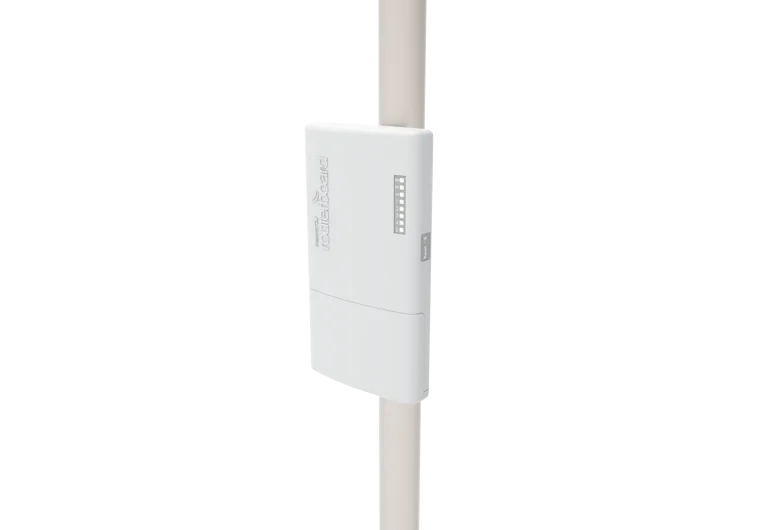
Select an image to view it. Click the main image to enlarge.
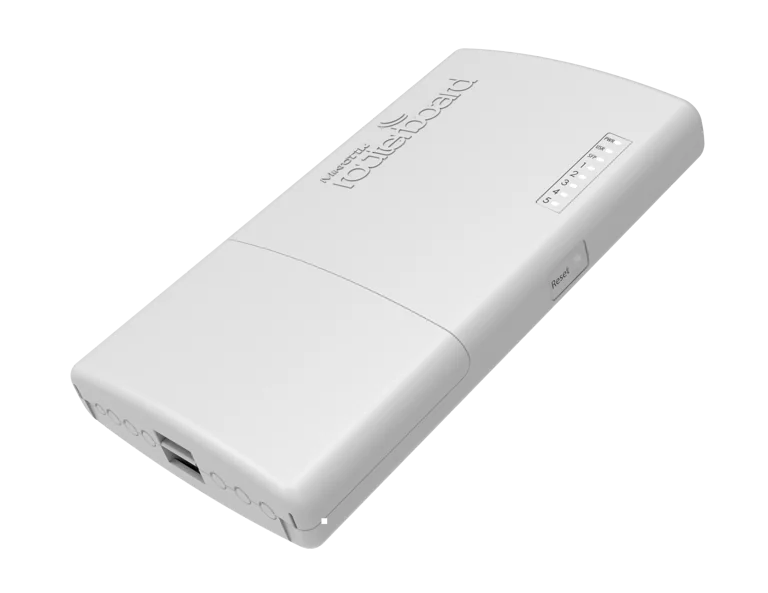
Mikrotik Router Powerbox Pro RB960PGS-PB Price in Kenya
In stock
KES 13,000.00
KES 15,000.00
You save KES 2,000.00
Buy MikroTik PowerBox Pro RB960PGS-PB in Kenya at Reisen SEO. Get five Gigabit ports, four PoE outputs, SFP connectivity, and an outdoor enclosure.
View product detailsNeed help choosing?
Talk to our team at +254 714 804 532
Product details
MikroTik PowerBox Pro RB960PGS-PB Outdoor Router Price in Kenya
Place a compact routed network and matched PoE distribution near outdoor equipment with the MikroTik PowerBox Pro. It combines 5 Gigabit Ethernet ports, a 1G SFP cage, and PoE output on ports 2–5 in an outdoor enclosure.
Output voltage follows the input. The bundled 24V supply does not turn the device into a 48V source for every PoE+ camera. Supported 802.3af/at mode-B endpoints require the specified 48–57V input arrangement. Observe per-port and total current limits, cable loss, and the actual endpoint demand. The SFP cage is 1G, not 10G SFP+. This router has no built-in radio, so a separate outdoor radio is still needed for a wireless link. Seal entries and mount the enclosure exactly as its manual requires.
Looking to purchase RB960PGS-PB in Kenya? Confirm the current stock, exact package, and total quotation with Reisen. Choose the product for the real installation rather than the model name alone.
Choose the exact model, confirm the complete package, approve the quote, and arrange delivery.
Key Specifications
|
Item |
Details |
|
Ethernet |
5 × Gigabit RJ45 |
|
Fiber |
1 × 1G SFP cage |
|
PoE output |
Ether2–ether5; voltage follows input |
|
Input |
12–57V DC or supported passive PoE input |
|
Standards-powered endpoints |
Check 48–57V input and mode-B compatibility |
|
Processor and RAM |
QCA9557 800MHz; 128MB |
|
Software |
RouterOS Level 4 |
|
Wireless |
Not built in |
Compatibility
Use the exact supplied hardware or component specification for the final compatibility decision.
Compatibility depends on the complete connection, power, physical, and service design. Check the exact model at both ends before ordering.
The steps summarize the workflow; use the matching manual for exact dimensions and settings.
An outdoor distribution example
The PowerBox Pro can place a routed connection and compatible powered endpoints near a planned outdoor installation. Write each output device’s required voltage and current next to its port. The supplied 24V adapter is useful only for a matching power design; it does not produce the 48–57V input arrangement needed for supported standards-powered endpoints. If mixed loads require incompatible voltages, redesign the supplies instead of relying on a common RJ45 connector. The SFP uplink is 1G. Protect the outdoor entries and keep any indoor-rated adapter in a suitable environment. Test all intended powered loads together before the enclosure is left in a remote position.
Put the gateway in the right place
A router controls how traffic moves between networks. In a small site it may sit between the internet provider and the local switch. In a larger design it may connect several service networks or optical handoffs. Start with the actual job: number of networks, provider connection, traffic demand, security policy, and expected growth. The correct port type is only one part of that decision.
The router does not supply an internet subscription by itself. A fiber service still needs the provider’s approved handoff, and a satellite service still needs its terminal and plan. Give every interface a clear role before connecting the live WAN. Label the upstream side, local networks, and any reserved service port. This makes later troubleshooting much easier than guessing from a bundle of identical cables.
For additional equipment in the wider installation, review managed access switches. Match the actual hardware label and accessories before approving a cross-brand or cross-version replacement.
Use RouterOS for useful control
RouterOS supports a detailed gateway design with addressing, routing, firewall rules, and other functions appropriate to the model and software version. A branch can use a clear local subnet and controlled internet access. A larger site can have separate management and service networks. The value is the ability to set rules that fit the job rather than accept a single fixed layout.
More options also mean more responsibility. A rule that helps one network may block another. Begin with a small working configuration and add services in stages. Keep notes on why each important rule exists. Remove abandoned test rules after validation. Good administration is easier when the owner can explain how the router is supposed to behave and who may change it.
Read performance claims in context
Gigabit, 10G, or 25G describes interface capabilities. Routed throughput also depends on packet size, firewall rules, queues, encryption, traffic patterns, and supported acceleration. A port-rate total is not a promise that every feature can process that traffic at once. Compare the actual intended workload with suitable manufacturer tests and allow room for change.
Test with capable clients and known-good links. An online speed test can be limited by the service, test server, or client. Local tests help separate those issues from the router. Watch interface errors and CPU load during the test. If a queue or security function changes performance, document the reason before deciding which service level is practical. Do not disable protection simply to obtain a larger headline number.
For gateway comparison, start with PowerBox Pro matching model listing and CCR2004 optical router. These are network design choices rather than identical substitutes. Match WAN method, required processing, and interface type.
Plan addressing before enabling services
Choose a LAN subnet that does not overlap the WAN or other networks you must reach. Assign a gateway address, DHCP range, and any fixed-address devices deliberately. Reserve or exclude management addresses from the ordinary pool. A device can appear to work briefly with an address conflict and then fail in ways that are hard to repeat.
DHCP supplies client settings; it is not the same as routing or NAT. A router may need a default route, working DNS, and suitable firewall and address-translation policy as well. Use the provider’s exact WAN instructions. Do not assume every ISP uses automatic DHCP. PPPoE, static addressing, and VLAN-tagged handoffs need their own approved details. Store service credentials securely.
If the site needs a different wired gateway, review CCR2004 matching model listing and hEX RB750Gr3 wired router. A router and an access point have different jobs; keep coverage and gateway control separate.
Protect the router and the users behind it
The router’s input policy protects the router itself. Forwarding policy controls traffic passing through it. Both need attention. Restrict management services to trusted networks and keep unnecessary services disabled. For remote support, use an approved secure access method instead of exposing a configuration port to the whole internet.
Keep DNS recursion limited to the intended local users if the router provides it. A public-facing open resolver can create problems unrelated to ordinary browsing. Review firewall rules in the right order because an earlier rule may decide the outcome. Where separate staff, guest, and camera networks are used, write the allowed traffic first, then test both permitted and blocked examples.
Fit the router into the whole network
A wired router needs a separate access point for Wi-Fi unless wireless is explicitly built in. A small router may also need a switch for extra ports. An optical router needs supported modules and correctly matched fiber or DACs. These parts determine whether the main device can be connected as planned. Include them in a complete installation quotation.
Power functions also differ by model. Passive PoE output must match the endpoint voltage and wiring. Do not assume that a supplied low-voltage adapter can power a device expecting a higher voltage. A router with no PoE output needs a separate source for powered endpoints. For an outdoor enclosure, follow the installation manual for orientation, entries, grounding, and cable protection; the indoor power adapter needs a suitable location too.
For a larger or differently connected network, examine hEX S router with SFP and L009 rackmount router. Read the exact model and power specification before transferring a feature from one product to another.
Keep recovery simple and controlled
Before a major change, save a backup and export the readable configuration where supported. Keep secrets protected. Use the correct recovery and reset instructions for the exact model. A reset can erase working WAN details and local policies, so it should not be the first response to every connection fault.
Separate diagnosis into power, physical link, IP addressing, gateway reachability, DNS, and the provider service. If an IP address can be reached but names fail, look at DNS. If no clients receive addresses, inspect the local DHCP path. If only one client fails, compare it with a working client before changing the shared router. A clear baseline saves time during service visits.
For another rack or branch layout, compare RB5009 router alternative and RB4011 router alternative. Include configuration needs, supporting accessories, and the performance required by the actual services.
To add local wired capacity, look at RB1100AHx4 rackmount alternative and UniFi Standard 24 for downstream access. An access switch complements a gateway; it does not by itself add a mobile subscription or wireless coverage.
Quick Brand Comparison
|
Family |
Main buying distinction |
|
MikroTik RouterOS or CRS |
Model-specific routing, switching, and power |
|
TP-Link unmanaged or consumer |
Exact speed, role, and revision |
|
UniFi managed equipment |
Controller ecosystem and supported interfaces |
|
Other comparable equipment |
Complete installed cost, compatibility, and service support |
Compare exact models and complete installation requirements. A brand family is a starting point, not evidence that every product has the same ports, power, software, or optical behavior.
Can It Be Used with Starlink?
Yes, a suitable Starlink Ethernet handoff can feed the router’s planned WAN connection. Choose a supported arrangement with the terminal’s actual hardware and gateway mode. Avoid unintended double NAT, keep the WAN out of the LAN bridge, and verify addressing and firewall rules. This router does not replace or power the Starlink dish.
For terminal-side and site-connectivity planning, review Starlink Kenya Installers and SpaceLink Internet Kenya. Match the local network to the exact terminal generation and approved handoff. Local hardware capability and satellite service performance are separate limits.
How to Set Up RB960PGS-PB
A Step by Step Guide
1. Record the provider and site requirements
Obtain the WAN method, any VLAN ID, login details, and address information from the provider. Draw the LAN subnet and planned port roles. Check which interfaces and power functions exist on the exact router. Keep an isolated setup connection available so a configuration mistake does not affect other users.
2. Connect locally with approved power
Place or mount the router as its hardware guide directs. Power it from the correct adapter or specified supply. Connect the setup computer to the intended local interface. Factory defaults differ across product families, especially professional CCR units, so inspect the supplied guide instead of assuming every model is ready as a home router.
3. Open the correct MikroTik login
Use a verified WinBox download for the computer platform or the supported WebFig browser interface. WinBox can discover a device by MAC address on a permitted local link when IP access is not ready. Check the label for supplied credentials. Create a strong owner-controlled account and protect any remaining administrative account.
4. Configure the local network first
Inspect existing bridge and port assignments. Create or adjust only the intended LAN interfaces. Add the chosen gateway address and DHCP service if required, using a pool that avoids fixed devices. Confirm that a test computer obtains the expected address, gateway, and DNS settings before attaching the provider connection.
5. Add the approved WAN connection
Use the provider’s DHCP, PPPoE, or static instructions on the correct interface. Add a required VLAN only when the provider specifies it. Verify the default route and upstream reachability. For an optical handoff, check module and link compatibility first. Do not bridge the public WAN into the private LAN by accident.
6. Apply firewall and translation policy
Protect input and forwarding traffic according to the written design. Add source NAT only where the addressing arrangement needs it. Restrict DNS and management to permitted users. Test the configuration locally before remote administration. Preserve a safe recovery path while changing rules that could block the current session.
7. Enable optional services in stages
Add guest networks, VPNs, queues, or monitoring only as required. For PowerBox Pro output, verify voltage, mode, current limits, and every powered endpoint before connection. For optical models, inspect supported link rates and errors. Re-test normal browsing and local services after each substantial change rather than adding all features at once.
8. Validate and keep the service record
Test internet access, DNS, local transfers, and the intended security boundaries. Watch load and errors during a realistic busy test. Save the working configuration and a secure recovery record. Label the WAN and LAN cables. After an agreed restart, confirm that settings persist and the owner can reach the management interface.
Advantages
· RouterOS control for the required gateway design.
· Model-specific wired interfaces and expansion options.
· A clear separation between gateway and wireless access roles.
Disadvantages and Limits
· Configuration needs technical knowledge and careful security rules.
· No built-in Wi-Fi on these wired models.
· Feature-heavy workloads can run below nominal port rates.
Frequently Asked Questions
Does this router include Wi-Fi?
Only use the wireless features explicitly listed for the model. These wired routers need a separate access point for wireless clients. Choose the access point for coverage, client load, and supported power.
What is the difference between WinBox and WebFig?
WinBox is MikroTik’s management application. WebFig is accessed through a browser on supported RouterOS devices. Both require a permitted management path and valid credentials. Neither bypasses the owner’s security policy.
Can I use hotspot billing?
A suitable RouterOS hotspot and billing design may be possible, but capacity, licensing, authentication, and supported integration must be assessed. Do not treat billing as configured merely because the router runs RouterOS.
Will the ports always run at their maximum rate?
No. The connected equipment, cabling or optics, and negotiation determine each link. Feature processing and the wider network can limit application throughput even when the physical link is up at its nominal rate.
Should I reset a router with no internet?
First check power, WAN link, addressing, routes, DNS, and provider status. A reset can erase the settings needed to restore service. Keep a backup and use the exact model’s reset procedure only when justified.
Can I order a configured router?
Ask Reisen for a separate configuration scope that states the WAN method, networks, firewall needs, and handover tests. Confirm the charge and responsibility in the quotation rather than assuming installation comes with hardware.
Complete the Installation with Reisen
Build a clear parts list around MikroTik CRS326-24G-2S+RM 24-Port Gigabit Switch and MikroTik CRS328-24P-4S+RM 24-Port Gigabit PoE+ Switch. Choose each item for a defined role and confirm the links, power, and supplied accessories before combining them.
For another part of the installation, review Easenet Cat6 Indoor Ethernet Cable and MikroTik cAP ac RBcAPGi-5acD2nD Wireless Access Point. A shared brand does not prove compatibility. Read the actual interface and power requirements on both sides.
Keep the service and connection roles distinct when selecting TP-Link TL-SF1024D 24-Port Fast Ethernet Switch and Netlink Single-mode Media Converter. These are complementary tools or network choices, not a promise that every item plugs directly into every other item.
The next stage of the project may need Netlink Gigabit Single-mode Media Converter and TP-Link M7200 4G LTE Mobile Wi-Fi. Ask for a quotation that marks each item as required, optional, or an alternative, so the complete package stays easy to review.
For the wider network, examine MikroTik hEX RB750Gr3 5-Port Gigabit Router. Keep the main device, cable routes, and distribution equipment aligned with the planned service. Check each exact model before adding it to the order.
Choosing the right package in Kenya
If you are asking where to buy RB960PGS-PB in Kenya, start with the exact model and the job it needs to do. Send Reisen the quantity, delivery location, and intended installation date. Include the equipment already in use and any important service requirement. A clear request helps distinguish a direct replacement from a new design that needs extra parts.
The cost of RB960PGS-PB should be reviewed as part of the complete working package. Ask whether the quoted amount includes taxes, the required accessories, delivery, and any agreed technical work. Hardware, setup labor, and an ongoing provider subscription are different charges. Keep them itemized. This makes the order easier to approve and avoids comparing a bare unit with a fully prepared installation.
What’s in the Box
Manufacturer package contents.
· PowerBox Pro RB960PGS-PB router
· 24V 2.5A adapter
· IEC cord
· Gigabit PoE injector
· Metal mounting ring
· K27 DIN mount
A higher-voltage approved supply, optics, outdoor cables, and powered endpoints are separate if required.
Check the sealed package and item list when it arrives. Keep the invoice and model or batch information. Photograph visible shipping damage before discarding the packing materials, and contact Reisen promptly if an item is missing or differs from the order. A package seen in a video may be from another region or revision, so use the actual quotation as the reference for your delivery.
Warranty
Ask Reisen to confirm the current warranty period, coverage, exclusions, and claim process for RB960PGS-PB in writing before payment. This description does not set a new warranty duration. Confirm who handles assessment, whether a local service route is available, and which supporting records are required. Keep the invoice and any serial or batch details with the product records.
If a fault appears, record the symptoms and any safe checks already performed. Do not open sealed equipment, modify power connections, or attempt an unauthorized repair while seeking a warranty decision. For installation-related concerns, keep the wiring, power, handling, and test records available. They can help separate a product fault from a problem elsewhere in the system without assuming the outcome of a claim.
Return Policy
Confirm Reisen’s current return window, eligibility rules, assessment process, and delivery-charge responsibilities before ordering. Ask specifically about opened, cut, assembled, registered, configured, or specially sourced items where relevant. Do not assume that every product can be returned after installation or that a refund is automatic. The applicable written policy and the circumstances of the order determine the process.
If the wrong item arrives, keep it protected and contact the team with the order reference before using or altering it. Retain packaging and accessories while the issue is reviewed. For a compatibility concern, share the exact connected-device labels and intended use. Getting those details checked before dispatch is usually simpler than arranging a return after the installation has begun.
Product Guides and Documents
Keep the exact product identification, matching technical sheet, supplied quick guide, packing list, quotation, and test record together. For RB960PGS-PB, ask for documents that match the actual hardware or component revision. A similar product’s guide can help explain a general idea, but its power ratings, preparation dimensions, or software controls must not be copied without verification.
Where a technical value is essential to the project, have it written into the approved specification. This may include optical parameters, interface rates, supported power, physical fit, or material grade. If no exact manufacturer SKU is supplied, request that identification before accepting a fixed performance promise. Clear documentation helps with replacements, future expansion, and handing the system to another technician.
Installation Manuals
Use the installation manual for the delivered unit as the final reference for assembly, safe handling, power, mounting, and recovery. The step-by-step guide on this page explains a practical workflow, but it does not replace model-specific dimensions or safety instructions. Ask Reisen for the matching manual before an installer travels to the site, especially when a missing adapter, bracket, or tool could stop the work.
Keep the installed layout and any approved settings with the manual. Record changes after maintenance rather than leaving the original plan out of date. For a provider-controlled product, retain the operator’s instructions as well. For passive components, keep the preparation and test procedure. This gives the owner a useful record instead of relying on memory when another part needs replacement.
Why Shop with Reisen
Reisen brings network equipment, connection parts, and installation accessories into one catalog. That lets you build the order around the job rather than buy a main device and discover missing parts later. Ask the team for current stock information, a clear itemized quotation, and technical checks for the models you already own. Confirm collection, delivery, and after-sales arrangements before approving the package.
We’re working to make Reisen a Leading eCommerce platform in Kenya and a Leading eCommerce platform in Africa through useful product information and clear buying support. For your order, focus on the promises written into the quotation: exact goods, condition, price, included parts, delivery terms, and agreed support. Keep those details together so follow-up questions can be handled against a clear record.
Order RB960PGS-PB from Reisen
Ready to buy RB960PGS-PB? Open MikroTik PowerBox Pro RB960PGS-PB Outdoor Router and confirm the current package with Reisen. Share your quantity, location, and intended use. If installation or configuration is required, request its scope and price separately. Approve the model and accessory list before payment, then arrange collection or delivery using the confirmed order details.
After delivery, check the package before the installation date. Complete the appropriate physical, connection, and service tests at handover. Save the invoice, guides, and test results for later support. A well-chosen product is most useful when the equipment, installation method, and owner’s needs fit the same plan.
Additional information
| Product | Mikrotik Router Powerbox Pro RB960PGS-PB Price in Kenya |
|---|---|
| Category | Mikrotik |
| Price | KES 13,000.00 |
| Availability | In stock |
Keep exploringMore in Mikrotik
Related products